Security questions.

Chiumiento

Chiumiento
Power User
Local time
11:20 AM
Messages
237
Location
United States, Bangor, Maine, 04401
I have no money so anything you prefer has to be free please & thank you.

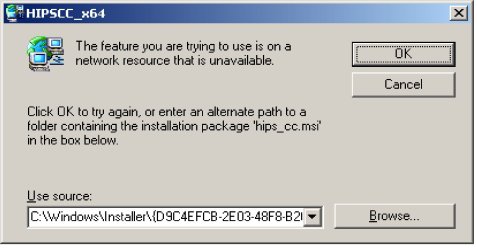
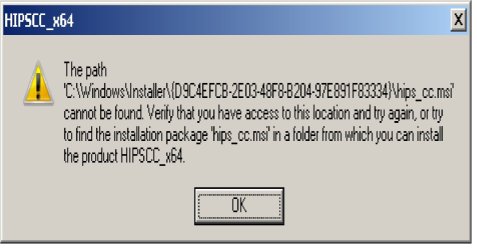
1. I have all of the sudden not been able to use my scan for malware in my ainti virus. What I mean is if I put a file on my desktop then right click it and click on scan for malware. It says something weird like a installer or something. Here is what is says.
1.jpg

2.jpg

What is says it is doing is downloading it onto the system I do not know. I have recently done a duplicate files finder scan. Also I did the new drivers for both my sound card and my video cards. But it was working fine after both of them I am wondering if it was the duplicate file finder.

2. I use Ca 2010 for an anti virus. It is given to my by my ISP (Road Runner). What I am wondering is if there is any other kind of program I should use for security. Like a on demand scanner or anything else. Like a malware scanner or something. The Ca that I use it called CA internet security plus.

3. Should I be using a third party fire wall. I want my computer to be as safe as possible. I want it to be as secure as I can get it. Is there a file encryption I should use or anything like that. I do use bitlocker encryption. Something else I was wondering is if there is a program that I could get for free that will make my ISP secret. I do not want sites or anyone to be able to see me or where I am or anything like that. I forget what it is called exactly. But I want to have a untraceable I.P. address.

I just noticed that anything I do with my anti virus that same thing pops up. So it must have something to do with my anti virus. Something must have happened. Also it said that it found to things Grokster, And AtlasDMT.com. How do I get rid of them When I did another scan the atlasDMT.com was gone after I quarantined it and deleted it. But the Grokster has not and will not go away. Every time I rescan it is there. How do I get rid of it. Please help. Even if someone can remote access me and help me would be great. I can always call Ca and fight for hours until they do it for me for free. But it is so hard to get them to. I wish someone would please help me. I have a whole bunch of Tools from CA that the guy left on here for me from last time. I guess they will do all the work to get rid of stuff. But I am not sure exactly how to use them . I mean I kind of know. But I do not know where to look for them. I do not even know how to use my anti virus to check where they are in my system.
 
Last edited by a moderator:

My Computer

Computer Manufacturer/Model Number
HP Pavilion p6000 series/Model p6654y
OS
Windows 7 Ultimate x64
CPU
AMD Athlon(tm) II X4 630
Motherboard
Socket AM3 (938)
Memory
DDR3 2048 MB's/ PC3-10600 (1,333 MHz) (2 Cards)
Graphics Card(s)
ATI Radeon HD 4200
Sound Card
Realtek High definition Audio
Monitor(s) Displays
PnP-Monitor (Standard) (I am using my Emerson TV)
Screen Resolution
1024 x 768 pixels at 75 Hz in true colors (32-bit)
Hard Drives
750.05 Gigabytes Usable Hard Drive Capacity
692.61 Gigabytes Hard Drive Free Space

hp DVD-RAM GH60L SATA CdRom Device [Optical drive]
YMAX magicJack USB Device [Optical drive]

Generic- Compact Flash USB Device [Hard drive] -- drive 2
Generic
PSU
250 Watts
Case
HP
Cooling
Fan
Keyboard
Logitech wireless wave combo MK550 (Came with mouse)
Mouse
Logitech wireless wave combo MK550 (Came with keyboard)
Internet Speed
DSL Download speed 15.06-mb/s Upload .49-mb/s ping 45ms
Other Info
HP Wireless 802.11 b/g/n PCIe Card
Grokster is a peer to peer sharing program that was shut down in 2005.

Please download Malwarebytes' Anti-Malware to your desktop
|MG| Malwarebytes Anti-Malware 1.50 Download
* Double-click mbam-setup.exe and follow the prompts to install the program.
* At the end, be sure a checkmark is placed next to Update Malwarebytes' Anti-Malware and Launch Malwarebytes' Anti-Malware, then click Finish.
* If an update is found, it will download and install the latest version.
* Once the program has loaded, select Perform full scan, then click Scan.
* When the scan is complete, click OK, then Show Results to view the results.

* Be sure that everything is checked, and click Remove Selected.

* When completed, a log will open in Notepad. Please save it to a convenient location. Copy and Paste that log into your next reply.
 

My Computer

Computer type
PC/Desktop
Computer Manufacturer/Model Number
Bruce ... somewhere in his 40's
OS
Windows 7 Ultimate 32bit SP1
CPU
Intel(R) Core(TM)2 Quad CPU @ 2.40GHz, 2400 MHz
Motherboard
INTEL/D975XBX2
Memory
4 GB
Graphics Card(s)
ATI Radeon HD 2600 Pro
Monitor(s) Displays
Samsung SyncMaster 914v
Screen Resolution
1280 x 1024
Hard Drives
2/500GB each ... ST3500630AS ATA Device.
One is not connected
PSU
Rocketfish 700 W
Case
G.Skill Gigabyte Chassis
Keyboard
Standard PS/2 Keyboard
Mouse
Microsoft PS/2 Mouse
Internet Speed
DSL
Antivirus
Avira Internet Security
Browser
IE 11
Other Info
ATI HDMI Audio
If you want to get rid of programs all the way, including the registry entries, you may want to try using Revo Uninstaller. They have a free version.

Download Revo Uninstaller Freeware - Free and Full Download - Uninstall software, remove programs, solve uninstall problems

However, make sure you read a couple tutorials on using this tool. You can very easily hose your sys making it unusable.

Either that or you can go into your registry and delete any keys related to Grokster. (Depending on how comfy you are with editing the registry) Then use something like CCleaner or Glary Utilities to clean out the leftover junk.

Both CCleaner and Glary Utilities are free

Once again, read a tutorial or 2 on using these and ALWAYS make a backup/restore point before you go digging in the registry.
 

My Computer

Computer type
PC/Desktop
Computer Manufacturer/Model Number
Dell Hell oh Well
OS
Win 7 32 Home Premium, Win 7 64 Pro, Win 8.1, Win 10
CPU
Intel Core 2 Duo 2.93GHz
Memory
Not much with my ADHD
Graphics Card(s)
ATI Radeon HD 4350
Monitor(s) Displays
24" HDTV/Monitor
Screen Resolution
Blurry after a Scotch or 2
Hard Drives
1 HDD 250 GB, 1 HDD 1 TB, 3 - 1 TB Externals
Case
Don't get on my case...man :D
Cooling
I have an Air Conditioner & Diet Pepsi
Keyboard
Saitek Cyborg
Mouse
10 yr old MS optical mouse that still works
Internet Speed
Never fast enough
Antivirus
Various
Browser
Various
Hi, Chiumiento.

First, please follow through with Jacee's recommendation regarding MBAM. I am replying merely to address a couple of the questions raised in your post.

2. I use Ca 2010 for an anti virus. It is given to my by my ISP (Road Runner). What I am wondering is if there is any other kind of program I should use for security.

I tried Computer Associates, also provided by Road Runner. I found it had false/positives, used a lot of resources, and support was terrible. A friend also installed it and had a problem. It took quite a while to straighten out the mess they made of her computer. She is now, happily, using Microsoft Security Essentials.

If you elect to replace Computer Associates, note that CA does not uninstall cleanly. I recommend using AppRemover.

The following antivirus software programs are free for personal use. My preference is Microsoft Security Essentials.

avast! 5 Home Edition
Avira AntiVir PersonalEdition Classic
Microsoft Security Essentials

3. Should I be using a third party fire wall. I want my computer to be as safe as possible.

If you elect to replace CA, you will need a software firewall replacement. The Windows 7 firewall is very good. It is also advisable to be behind a router.
 

My Computer

OS
Windows 7 & Windows Vista Ultimate
Hi, Chiumiento.

First, please follow through with Jacee's recommendation regarding MBAM. I am replying merely to address a couple of the questions raised in your post.

2. I use Ca 2010 for an anti virus. It is given to my by my ISP (Road Runner). What I am wondering is if there is any other kind of program I should use for security.

I tried Computer Associates, also provided by Road Runner. I found it had false/positives, used a lot of resources, and support was terrible. A friend also installed it and had a problem. It took quite a while to straighten out the mess they made of her computer. She is now, happily, using Microsoft Security Essentials.

If you elect to replace Computer Associates, note that CA does not uninstall cleanly. I recommend using AppRemover.

The following antivirus software programs are free for personal use. My preference is Microsoft Security Essentials.

avast! 5 Home Edition
Avira AntiVir PersonalEdition Classic
Microsoft Security Essentials

3. Should I be using a third party fire wall. I want my computer to be as safe as possible.

If you elect to replace CA, you will need a software firewall replacement. The Windows 7 firewall is very good. It is also advisable to be behind a router.
I saw a firewall in the Great programs for free somewhere it said something that is was a good fire wall. I think I will try that one. Thank you. Very much. Does Microsoft essentials have all the stuff I need like on demand scanners and all that stuff.
 

My Computer

Computer Manufacturer/Model Number
HP Pavilion p6000 series/Model p6654y
OS
Windows 7 Ultimate x64
CPU
AMD Athlon(tm) II X4 630
Motherboard
Socket AM3 (938)
Memory
DDR3 2048 MB's/ PC3-10600 (1,333 MHz) (2 Cards)
Graphics Card(s)
ATI Radeon HD 4200
Sound Card
Realtek High definition Audio
Monitor(s) Displays
PnP-Monitor (Standard) (I am using my Emerson TV)
Screen Resolution
1024 x 768 pixels at 75 Hz in true colors (32-bit)
Hard Drives
750.05 Gigabytes Usable Hard Drive Capacity
692.61 Gigabytes Hard Drive Free Space

hp DVD-RAM GH60L SATA CdRom Device [Optical drive]
YMAX magicJack USB Device [Optical drive]

Generic- Compact Flash USB Device [Hard drive] -- drive 2
Generic
PSU
250 Watts
Case
HP
Cooling
Fan
Keyboard
Logitech wireless wave combo MK550 (Came with mouse)
Mouse
Logitech wireless wave combo MK550 (Came with keyboard)
Internet Speed
DSL Download speed 15.06-mb/s Upload .49-mb/s ping 45ms
Other Info
HP Wireless 802.11 b/g/n PCIe Card
My Computer

Computer type
PC/Desktop
Computer Manufacturer/Model Number
Bruce ... somewhere in his 40's
OS
Windows 7 Ultimate 32bit SP1
CPU
Intel(R) Core(TM)2 Quad CPU @ 2.40GHz, 2400 MHz
Motherboard
INTEL/D975XBX2
Memory
4 GB
Graphics Card(s)
ATI Radeon HD 2600 Pro
Monitor(s) Displays
Samsung SyncMaster 914v
Screen Resolution
1280 x 1024
Hard Drives
2/500GB each ... ST3500630AS ATA Device.
One is not connected
PSU
Rocketfish 700 W
Case
G.Skill Gigabyte Chassis
Keyboard
Standard PS/2 Keyboard
Mouse
Microsoft PS/2 Mouse
Internet Speed
DSL
Antivirus
Avira Internet Security
Browser
IE 11
Other Info
ATI HDMI Audio
We all have the desire to have a system that is as safe as possible. Unfortunately even the biggest armada of security programs is no guarantee that you are really safe. Plus there may always be other system failures that bring your OS down.

I therefore always recommend a proper imaging strategy. That will safeguard you against any event (even a disk failure). It will not help though, if your mobo, PSU or other major hardware pieces go on the blink. You may want to study the 2 tutorials I made on the subject.

1. A general overview: http://www.sevenforums.com/tutorials/128494-imaging-strategies.html

2. A very good free imaging program that is easy to use: http://www.sevenforums.com/tutorials/73828-imaging-free-macrium.html?ltr=I
 

My Computer

Computer Manufacturer/Model Number
HP, Dell, Gateway, Toshiba - 4 laptops and 2 desktops
OS
Vista, Windows7, Mint Mate, Zorin, Windows 8
CPU
from 1.6GHz Duo to i7
Monitor(s) Displays
2x HP w2207
Hard Drives
5x HDD, 7x SSD, 12x Externals
Keyboard
with trackball - no mices
Mouse
Trackball mice
Internet Speed
DSL 6000
I would also download SuperAntiSpyware portable and run it. Then rerun Malwarebytes. For MSE, just install it and tick the option to scan USB's. For the system image idea, if something happens to my system, I always reformat rather than using system images, as 2 other drives hold all data (disconnected before a reformat). Reinstalling Win 7 on an SSD doesn't take too long anyway and the 5 or 6 programs I use daily don't take any time either.
 

My Computer

Computer Manufacturer/Model Number
Self-Built
OS
Windows 7 Ultimate x64
CPU
AMD Phenom 965 @ 3.4GHz w/ Thermaltake Contac 29 (updraft)
Motherboard
Gigabyte 790GPT-UD3H w/ F3 BIOS & IGP disabled
Memory
Kingston 8GB DDR3 1333MHz 9-9-9-24 (2 x 4GB kits)
Graphics Card(s)
Sapphire 6870 1GB GDDR5 (reference model)
Sound Card
Onboard Realtek 889A codec
Monitor(s) Displays
BenQ 22" M2200HD
Screen Resolution
1920x1080
Hard Drives
1 x Seagate Barracuda 7200.12 1TB 7200RPM w/32MB cache
PSU
Xigmatek NRP-MC651 650w 80+ bronze certified
Case
Antec Two Hundred
Cooling
1 x 140mm exhaust top, 1 x 120mm exhaust rear
Keyboard
Stock PS/2 model
Mouse
Razer Salmosa
Internet Speed
ADSL2+/ 2MB/s
Reinstalling Win 7 on an SSD doesn't take too long anyway and the 5 or 6 programs I use daily don't take any time either.
You are lucky. With that few programs a reinstall may be OK. But what about all the updates. Last time I reinstalled one of my Vista systems (dated from Febr. 07) I got over 200 updates including SP1 and SP2. Plus I have a lot of programs and system settings. The whole operation took me 3 days (not full time though). I think I prefer an image from last week which puts me back into business in less than 1 hour.
 

My Computer

Computer Manufacturer/Model Number
HP, Dell, Gateway, Toshiba - 4 laptops and 2 desktops
OS
Vista, Windows7, Mint Mate, Zorin, Windows 8
CPU
from 1.6GHz Duo to i7
Monitor(s) Displays
2x HP w2207
Hard Drives
5x HDD, 7x SSD, 12x Externals
Keyboard
with trackball - no mices
Mouse
Trackball mice
Internet Speed
DSL 6000
Reinstalling Win 7 on an SSD doesn't take too long anyway and the 5 or 6 programs I use daily don't take any time either.
You are lucky. With that few programs a reinstall may be OK. But what about all the updates. Last time I reinstalled one of my Vista systems (dated from Febr. 07) I got over 200 updates including SP1 and SP2. Plus I have a lot of programs and system settings. The whole operation took me 3 days (not full time though). I think I prefer an image from last week which puts me back into business in less than 1 hour.

I never have more than 10 programs installed, and 80% of those are less than 10mb utilities. Last time I checked 200mb of updates isn't that much with my quota. My choice though.
 

My Computer

Computer Manufacturer/Model Number
Self-Built
OS
Windows 7 Ultimate x64
CPU
AMD Phenom 965 @ 3.4GHz w/ Thermaltake Contac 29 (updraft)
Motherboard
Gigabyte 790GPT-UD3H w/ F3 BIOS & IGP disabled
Memory
Kingston 8GB DDR3 1333MHz 9-9-9-24 (2 x 4GB kits)
Graphics Card(s)
Sapphire 6870 1GB GDDR5 (reference model)
Sound Card
Onboard Realtek 889A codec
Monitor(s) Displays
BenQ 22" M2200HD
Screen Resolution
1920x1080
Hard Drives
1 x Seagate Barracuda 7200.12 1TB 7200RPM w/32MB cache
PSU
Xigmatek NRP-MC651 650w 80+ bronze certified
Case
Antec Two Hundred
Cooling
1 x 140mm exhaust top, 1 x 120mm exhaust rear
Keyboard
Stock PS/2 model
Mouse
Razer Salmosa
Internet Speed
ADSL2+/ 2MB/s
I do not have a SSD. What about me using a backup disk. That does not work. Can't I update my backup disk like ounce a week or so. Then I can Just use that is anything happens. I do not have a windows 7 disk so If my system was to crash I hope that My backup disk is what I need. If I needed to reinstall my whole system would a backup disk be what I need. I have a backup disk and a system restore disk. Is that everything I would need if I ever got into trouble. I was also wondering. Is there a way I could just put all the files and programs I have on my computer on a DVD. Or is that what one of my disks do. Please tell me what both of them do.
 

My Computer

Computer Manufacturer/Model Number
HP Pavilion p6000 series/Model p6654y
OS
Windows 7 Ultimate x64
CPU
AMD Athlon(tm) II X4 630
Motherboard
Socket AM3 (938)
Memory
DDR3 2048 MB's/ PC3-10600 (1,333 MHz) (2 Cards)
Graphics Card(s)
ATI Radeon HD 4200
Sound Card
Realtek High definition Audio
Monitor(s) Displays
PnP-Monitor (Standard) (I am using my Emerson TV)
Screen Resolution
1024 x 768 pixels at 75 Hz in true colors (32-bit)
Hard Drives
750.05 Gigabytes Usable Hard Drive Capacity
692.61 Gigabytes Hard Drive Free Space

hp DVD-RAM GH60L SATA CdRom Device [Optical drive]
YMAX magicJack USB Device [Optical drive]

Generic- Compact Flash USB Device [Hard drive] -- drive 2
Generic
PSU
250 Watts
Case
HP
Cooling
Fan
Keyboard
Logitech wireless wave combo MK550 (Came with mouse)
Mouse
Logitech wireless wave combo MK550 (Came with keyboard)
Internet Speed
DSL Download speed 15.06-mb/s Upload .49-mb/s ping 45ms
Other Info
HP Wireless 802.11 b/g/n PCIe Card
Imaging covers activation status of everything as well.
Windows, Games, Applications etc.

In just a couple minutes it will have formated the HD, rolled back to an earlier time just as it all was the day you made the Image.

You can make a Image and record it to DVD, if it will fit.
However, please keep in mind the safest, most reliable method is to save the image to another Hard Drive (Seperate from the one you are imaging) either internal or external.
 

My Computer

Computer Manufacturer/Model Number
Custom (Self Build)
OS
Windows 7 Home Premium 64bit
CPU
Intel Core i7 2700k
Motherboard
eVGA P67 SLI
Memory
8GB Mushkin Redline Ridgebacks @1866
Graphics Card(s)
EVGA GTX570 SC
Sound Card
XiFi Titanium HD
Monitor(s) Displays
LG W2453V
Screen Resolution
1920x1080
Hard Drives
Intel 320 80GB -- Intel X25-V 40GB --WD Black 1TB x2 -- WD Blue 640GB
PSU
Seasonic x750
Case
Corsair 600T SE White
Cooling
eVGA Superclocked CPU Cooler
Keyboard
Saitek Cyborg
Antivirus
Kaspersky
Browser
IE
Other Info
LG BD/DVD
I am working on getting the right cables to hook up an external hard drive. Also I oreder an anti static wrist band. I called a local computer place. They told me that there is no need for anti static wrist bands. I do not have any rugs in my house other than 2 little ones by the front and back doors. I do have blanket so I worry about everything. I do not want anything to ahppen to my computer if I touch it
 

My Computer

Computer Manufacturer/Model Number
HP Pavilion p6000 series/Model p6654y
OS
Windows 7 Ultimate x64
CPU
AMD Athlon(tm) II X4 630
Motherboard
Socket AM3 (938)
Memory
DDR3 2048 MB's/ PC3-10600 (1,333 MHz) (2 Cards)
Graphics Card(s)
ATI Radeon HD 4200
Sound Card
Realtek High definition Audio
Monitor(s) Displays
PnP-Monitor (Standard) (I am using my Emerson TV)
Screen Resolution
1024 x 768 pixels at 75 Hz in true colors (32-bit)
Hard Drives
750.05 Gigabytes Usable Hard Drive Capacity
692.61 Gigabytes Hard Drive Free Space

hp DVD-RAM GH60L SATA CdRom Device [Optical drive]
YMAX magicJack USB Device [Optical drive]

Generic- Compact Flash USB Device [Hard drive] -- drive 2
Generic
PSU
250 Watts
Case
HP
Cooling
Fan
Keyboard
Logitech wireless wave combo MK550 (Came with mouse)
Mouse
Logitech wireless wave combo MK550 (Came with keyboard)
Internet Speed
DSL Download speed 15.06-mb/s Upload .49-mb/s ping 45ms
Other Info
HP Wireless 802.11 b/g/n PCIe Card
I never used an antistatic wrist band. But in an area where it is very dry (e.g. Denver), that may not be such a bad idea.
If you get the external harddrive going, do the imaging as explained in the tutorial I linked in post #7. From that you can always reinstall. But also burn the Recovery CD - that has the program which will actually pull the image in - it is not the image itself.
 

My Computer

Computer Manufacturer/Model Number
HP, Dell, Gateway, Toshiba - 4 laptops and 2 desktops
OS
Vista, Windows7, Mint Mate, Zorin, Windows 8
CPU
from 1.6GHz Duo to i7
Monitor(s) Displays
2x HP w2207
Hard Drives
5x HDD, 7x SSD, 12x Externals
Keyboard
with trackball - no mices
Mouse
Trackball mice
Internet Speed
DSL 6000
Okay. I actually have 2 extra HDDs. i would like to use both of them my computer has a spot for both to. But I am not sure if it will power it. I was told that it would. By HP. But I found a site to check what power I need if I was to update. But it has way to complicated for me. I had no Idea what I was doing there. I hate this. I love computers. I want to know everything there is to know. But I think I will be fine with my regular PSU. I do not have a really expensive computer. It is the HP Pavilion p6654y. I do want to make it a good computer someday though if I could. But I have read that I will have to upgrade my PSU. Are they expensive?
 

My Computer

Computer Manufacturer/Model Number
HP Pavilion p6000 series/Model p6654y
OS
Windows 7 Ultimate x64
CPU
AMD Athlon(tm) II X4 630
Motherboard
Socket AM3 (938)
Memory
DDR3 2048 MB's/ PC3-10600 (1,333 MHz) (2 Cards)
Graphics Card(s)
ATI Radeon HD 4200
Sound Card
Realtek High definition Audio
Monitor(s) Displays
PnP-Monitor (Standard) (I am using my Emerson TV)
Screen Resolution
1024 x 768 pixels at 75 Hz in true colors (32-bit)
Hard Drives
750.05 Gigabytes Usable Hard Drive Capacity
692.61 Gigabytes Hard Drive Free Space

hp DVD-RAM GH60L SATA CdRom Device [Optical drive]
YMAX magicJack USB Device [Optical drive]

Generic- Compact Flash USB Device [Hard drive] -- drive 2
Generic
PSU
250 Watts
Case
HP
Cooling
Fan
Keyboard
Logitech wireless wave combo MK550 (Came with mouse)
Mouse
Logitech wireless wave combo MK550 (Came with keyboard)
Internet Speed
DSL Download speed 15.06-mb/s Upload .49-mb/s ping 45ms
Other Info
HP Wireless 802.11 b/g/n PCIe Card
Also how long will the imaging take. Will it take me a while. Or not. Is it a hard thing to do. I would read it right now. But I have to go to bed. I will tomorrow hopefully have the time to.
 

My Computer

Computer Manufacturer/Model Number
HP Pavilion p6000 series/Model p6654y
OS
Windows 7 Ultimate x64
CPU
AMD Athlon(tm) II X4 630
Motherboard
Socket AM3 (938)
Memory
DDR3 2048 MB's/ PC3-10600 (1,333 MHz) (2 Cards)
Graphics Card(s)
ATI Radeon HD 4200
Sound Card
Realtek High definition Audio
Monitor(s) Displays
PnP-Monitor (Standard) (I am using my Emerson TV)
Screen Resolution
1024 x 768 pixels at 75 Hz in true colors (32-bit)
Hard Drives
750.05 Gigabytes Usable Hard Drive Capacity
692.61 Gigabytes Hard Drive Free Space

hp DVD-RAM GH60L SATA CdRom Device [Optical drive]
YMAX magicJack USB Device [Optical drive]

Generic- Compact Flash USB Device [Hard drive] -- drive 2
Generic
PSU
250 Watts
Case
HP
Cooling
Fan
Keyboard
Logitech wireless wave combo MK550 (Came with mouse)
Mouse
Logitech wireless wave combo MK550 (Came with keyboard)
Internet Speed
DSL Download speed 15.06-mb/s Upload .49-mb/s ping 45ms
Other Info
HP Wireless 802.11 b/g/n PCIe Card
The HDD will fit and the PSU is (just) enough. Honestly, that really is a poor case. It can only fit one other 3.5in drive. The thing you need to check is that the motherboard has a SATA port spare and the PSU has one spare SATA plug:

HP Pavilion p6654y Magnesium Gray Edition Desktop PC Product Specifications HP Pavilion p6654y Desktop PC - HP Customer Care (United States - English)

I think you have the requirements but you'll need to open up the case and possibly void the warranty if it is on warranty.
 

My Computer

Computer Manufacturer/Model Number
Self-Built
OS
Windows 7 Ultimate x64
CPU
AMD Phenom 965 @ 3.4GHz w/ Thermaltake Contac 29 (updraft)
Motherboard
Gigabyte 790GPT-UD3H w/ F3 BIOS & IGP disabled
Memory
Kingston 8GB DDR3 1333MHz 9-9-9-24 (2 x 4GB kits)
Graphics Card(s)
Sapphire 6870 1GB GDDR5 (reference model)
Sound Card
Onboard Realtek 889A codec
Monitor(s) Displays
BenQ 22" M2200HD
Screen Resolution
1920x1080
Hard Drives
1 x Seagate Barracuda 7200.12 1TB 7200RPM w/32MB cache
PSU
Xigmatek NRP-MC651 650w 80+ bronze certified
Case
Antec Two Hundred
Cooling
1 x 140mm exhaust top, 1 x 120mm exhaust rear
Keyboard
Stock PS/2 model
Mouse
Razer Salmosa
Internet Speed
ADSL2+/ 2MB/s
An image can take anything from 3.5 minutes (my case when I image 20GBs from a SSD to an internal HDD), or it can take 1 hour for 100GBs to an external disk. But that does not really matter because it can run in the background.
 

My Computer

Computer Manufacturer/Model Number
HP, Dell, Gateway, Toshiba - 4 laptops and 2 desktops
OS
Vista, Windows7, Mint Mate, Zorin, Windows 8
CPU
from 1.6GHz Duo to i7
Monitor(s) Displays
2x HP w2207
Hard Drives
5x HDD, 7x SSD, 12x Externals
Keyboard
with trackball - no mices
Mouse
Trackball mice
Internet Speed
DSL 6000
You will also find that a few of us will warn about Peer to Peer programs... Unfortunately, given the number of questionable practices, the best solution is to recommend avoiding them as much as possible as they are one of the vectors to getting trojans and viruses when you are trying to get something from a less legal channel and tends to cause more problems than it is worth.

This post isn't meant to berate you for it, just trying to warn that unfortunately, a lot of new users who find the 'free stuff', often pay for it in the long run and usually with bad results.

And as WHS pointed out, no armada of good security software will protect you from the new ways to hack you due to the fact that 0 day attacks will never be detected or figured out until days after the attack. The best you can do is to try and keep a reasonable image of your last known good system and be a little paranoid about everything you do in the future.
 

My Computer

Computer Manufacturer/Model Number
Alienware Area 51 Desktop and Dell Inspirion 17R (N7010)
OS
Windows 7 Ultimate x64 and Home Premium x64
CPU
Intel i7 960 (3.2 GHz Quad Core)
Motherboard
Alienware Intel based X58
Memory
12 Gigs (Triple Channel)
Graphics Card(s)
Alienware OEM nVidia GTX 560 Ti (1.25 Gig)
Sound Card
Creative Labs X-Fi Titanium
Monitor(s) Displays
Samsung PX2370 LED 23" Monitor
Screen Resolution
1920x1080
Hard Drives
2 320 Gig SATA in Raid 1 Configuration (System/App)
1 1 Tera SATA (Games)
1 1 Tera SATA (Data/Music/Videos)
PSU
750 Watt Power Supply
Case
Alienware Area 51 Desktop
Cooling
Liquid Cooled
Keyboard
Logitech G510
Mouse
Microsoft Trackball Explorer
Internet Speed
Cable
The HDD will fit and the PSU is (just) enough. Honestly, that really is a poor case. It can only fit one other 3.5in drive. The thing you need to check is that the motherboard has a SATA port spare and the PSU has one spare SATA plug:

HP Pavilion p6654y Magnesium Gray Edition Desktop PC Product Specifications HP Pavilion p6654y Desktop PC - HP Customer Care (United States - English)

I think you have the requirements but you'll need to open up the case and possibly void the warranty if it is on warranty.
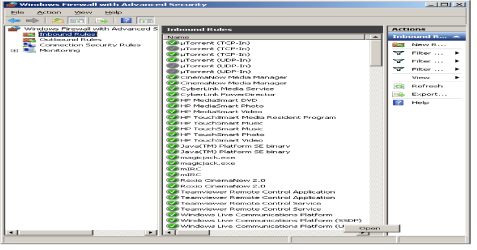
My PC has 3 extra ports for an SATA. But it only has enough room for 2 extra hard drives. That means I could have 3 total hard drives. I do not plan on doing any p2p programs. I am wondering though. I do have uTorrent. But just for when I need it for files from on this forum to extract. But when I check my firewall it has an opening that says it can pass through both TCP and IP ports. Here is a picture. Of what I mean.

uTORRENT 1.png
 

My Computer

Computer Manufacturer/Model Number
HP Pavilion p6000 series/Model p6654y
OS
Windows 7 Ultimate x64
CPU
AMD Athlon(tm) II X4 630
Motherboard
Socket AM3 (938)
Memory
DDR3 2048 MB's/ PC3-10600 (1,333 MHz) (2 Cards)
Graphics Card(s)
ATI Radeon HD 4200
Sound Card
Realtek High definition Audio
Monitor(s) Displays
PnP-Monitor (Standard) (I am using my Emerson TV)
Screen Resolution
1024 x 768 pixels at 75 Hz in true colors (32-bit)
Hard Drives
750.05 Gigabytes Usable Hard Drive Capacity
692.61 Gigabytes Hard Drive Free Space

hp DVD-RAM GH60L SATA CdRom Device [Optical drive]
YMAX magicJack USB Device [Optical drive]

Generic- Compact Flash USB Device [Hard drive] -- drive 2
Generic
PSU
250 Watts
Case
HP
Cooling
Fan
Keyboard
Logitech wireless wave combo MK550 (Came with mouse)
Mouse
Logitech wireless wave combo MK550 (Came with keyboard)
Internet Speed
DSL Download speed 15.06-mb/s Upload .49-mb/s ping 45ms
Other Info
HP Wireless 802.11 b/g/n PCIe Card
Back
Top