Security Wireless Cisco LEAP

Cedric

New member
Local time
4:12 AM
Messages
1
Hi,

I need to access to a wireless protected bye Cisco LEAP.

On windows vista, I install Intel/Proset wireless on my HP6730b and the Cisco LEAP security is present.

But on windows seven, after I install this software, no Cisco LEAP security is present.

Have you the sames problem ?

Have you a solutions ?
 

My Computer

OS
Windows Seven
I also have an Intel Wireless 4965AG and need to use Cisco LEAP to connect to my wireless network at work. In any dialog, I only see Microsoft PEAP - any fix to this issue?
 

My Computer

OS
Windows 7 64 bit Build 7000
Anyone solve this issue yet ?
 

My Computer

OS
Windows 7 64 bit Build 7000
What I did to get leap to work on W7 was download intel wireless proset for windows vista ultimate, saved the .exe
right clicked .exe
Then go to Properties-> Select Compatibility tab-> Check Run this program in compatibility mode -> select windows vista service pack 1.
then you should have the option to select leap authentication.
 

My Computer

OS
w7
Downloaded the file ICS_v32 and set the compatibility mode but did not get the option to use leap authentication. Any other ideas? Thanks
 

My Computer

Computer Manufacturer/Model Number
Motion Computing
OS
Windows 7
Reply

Open Network and sharing Center -> Manage wireless network-> Add or Select your wireless connection-> open wireless properties-> select the tab security and there will option be more for authentication methods-> click settings to input your credentials

Good luck
 

My Computer

OS
w7
Thanks for your help but I do not have the authentication options that I would expect to see. Is there any way to tell if I have the correct proset download? The options I have are Open, WEP, WPA + WPA2 for personal+enterprise and WEP, nothing takes me to a LEAP config.
 

My Computer

Computer Manufacturer/Model Number
Motion Computing
OS
Windows 7
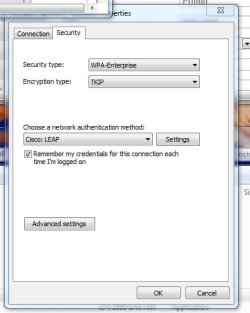
Theses are the setting I used to set up my Wireless(attachment), I believe you can only use Leap with WPA Security but not 100 percent sure
 

Attachments

  • ScreenHunter_03 Jul. 06 10.42.jpg
    ScreenHunter_03 Jul. 06 10.42.jpg
    21.8 KB · Views: 735

My Computer

OS
w7
Make sure you have a intel wireless adapter or the intel wireless software will not work, here is some of the
Download Software, Drivers and Utilities Search Results.

make sure you get the right model for your adapter and the right bit

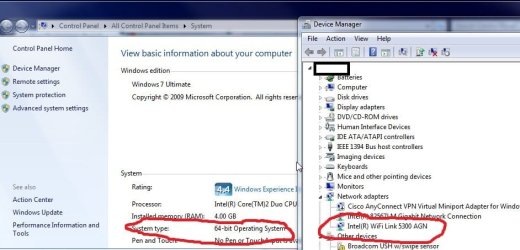
I have a 5300 model adapter and I use a 64 bit os and the one that worked for me was

Intel® WiFi Link 5300 and Intel® WiFi Link 5100 products
File Name: Intel® PROSet/Wireless WiFi Connection Utility for Windows Vista* 64-Bit
 

Attachments

  • ScreenHunter_04 Jul. 06 11.01.jpg
    ScreenHunter_04 Jul. 06 11.01.jpg
    60.6 KB · Views: 2,286
Last edited:

My Computer

OS
w7
Downloaded the right driver this time and worked fine. Thanks for your help.
 

My Computer

Computer Manufacturer/Model Number
Motion Computing
OS
Windows 7
Cisco ACS software

I had this same problem, where I had updated a Dell Latitude E4300 laptop to Windows 7 with Intel AGN 5300 wifi controller. After installing the appropriate Intel software to acquire the 'Cisco: LEAP' authentication type on the wireless profile, I was still unable to connect or authenticate to the Wifi WVLAN.

I started a ticket with Intel as well, and was having intermittent connectivity, though 95% of the time it was failing to authenticate. A few days later we upgraded our Cisco Secure ACS (RADIUS) server from version 3.x to a 4.x platform, and it was immediately resolved.

Hopefully this is helpful information if you've run into the same problems as I have, an upgrade to a more modern version of Cisco Secure ACS might help. It did for me!
 

My Computer

Computer Manufacturer/Model Number
Dell Latitude E4300 laptop
OS
Windows 7
anyone come up with a solution to this that doesn't require upgrading ACS? I'm using Windows 7 on a Tablet machine and it would be great to use our corporate wifi but we use Leap and ACS 3.2, chances of getting IT to upgrade to ACS 4 are not looking good.

microsoft get alot of stick about bad software but they don't hold a candle to issues that I've seen with Cisco over the years.
 

My Computer

OS
Windows 7 Ultimate 64bit
Having tried every Cisco client installer (along with many others) I still haven't been able to get this to work either. The drivers for the card install correctly from the Cisco wizards but the supplicant software won't pull any information from the card. When using the Windows wireless config I am able to select Cisco LEAP as authentication but it won't authenticate.
I have checked my ACS and it says I'm trying to authenticate using PEAP. After some packet tracing I found this to be true(!) even though it states in Windows I am using LEAP. The packet traces have identified that the client will try to authenticate with the Access Point using PEAP which is the backed off to the ACS and fails, however the AP then receives a second request but this time using LEAP - unfortunately this won't relay back to the ACS to authenticate the client.
 

My Computer

OS
WinXP / 7
I have a Lenovo machine and with Thankvantage Access Connection, I am able to setup this LEAP wireless connection. That said i think it's a utility feature rather than a driver, or builtin W7 tool that can get this option.
 

My Computer

Computer Manufacturer/Model Number
Lenovo ThinkPad T60
OS
Windows 7 Ultimate 64Bit
CPU
GenuineIntel Intel(R) Core(TM) DuoCore T2400 @ 1.83GHz
Motherboard
Intel(R) 82801G (ICH7 Family)
Memory
2.00 GB
Graphics Card(s)
Mobile Intel(R) 945 Express Chipset
Sound Card
SoundMAX Integrated Digital HD Audio
Monitor(s) Displays
ThinkPad Display
Screen Resolution
1400x1050
Hard Drives
100Gb SATA
Keyboard
Standard Keyboard
Mouse
HID-compliant Mouse
Internet Speed
Cable Broadband - 54Mbps
Other Info
Intel(R) PRO/1000 PL Network Connection
11a/b/g Wireless LAN Mini PCI Express Adapter
Solution!

Hi all, I had this exact same problem and have found a working solution.

I was unable to connect to LEAP at my workplace. Other colleagues with Windows 7 either had the same issue or intermittent connectivity. All troubleshooting showed an error in authentication.

To fix this change your security settings as follows:

Security Type: WPA-Enterprise
Encryption Type: TKIP

Choose a network authentication method: Microsoft: Protected EAP (PEAP)
I previously tried to use LEAP with no success.

Then under settings: un-check the Validate server certificate

Because my login is not on the same domain as my computer, i had to change the Configuration settings of the EAP MSCHAPv2 properties to not automatically use my windows login name and password.

After doing this I was challenged for a login and password for my wireless connection. After entering <domain/username> and <password> I was able to connect!

At first it was reporting 'No internet Access' with the limited connection icon, but after a day or so it disappeared.

I hope this helps!

Michael
 

My Computer

OS
Windows 7 Enterprise
Back
Top