see computer screen on t.v.

magsm

New member
Local time
11:13 PM
Messages
3
I had Windows Vista and was able to view my computer screen/audio on my television. I have now changed to Windows 7 and can no longer see the computer screen or get audio on my t.v. Help please?
 

My Computer

Computer type
PC/Desktop
Computer Manufacturer/Model Number
HP Pavilion P6140a
OS
Windows 7 Professional 32 bit
CPU
Intel Core 2 duo processor E7400
Motherboard
4096mb DDR2
Memory
500gb hard drive
Graphics Card(s)
AII Radeon HD 4350
Monitor(s) Displays
HP 2009f
Antivirus
AVG
Browser
Google Chrome
You can help us to help you by completely filling out your system specs. Like what model of PC you have, the make and model of your graphics card, etc.

Also, what kind of TV is it? How do you have it hooked up?

The more information you can give up, the more we can help you.
 

My Computer

Computer type
PC/Desktop
Computer Manufacturer/Model Number
Mellon Labs (custom build)
OS
Win 7 Pro x64/Win 10 Pro x64 dual boot
CPU
AMD FX 8350 Vishera @ 4200
Motherboard
ASUS M5A97 R2.0
Memory
16 GB Mushkin Blackline DDR3-2400 @ 1866 (9-10-10-10-31)
Graphics Card(s)
XFX Radeon R9 280 Double D Black Edition
Sound Card
Realtek HD Audio on MB. Sounds great.
Monitor(s) Displays
Acer 24", Acer 22"
Screen Resolution
3840 x 1080
Hard Drives
1 x Mushkin Chronos 120 GB SSD (Win 10)
1 x Samsung 850 EVO 250 GB SSD (Win 7)
1 x WD 1TB SATA Blue
1 x WD 1TB SATA Green
PSU
Corsair TX-750
Case
CoolerMaster HAF 912+
Cooling
Coolermaster Seidon 240M Liquid AIO. 6 case fans
Keyboard
Logitech G710+
Mouse
Logitech G500s
Internet Speed
Much better since I got fiber, but still way overpriced.
Antivirus
MSE, Malware Bytes for scanning
Browser
Firefox
Other Info
Corsair VOID USB headphones.

A Mellon Labs X-1 - LCD Smartie driven system status display.

Brought to you by the letter E
Thanks. I have updated system specs as best I can. Samsung t.v., which is hooked up. I should clarify that I can see the computer desktop background on the t.v., but not what is actually being shown on the computer screen at the time.
 

My Computer

Computer type
PC/Desktop
Computer Manufacturer/Model Number
HP Pavilion P6140a
OS
Windows 7 Professional 32 bit
CPU
Intel Core 2 duo processor E7400
Motherboard
4096mb DDR2
Memory
500gb hard drive
Graphics Card(s)
AII Radeon HD 4350
Monitor(s) Displays
HP 2009f
Antivirus
AVG
Browser
Google Chrome
Just run an HDMI cable to the tv and choose the hdmi output on the video card as the default audio and video source, that should fix it :)

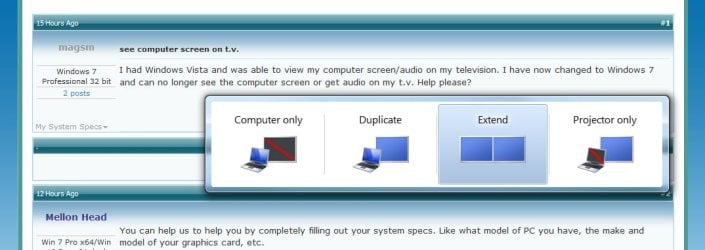
And as far as seeing the same thing, make sure you have the displays set to duplicate, not extend, although, I don`t know why you wouldn`t want it set to extend.
 
Last edited:

My Computer

Computer type
PC/Desktop
Computer Manufacturer/Model Number
Skylake Special #666
OS
Windows 10 Pro x64
CPU
Intel Core i7 6700K
Motherboard
Asus Sabertooth Z170 Mark 1
Memory
GSkill TridentZ RGB 16GB 3600 16-16-16-36
Graphics Card(s)
EVGA GTX 980 Ti SC x2
Sound Card
Realtek High Definition
Monitor(s) Displays
AOC G2460PG
Screen Resolution
1920 x 1080 144Hz
Hard Drives
Samsung 860 Pro 256GB, Seagate Barracuda 4TB x2
PSU
EVGA 1000 P2, EVGA White Custom Braided Cables
Case
Corsair Vengeance C70 Gunmetal Black
Cooling
Corsair H100i v2, Corsair ML120 x2, Thermal Grizzly Kryonaut
Keyboard
Logitech G910 Orion Spectrum
Mouse
Logitech G700s
Internet Speed
Verizon Fios Quantum Gateway 75/75
Antivirus
Windows Defender, Malwarebytes Free 3.8.3
Browser
Chrome
Other Info
Corsair SP120 x4, LG Blu-ray Drive, Durabrand HT-395 100 Watt Dolby Digital Amp, Corsair H2100 Wireless 7.1 Headset
Is your dual display set to duplicate or extend ? Duplicate clones the display, extend makes one large desktop - sounds like you need duplicate. Hold down Windows key and press P to select - see pic

windowsP.jpg

with extend you can drag a app/window from one screen to the other. With clone, the 2 displays must be the same resolution.
 

My Computer

Computer type
PC/Desktop
Computer Manufacturer/Model Number
self build
OS
W10 Pro x64, W7 Pro x64 in VMware
CPU
i7 2600K @ 4.4GHz
Motherboard
MSI Z68A-GD80
Memory
8GB Mushkin @ 1600MHz
Graphics Card(s)
Nvidia GTX 750 Ti
Monitor(s) Displays
27" Benq + 27" LG
Screen Resolution
1080p
Hard Drives
500GB 850 Evo SSD + 3 * 2TB Seagate
PSU
EVGA 650 GS modular
Case
Antec 300
Cooling
Seidon 120V v2
Internet Speed
62/18 Mbps
Antivirus
Defender (W10) + MSE (W7)
Browser
Firefox
Thank you so much for your help. Problem was solved when I set the displays to duplicate.
 

My Computer

Computer type
PC/Desktop
Computer Manufacturer/Model Number
HP Pavilion P6140a
OS
Windows 7 Professional 32 bit
CPU
Intel Core 2 duo processor E7400
Motherboard
4096mb DDR2
Memory
500gb hard drive
Graphics Card(s)
AII Radeon HD 4350
Monitor(s) Displays
HP 2009f
Antivirus
AVG
Browser
Google Chrome
Yay! :)
 

My Computer

Computer type
PC/Desktop
Computer Manufacturer/Model Number
Mellon Labs (custom build)
OS
Win 7 Pro x64/Win 10 Pro x64 dual boot
CPU
AMD FX 8350 Vishera @ 4200
Motherboard
ASUS M5A97 R2.0
Memory
16 GB Mushkin Blackline DDR3-2400 @ 1866 (9-10-10-10-31)
Graphics Card(s)
XFX Radeon R9 280 Double D Black Edition
Sound Card
Realtek HD Audio on MB. Sounds great.
Monitor(s) Displays
Acer 24", Acer 22"
Screen Resolution
3840 x 1080
Hard Drives
1 x Mushkin Chronos 120 GB SSD (Win 10)
1 x Samsung 850 EVO 250 GB SSD (Win 7)
1 x WD 1TB SATA Blue
1 x WD 1TB SATA Green
PSU
Corsair TX-750
Case
CoolerMaster HAF 912+
Cooling
Coolermaster Seidon 240M Liquid AIO. 6 case fans
Keyboard
Logitech G710+
Mouse
Logitech G500s
Internet Speed
Much better since I got fiber, but still way overpriced.
Antivirus
MSE, Malware Bytes for scanning
Browser
Firefox
Other Info
Corsair VOID USB headphones.

A Mellon Labs X-1 - LCD Smartie driven system status display.

Brought to you by the letter E
Back
Top