Solved Seeking a Plain, Minimal Theme

Markjpz

New member
Local time
9:37 PM
Messages
5
Hello, and let me say first what a tremendous help and resource this website has been. I can't thank the contributors enough for the outstanding content offered here.

As seen in my screenshot below, I prefer a "bling-less" theme, which is next to impossible with Aero. The screenshot contains bits and pieces of things I found on this site.

Aero No Shine and Aero Plain come to mind.

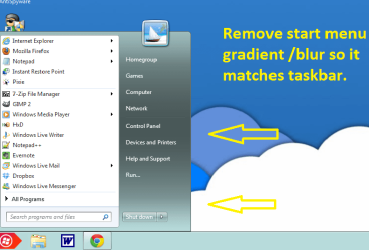
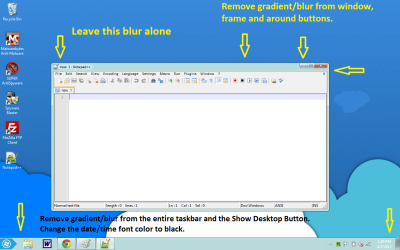
I realize I am asking a huge favor here. Can someone make me a single Aero theme that captures what I have in the screenshot, plus a start menu (and shutdown button) without the blur, a "show desktop" button without the blur, date and clock fonts in black, and window frames without the blur?

I would like to retain the ability to change the color (the greenish stuff in the screenshot) from the Aero Windows Color in personalization (transparency off).

The only blur/gradient I would like to keep is around the window titles (see the notepad++ window in the screenshot).

As it stands now, it is a confusing amalgam of bits and pieces I'm not sure I could replicate if I had a gun to my head.

Thank you in advance for all your work past and present.
 

Attachments
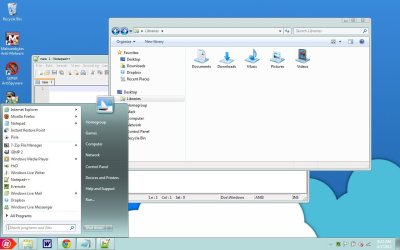
  • screenshot 1.jpg
    screenshot 1.jpg
    78.8 KB · Views: 187

My Computer

OS
Windows 7 Home Premium x64
Welcome to the Seven Forums
I think I made Aero No Shine not sure post links to them.

I can make them changes for you, will you post more screenshots of what you want with arrows pointing to the areas it will help.
This will be a custom theme and you will need to do 1 of these 2 ways of Enabling custom themes for it to work.
http://www.sevenforums.com/tutorials/34579-enabling-custom-themes-windows-7-a.html
Or
http://www.sevenforums.com/tutorials/28377-theme-how-apply-custom-themes.html?filter

Jerry
 

My Computer

Computer type
Laptop
Computer Manufacturer/Model Number
Sager NP9170
OS
Win 7 Pro x64 / Win 10 Pro
CPU
Intel(R) Core(TM) i7-3630QM CPU @ 2.40GHz
Motherboard
CLEVO P170EM
Memory
12 GB
Graphics Card(s)
(1) Intel(R) HD Graphics 4000 (2) NVIDIA GeForce GTX 675M
Sound Card
(1) Realtek High Definition Audio (2) Intel(R) Display Aud
Monitor(s) Displays
17.3
Screen Resolution
1920x1080
Hard Drives
(1) Samsung 860 EVO 500GB(OS) (1) Samsung 860 EVO 500GB(Data)
Keyboard
Backlite
Antivirus
MSE, Malwarebytes Pro
Browser
Firefox
Other Info
DESKTOP: Custom-built.
OS: Win 10 Pro x64.
CASE: Rosewill R5.
CPU: Intel I5 4670K CPU @ 3.40GHz.
CPU COOLER: Cool Master Hyper 212 EVO.
MOTHERBOARD: Asus Z87-A.
MEMORY: Kingston HyperX 2x4 GB.
GPU: Nvidia Geforce 650 TI.
PSU: Corsair TX750.
DRIVES: (1) Samsung 840 120 GB SSD (2) Western Digital blue 500 GB 7200 RPM.
Bongo, thanks for the quick reply. No Shine is your handiwork. My escapade started with this thread

Thanks for your generous offer. I posted a couple more screen shots as requested. If I'm still unclear, lemme know, and I'll post more.
 

Attachments

  • screenshot start menu.png
    screenshot start menu.png
    34.6 KB · Views: 29
  • screenshot window and frame2.png
    screenshot window and frame2.png
    53.2 KB · Views: 57

My Computer

OS
Windows 7 Home Premium x64
Give me a day or two and I will see what I can do.
Jerry
 

My Computer

Computer type
Laptop
Computer Manufacturer/Model Number
Sager NP9170
OS
Win 7 Pro x64 / Win 10 Pro
CPU
Intel(R) Core(TM) i7-3630QM CPU @ 2.40GHz
Motherboard
CLEVO P170EM
Memory
12 GB
Graphics Card(s)
(1) Intel(R) HD Graphics 4000 (2) NVIDIA GeForce GTX 675M
Sound Card
(1) Realtek High Definition Audio (2) Intel(R) Display Aud
Monitor(s) Displays
17.3
Screen Resolution
1920x1080
Hard Drives
(1) Samsung 860 EVO 500GB(OS) (1) Samsung 860 EVO 500GB(Data)
Keyboard
Backlite
Antivirus
MSE, Malwarebytes Pro
Browser
Firefox
Other Info
DESKTOP: Custom-built.
OS: Win 10 Pro x64.
CASE: Rosewill R5.
CPU: Intel I5 4670K CPU @ 3.40GHz.
CPU COOLER: Cool Master Hyper 212 EVO.
MOTHERBOARD: Asus Z87-A.
MEMORY: Kingston HyperX 2x4 GB.
GPU: Nvidia Geforce 650 TI.
PSU: Corsair TX750.
DRIVES: (1) Samsung 840 120 GB SSD (2) Western Digital blue 500 GB 7200 RPM.
Thanks a bunch, Bongo.

Have a good Easter.
 

My Computer

OS
Windows 7 Home Premium x64
Give this a try.
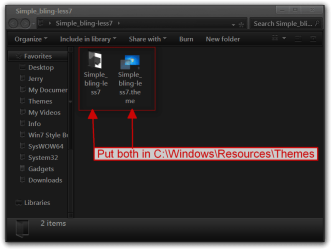
Download the zip at the bottom of this post to your desktop extract it and put both 1 Simple_bling-less7 folder and 1 Simple_bling-less7.theme file in C:\Windows\Resources\Themes
Simple_bling-less7.png

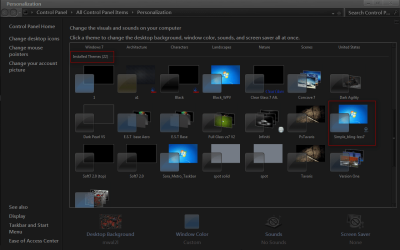
Will so up in Personalization under Installed Themes as Simple_bling-less7
Personalization.png

If I miss something let me know.
Jerry
 

Attachments

My Computer

Computer type
Laptop
Computer Manufacturer/Model Number
Sager NP9170
OS
Win 7 Pro x64 / Win 10 Pro
CPU
Intel(R) Core(TM) i7-3630QM CPU @ 2.40GHz
Motherboard
CLEVO P170EM
Memory
12 GB
Graphics Card(s)
(1) Intel(R) HD Graphics 4000 (2) NVIDIA GeForce GTX 675M
Sound Card
(1) Realtek High Definition Audio (2) Intel(R) Display Aud
Monitor(s) Displays
17.3
Screen Resolution
1920x1080
Hard Drives
(1) Samsung 860 EVO 500GB(OS) (1) Samsung 860 EVO 500GB(Data)
Keyboard
Backlite
Antivirus
MSE, Malwarebytes Pro
Browser
Firefox
Other Info
DESKTOP: Custom-built.
OS: Win 10 Pro x64.
CASE: Rosewill R5.
CPU: Intel I5 4670K CPU @ 3.40GHz.
CPU COOLER: Cool Master Hyper 212 EVO.
MOTHERBOARD: Asus Z87-A.
MEMORY: Kingston HyperX 2x4 GB.
GPU: Nvidia Geforce 650 TI.
PSU: Corsair TX750.
DRIVES: (1) Samsung 840 120 GB SSD (2) Western Digital blue 500 GB 7200 RPM.
Thanks much, Bongo,

I have an unusual problem now, though. A few weeks ago, I used UXStyle for changing themes without modifying system files. Everything worked fine. This is how I got the screenshots I showed you earlier.

Now, every downloaded theme I try, including this new one, coughs up the Classic desktop (win 2000). The standard Aero themes work.

I tried reinstalling UXStyle, and end up with the same result.

The only way I can get back to what you saw in my screenshots is to do a system restore.

Thanks for any help.
 

My Computer

OS
Windows 7 Home Premium x64
UXStyle is a service I have had that same trouble every now and then here's what you will need to do when that happens.
Switch to the default Aero theme first then do the following.
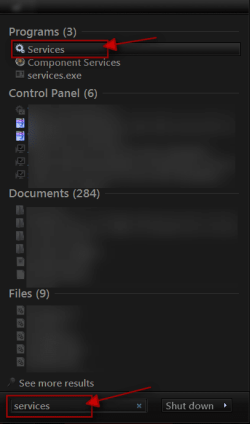
Click on the Start Button type in Services In the search box and then click on Services
1.png


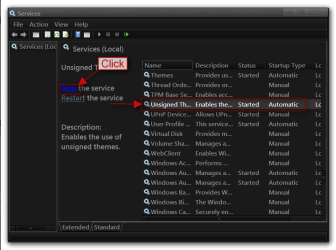
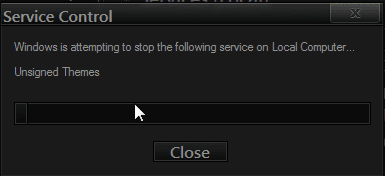
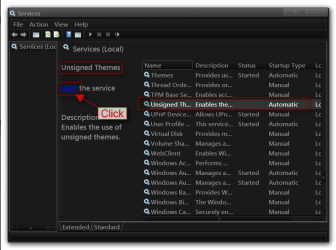
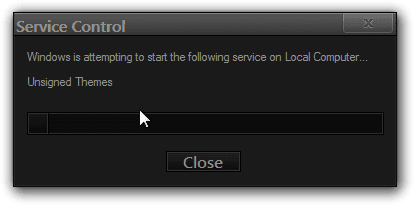
Scroll down until you see unsigned themes select it in click on the Stop text and let it stop after that click on Start text. Your screen may blink when you do this.
4.pngstop.PNG5.pngstart.png


Jerry
 

My Computer

Computer type
Laptop
Computer Manufacturer/Model Number
Sager NP9170
OS
Win 7 Pro x64 / Win 10 Pro
CPU
Intel(R) Core(TM) i7-3630QM CPU @ 2.40GHz
Motherboard
CLEVO P170EM
Memory
12 GB
Graphics Card(s)
(1) Intel(R) HD Graphics 4000 (2) NVIDIA GeForce GTX 675M
Sound Card
(1) Realtek High Definition Audio (2) Intel(R) Display Aud
Monitor(s) Displays
17.3
Screen Resolution
1920x1080
Hard Drives
(1) Samsung 860 EVO 500GB(OS) (1) Samsung 860 EVO 500GB(Data)
Keyboard
Backlite
Antivirus
MSE, Malwarebytes Pro
Browser
Firefox
Other Info
DESKTOP: Custom-built.
OS: Win 10 Pro x64.
CASE: Rosewill R5.
CPU: Intel I5 4670K CPU @ 3.40GHz.
CPU COOLER: Cool Master Hyper 212 EVO.
MOTHERBOARD: Asus Z87-A.
MEMORY: Kingston HyperX 2x4 GB.
GPU: Nvidia Geforce 650 TI.
PSU: Corsair TX750.
DRIVES: (1) Samsung 840 120 GB SSD (2) Western Digital blue 500 GB 7200 RPM.
Thanks for that. Everything is working fine.

And thank you again for the theme.
 

My Computer

OS
Windows 7 Home Premium x64
You're welcome
 

My Computer

Computer type
Laptop
Computer Manufacturer/Model Number
Sager NP9170
OS
Win 7 Pro x64 / Win 10 Pro
CPU
Intel(R) Core(TM) i7-3630QM CPU @ 2.40GHz
Motherboard
CLEVO P170EM
Memory
12 GB
Graphics Card(s)
(1) Intel(R) HD Graphics 4000 (2) NVIDIA GeForce GTX 675M
Sound Card
(1) Realtek High Definition Audio (2) Intel(R) Display Aud
Monitor(s) Displays
17.3
Screen Resolution
1920x1080
Hard Drives
(1) Samsung 860 EVO 500GB(OS) (1) Samsung 860 EVO 500GB(Data)
Keyboard
Backlite
Antivirus
MSE, Malwarebytes Pro
Browser
Firefox
Other Info
DESKTOP: Custom-built.
OS: Win 10 Pro x64.
CASE: Rosewill R5.
CPU: Intel I5 4670K CPU @ 3.40GHz.
CPU COOLER: Cool Master Hyper 212 EVO.
MOTHERBOARD: Asus Z87-A.
MEMORY: Kingston HyperX 2x4 GB.
GPU: Nvidia Geforce 650 TI.
PSU: Corsair TX750.
DRIVES: (1) Samsung 840 120 GB SSD (2) Western Digital blue 500 GB 7200 RPM.
Back
Top