
Seemingly Random BSOD, error 0x0000003B

FuzzyDunlop

New member
Local time
1:46 PM
Messages
11
Hi, first time posting on the Seven Forums. Glad to be here. :) Anyway, about a month or two ago, I started getting random BSODs, shortly after that, my GPU started overheating. I assumed those blue screens were due to my faulty GPU, so I went and purchased a GTX 770. They SEEMED to stop, but recently I have been getting the blue screens again. It has happened twice within the last week or so. Once during a video game, and another when I had multiple tabs open in my browser. I followed the guide here to set Windows up to create a .dmp file after a crash, but my Minidump folder is still empty, unfortunately.

I have no clue what the error could be. I ran memtest for about 11 hours a few days ago, which was about 6 passes. (would have ran it to 8, but my I have to use my PC a lot, unfortunately) I'm thinking it might be an issue with Nvidia drivers (mine are up to date) or perhaps the remnants of a notorious program which I tried to thoroughly remove called motioninjoy. (it's a program that lets you emulate a PS3 controller as a 360 controller) I'd be super grateful to anyone that would take their time to help me. I will provide any more information if needed. I took a picture of my BSOD as well as uploading my diagnostics folder.
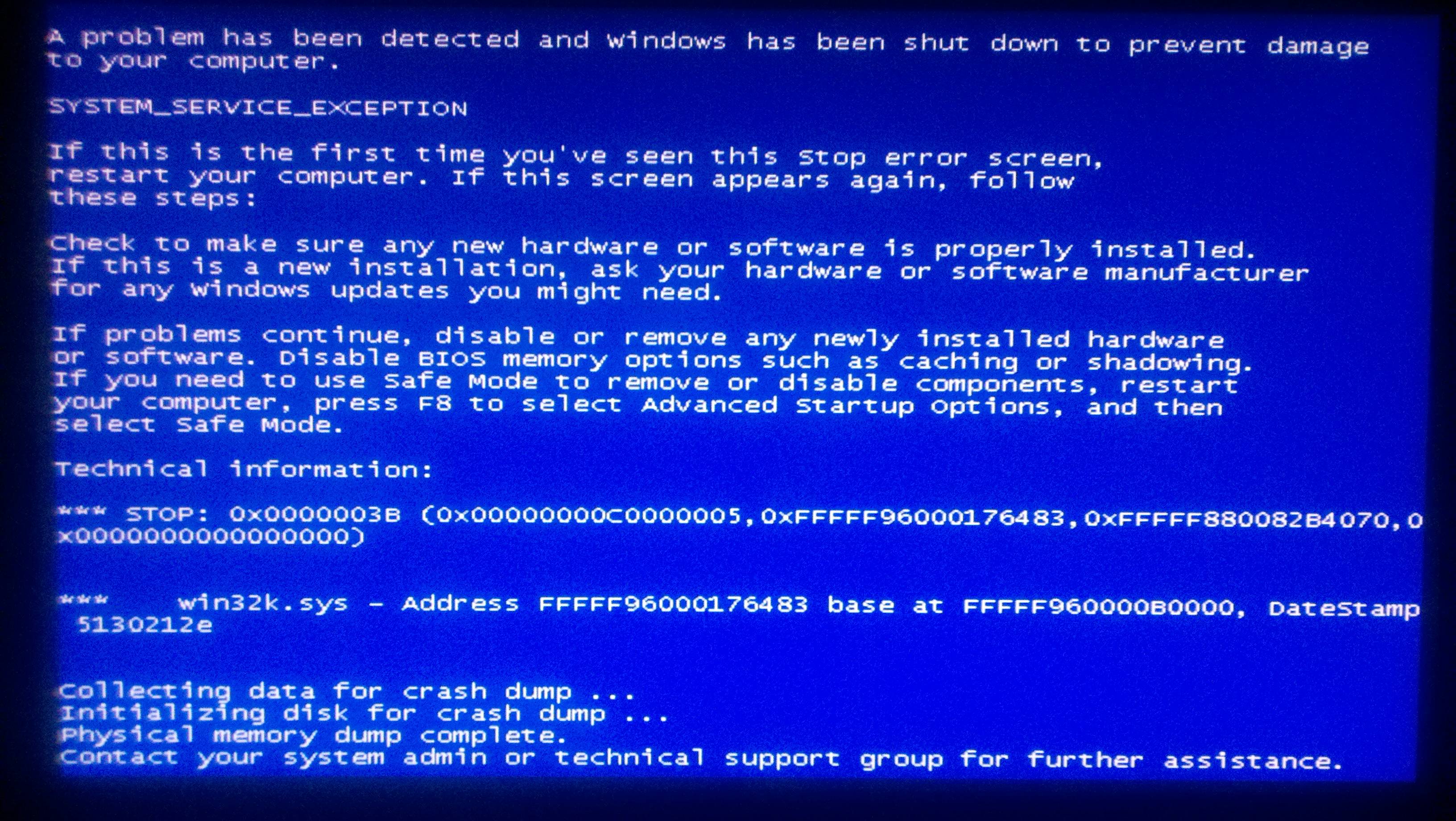
Cmk5syL.jpg
 

My Computer

Computer type
PC/Desktop
OS
Windows 7 Home Premium 64 bit
CPU
Intel i5 760 @ stock
Motherboard
asus p7p55d-e lx
Memory
8GB OCZ
Graphics Card(s)
Gigabyte GTX 770
Hard Drives
1TB Samsung Spinpoint F1
Antivirus
Kaspersky Internet Security
Browser
Google Chrome
One and only bump.
 

My Computer

Computer type
PC/Desktop
OS
Windows 7 Home Premium 64 bit
CPU
Intel i5 760 @ stock
Motherboard
asus p7p55d-e lx
Memory
8GB OCZ
Graphics Card(s)
Gigabyte GTX 770
Hard Drives
1TB Samsung Spinpoint F1
Antivirus
Kaspersky Internet Security
Browser
Google Chrome
View attachment 304693

The zip you uploaded does not contain any crash dump.

Follow it: http://www.sevenforums.com/tutorials/174459-dump-files-configure-windows-create-bsod.html
Go to Option Two, Point 2. Download the .reg file and merge it in registry by double clicking it.

Now wait for another BSOD. When it occurred, search the .dmp files manually in the default path: C:\Windows\Minidump or %SystemRoot%\Minidump. See if the crash dump is recorded or not (hopefully it will be recorded).Post it following the Blue Screen of Death (BSOD) Posting Instructions.

Dont run any disc cleanup program before you upload another zip.
 

My Computer

Computer type
PC/Desktop
Computer Manufacturer/Model Number
Self Assembled
OS
Microsoft Windows 10 Pro Insider Preview 64-bit
CPU
Intel(R) Core(TM) i3-4130 CPU @ 3.40GHz
Motherboard
Gigabyte Technology Co., Ltd. B85M-D3H
Memory
Corsair Vengence 4GB x2 (8.00GB Dual-Channel DDR3 @ 798MHz)
Graphics Card(s)
2047MB GeForce GTS 450 (ZOTAC International)
Sound Card
Onboard (Realtek High Definition Audio)
Monitor(s) Displays
LG Flatron E2040T
Screen Resolution
1600x900
Hard Drives
Western Digital 1 TB
Seagate 500 GB
PSU
Corsair VS550
Case
Cooler Master K380
Cooling
Cooler Master Seidon 120V Plus
Keyboard
Logitech MK260r
Mouse
Logitech MK260r
Internet Speed
PMPL Broadband
Antivirus
Windows Defender + MBAM
Browser
Firefox
Other Info
Dell Studio 15" Laptop
Alright, done. The blue screens are very sporadic though, nothing in particular seems to trigger them, although I could be wrong. Not sure when I will get my next one, but I will certainly bump the thread when I do and hopefully with a proper crash dump.
 

My Computer

Computer type
PC/Desktop
OS
Windows 7 Home Premium 64 bit
CPU
Intel i5 760 @ stock
Motherboard
asus p7p55d-e lx
Memory
8GB OCZ
Graphics Card(s)
Gigabyte GTX 770
Hard Drives
1TB Samsung Spinpoint F1
Antivirus
Kaspersky Internet Security
Browser
Google Chrome
Got another BSOD while I was browsing on Chrome, same error. However, I wasn't able to collect a dmp file, unfortunately. The blue screen just hung-up on initializing disk for crash dump. I'm not quite sure what to do here.
 

My Computer

Computer type
PC/Desktop
OS
Windows 7 Home Premium 64 bit
CPU
Intel i5 760 @ stock
Motherboard
asus p7p55d-e lx
Memory
8GB OCZ
Graphics Card(s)
Gigabyte GTX 770
Hard Drives
1TB Samsung Spinpoint F1
Antivirus
Kaspersky Internet Security
Browser
Google Chrome

My Computer

Computer type
PC/Desktop
Computer Manufacturer/Model Number
Self Assembled
OS
Microsoft Windows 10 Pro Insider Preview 64-bit
CPU
Intel(R) Core(TM) i3-4130 CPU @ 3.40GHz
Motherboard
Gigabyte Technology Co., Ltd. B85M-D3H
Memory
Corsair Vengence 4GB x2 (8.00GB Dual-Channel DDR3 @ 798MHz)
Graphics Card(s)
2047MB GeForce GTS 450 (ZOTAC International)
Sound Card
Onboard (Realtek High Definition Audio)
Monitor(s) Displays
LG Flatron E2040T
Screen Resolution
1600x900
Hard Drives
Western Digital 1 TB
Seagate 500 GB
PSU
Corsair VS550
Case
Cooler Master K380
Cooling
Cooler Master Seidon 120V Plus
Keyboard
Logitech MK260r
Mouse
Logitech MK260r
Internet Speed
PMPL Broadband
Antivirus
Windows Defender + MBAM
Browser
Firefox
Other Info
Dell Studio 15" Laptop

My Computer

Computer type
PC/Desktop
OS
Windows 7 Home Premium 64 bit
CPU
Intel i5 760 @ stock
Motherboard
asus p7p55d-e lx
Memory
8GB OCZ
Graphics Card(s)
Gigabyte GTX 770
Hard Drives
1TB Samsung Spinpoint F1
Antivirus
Kaspersky Internet Security
Browser
Google Chrome
Regardless, I will upload it although I'm not sure anything has changed.
 

My Computer

Computer type
PC/Desktop
OS
Windows 7 Home Premium 64 bit
CPU
Intel i5 760 @ stock
Motherboard
asus p7p55d-e lx
Memory
8GB OCZ
Graphics Card(s)
Gigabyte GTX 770
Hard Drives
1TB Samsung Spinpoint F1
Antivirus
Kaspersky Internet Security
Browser
Google Chrome
Actually, if we suggest anything without seeing the data, that will be some guesswork only, and will not be very sound suggestion.

But still, if you want, I may continue the guesswork.

First step of guesswork (based on event logs), uninstall Libusb-win32 and update Hamachi.

Let us know the results.
 

My Computer

Computer type
PC/Desktop
Computer Manufacturer/Model Number
Self Assembled
OS
Microsoft Windows 10 Pro Insider Preview 64-bit
CPU
Intel(R) Core(TM) i3-4130 CPU @ 3.40GHz
Motherboard
Gigabyte Technology Co., Ltd. B85M-D3H
Memory
Corsair Vengence 4GB x2 (8.00GB Dual-Channel DDR3 @ 798MHz)
Graphics Card(s)
2047MB GeForce GTS 450 (ZOTAC International)
Sound Card
Onboard (Realtek High Definition Audio)
Monitor(s) Displays
LG Flatron E2040T
Screen Resolution
1600x900
Hard Drives
Western Digital 1 TB
Seagate 500 GB
PSU
Corsair VS550
Case
Cooler Master K380
Cooling
Cooler Master Seidon 120V Plus
Keyboard
Logitech MK260r
Mouse
Logitech MK260r
Internet Speed
PMPL Broadband
Antivirus
Windows Defender + MBAM
Browser
Firefox
Other Info
Dell Studio 15" Laptop
Actually, if we suggest anything without seeing the data, that will be some guesswork only, and will not be very sound suggestion.

But still, if you want, I may continue the guesswork.

First step of guesswork (based on event logs), uninstall Libusb-win32 and update Hamachi.

Let us know the results.

Yes, I understand and I appreciate your help. :) I opted to just uninstall both of those. I will make another post whenever I'm able to procure a proper crash log after a BSOD OR if I don't get another BSOD in about a week or two, then I'll assume the problem is fixed. If I'm not able to, I'm assuming the only option for me would be to format my hard drive, which I don't want to do, but time will tell.
 

My Computer

Computer type
PC/Desktop
OS
Windows 7 Home Premium 64 bit
CPU
Intel i5 760 @ stock
Motherboard
asus p7p55d-e lx
Memory
8GB OCZ
Graphics Card(s)
Gigabyte GTX 770
Hard Drives
1TB Samsung Spinpoint F1
Antivirus
Kaspersky Internet Security
Browser
Google Chrome
Let us know how the computer is running after uninstalling them two.
 

My Computer

Computer type
PC/Desktop
Computer Manufacturer/Model Number
Self Assembled
OS
Microsoft Windows 10 Pro Insider Preview 64-bit
CPU
Intel(R) Core(TM) i3-4130 CPU @ 3.40GHz
Motherboard
Gigabyte Technology Co., Ltd. B85M-D3H
Memory
Corsair Vengence 4GB x2 (8.00GB Dual-Channel DDR3 @ 798MHz)
Graphics Card(s)
2047MB GeForce GTS 450 (ZOTAC International)
Sound Card
Onboard (Realtek High Definition Audio)
Monitor(s) Displays
LG Flatron E2040T
Screen Resolution
1600x900
Hard Drives
Western Digital 1 TB
Seagate 500 GB
PSU
Corsair VS550
Case
Cooler Master K380
Cooling
Cooler Master Seidon 120V Plus
Keyboard
Logitech MK260r
Mouse
Logitech MK260r
Internet Speed
PMPL Broadband
Antivirus
Windows Defender + MBAM
Browser
Firefox
Other Info
Dell Studio 15" Laptop
Let us know how the computer is running after uninstalling them two.
Running fine right now. Not noticing any differences. I will certainly update the thread if I run into some abnormalities.
 

My Computer

Computer type
PC/Desktop
OS
Windows 7 Home Premium 64 bit
CPU
Intel i5 760 @ stock
Motherboard
asus p7p55d-e lx
Memory
8GB OCZ
Graphics Card(s)
Gigabyte GTX 770
Hard Drives
1TB Samsung Spinpoint F1
Antivirus
Kaspersky Internet Security
Browser
Google Chrome
Hm, went about a month without experiencing a single blue screen up until a few days ago. Not sure what the issue is now, as I still can't seem to produce a .dmp file. It is the same stop error I originally had. I'm tearing my hair out over this, as I cannot seem to find a reason why I'm not able to find a .dmp file. Anyone have any ideas? I will provide any more information I can if requested.
 

My Computer

Computer type
PC/Desktop
OS
Windows 7 Home Premium 64 bit
CPU
Intel i5 760 @ stock
Motherboard
asus p7p55d-e lx
Memory
8GB OCZ
Graphics Card(s)
Gigabyte GTX 770
Hard Drives
1TB Samsung Spinpoint F1
Antivirus
Kaspersky Internet Security
Browser
Google Chrome
Bump
 

My Computer

Computer type
PC/Desktop
OS
Windows 7 Home Premium 64 bit
CPU
Intel i5 760 @ stock
Motherboard
asus p7p55d-e lx
Memory
8GB OCZ
Graphics Card(s)
Gigabyte GTX 770
Hard Drives
1TB Samsung Spinpoint F1
Antivirus
Kaspersky Internet Security
Browser
Google Chrome
Final bump before I move on to another forum. I would greatly appreciate ANY sort of help. I will provide absolutely any more information on my PC if requested.
 

My Computer

Computer type
PC/Desktop
OS
Windows 7 Home Premium 64 bit
CPU
Intel i5 760 @ stock
Motherboard
asus p7p55d-e lx
Memory
8GB OCZ
Graphics Card(s)
Gigabyte GTX 770
Hard Drives
1TB Samsung Spinpoint F1
Antivirus
Kaspersky Internet Security
Browser
Google Chrome
Back
Top