Solved Seemingly random BSOD

SypherLocke

New member
Local time
1:33 PM
Messages
38
Hello all thank you for reading.

My pc is a custom make done for me by a company called, Altex. Two of the drives in it are from the previous machine. I got the pc in August of 2013 and pretty much had issues from the start. At least once during a seven day period while the pc was sitting idle it would freeze.

No BSOD, no error messages just a frozen screen and keyboard. This was a nonstop issue till late December, then while checking out the flight bay for Star Citizen, I noticed the machines fans making quite a good amount of noise. After getting out of the demo my pc began a new and wonderous behavior. Freezing every few hours.

At that time I tried just about everything I could think of, system restore did nothing. I un-installed recently installed programs, I installed new video drivers. I finally got the idea to do selective startup using msconfig, making sure to allow start up of programs I knew I would need, IE: Trillian, Steam and a few others, then see what the machine would do. Crashing problems went away.. so I went back into msconfig and made one slight change, I added all of the drivers and programs for my video card to startup, this included the Catalyst Control Center and like magic... the pc started freezing again. So I uninstalled all that tripe and manually installed the video drivers. No more frequent freezes, I return msconfig to normal startup and I'm back on the once a week schedule of freezes for my pc.

Fast forward to two weeks ago, my pc was once again singing me a song, fortunately my case has a nice window on the side so I could tell pretty easily what song was being sung, my CPU fan was dying. PC is still under warranty so I take it in, they replace the fan I bring it home and it was once again freezing a few times a night.

I once again tried system restore, nothing. I uninstalled and reinstalled video drivers, nothing. So I take the machine in, they keep it for a week, decide nothing is wrong with the hardware so they decide it must be a virus, the virus check naturally isn't covered under the warranty but whatever, they scan all three drives. One drive keeps giving them issues, causing the pc running the scan to freeze, they decide the drive is failing, they flash copy all the info to a new drive and finish the virus scan and give me a call telling me that all is fixed.

But if it was all fixed you wouldn't be reading this would you?

The PC is giving me BSOD, once again seemingly randomly, I got one when I clicked on a tab in firefox, another when I was watching a show in a video player, another while playing a game.

For the most part each bsod was different than the one before it expect for the last, it is a duplicate of one I got last night, "system service exception 0x3b".

One problem is it took a few bsod before I enabled minidumps so I only have 4 logfiles but hopefully they will be helpful.

Any advice will be deeply appreciated.

Help me Obi-Wan Kenobi, you are my only hope, mainly because I don't feel like taking it back to the people who already told me it was fixed.

I realize I've given you guys a large amount of information and history about my pc, I'm just trying to be thorough.

Thank you folks for any help.

EDIT: Ah yes I forgot atleast once during the past few days the system froze and the screen warbled. Appearing distorted as if someone as tossed water onto a painting.
 

My Computer

Computer type
PC/Desktop
Computer Manufacturer/Model Number
Custom Build
OS
Windows 7 Professional 64 Bit
CPU
AMD FX(tm)-8120 Eight Core Processor 3.89 GHz
Memory
8
Graphics Card(s)
AMD Radeon HD 7800 Series
Hard Drives
2 1 Tb drives
1 500 gb
Antivirus
Comodo
Browser
Firefox/Chrome

My Computer

Computer type
PC/Desktop
Computer Manufacturer/Model Number
Custom Build
OS
Windows 7 Professional 64 Bit
CPU
AMD FX(tm)-8120 Eight Core Processor 3.89 GHz
Memory
8
Graphics Card(s)
AMD Radeon HD 7800 Series
Hard Drives
2 1 Tb drives
1 500 gb
Antivirus
Comodo
Browser
Firefox/Chrome
Try uninstalling COMODO Internet Security as a test.

Malwarebytes is causing issues, probably conflicting with COMODO.

Code:
Unable to load image mwac.sys, Win32 error 0n2
*** WARNING: Unable to verify timestamp for mwac.sys
*** ERROR: Module load completed but symbols could not be loaded for mwac.sys
 [COLOR="red"]mwac+0xdd00[/COLOR]

I use Malwarebytes and we recommend it here at SF so I would keep it but remove COMODO.
However if issues arise still then remove Malwarebytes.

Your Razer software is also causing issues.

Code:
Unable to load image RzDxgk.sys, Win32 error 0n2
*** WARNING: Unable to verify timestamp for RzDxgk.sys
*** ERROR: Module load completed but symbols could not be loaded for [COLOR="Red"]RzDxgk.sys[/COLOR]
 RzDxgk+0x3896

Post back the results.
 

My Computer

Computer type
PC/Desktop
Try uninstalling COMODO Internet Security as a test.

Malwarebytes is causing issues, probably conflicting with COMODO.

Code:
Unable to load image mwac.sys, Win32 error 0n2
*** WARNING: Unable to verify timestamp for mwac.sys
*** ERROR: Module load completed but symbols could not be loaded for mwac.sys
 [COLOR=red]mwac+0xdd00[/COLOR]
I use Malwarebytes and we recommend it here at SF so I would keep it but remove COMODO.
However if issues arise still then remove Malwarebytes.

I only installed COMODO last night so I'm doubting that it's the cause of all my issues, still, I will uninstall it. When I run with just Malwarebytes windows seems to think I have no anti-virus software. Does MWB not scan for viruses, or am I using the wrong MWB product?

Your Razer software is also causing issues.

Code:
Unable to load image RzDxgk.sys, Win32 error 0n2
*** WARNING: Unable to verify timestamp for RzDxgk.sys
*** ERROR: Module load completed but symbols could not be loaded for [COLOR=Red]RzDxgk.sys[/COLOR]
 RzDxgk+0x3896
Post back the results.
Ok, I've had this Razer stuff for a few months.

I'm assuming I should uninstall then reinstall it, I need it for my mouse.

Will check back when I've done all the above and rebooted.
 

My Computer

Computer type
PC/Desktop
Computer Manufacturer/Model Number
Custom Build
OS
Windows 7 Professional 64 Bit
CPU
AMD FX(tm)-8120 Eight Core Processor 3.89 GHz
Memory
8
Graphics Card(s)
AMD Radeon HD 7800 Series
Hard Drives
2 1 Tb drives
1 500 gb
Antivirus
Comodo
Browser
Firefox/Chrome
Uninstalled Comodo
Rebooted
Uninstalled Razer Core
Rebooted
Uninstalled Razer Synapse
Rebooted
Reinstalled Razer Synapse
Rebooted.

Really hoping that Synapse isn't part of the problem as its necessary for my mouse to run right.
 

My Computer

Computer type
PC/Desktop
Computer Manufacturer/Model Number
Custom Build
OS
Windows 7 Professional 64 Bit
CPU
AMD FX(tm)-8120 Eight Core Processor 3.89 GHz
Memory
8
Graphics Card(s)
AMD Radeon HD 7800 Series
Hard Drives
2 1 Tb drives
1 500 gb
Antivirus
Comodo
Browser
Firefox/Chrome
Comp froze again, reran dm log collector, does it say if the Razer software is still in conflict?
 

My Computer

Computer type
PC/Desktop
Computer Manufacturer/Model Number
Custom Build
OS
Windows 7 Professional 64 Bit
CPU
AMD FX(tm)-8120 Eight Core Processor 3.89 GHz
Memory
8
Graphics Card(s)
AMD Radeon HD 7800 Series
Hard Drives
2 1 Tb drives
1 500 gb
Antivirus
Comodo
Browser
Firefox/Chrome
I'm struggling to find anything in particular.


Can you also enable driver verifier but only enable the options: Standard settings and IRP logging step 3.
Don't enable Force Pending I/O Requests

Enable Driver Verifier to monitor the drivers.
Driver Verifier -Enable and Disable
Run Driver Verifier for 24 hours or the occurrence of the next crash, whichever is earlier.

   Information

Why Driver Verifier:
It puts a stress on the drivers, and so it makes the unstable drivers crash. Hopefully the driver that crashes is recorded in the memory dump.

How Can we know that DV is enabled:
It will make the system bit of slow, laggy.


   Warning

Before enabling DV, make sure that you have earlier System restore points made in your computer. You can check it easily by using CCleaner looking at Tools > System Restore.

If there are no points, make a System Restore Point Manually before enabling DV.


   Tip

  • If you fail to get on the Desktop because of DV, Boot into Advanced Boot Options > Safe mode. Disable DV there. Now boot normally again, and try following the instruction of enabling DV again.
  • If you cannot boot in Safe mode too, do a System Restore to a point you made earlier.


Let us know the results, with the subsequent crash dumps, if any.
 

My Computer

Computer type
PC/Desktop
I've been trying to get DV to work for a few days I'm having an odd problem, a problem I didn't have when I used it during my christmas adventures with my pc.

When I reach the point of the process where I am to choose non-ms drivers there are no non-ms drivers on the list.

Now when I used this program in the past there were definately non-ms drivers on the list so I have no idea what their absence here means.

One thing I did note last night before the PC locked up and during the lock up there was something in my pc that was making a good deal of more noise than usual then BAM screen frozen and only the mouse would run, after a few minutes the mouse froze too. I tried getting into the pc to see which part of it was making all the noise but the person who worked on my pc a week ago was overzealous when he put the screws in so by the time I got the side of the machine off it was too late and the noise was gone.
 

My Computer

Computer type
PC/Desktop
Computer Manufacturer/Model Number
Custom Build
OS
Windows 7 Professional 64 Bit
CPU
AMD FX(tm)-8120 Eight Core Processor 3.89 GHz
Memory
8
Graphics Card(s)
AMD Radeon HD 7800 Series
Hard Drives
2 1 Tb drives
1 500 gb
Antivirus
Comodo
Browser
Firefox/Chrome
Well noises generally indicate a hardware issue but not always.
We can run some hardware tests.


Stress test your CPU with Prime95

I recommend running Prime95 for around 2 hours

   Warning

As with most stress tests your component's temperature will rapidly increase.
It is advised that you download a temperature monitoring program like HWmonitor
Keep an eye on your temperatures and stop the tests if it starts to overheat


Stress test your graphics card with Furmark

I recommend running it for around 30 minutes

   Warning

Furmark will increase the temperature of your GPU rapidly so keep and eye on your temperatures


Memtest86 will test your RAM

   Information

Run Memtest86 for at least 8 passes so we get enough information to confirm that your RAM isn't failing


Run a Disk Check to scan for errors

   Note

Afterwards go into an Elevated Command Prompt (Run as administrator) and type in sfc /scannow
If it finds errors reboot and run the scan two more times


Run SeaTools to see if your HDD or SSD is failing

Post back the results.
 

My Computer

Computer type
PC/Desktop
Ok, I'll start running this all one at a time now. Do you have any idea why driver verifier is only showing ms drivers?
 

My Computer

Computer type
PC/Desktop
Computer Manufacturer/Model Number
Custom Build
OS
Windows 7 Professional 64 Bit
CPU
AMD FX(tm)-8120 Eight Core Processor 3.89 GHz
Memory
8
Graphics Card(s)
AMD Radeon HD 7800 Series
Hard Drives
2 1 Tb drives
1 500 gb
Antivirus
Comodo
Browser
Firefox/Chrome
After running Prime95 for about 30 minutes I found out I'd have to be doing something else today that will for a while atleast prevent me from babysitting the pc so I turned off the software.

I come back a hour or so later and it's bsod. See attatched.
 

My Computer

Computer type
PC/Desktop
Computer Manufacturer/Model Number
Custom Build
OS
Windows 7 Professional 64 Bit
CPU
AMD FX(tm)-8120 Eight Core Processor 3.89 GHz
Memory
8
Graphics Card(s)
AMD Radeon HD 7800 Series
Hard Drives
2 1 Tb drives
1 500 gb
Antivirus
Comodo
Browser
Firefox/Chrome
Ok ran Prime95, there were no errors.

Just started to run Furmark and withing 4 minutes I was up to 100 degrees, the temp alarm went off so I stopped the test. Considering you wanted me to run it for 30 minutes the fact it got so hot so fast seems bad.

Will run the other tests now and report back.
 

My Computer

Computer type
PC/Desktop
Computer Manufacturer/Model Number
Custom Build
OS
Windows 7 Professional 64 Bit
CPU
AMD FX(tm)-8120 Eight Core Processor 3.89 GHz
Memory
8
Graphics Card(s)
AMD Radeon HD 7800 Series
Hard Drives
2 1 Tb drives
1 500 gb
Antivirus
Comodo
Browser
Firefox/Chrome
Your GPU is overheating.
Check to see if you have enough airflow in your case.
Use HWmonitor to see how hot your computer gets during normal operation.

Take a screenshot of your computer's temperatures by using HWmonitor

Are you overclocking your GPU?
If so reset it to factory settings immediately!

Clean out your computer with compressed air.
 

My Computer

Computer type
PC/Desktop
Your GPU is overheating.
Check to see if you have enough airflow in your case.
Use HWmonitor to see how hot your computer gets during normal operation.

Take a screenshot of your computer's temperatures by using HWmonitor

Are you overclocking your GPU?
If so reset it to factory settings immediately!

Clean out your computer with compressed air.

Memtest took a small eternity but it ran all 8 cycles with zero errors. Chkdisk gave me an error on a drive that doesn't have my os, it fixed it.

Here is my system temps after 30 minutes of use on the net. See attached.
It doesn't seem all that hot, I do use canned air on my system ever so often, including opening it up and clearing it out, I actually did that the night before I started this post.

I do not overclock my GPU, back before I took off the Catalyst software I thought about it, but I was too paranoid that I'd do something wrong and hurt my system so I never touched it.

Seatools crashes on launch. Don't know what else to say about that one.

SFC gives this response:
C:\Users\owner>sfc /scannow

Windows Resource Protection could not start the repair service.


I'm going to be gone most of the day so I'll try to figure out how to fix that when I get home, unless you have any ideas. Thanks for your help, hope your having a good saturday.
 

My Computer

Computer type
PC/Desktop
Computer Manufacturer/Model Number
Custom Build
OS
Windows 7 Professional 64 Bit
CPU
AMD FX(tm)-8120 Eight Core Processor 3.89 GHz
Memory
8
Graphics Card(s)
AMD Radeon HD 7800 Series
Hard Drives
2 1 Tb drives
1 500 gb
Antivirus
Comodo
Browser
Firefox/Chrome
Have you got another GPU you can test?

Those temperatures are fine, GPU a little hot for normal use.

What do you mean SeaTools crashes?
What exactly does it do?
When you say crash do you mean not responding?

Does you computer crash when loading large files etc?
 

My Computer

Computer type
PC/Desktop
Have you got another GPU you can test?

Those temperatures are fine, GPU a little hot for normal use.

What do you mean SeaTools crashes?
What exactly does it do?
When you say crash do you mean not responding?

Does you computer crash when loading large files etc?

I do not have another GPU no, though considering how hot my GPU got I am considering purchasing another one come payday, can you recommend any good ones?


As for SeaTools crashing... see picture.

And no I don't have any real problems loading large files, I was messing around with a 3 gig iso the other day no problem. Unless you mean bigger files than that.. I don't even know what I'd do with files bigger than that.
 

My Computer

Computer type
PC/Desktop
Computer Manufacturer/Model Number
Custom Build
OS
Windows 7 Professional 64 Bit
CPU
AMD FX(tm)-8120 Eight Core Processor 3.89 GHz
Memory
8
Graphics Card(s)
AMD Radeon HD 7800 Series
Hard Drives
2 1 Tb drives
1 500 gb
Antivirus
Comodo
Browser
Firefox/Chrome
Try the SeaTools DOS version. It's recommended.

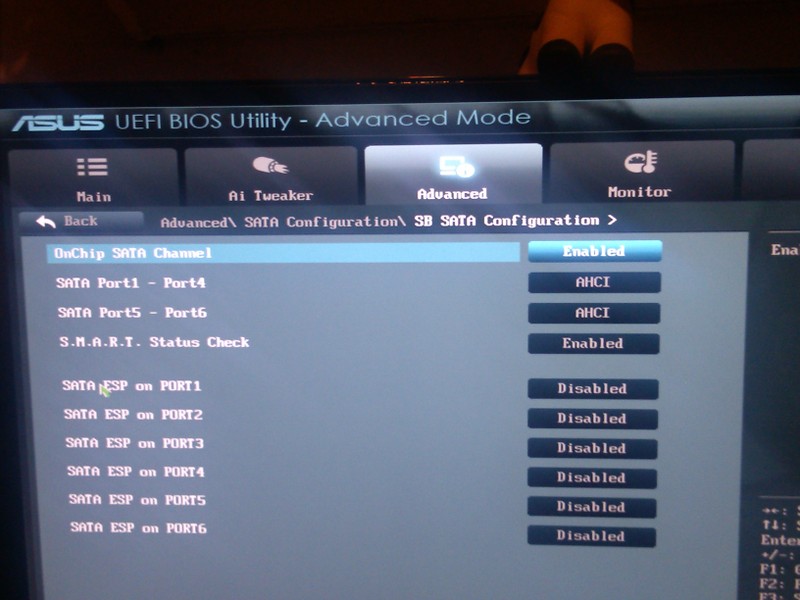
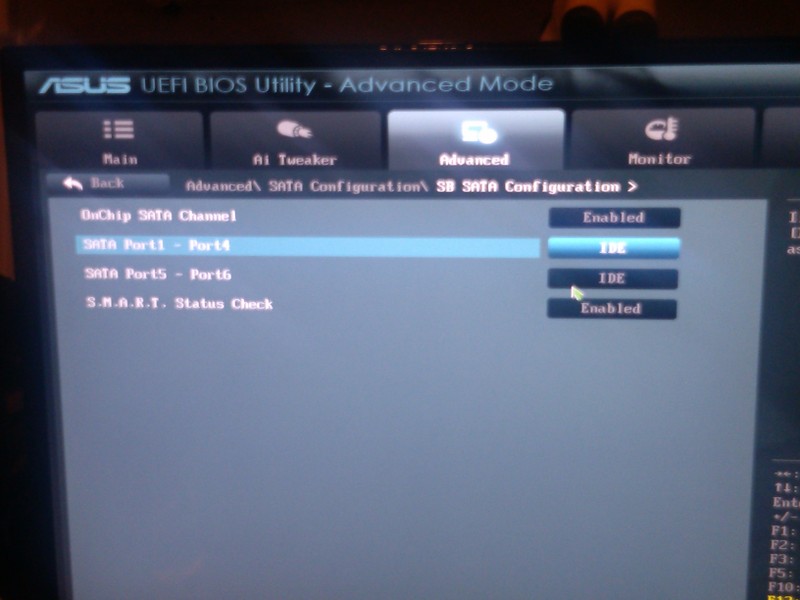
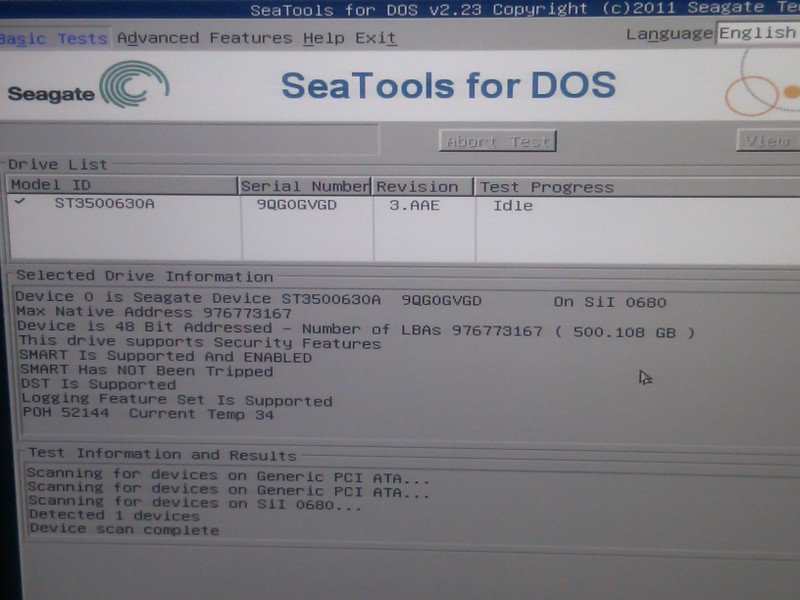
It only detected my seagate drive, I attempted to make the changes to my bios but it doesn't seem to have worked.

Chose Sata config
6bxd.jpg


kigt.jpg


02m0.jpg


c7pcu.jpg


r34l.jpg


The actual scan of the drive it did find showed no errors.

I realized that the program SpeedFan if you click on the S.M.A.R.T. tab will test the drives that I was unable to test using the tool recommended.

The computer took it upon itself to freeze late last night after I went to bed, I happened to have smartfun up and running so this morning I could see what it said, temps were low.
 

My Computer

Computer type
PC/Desktop
Computer Manufacturer/Model Number
Custom Build
OS
Windows 7 Professional 64 Bit
CPU
AMD FX(tm)-8120 Eight Core Processor 3.89 GHz
Memory
8
Graphics Card(s)
AMD Radeon HD 7800 Series
Hard Drives
2 1 Tb drives
1 500 gb
Antivirus
Comodo
Browser
Firefox/Chrome
I recommend trying Driver Verifier if you are having freezing issues.

Enable driver verifier but only enable the options: Standard settings and IRP logging step 3.
Don't enable Force Pending I/O Requests

Enable Driver Verifier to monitor the drivers.
Driver Verifier -Enable and Disable
Run Driver Verifier for 24 hours or the occurrence of the next crash, whichever is earlier.

   Information

We use Driver Verifier as it puts a stress on the drivers, and so it makes the unstable drivers crash. This should flag the driver responsible in the dump file.
It

Driver Verifier will make the system laggy, this is normal so don't worry.

Before enabling DV, make sure that you have earlier System restore points made in your computer.

If there are no points, make a System Restore Point Manually


Post back the results.
 

My Computer

Computer type
PC/Desktop
Running now, be back tomorrow.
 

My Computer

Computer type
PC/Desktop
Computer Manufacturer/Model Number
Custom Build
OS
Windows 7 Professional 64 Bit
CPU
AMD FX(tm)-8120 Eight Core Processor 3.89 GHz
Memory
8
Graphics Card(s)
AMD Radeon HD 7800 Series
Hard Drives
2 1 Tb drives
1 500 gb
Antivirus
Comodo
Browser
Firefox/Chrome
Back
Top