Seemingly random GPU freezes

gdmagnuson

New member
Local time
1:22 AM
Messages
7
I am running the 7100 64 bit version. I have a XFX 9600GSO installed, with the latest drivers from the nvidia website. During normal use, i.e. surfing the web, randomly the GPU will lose connectivity/use for a second, and then regain it. This also happens during any games I play, except that when it happens in-game or during watching a movie, the computer freezes and requires a hard-restart.

I have run memtest to see if it is a problem linked to bad ram, i have used several older drivers from nvidia, and the one from windows update.

Any ideas would be much appreciated, as anything that requires heavy graphics use seems to freeze the computer.
 

My Computer

Computer Manufacturer/Model Number
Custom
OS
Windows 7 Build 7100
CPU
AMD Athlon X2 5200+
Motherboard
MSI K9N2 SLI Platinum
Memory
4GB Corsair XMS2 800MHz
Graphics Card(s)
XFX Geforce 9600 GSO
Hard Drives
Seagate Barracuda 500gb
PSU
ULTRA LS600 600Watt
I am running the 7100 64 bit version. I have a XFX 9600GSO installed, with the latest drivers from the nvidia website. During normal use, i.e. surfing the web, randomly the GPU will lose connectivity/use for a second, and then regain it. This also happens during any games I play, except that when it happens in-game or during watching a movie, the computer freezes and requires a hard-restart.

I have run memtest to see if it is a problem linked to bad ram, i have used several older drivers from nvidia, and the one from windows update.

Any ideas would be much appreciated, as anything that requires heavy graphics use seems to freeze the computer.

Hi gdmagnuson........;)

are you monitoring system temps..??, CPU / GPU.

how long has this been occuring..??, is it recent..??


:)SK
 

My Computer

Computer Manufacturer/Model Number
myself
OS
SEVEN x64
CPU
Q9450 @ 3.6GHZ 1.34v
Motherboard
ASUS P5K PREMIUM P35
Memory
8GB 1066 buffalo firestix @ 1152mhz CL5
Graphics Card(s)
Sapphire HD 5970 + GTX260 (physX)
Sound Card
Creative X-FI Xtreme Gamer
Monitor(s) Displays
SAMSUNG 20'' & SAMSUNG 23'' (dual screens)
Screen Resolution
2048x1152 & 1680x1050
Hard Drives
1x seagate 160gb IDE & 1x seagate 160gb SATA
PSU
XCILIO 850w (78A)
Case
CM590 1x 120x38mm & 2x92x38mm / 4x 120x25mm
Cooling
AC7 PRO @ 92x38mm blower, Lamptron military bus bay controll
Keyboard
LOGITECH E110
Mouse
logitech NX5
Internet Speed
2MB
Other Info
its a continual ''work in progress''....
I dont monitor the temps actively while im running programs, i suppose i should. The CPU fan does run on high all the time, as does the GPU fan. It has been occurring since I installed 7, a fresh install, I just built the computer and figured id give 7 a try on it.
I will start monitoring the CPU and GPU temps tonight, and post back with the results.
 

My Computer

Computer Manufacturer/Model Number
Custom
OS
Windows 7 Build 7100
CPU
AMD Athlon X2 5200+
Motherboard
MSI K9N2 SLI Platinum
Memory
4GB Corsair XMS2 800MHz
Graphics Card(s)
XFX Geforce 9600 GSO
Hard Drives
Seagate Barracuda 500gb
PSU
ULTRA LS600 600Watt
To help some, there are a few programs I use for monitoring temps... for system-wide temps including newer nvidia GPUs, I use SpeedFan.
I also use EVGA Precision which has easy overclocking and temp monitoring (and it works on other non-EVGA cards, I now have a Gigabyte 9800GT).
 

My Computer

Computer Manufacturer/Model Number
Custom built desktops and a Compaq CQ60-211DX laptop
OS
Win7, XP, Vista x64, Ubuntu 9.04
CPU
Desktops: E6600, E2140, XP3000+; Laptop: Celeron 585
Motherboard
Desktops: GA-EP35-DS3P, GA-P965-DS3, A7N8X
Memory
Desktops: 4GB, 3GB, 1GB; Laptop: 2GB
Graphics Card(s)
Desktops: 320MB 8800GTS, 128MB 7300GTS, 128MB 9600XT
Sound Card
Creative or onboard
Monitor(s) Displays
19" widescreen, 17" CRT, 19" CRT, and 15.6" LCD on laptop.
Screen Resolution
1440x900, 1280x1024.... 1366x768
Hard Drives
Desktop 1: 320GB Seagate main, 500GB WD backup, 120GB WD testing
Desktop 2: 80GB server
Desktop 3: 160GB main, 250GB backup
Laptop: 160GB
PSU
varies, 350W to 550W
Internet Speed
8Mb+ cable
GPU freeze

I am running the 7100 64 bit version. I have a XFX 9600GSO installed, with the latest drivers from the nvidia website. During normal use, i.e. surfing the web, randomly the GPU will lose connectivity/use for a second, and then regain it. This also happens during any games I play, except that when it happens in-game or during watching a movie, the computer freezes and requires a hard-restart.

I have run memtest to see if it is a problem linked to bad ram, i have used several older drivers from nvidia, and the one from windows update.

Any ideas would be much appreciated, as anything that requires heavy graphics use seems to freeze the computer.

Did it do this when you first installed win 7?
could you goto event viewer (event into search) and see if there are any errors related to this and if so.. could you use the snipping tool to upload a pic to us

Thanks

Ken
 

My Computer

Computer Manufacturer/Model Number
HP Pavillion dv-7 1005 Tx
OS
Win 8 Release candidate 8400
CPU
[email protected]
Memory
4 gigs
Graphics Card(s)
Nvidia 9600M
Sound Card
HD built-in
Monitor(s) Displays
17" Wxga
Screen Resolution
1440x900
Cooling
none
Internet Speed
45Mb down 5Mb up
It has done this since I initially installed it. I am currently sitting in a class, so I can post information later. I ran speedfan, and got some pretty odd-looking results for my local/remote temps...said they were running at 112 degrees...which doesnt really make sense to me. My GPU came in at 55, and core temperature was 13. This was at an idle, although the computer has been running since yesterday.
 

My Computer

Computer Manufacturer/Model Number
Custom
OS
Windows 7 Build 7100
CPU
AMD Athlon X2 5200+
Motherboard
MSI K9N2 SLI Platinum
Memory
4GB Corsair XMS2 800MHz
Graphics Card(s)
XFX Geforce 9600 GSO
Hard Drives
Seagate Barracuda 500gb
PSU
ULTRA LS600 600Watt
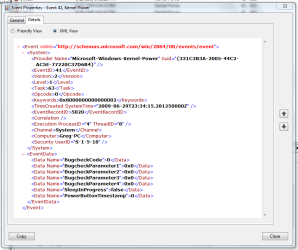
I did look at my event viewer, although not entirely sure what to look for. I got a clip of one of the many application errors it had, not sure if thats what i should be posting.
 

Attachments

  • Error2.PNG
    Error2.PNG
    26.3 KB · Views: 171

My Computer

Computer Manufacturer/Model Number
Custom
OS
Windows 7 Build 7100
CPU
AMD Athlon X2 5200+
Motherboard
MSI K9N2 SLI Platinum
Memory
4GB Corsair XMS2 800MHz
Graphics Card(s)
XFX Geforce 9600 GSO
Hard Drives
Seagate Barracuda 500gb
PSU
ULTRA LS600 600Watt
gpr freezes

I did look at my event viewer, although not entirely sure what to look for. I got a clip of one of the many application errors it had, not sure if thats what i should be posting.


you chould just send the clip not open it in a browser.

try it again if you can

Ken
 

My Computer

Computer Manufacturer/Model Number
HP Pavillion dv-7 1005 Tx
OS
Win 8 Release candidate 8400
CPU
[email protected]
Memory
4 gigs
Graphics Card(s)
Nvidia 9600M
Sound Card
HD built-in
Monitor(s) Displays
17" Wxga
Screen Resolution
1440x900
Cooling
none
Internet Speed
45Mb down 5Mb up
ive got a ton of errors, im not really sure which will help


Log Name: System
Source: Microsoft-Windows-Kernel-Power
Date: 6/29/2009 8:35:28 PM
Event ID: 41
Task Category: (63)
Level: Critical
Keywords: (2)
User: SYSTEM
Computer: Greg-PC
Description:
The system has rebooted without cleanly shutting down first. This error could be caused if the system stopped responding, crashed, or lost power unexpectedly.
Event Xml:
<Event xmlns="http://schemas.microsoft.com/win/2004/08/events/event">
<System>
<Provider Name="Microsoft-Windows-Kernel-Power" Guid="{331C3B3A-2005-44C2-AC5E-77220C37D6B4}" />
<EventID>41</EventID>
<Version>2</Version>
<Level>1</Level>
<Task>63</Task>
<Opcode>0</Opcode>
<Keywords>0x8000000000000002</Keywords>
<TimeCreated SystemTime="2009-06-30T03:35:28.546875000Z" />
<EventRecordID>5882</EventRecordID>
<Correlation />
<Execution ProcessID="4" ThreadID="8" />
<Channel>System</Channel>
<Computer>Greg-PC</Computer>
<Security UserID="S-1-5-18" />
</System>
<EventData>
<Data Name="BugcheckCode">0</Data>
<Data Name="BugcheckParameter1">0x0</Data>
<Data Name="BugcheckParameter2">0x0</Data>
<Data Name="BugcheckParameter3">0x0</Data>
<Data Name="BugcheckParameter4">0x0</Data>
<Data Name="SleepInProgress">false</Data>
<Data Name="PowerButtonTimestamp">128908058427392578</Data>
</EventData>
</Event>
 

My Computer

Computer Manufacturer/Model Number
Custom
OS
Windows 7 Build 7100
CPU
AMD Athlon X2 5200+
Motherboard
MSI K9N2 SLI Platinum
Memory
4GB Corsair XMS2 800MHz
Graphics Card(s)
XFX Geforce 9600 GSO
Hard Drives
Seagate Barracuda 500gb
PSU
ULTRA LS600 600Watt
I am running the 7100 64 bit version. I have a XFX 9600GSO installed, with the latest drivers from the nvidia website. During normal use, i.e. surfing the web, randomly the GPU will lose connectivity/use for a second, and then regain it. This also happens during any games I play, except that when it happens in-game or during watching a movie, the computer freezes and requires a hard-restart.

I have run memtest to see if it is a problem linked to bad ram, i have used several older drivers from nvidia, and the one from windows update.

Any ideas would be much appreciated, as anything that requires heavy graphics use seems to freeze the computer.

Hi Gdmagnuson,

Your better off using the drivers provided by Windows Update since they are specifically for Windows 7 and 9/10 are more stable and reliable.

It sounds to me like a temperature issue but it could also be insufficient power being supplied to your GPU or its been over-clocked too high.

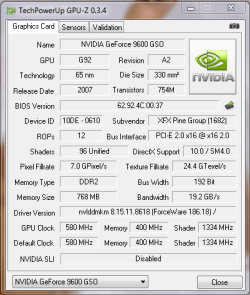
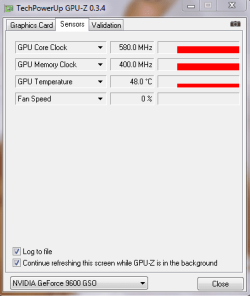
Can you upload a screenshot of GPUZ? GPU-Z Video card GPU Information Utility

Steven
 
I have two shots from GPU-Z. These were taken right after i watched a movie, and the computer has been on since yesterday. It says the fan is at 0% which is untrue...it is definitely on and spinning, kinda loud too.
 

Attachments

  • GPU-Z 1.PNG
    GPU-Z 1.PNG
    14.8 KB · Views: 44
  • GPU-Z 2.PNG
    GPU-Z 2.PNG
    8.6 KB · Views: 28

My Computer

Computer Manufacturer/Model Number
Custom
OS
Windows 7 Build 7100
CPU
AMD Athlon X2 5200+
Motherboard
MSI K9N2 SLI Platinum
Memory
4GB Corsair XMS2 800MHz
Graphics Card(s)
XFX Geforce 9600 GSO
Hard Drives
Seagate Barracuda 500gb
PSU
ULTRA LS600 600Watt
I currently experience these errors also. While I'm on the desktop I'll randomly get errors like 'Display driver nvlddmkm stopped responding and has successfully recovered.'

When playing a game I will sometimes get a BSOD and a hard reset is required. It used to happen with a Geforce 8800 GTS. I have recently upgraded my card to a Geforce GTX 275, and I still have the same problem. Running 186.18 Nvidia drivers, but I seem to get these problems no matter what driver I use.

My temps are also fine and I don't get these problems when I boot into Vista.
 

My Computer

OS
Windows 7 Build 7264
I currently experience these errors also. While I'm on the desktop I'll randomly get errors like 'Display driver nvlddmkm stopped responding and has successfully recovered.'

When playing a game I will sometimes get a BSOD and a hard reset is required. It used to happen with a Geforce 8800 GTS. I have recently upgraded my card to a Geforce GTX 275, and I still have the same problem. Running 186.18 Nvidia drivers, but I seem to get these problems no matter what driver I use.

My temps are also fine and I don't get these problems when I boot into Vista.

Its defiantly not your graphics card causing the BSODs... If your bios has an option for HPET then try disabling it, the other usual cause is overclocking or a PCI device causing the lockup.

If your bios doesn't have the HPET option (double check your bios, it's sometimes hidden away) then try underclocking various devices and removing any PCI cards ;)
 
Can't seem to find HPET under my bios. I've checked a few times. My motherboard is an Asus P5Q Pro if that is of any help.

I have no PCI cards installed and my system isn't overclocked. I'll try underclocking a few components later. I still find it strange that it is a windows 7 only issue.
 

My Computer

OS
Windows 7 Build 7264
I have the same exact issue. I will check my bios, but i also have nothing in PCI slots.
 

My Computer

Computer Manufacturer/Model Number
Custom
OS
Windows 7 Build 7100
CPU
AMD Athlon X2 5200+
Motherboard
MSI K9N2 SLI Platinum
Memory
4GB Corsair XMS2 800MHz
Graphics Card(s)
XFX Geforce 9600 GSO
Hard Drives
Seagate Barracuda 500gb
PSU
ULTRA LS600 600Watt
Back
Top