Select all - Add to Context Menu in Windows 7

How to Add "Select all" to the Context Menu in Windows 7


   Information
By default in Windows 7, you have to either click on Edit (Menu bar) and Select all, or press CTRL+A to select all items in a Windows Explorer window.

This will show you how to add Select all to the context menu of a file, folder, drive, desktop, and library to be able to easily select all items in a Windows Explorer window in Windows 7.

You must be logged in as an administrator to be able to do this tutorial.

   Warning
Do not use this in Vista since Vista does not have libraries. Use the tutorial below for Vista instead:

How to Add "Select all" to the Context Menu in Vista


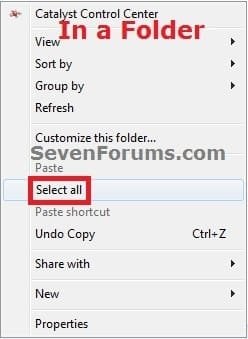
EXAMPLE: "Select all" added to context menu
NOTE: You would right click on a file, folder, drive, or on empty area on the desktop, in a folder window, or in a library window to see these.
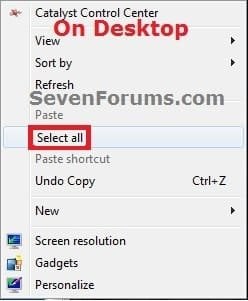
Add_Desktop.jpgAdd_Folder.jpgAdd_Library.jpg


OPTION ONE

To Add "Select all" to Context Menu


1. Click on the Download button below to download the .reg file below, and save it to your desktop.
Add_Select_all.reg


Download


2. Right click on the downloaded .reg file and click on Merge.

3. Click on Run, Yes (UAC), Yes, and OK when prompted.

4. Select all has now been added to the context menu in Windows 7.

5. If you like, you can now delete the downloaded .reg file.


OPTION TWO

To Remove "Select all" from Context Menu


NOTE: This is the default setting.
1. Click on the Download button below to download the .reg file below, and save it to your desktop.
Remove_Select_all.reg


Download


2. Right click on the downloaded .reg file and click on Merge.

3. Click on Run, Yes (UAC), Yes, and OK when prompted.

4. Select all has now been removed from the context menu in Windows 7.

5. If you like, you can now delete the downloaded .reg file.
That's it,
Shawn


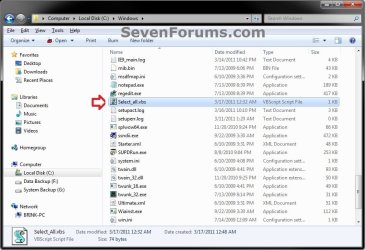
Attachments
Last edited:
Thanks a lot....
 

My Computer My Computer

At a glance

win 7 Ultimate sp1 32bit.
Computer type
PC/Desktop
OS
win 7 Ultimate sp1 32bit.
You're welcome mrsureshisha, and welcome to Seven Forums. :)
 

My Computer My Computer

At a glance

64-bit Windows 11 Pro for WorkstationsIntel i7-8700K OC'd to 5 GHz64 GB (4x16GB) G.SKILL TridentZ RGB DDR4 3600...ASUS ROG-STRIX-GTX1080TI-O11G-GAMING
Computer type
PC/Desktop
Computer Manufacturer/Model Number
Self built custom
OS
64-bit Windows 11 Pro for Workstations
CPU
Intel i7-8700K OC'd to 5 GHz
Motherboard
ASUS ROG Maximus XI Formula Z390
Memory
64 GB (4x16GB) G.SKILL TridentZ RGB DDR4 3600 MHz
Graphics Card(s)
ASUS ROG-STRIX-GTX1080TI-O11G-GAMING
Sound Card
Integrated
Monitor(s) Displays
2 x Samsung Odyssey G7 27"
Screen Resolution
2560x1440
Hard Drives
1TB Samsung 990 PRO M.2,
4TB Samsung 990 PRO PRO M.2,
TerraMaster F8 SSD Plus NAS
PSU
Seasonic Prime Titanium 850W
Case
Thermaltake Core P3
Cooling
Corsair Hydro H115i
Keyboard
Logitech wireless K800
Mouse
Logitech MX Master 4
Internet Speed
2 Gb/s Download and 100 Mb/s Upload
Antivirus
Malwarebyte Anti-Malware Premium
Browser
Google Chrome
Other Info
Logitech Z625 speaker system,
Logitech BRIO 4K Pro webcam,
HP Color LaserJet Pro MFP M477fdn,
APC SMART-UPS RT 1000 XL - SURT1000XLI,
Galaxy S23 Plus phone
I would like to know how to add the select cascading menu with select all, invert select, and select none features from Windows 8 into the Windows 7 shell for right clicking on the desktop, in a folder, directory and libraries.

Select - Add or Remove from Context Menu in Windows 8

I am not a coder or anything but I would like to know what the analogous shell command lines for invert select and select none would be, as windows.select would be used for select all.

Are the icons used for select all, invert select, and select none in the windows 7 at all?

Also, would it be possible to create a fourth option, wildcard select, where a small command line pops up that you could select by file type? That would be very useful.
 

My Computer My Computer

At a glance

Vista
OS
Vista
Hello Bamajon,

Like you, I'm not sure how. I've already tried adding all the registry entries from Windows 8 to Windows 7, but the new "invert selection" and "select none" options from Windows 8 just will not work in Windows 7. :(
 

My Computer My Computer

At a glance

64-bit Windows 11 Pro for WorkstationsIntel i7-8700K OC'd to 5 GHz64 GB (4x16GB) G.SKILL TridentZ RGB DDR4 3600...ASUS ROG-STRIX-GTX1080TI-O11G-GAMING
Computer type
PC/Desktop
Computer Manufacturer/Model Number
Self built custom
OS
64-bit Windows 11 Pro for Workstations
CPU
Intel i7-8700K OC'd to 5 GHz
Motherboard
ASUS ROG Maximus XI Formula Z390
Memory
64 GB (4x16GB) G.SKILL TridentZ RGB DDR4 3600 MHz
Graphics Card(s)
ASUS ROG-STRIX-GTX1080TI-O11G-GAMING
Sound Card
Integrated
Monitor(s) Displays
2 x Samsung Odyssey G7 27"
Screen Resolution
2560x1440
Hard Drives
1TB Samsung 990 PRO M.2,
4TB Samsung 990 PRO PRO M.2,
TerraMaster F8 SSD Plus NAS
PSU
Seasonic Prime Titanium 850W
Case
Thermaltake Core P3
Cooling
Corsair Hydro H115i
Keyboard
Logitech wireless K800
Mouse
Logitech MX Master 4
Internet Speed
2 Gb/s Download and 100 Mb/s Upload
Antivirus
Malwarebyte Anti-Malware Premium
Browser
Google Chrome
Other Info
Logitech Z625 speaker system,
Logitech BRIO 4K Pro webcam,
HP Color LaserJet Pro MFP M477fdn,
APC SMART-UPS RT 1000 XL - SURT1000XLI,
Galaxy S23 Plus phone
Invert Selection is available in Explorer in the Edit menu. Can it be transmogrified to the right click context?
 

My Computer My Computer

At a glance

Windows 7 Ultimate X64 SP1Intel i5-2550K, Differing ~4.4-4.8GHz No buil...16GB G.Skill Sniper 1866MHz @ 2133MHz 2x8GBASUS GTX650TIB-DC2OC-2GD5, (650TI Boost)
Computer type
PC/Desktop
Computer Manufacturer/Model Number
Home Built Desktop By DataTech
OS
Windows 7 Ultimate X64 SP1
CPU
Intel i5-2550K, Differing ~4.4-4.8GHz No built in GPU
Motherboard
ASUS P8Z68-V PRO/GEN3
Memory
16GB G.Skill Sniper 1866MHz @ 2133MHz 2x8GB
Graphics Card(s)
ASUS GTX650TIB-DC2OC-2GD5, (650TI Boost)
Sound Card
Onboard Realtek 5-1
Monitor(s) Displays
Samsung P2570HD
Screen Resolution
1920x1080
Hard Drives
Samsung 840 Pro 256GB SSD for OS, 500GB Seagate Constellation (Enterprise drive) for Data
PSU
Corsair HX650W
Case
Inwin Dragon Rider
Cooling
Hyper 212 EVO w/two Noctua fans, push-pull, @1300 RPM
Keyboard
E-Z Eyes, bright yellow keys with large characters
Mouse
steelseries SENSEI Laser Pro Gaming
Internet Speed
48-51Mbs Mbs down, 11 Mbs up Xfinity Cable
Antivirus
Norton Internet Security 2013
Browser
IE 10, Opera, Pale Moon if needed
Other Info
4 case fans, LG BluRay-RE, ASUS DVD-RW, Mr. Fusion power supply, 1.21 gigawatts.
I'll have to do some more playing and testing, but so far I haven't had much luck with it in Windows 7.
 

My Computer My Computer

At a glance

64-bit Windows 11 Pro for WorkstationsIntel i7-8700K OC'd to 5 GHz64 GB (4x16GB) G.SKILL TridentZ RGB DDR4 3600...ASUS ROG-STRIX-GTX1080TI-O11G-GAMING
Computer type
PC/Desktop
Computer Manufacturer/Model Number
Self built custom
OS
64-bit Windows 11 Pro for Workstations
CPU
Intel i7-8700K OC'd to 5 GHz
Motherboard
ASUS ROG Maximus XI Formula Z390
Memory
64 GB (4x16GB) G.SKILL TridentZ RGB DDR4 3600 MHz
Graphics Card(s)
ASUS ROG-STRIX-GTX1080TI-O11G-GAMING
Sound Card
Integrated
Monitor(s) Displays
2 x Samsung Odyssey G7 27"
Screen Resolution
2560x1440
Hard Drives
1TB Samsung 990 PRO M.2,
4TB Samsung 990 PRO PRO M.2,
TerraMaster F8 SSD Plus NAS
PSU
Seasonic Prime Titanium 850W
Case
Thermaltake Core P3
Cooling
Corsair Hydro H115i
Keyboard
Logitech wireless K800
Mouse
Logitech MX Master 4
Internet Speed
2 Gb/s Download and 100 Mb/s Upload
Antivirus
Malwarebyte Anti-Malware Premium
Browser
Google Chrome
Other Info
Logitech Z625 speaker system,
Logitech BRIO 4K Pro webcam,
HP Color LaserJet Pro MFP M477fdn,
APC SMART-UPS RT 1000 XL - SURT1000XLI,
Galaxy S23 Plus phone
The keyboard command for invert selection is Alt + E + I. Is there a way to make a shell command in the registry based on these keystrokes?

Crashcourse software (http://www.crashcoursesoftware.com/download/index.htm) has dll files for select all and invert selection that might be useful but they are very old and probably not compatible with x64 windows. Perhaps they might be helpful.

And here is a link to an old code for wildcard select Windows Explorer wildcard selection shell extension - CodeProject

Will this information be helpful?
 

My Computer My Computer

At a glance

Vista
OS
Vista
Ok I believe I found a solution but need a little help to finish it off.

So basically I need to know what the keyboard shortcuts for Invert Selection and Select None are and how would you correctly code them in a vbscript file.

I figured out how to add a "Select" parent menu with Select All, Invert Select, and Select None operations based on right click menu based on cascading context menu tutorials from AskVG.

Add Cascading Menus for Your Favorite Programs in Windows 7 Desktop and My Computer Context Menus - Tweaking with Vishal

In registry editor, I added a "Select" menu in

[HKEY_CLASSES_ROOT\*\shell\]
[HKEY_CLASSES_ROOT\Folder\shell\]
[HKEY_CLASSES_ROOT\Directory\Background\shell\]
[HKEY_CLASSES_ROOT\LibraryFolder\background\shell\]

For example, in

[HKEY_CLASSES_ROOT\LibraryFolder\background\shell\]

I added a new key called Menu.
I added MUIVerb string called "Select"
I added Subcommands called "Windows.selectall;SelectInvert;SelectNone
I also added Icon and Position strings but left them blank.

I did the same thing for *, folder, and library, in addition to desktop background.

Then I went to

HKEY_LOCAL_MACHINE\SOFTWARE\Microsoft\Windows\CurrentVersion\Explorer\CommandStore\Shell

Windows.selectall functionality is already there and the operation works as is. Invert select and select none is not. So i have to add it some way.

So I found this tutorial to add selectall and invert selection on door2windows using vbscripts based on keyboard shortcuts.

How To Select All Files In A Folder Using Context Menu | door2windows

Select all is control + a
Invert select is Alt + E + I
Select none is ???? -- I don't know here, I have seen Shift + A but I don't think it works. Can someone help?

Write a vbscript for invert selection:

set oShell = WScript.CreateObject("WScript.Shell")
oShell.SendKeys "%ei"

Open notepad, save the script as "InvertSelect.vbs" in windows directory.

Write a vbscript for select none:

set oShell = WScript.CreateObject("WScript.Shell")
oShell.SendKeys "+a"

Open notepad, save the script as "SelectNone.vbs" in windows directory.

In ....\CommandStore\Shell, I made "selectinvert" key and "selectnone" key

For selectinvert, the Default string, the value is "Invert Selection"
I added an icon string with a path to an appropriate invert selection icon.
In the selectinvert key, i made a new sub-key and called it "command"
and set the value to the path where I saved InvertSelect.vbs file.

For selectnone, the Default string, the value is "Select None"
I added an icon string with a path to an appropriate select none icon.
In the selectnone key, i made a new sub-key and called it "command"
and set the value to the path where I saved SelectNone.vbs file.

Now I have the cascading Select menu with Select All, Invert Selection, and Select None, all with Icons. Select All works, but the other two don't because I don't think I have the right format for keyboard shortcuts. This should be a simple fix. Can someone help?

Or if there is a better solution, I am all ears.

Thanks!
 

My Computer My Computer

At a glance

Vista
OS
Vista
Bamajon,

That's the issue I'm having is to get the Invert Selection, and Select None options to work in Windows 7.
 

My Computer My Computer

At a glance

64-bit Windows 11 Pro for WorkstationsIntel i7-8700K OC'd to 5 GHz64 GB (4x16GB) G.SKILL TridentZ RGB DDR4 3600...ASUS ROG-STRIX-GTX1080TI-O11G-GAMING
Computer type
PC/Desktop
Computer Manufacturer/Model Number
Self built custom
OS
64-bit Windows 11 Pro for Workstations
CPU
Intel i7-8700K OC'd to 5 GHz
Motherboard
ASUS ROG Maximus XI Formula Z390
Memory
64 GB (4x16GB) G.SKILL TridentZ RGB DDR4 3600 MHz
Graphics Card(s)
ASUS ROG-STRIX-GTX1080TI-O11G-GAMING
Sound Card
Integrated
Monitor(s) Displays
2 x Samsung Odyssey G7 27"
Screen Resolution
2560x1440
Hard Drives
1TB Samsung 990 PRO M.2,
4TB Samsung 990 PRO PRO M.2,
TerraMaster F8 SSD Plus NAS
PSU
Seasonic Prime Titanium 850W
Case
Thermaltake Core P3
Cooling
Corsair Hydro H115i
Keyboard
Logitech wireless K800
Mouse
Logitech MX Master 4
Internet Speed
2 Gb/s Download and 100 Mb/s Upload
Antivirus
Malwarebyte Anti-Malware Premium
Browser
Google Chrome
Other Info
Logitech Z625 speaker system,
Logitech BRIO 4K Pro webcam,
HP Color LaserJet Pro MFP M477fdn,
APC SMART-UPS RT 1000 XL - SURT1000XLI,
Galaxy S23 Plus phone
What is the need for a "Select None'? Maybe 8 is different, but to select none in w7 take only a left click in an empty spot in an Explorer window. :confused:

OF course I'm always willing to attribute any misunderstanding to my age and possible dementia. ;)
 

My Computer My Computer

At a glance

Windows 7 Ultimate X64 SP1Intel i5-2550K, Differing ~4.4-4.8GHz No buil...16GB G.Skill Sniper 1866MHz @ 2133MHz 2x8GBASUS GTX650TIB-DC2OC-2GD5, (650TI Boost)
Computer type
PC/Desktop
Computer Manufacturer/Model Number
Home Built Desktop By DataTech
OS
Windows 7 Ultimate X64 SP1
CPU
Intel i5-2550K, Differing ~4.4-4.8GHz No built in GPU
Motherboard
ASUS P8Z68-V PRO/GEN3
Memory
16GB G.Skill Sniper 1866MHz @ 2133MHz 2x8GB
Graphics Card(s)
ASUS GTX650TIB-DC2OC-2GD5, (650TI Boost)
Sound Card
Onboard Realtek 5-1
Monitor(s) Displays
Samsung P2570HD
Screen Resolution
1920x1080
Hard Drives
Samsung 840 Pro 256GB SSD for OS, 500GB Seagate Constellation (Enterprise drive) for Data
PSU
Corsair HX650W
Case
Inwin Dragon Rider
Cooling
Hyper 212 EVO w/two Noctua fans, push-pull, @1300 RPM
Keyboard
E-Z Eyes, bright yellow keys with large characters
Mouse
steelseries SENSEI Laser Pro Gaming
Internet Speed
48-51Mbs Mbs down, 11 Mbs up Xfinity Cable
Antivirus
Norton Internet Security 2013
Browser
IE 10, Opera, Pale Moon if needed
Other Info
4 case fans, LG BluRay-RE, ASUS DVD-RW, Mr. Fusion power supply, 1.21 gigawatts.
I don't know exactly what "select none" does. Perhaps this operation is more of an exclusive Win8 feature.

I can see what Brink is saying now. The ALT E I keyboard combo works in a folder but not on the desktop and the keyboard strokes don't work in the VB script. This is beyond my limited knowledge of coding. It would be nice to have these features added back into the context menu. Let me know what you find out about it.
 

My Computer My Computer

At a glance

Vista
OS
Vista
:confused:How can i check if this has been removed from the registry,or do i just delete it from the Desktop.
 

My Computer My Computer

At a glance

Windows7 ProfessionalQuadCore Intel Core i7-4770, 3400 MHz (34 x 100)Crucial BLT4G3D1608DT2TXRGEVGA e-GeForce GT 610
Computer type
PC/Desktop
Computer Manufacturer/Model Number
Custom Build
OS
Windows7 Professional
CPU
QuadCore Intel Core i7-4770, 3400 MHz (34 x 100)
Motherboard
Asus Sabertooth Z87
Memory
Crucial BLT4G3D1608DT2TXRG
Graphics Card(s)
EVGA e-GeForce GT 610
Hard Drives
Drive #1 - Crucial_CT120M500SSD1 (111 GB)
Drive #2 - WDC WD20EZRX-00DC0B0 (1863 GB)
PSU
Corsair 1000
Case
Lian-Li 17A
Cooling
CPU Type QuadCore Intel Core i7-4770, 3400 MHz (34 x 100)
Keyboard
Keyboard Name Logitech HID-Compliant Keyboard
Mouse
Logitech HID-compliant Cordless Mouse
Antivirus
SuperantiSpyware-MalwareByes-Microsoft Security Essentials
Browser
Firefox 44.0.2
Hello Tremarco, and welcome to Seven Forums. :)

If you used OPTION TWO to undo OPTION ONE, then it has been removed.
 

My Computer My Computer

At a glance

64-bit Windows 11 Pro for WorkstationsIntel i7-8700K OC'd to 5 GHz64 GB (4x16GB) G.SKILL TridentZ RGB DDR4 3600...ASUS ROG-STRIX-GTX1080TI-O11G-GAMING
Computer type
PC/Desktop
Computer Manufacturer/Model Number
Self built custom
OS
64-bit Windows 11 Pro for Workstations
CPU
Intel i7-8700K OC'd to 5 GHz
Motherboard
ASUS ROG Maximus XI Formula Z390
Memory
64 GB (4x16GB) G.SKILL TridentZ RGB DDR4 3600 MHz
Graphics Card(s)
ASUS ROG-STRIX-GTX1080TI-O11G-GAMING
Sound Card
Integrated
Monitor(s) Displays
2 x Samsung Odyssey G7 27"
Screen Resolution
2560x1440
Hard Drives
1TB Samsung 990 PRO M.2,
4TB Samsung 990 PRO PRO M.2,
TerraMaster F8 SSD Plus NAS
PSU
Seasonic Prime Titanium 850W
Case
Thermaltake Core P3
Cooling
Corsair Hydro H115i
Keyboard
Logitech wireless K800
Mouse
Logitech MX Master 4
Internet Speed
2 Gb/s Download and 100 Mb/s Upload
Antivirus
Malwarebyte Anti-Malware Premium
Browser
Google Chrome
Other Info
Logitech Z625 speaker system,
Logitech BRIO 4K Pro webcam,
HP Color LaserJet Pro MFP M477fdn,
APC SMART-UPS RT 1000 XL - SURT1000XLI,
Galaxy S23 Plus phone
If you used OPTION TWO to undo OPTION ONE, then it has been removed.

Thanks for your reply,(Brink).

Yes i done that,its just they both seemed to be the same.
 

My Computer My Computer

At a glance

Windows7 ProfessionalQuadCore Intel Core i7-4770, 3400 MHz (34 x 100)Crucial BLT4G3D1608DT2TXRGEVGA e-GeForce GT 610
Computer type
PC/Desktop
Computer Manufacturer/Model Number
Custom Build
OS
Windows7 Professional
CPU
QuadCore Intel Core i7-4770, 3400 MHz (34 x 100)
Motherboard
Asus Sabertooth Z87
Memory
Crucial BLT4G3D1608DT2TXRG
Graphics Card(s)
EVGA e-GeForce GT 610
Hard Drives
Drive #1 - Crucial_CT120M500SSD1 (111 GB)
Drive #2 - WDC WD20EZRX-00DC0B0 (1863 GB)
PSU
Corsair 1000
Case
Lian-Li 17A
Cooling
CPU Type QuadCore Intel Core i7-4770, 3400 MHz (34 x 100)
Keyboard
Keyboard Name Logitech HID-Compliant Keyboard
Mouse
Logitech HID-compliant Cordless Mouse
Antivirus
SuperantiSpyware-MalwareByes-Microsoft Security Essentials
Browser
Firefox 44.0.2
Nar, they're different. You can right click on the .reg file and click on "Edit" to see the contents.

I just double checked them, and noticed there was an error in the remove .reg file for the folders. Please download and merge the updated version in the tutorial to see if that helps. :)
 

My Computer My Computer

At a glance

64-bit Windows 11 Pro for WorkstationsIntel i7-8700K OC'd to 5 GHz64 GB (4x16GB) G.SKILL TridentZ RGB DDR4 3600...ASUS ROG-STRIX-GTX1080TI-O11G-GAMING
Computer type
PC/Desktop
Computer Manufacturer/Model Number
Self built custom
OS
64-bit Windows 11 Pro for Workstations
CPU
Intel i7-8700K OC'd to 5 GHz
Motherboard
ASUS ROG Maximus XI Formula Z390
Memory
64 GB (4x16GB) G.SKILL TridentZ RGB DDR4 3600 MHz
Graphics Card(s)
ASUS ROG-STRIX-GTX1080TI-O11G-GAMING
Sound Card
Integrated
Monitor(s) Displays
2 x Samsung Odyssey G7 27"
Screen Resolution
2560x1440
Hard Drives
1TB Samsung 990 PRO M.2,
4TB Samsung 990 PRO PRO M.2,
TerraMaster F8 SSD Plus NAS
PSU
Seasonic Prime Titanium 850W
Case
Thermaltake Core P3
Cooling
Corsair Hydro H115i
Keyboard
Logitech wireless K800
Mouse
Logitech MX Master 4
Internet Speed
2 Gb/s Download and 100 Mb/s Upload
Antivirus
Malwarebyte Anti-Malware Premium
Browser
Google Chrome
Other Info
Logitech Z625 speaker system,
Logitech BRIO 4K Pro webcam,
HP Color LaserJet Pro MFP M477fdn,
APC SMART-UPS RT 1000 XL - SURT1000XLI,
Galaxy S23 Plus phone
Great fix i really missed that option
 

My Computer My Computer

At a glance

Microsoft Windows 7 Professional 64-bitIntel Core i7 4770 Haswell @3.4GHzG.Skill 16GB Kit (2x8GB) DDR3 Ripjaws X C10 1...Leadtek Quadro 410 192-CUDA Core 512MB DDR3 DVI
Computer type
PC/Desktop
Computer Manufacturer/Model Number
Custom Build
OS
Microsoft Windows 7 Professional 64-bit
CPU
Intel Core i7 4770 Haswell @3.4GHz
Motherboard
ASUSTeK Z87-PRO LGA1150 ATX Motherboard
Memory
G.Skill 16GB Kit (2x8GB) DDR3 Ripjaws X C10 1600MHz
Graphics Card(s)
Leadtek Quadro 410 192-CUDA Core 512MB DDR3 DVI
Sound Card
Realtek® ALC1150 8-Channel High Definition Audio CODEC
Monitor(s) Displays
Asus MX239H 23" Full HD AH-IPS WS 5MS Frameless LED Monitor
Screen Resolution
1920 x 1080 x 32 bits (4294967296 color 50 Hz/75 Hz
Hard Drives
Samsung 840 Pro Series 2.5" 7mm 256GB SSD
Hitachi HDS722020ALA330 ATA Device 2TB
WDC WD2002FAEX-007BA0 ATA Device 2TB
PSU
XFX Core Edition 550W 80PLUS Bronze Power Supply
Case
Gigabyte GZ-X7 Black Mid Tower Case -
Cooling
Standard Fans in Case
Keyboard
Microsoft Wireless Desktop 2000
Mouse
Microsoft Wireless Desktop 2000
Internet Speed
Reasonable
Antivirus
Trend Micro Titanium Maximum Security
Browser
Firefox 95% - Exploror 5%
Other Info
On board Wi-Fi 802.11 a/b/g/n Qualcomm Atheros AR946x Wireless Ethernet 802.3 Network Adapter
Supports dual band frequency 2.4/5 GHz
I'm glad it could help mojo53. :)
 

My Computer My Computer

At a glance

64-bit Windows 11 Pro for WorkstationsIntel i7-8700K OC'd to 5 GHz64 GB (4x16GB) G.SKILL TridentZ RGB DDR4 3600...ASUS ROG-STRIX-GTX1080TI-O11G-GAMING
Computer type
PC/Desktop
Computer Manufacturer/Model Number
Self built custom
OS
64-bit Windows 11 Pro for Workstations
CPU
Intel i7-8700K OC'd to 5 GHz
Motherboard
ASUS ROG Maximus XI Formula Z390
Memory
64 GB (4x16GB) G.SKILL TridentZ RGB DDR4 3600 MHz
Graphics Card(s)
ASUS ROG-STRIX-GTX1080TI-O11G-GAMING
Sound Card
Integrated
Monitor(s) Displays
2 x Samsung Odyssey G7 27"
Screen Resolution
2560x1440
Hard Drives
1TB Samsung 990 PRO M.2,
4TB Samsung 990 PRO PRO M.2,
TerraMaster F8 SSD Plus NAS
PSU
Seasonic Prime Titanium 850W
Case
Thermaltake Core P3
Cooling
Corsair Hydro H115i
Keyboard
Logitech wireless K800
Mouse
Logitech MX Master 4
Internet Speed
2 Gb/s Download and 100 Mb/s Upload
Antivirus
Malwarebyte Anti-Malware Premium
Browser
Google Chrome
Other Info
Logitech Z625 speaker system,
Logitech BRIO 4K Pro webcam,
HP Color LaserJet Pro MFP M477fdn,
APC SMART-UPS RT 1000 XL - SURT1000XLI,
Galaxy S23 Plus phone
Back
Top