
LeonWolf
New member
I really don't have time to read all topic since i have to go to sleep, but i have one problem. I created partition in Windows 7, installed Windows XP without any problems, installed EasyBCD, added Microsoft Windows XP in EasyBCD but when i restarted PC it booted back to Windows 7. I installed EasyBCD in Windows 7 and everything is as it's suposed to be, but in "msconfig" on Boot tab it doesn't show Windows XP, so i'm assuming that there is the problem... Is there any way to add it to msconfigs Boot tab??
Thanks in advance,
Elmir
Thanks in advance,
Elmir
My Computer
- OS
- Windows 7 Ultimate x86

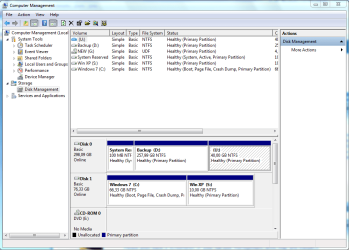
 . And yes i could boot into XP before i set up options in EasyBCD... As soon as i added "Microsoft Windows XP" in Add/Remove Entries in EasyBCD and restarted PC it just booted into Windows 7 without asking me which OS i want to choose.