
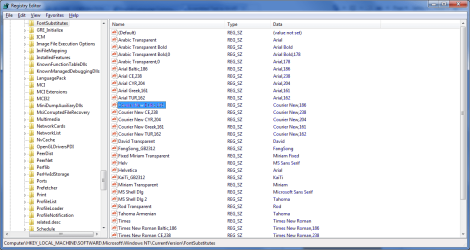
Selected Text no visible.

hpcdatta

New member
Local time
4:43 PM
Messages
7
Hi Forum,

I have strange problem on window 7, the selected text is not clear. I am unable to read it.

I have updated the graphics card dirver to the latest one. I tried with various combinations of appearance settings in windows 7. But still not able to find the solution.

I have attached the screen shot FYR.

If anybody been trough this please, let me know.

Cheers,
Hpcdatta
 

Attachments
  • Untitled.png
    Untitled.png
    37.7 KB · Views: 55
Last edited:

My Computer

Computer Manufacturer/Model Number
Built UP
OS
Windows 7 Ultimate x32
CPU
Intel i7 870
Motherboard
Asus P7P55D-E
Memory
4GB DDR3
Graphics Card(s)
SAPPHIRE ATI 5700 HD
Sound Card
VIA 8 Channel
Monitor(s) Displays
Acer 23"
Screen Resolution
1920*1080p
Hard Drives
WD 1 TB 64MB Cache
PSU
Cooler Master
Case
Cooler Master
Internet Speed
512 Kbps
Welcome to SF, hpcdatta.

Do you have the latest video driver installed?

Are you using Aero? Does this happen if you disable Aero?
 

My Computer

Computer Manufacturer/Model Number
Dell and Custom
OS
Systems 1 and 2: Windows 7 Enterprise x64, Win 8 Developer
CPU
System 1: i7 [email protected], System 2: AMD FX-4100 Zambezi 3.6G
Motherboard
System 1:Dell 06NWYK System 2: ASUS M5A97 AM3+
Memory
System 1: 8GB System 2: 8GB
Graphics Card(s)
System 1: ATI FirePro V4800 System 2: Radeon HD 6850
Sound Card
System 1: onboard System 2: onboard
Monitor(s) Displays
System1: Viewsonic HDMI 24"
Screen Resolution
System 1: 1920x1080 System 2: 1920x1080
Hard Drives
System 1: Mirrored .5B drives System 2: Seagate Barracuda ST1000DM003 1TB 7200 RPM 64MB Cache SATA 6.0Gb/s
Case
System 1: Dell System 2: Cooler Master
Internet Speed
10 MBPS
Yes I am using the latest driver.
I have enabled the aero mode. If disabled everthing is fine. But I like windows 7 in aero mode, I d'nt want to loose that :(
 

My Computer

Computer Manufacturer/Model Number
Built UP
OS
Windows 7 Ultimate x32
CPU
Intel i7 870
Motherboard
Asus P7P55D-E
Memory
4GB DDR3
Graphics Card(s)
SAPPHIRE ATI 5700 HD
Sound Card
VIA 8 Channel
Monitor(s) Displays
Acer 23"
Screen Resolution
1920*1080p
Hard Drives
WD 1 TB 64MB Cache
PSU
Cooler Master
Case
Cooler Master
Internet Speed
512 Kbps
Did you try using the ATI driver from ASUS, or ATI?
 

My Computer

Computer Manufacturer/Model Number
Dell and Custom
OS
Systems 1 and 2: Windows 7 Enterprise x64, Win 8 Developer
CPU
System 1: i7 [email protected], System 2: AMD FX-4100 Zambezi 3.6G
Motherboard
System 1:Dell 06NWYK System 2: ASUS M5A97 AM3+
Memory
System 1: 8GB System 2: 8GB
Graphics Card(s)
System 1: ATI FirePro V4800 System 2: Radeon HD 6850
Sound Card
System 1: onboard System 2: onboard
Monitor(s) Displays
System1: Viewsonic HDMI 24"
Screen Resolution
System 1: 1920x1080 System 2: 1920x1080
Hard Drives
System 1: Mirrored .5B drives System 2: Seagate Barracuda ST1000DM003 1TB 7200 RPM 64MB Cache SATA 6.0Gb/s
Case
System 1: Dell System 2: Cooler Master
Internet Speed
10 MBPS
I have installed driver from ATI. (Not from ASUS)
 

My Computer

Computer Manufacturer/Model Number
Built UP
OS
Windows 7 Ultimate x32
CPU
Intel i7 870
Motherboard
Asus P7P55D-E
Memory
4GB DDR3
Graphics Card(s)
SAPPHIRE ATI 5700 HD
Sound Card
VIA 8 Channel
Monitor(s) Displays
Acer 23"
Screen Resolution
1920*1080p
Hard Drives
WD 1 TB 64MB Cache
PSU
Cooler Master
Case
Cooler Master
Internet Speed
512 Kbps
hello hpcdatta and welcome,
is it cause to any selected text??
 

My Computer

Computer Manufacturer/Model Number
built up
OS
windows 7
CPU
Phenom II AMD Dragon 3.5Ghz
Memory
DDR3 4GB
Graphics Card(s)
ATI Radeon 512Mb
Monitor(s) Displays
HP L1506
Screen Resolution
1152 x 864
Hard Drives
WDC 1 TB SATA-II Green Power
Keyboard
HP wireless keyboard
Mouse
HP Optic
Internet Speed
1GB
Thanks ryo.

Ya the selected text in registery, hyperlinks and in task manager the CPU and memory figures are not visible.
I several times update the drivers, before re-installing the driver I clean up the registery. But still no effect.

Please, guys I am counting on you people.. :)
 

My Computer

Computer Manufacturer/Model Number
Built UP
OS
Windows 7 Ultimate x32
CPU
Intel i7 870
Motherboard
Asus P7P55D-E
Memory
4GB DDR3
Graphics Card(s)
SAPPHIRE ATI 5700 HD
Sound Card
VIA 8 Channel
Monitor(s) Displays
Acer 23"
Screen Resolution
1920*1080p
Hard Drives
WD 1 TB 64MB Cache
PSU
Cooler Master
Case
Cooler Master
Internet Speed
512 Kbps

My Computer

Computer type
PC/Desktop
Computer Manufacturer/Model Number
Dwarf Dwf/11/2012 r09/2013
OS
Windows 8.1 Pro RTM x64
CPU
Intel Core-i5-3570K 4-core @ 3.4GHz (Ivy Bridge) (OC 4.4GHz)
Motherboard
ASRock Z77 Extreme4-M
Memory
4 x 4GB DDR3-1600 Corsair Vengeance CMZ8GX3M2A1600C9B (16GB)
Graphics Card(s)
MSI GeForce GTX770 Gaming OC 2GB
Sound Card
Realtek High Definition on board solution (ALC 898)
Monitor(s) Displays
ViewSonic VA1912w Widescreen (VGA)
Screen Resolution
1440x900
Hard Drives
OCZ Agility 3 SSD 120GB SATA III x2 (RAID 0)
Samsung HD501LJ 500GB SATA II x2
Hitachi HDS721010CLA332 1TB SATA II
Iomega 1.5TB Ext USB 2.0
WD 2.0TB Ext USB 3.0
PSU
XFX Pro Series 850W Semi-Modular
Case
Gigabyte IF233
Cooling
1 x 120mm Front Inlet 1 x 120mm Rear Exhaust
Keyboard
Microsoft Comfort Curve Keyboard 3000 (USB)
Mouse
Microsoft Comfort Mouse 3000 for Business (USB)
Internet Speed
NetGear DG834Gv3 ADSL Modem/Router (Ethernet) ~4.0 Mb/s (O2)
Antivirus
Avast! 8.0.1497
Browser
IE 11
Other Info
Optical Drive: HL-DT-ST BD-RE BH10LS30 SATA Bluray
Lexmark S305 Printer/Scanner/Copier (USB)
WEI Score: 8.1/8.1/8.5/8.5/8.25
Asus Eee PC 1011PX Netbook (Windows 7 x86 Starter)
Dwarf,

I have tried these things earlier.

The font display corruption (multi-coloured, mixup, fuzzy display) is fixed only when I uncheck
"Smooth edgesof screen fonts" from "Window Color and Appearance" settings.

But the font display is not that appealy to watch.
I think it has to be fixed from the vendor by patch or so.

I shall check the support from the vendor.

Still guys keep rooling the things , i will be trying differnt things.
 

My Computer

Computer Manufacturer/Model Number
Built UP
OS
Windows 7 Ultimate x32
CPU
Intel i7 870
Motherboard
Asus P7P55D-E
Memory
4GB DDR3
Graphics Card(s)
SAPPHIRE ATI 5700 HD
Sound Card
VIA 8 Channel
Monitor(s) Displays
Acer 23"
Screen Resolution
1920*1080p
Hard Drives
WD 1 TB 64MB Cache
PSU
Cooler Master
Case
Cooler Master
Internet Speed
512 Kbps

My Computer

Computer type
PC/Desktop
Computer Manufacturer/Model Number
Dwarf Dwf/11/2012 r09/2013
OS
Windows 8.1 Pro RTM x64
CPU
Intel Core-i5-3570K 4-core @ 3.4GHz (Ivy Bridge) (OC 4.4GHz)
Motherboard
ASRock Z77 Extreme4-M
Memory
4 x 4GB DDR3-1600 Corsair Vengeance CMZ8GX3M2A1600C9B (16GB)
Graphics Card(s)
MSI GeForce GTX770 Gaming OC 2GB
Sound Card
Realtek High Definition on board solution (ALC 898)
Monitor(s) Displays
ViewSonic VA1912w Widescreen (VGA)
Screen Resolution
1440x900
Hard Drives
OCZ Agility 3 SSD 120GB SATA III x2 (RAID 0)
Samsung HD501LJ 500GB SATA II x2
Hitachi HDS721010CLA332 1TB SATA II
Iomega 1.5TB Ext USB 2.0
WD 2.0TB Ext USB 3.0
PSU
XFX Pro Series 850W Semi-Modular
Case
Gigabyte IF233
Cooling
1 x 120mm Front Inlet 1 x 120mm Rear Exhaust
Keyboard
Microsoft Comfort Curve Keyboard 3000 (USB)
Mouse
Microsoft Comfort Mouse 3000 for Business (USB)
Internet Speed
NetGear DG834Gv3 ADSL Modem/Router (Ethernet) ~4.0 Mb/s (O2)
Antivirus
Avast! 8.0.1497
Browser
IE 11
Other Info
Optical Drive: HL-DT-ST BD-RE BH10LS30 SATA Bluray
Lexmark S305 Printer/Scanner/Copier (USB)
WEI Score: 8.1/8.1/8.5/8.5/8.25
Asus Eee PC 1011PX Netbook (Windows 7 x86 Starter)
It is set to default DPI settings 96DPI.
I changed to custome DPI but still the same.

An I have set the monitor to 60 Hertz. Resolution 1920*1080p (Native resolution of the monitor)
 

My Computer

Computer Manufacturer/Model Number
Built UP
OS
Windows 7 Ultimate x32
CPU
Intel i7 870
Motherboard
Asus P7P55D-E
Memory
4GB DDR3
Graphics Card(s)
SAPPHIRE ATI 5700 HD
Sound Card
VIA 8 Channel
Monitor(s) Displays
Acer 23"
Screen Resolution
1920*1080p
Hard Drives
WD 1 TB 64MB Cache
PSU
Cooler Master
Case
Cooler Master
Internet Speed
512 Kbps

My Computer

Computer Manufacturer/Model Number
built up
OS
windows 7
CPU
Phenom II AMD Dragon 3.5Ghz
Memory
DDR3 4GB
Graphics Card(s)
ATI Radeon 512Mb
Monitor(s) Displays
HP L1506
Screen Resolution
1152 x 864
Hard Drives
WDC 1 TB SATA-II Green Power
Keyboard
HP wireless keyboard
Mouse
HP Optic
Internet Speed
1GB
Hey Guys,

I really thank you guys for providing tons of options to get out of it.

Finally, I have nailed it as doing below

1. Updated the MB BIOS to latest version
2. Re-installed windows 7..

Its absolutley crystal clear now.. I am so happy.

hurry.. :)
 

My Computer

Computer Manufacturer/Model Number
Built UP
OS
Windows 7 Ultimate x32
CPU
Intel i7 870
Motherboard
Asus P7P55D-E
Memory
4GB DDR3
Graphics Card(s)
SAPPHIRE ATI 5700 HD
Sound Card
VIA 8 Channel
Monitor(s) Displays
Acer 23"
Screen Resolution
1920*1080p
Hard Drives
WD 1 TB 64MB Cache
PSU
Cooler Master
Case
Cooler Master
Internet Speed
512 Kbps
Hey Guys,

I really thank you guys for providing tons of options to get out of it.

Finally, I have nailed it as doing below

1. Updated the MB BIOS to latest version
2. Re-installed windows 7..

Its absolutley crystal clear now.. I am so happy.

hurry.. :)

glad hear it sorted. thanks for the update. you can mark it as solved at the triangle and write it solved. :)
 

My Computer

Computer Manufacturer/Model Number
built up
OS
windows 7
CPU
Phenom II AMD Dragon 3.5Ghz
Memory
DDR3 4GB
Graphics Card(s)
ATI Radeon 512Mb
Monitor(s) Displays
HP L1506
Screen Resolution
1152 x 864
Hard Drives
WDC 1 TB SATA-II Green Power
Keyboard
HP wireless keyboard
Mouse
HP Optic
Internet Speed
1GB
Back
Top