Selecting text in Windows 7 Ultimate 64

melamina

New member
Local time
9:40 AM
Messages
4
Hi,
I´m been having this problem since I installed windows 7 (Maybe it´s not a problem and Windows 7 works like this)
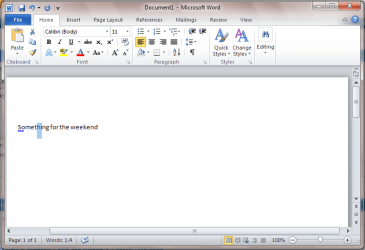
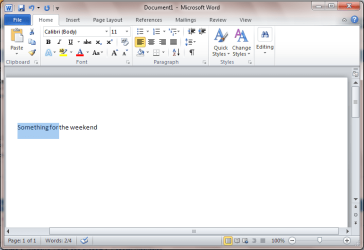
Whenever I select text, be it in a browser, html editor, Word, etc., it never starts selecting from the letter I place my mouse over, it always starts selecting from a letter before or a letter after, as if the selection was precise enough.

In Windows XP this never happened, you could start selecting text from whatever place and the selection was precise.

All of the friends I´ve asked said this also happened on their computers as well.

If anyone can be of any help it would be great.
Jimmy
 

My Computer

Computer Manufacturer/Model Number
Dell Optiplex 780
OS
Windows 7 Ultimate x64
CPU
Core2Duo E8400 3.0Ghz
Memory
2GB 1066 DDR3
Hard Drives
1TB Samsung
160 GB
Hi, Jimmy! Welcome to the Seven Forums. :)

Sad to say, it is what it is. I experience the same issue but, after a while, I've grown accustomed to the difference, a slight as it is from XP, and no longer pay it any attention. I guess my "selection technique" has changed to account for this small difference.

That being said, I can understand your concern as I went from XP to 7 and was a bit frustrated, at first, as well. Now, I really don't have an issue with it and can select exactly the text I desire without a second thought.
 

My Computer

Computer Manufacturer/Model Number
Toshiba L355D
OS
Windows 7 Ultimate x64 SP1
CPU
Core2 Duo
Motherboard
Intel
Memory
4 GB
Graphics Card(s)
GM965 on-board
Sound Card
RealTek on-board
Monitor(s) Displays
19"+17"(laptop)
Screen Resolution
1440x900 (x 2)
Hard Drives
500GB Ext. 200GB Internal
PSU
N/A
Case
N/A
Cooling
N/A
When you see this behavior when selecting part words Windows is compensating to include the whole word.

Start Click.PNG
Stop Click.PNG


OS
 

My Computer

Computer Manufacturer/Model Number
Compaq Desktop
OS
Windows 7 Ultimate x64
CPU
AMD Sempron Dual Core
Memory
3GB
Graphics Card(s)
NVIDIA GeForce 6150SE nForce 430
Screen Resolution
1024x768
Hard Drives
150GB Sata
Many thanks for your replies.
I´ll have to get used to it then.
What bothers me the most is that I use XP at work (which is most of the day) and 7 at home, so it will keep bothering me for some time.
Thanks!
 

My Computer

Computer Manufacturer/Model Number
Dell Optiplex 780
OS
Windows 7 Ultimate x64
CPU
Core2Duo E8400 3.0Ghz
Memory
2GB 1066 DDR3
Hard Drives
1TB Samsung
160 GB
Hi Jimmy,
Welcome to SevenForums

Guess we all have to get used to the selection method in 7. I was a bit perturbed by the way 7 was selecting text, but I've also grown used to it now and now I automatically compensate for it :)
Only problem I have now is that I use XP at work and have to switch between my selection methods ;)
 

My Computer

Computer type
Laptop
Computer Manufacturer/Model Number
HP EliteBook 8530w Mobile Workstation
OS
Windows 7 Ultimate x64 (XP, 98SE, 95, 3.11, DOS 7.10 on VM) + Ubuntu 10.04 LTS Lucid Lynx
CPU
Intel Core 2 Duo Processor P8600 (2.40 GHz, 3 MB L2 cache)
Motherboard
Mobile Intel PM45 Express Chipset ICH9M-Enhanced
Memory
4GB 800 MHz DDR2 SDRAM
Graphics Card(s)
ATI Mobility FireGL V5700 with 256 MB
Sound Card
SoundMAX Integrated Digital HD Audio
Monitor(s) Displays
15.4-inch WXGA anti-glare (1280 x 800 resolution)
Screen Resolution
1280 x 800
Hard Drives
500GB + 1TB
Mouse
Synaptics PS/2 Port Touchpad, USB Mouse
Internet Speed
4 Mbps
Antivirus
MSE
Browser
Firefox, Chrome, IE
Other Info
Authentec AES2810 Fingerprint Reader
This and fonts issue was driving me crazy when I switched to Windows 7 from XP. But I guess I have gotten used to this over last few months and now cannot go back to XP (though I have maintained a dual boot system).
 

My Computer

OS
Windows 7 x64
Back
Top