Selective black icons in explorer and themes

Gorham

New member
Member
Local time
3:09 PM
Messages
59
Location
Gorham, Maine
Windows 7 Pro; Dell OptiPlex 5050

I have black shortcut icons but not all of them; the fixes I've found here haven't worked.

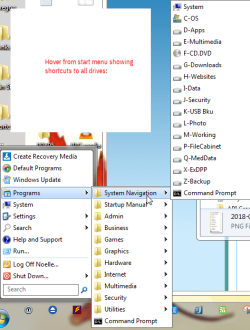
I'm trying to narrow it down. When I hover from start menu, all icons look fine.

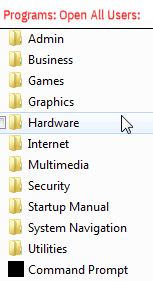
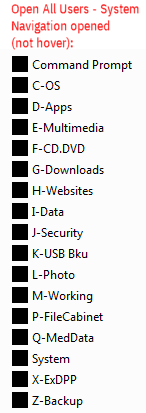
When I actually open (I use Open All Users) Programs, the shortcut icons are black; the same happens when I drill one step further.

Again, when I hover - no matter how far down I drill - the icons are fine.

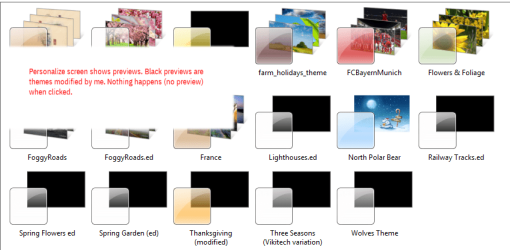
The other part of the puzzle involves themes. It seems the themes I've modified, show up black in the personalization menu. This did not used to be true. Those themes have showed up fine in preview and I've used them extensively.

This would have been easier to explain if I could have interleaved the images in the narrative but maybe I've given you enough to at least ask questions. I've just previewed and it seems the images are all a-jumble. Ah well.

This is not an end-of-the-world problem. I've put up with it for awhile but it does get annoying and I thought I'd ask for help solving it.

Thanks for 'listening' and appreciation is forthcoming for any ideas.


-G.
 

Attachments

  • screenshot 1.png
    screenshot 1.png
    5.6 KB · Views: 16
  • screenshot 2.png
    screenshot 2.png
    3.8 KB · Views: 16
  • screenshot 3.png
    screenshot 3.png
    30.6 KB · Views: 16
  • screenshot 4.png
    screenshot 4.png
    4.3 KB · Views: 16
  • screenshot 5.png
    screenshot 5.png
    40.6 KB · Views: 1

My Computer My Computer

At a glance

Windows 7 Professional 64bitIntel Core i3-2020 @ 3.3GHz3.00 GBIntel HD Graphics Family
Computer Manufacturer/Model Number
Dell Optiplex 990
OS
Windows 7 Professional 64bit
CPU
Intel Core i3-2020 @ 3.3GHz
Memory
3.00 GB
Graphics Card(s)
Intel HD Graphics Family
Sound Card
Realtek High Definition Audio (integrated)
Monitor(s) Displays
Dell P2411H Analog (flat screen)
Screen Resolution
1920 x 1080
Hard Drives
300 GB SATA (Internal)
300 GB SATA (External) x 2
LaCie d2 quadra 500 GB
FreeAgency GoFlex Drive (NTFS) 2 TB
PSU
Yup
Case
Black
Cooling
2 fans
Keyboard
Microsoft ComfortCurve 2000
Mouse
Microsoft Optical
Internet Speed
Apparently a variable. Supposed to be cable modem speed.
Hi Gorham,

Windows 7 Pro; Dell OptiPlex 5050
I have black shortcut icons but not all of them; the fixes I've found here haven't worked.

What fixes did you try?
 

My Computer My Computer

At a glance

Win 10 x64, Linux Lite, Win 7 x64, BlackArch,...
Computer type
PC/Desktop
Computer Manufacturer/Model Number
HP Desktop & Compaq Laptop
OS
Win 10 x64, Linux Lite, Win 7 x64, BlackArch, & Kali
Hard Drives
Samsung 850 Pro 256Gb,
Hitachi HDD 1Tb,
Crucial MX SSD 250Gb
Segate 3Tb USB 3.0 Ext. Backup HDD
Internet Speed
150Mbps dn, 20Mbps up
Antivirus
Avast Free, Malwarebytes Anti-Exploit & Anti-Ransomware
Browser
Firefox, Chrome, Opera, & VPN
I'm sure a Repair Install with rectify your issues. It replaces the OS with a fresh copy and is performed while you are using your computer and preserves all you installed programs, files, folders, music, video, pictures, etc. it just replaced a damaged Win 7 OS with a fresh copy.

Here's some info
Repair Install - Windows 7 Help Forums

[FONT=&quot]If you don't have a Win7 ISO you can obtain it from [/FONT][FONT=&quot]TechBench all editions (pro, home premium, etc. ) can be made available from any windows 7 ISO - either by removing the ei.cfg file from the sources folder, or by using eicfg_removal_utility.zip [/FONT][FONT=&quot]
[/FONT][FONT=&quot]The only links to Microsoft's page currently working on TechBench are for Ultimate x32 and Ultimate x64. You have to install the same version as is currently on your machine or it will not activate.

You will have to extract the files from the ISO with [/FONT][FONT=&quot]7-Zip. I create a new folder on the desktop and extract it there. That prevents your desktop being filled with the numerous files and folders in the Win7 ISO. You can only install the version that is currently on your system, otherwise it will not activate.

[/FONT][FONT=&quot] Before you start the repair install process you want to run Disk Cleanup : Extended - Windows 7 Help Forums with all options checked, which will significantly shorten the install process, and it also reduces the size of the Windows.old backup it creates.

Here's a video by Brian at Britec Computers UK
Repair Install to Fix Windows 7 Without Reformatting by Britec

Repair Install is piece of cake, at the appropriate screen you want to choose UPGRADE

If you don't have your 25 character CD key which is either on the exterior of the case, or in the battery compartment of a laptop you can use KeyFinder | Magical Jelly Bean to locate it. You want CD key not Product ID. copy and paste to, say, notepad and print to prevent typos.

Currently there are over 240 updates for Win7
After the repair install, use DISM++ to install the updates you wish. You also want to temporarily set Win Update to Never Check for Updates and use DISM++, it prevents Win Update from trying to download hundreds of updates, while DISM++ is doing that. When finished installing the updates you choose, the reset Win Updates to whatever you wish, or leave it turned off and run DISM++ every week or so for updates.
[/FONT][FONT=&quot]
Dism++ | New Windows Utility
Direct download DISM++

Run DISM++ click on updates, click on scan, choose the updates you wish to install, it will inform you of the problems other have experienced with the update and provides you with a choice.
It only install relevant current updates, not superseded one as WU does, and it does not require a reboot or prerequisites to be installed before others as WU does or days receiving updates to be current. It's done in one felled swoop!

If you have any questions or concerns, by all means let us know and we'll do our best to provide the answers.[/FONT]

Nic


My Computer My Computer

At a glance

Win 10 x64, Linux Lite, Win 7 x64, BlackArch,...
Computer type
PC/Desktop
Computer Manufacturer/Model Number
HP Desktop & Compaq Laptop
OS
Win 10 x64, Linux Lite, Win 7 x64, BlackArch, & Kali
Hard Drives
Samsung 850 Pro 256Gb,
Hitachi HDD 1Tb,
Crucial MX SSD 250Gb
Segate 3Tb USB 3.0 Ext. Backup HDD
Internet Speed
150Mbps dn, 20Mbps up
Antivirus
Avast Free, Malwarebytes Anti-Exploit & Anti-Ransomware
Browser
Firefox, Chrome, Opera, & VPN
Hi Nic,


Sorry I missed your first post. Most of what came up on Google was the shortcut icons on the desktop, not in the menus. There was this one: How to Fix Black Desktop Icons in Windows 7: 4 Steps. But this one looked promising: Thumbnail Cache - Clear and Reset Alas, it didn't do anything that I could see.


The other links I didn't even try.


Okay, now I'm muddling through your *very* thorough response. I'll see if I can find a restore point first; I'd forgotten that option. Then I'll try to be brave enough to do the repair install. Gulp! :eek:


Seriously, thanks so much! You put a lot of thought into that. I'll try to do it justice and will get back to you. Life is intruding though and since it's not an end-of-the-world problem, it might be a few days before I report back.


Again, many, many thanks.


-G.
 

My Computer My Computer

At a glance

Windows 7 Professional 64bitIntel Core i3-2020 @ 3.3GHz3.00 GBIntel HD Graphics Family
Computer Manufacturer/Model Number
Dell Optiplex 990
OS
Windows 7 Professional 64bit
CPU
Intel Core i3-2020 @ 3.3GHz
Memory
3.00 GB
Graphics Card(s)
Intel HD Graphics Family
Sound Card
Realtek High Definition Audio (integrated)
Monitor(s) Displays
Dell P2411H Analog (flat screen)
Screen Resolution
1920 x 1080
Hard Drives
300 GB SATA (Internal)
300 GB SATA (External) x 2
LaCie d2 quadra 500 GB
FreeAgency GoFlex Drive (NTFS) 2 TB
PSU
Yup
Case
Black
Cooling
2 fans
Keyboard
Microsoft ComfortCurve 2000
Mouse
Microsoft Optical
Internet Speed
Apparently a variable. Supposed to be cable modem speed.
Hi,

You could try and create a new user account and see if the black icons problem exists there, in the new account.
 

My Computer My Computer

At a glance

Windows 7 x64, Vista x64, 8.1 smartphoneIntel E8400 65W 64-bitDDR2 2 x 2GB, 1GB x 2XFX Radeon HD5750
Computer type
PC/Desktop
OS
Windows 7 x64, Vista x64, 8.1 smartphone
CPU
Intel E8400 65W 64-bit
Motherboard
Gigabyte EP45-UD3LR
Memory
DDR2 2 x 2GB, 1GB x 2
Graphics Card(s)
XFX Radeon HD5750
Sound Card
AMD High Definition Audio; Realtek High Definition Audio
Monitor(s) Displays
iiyama prolite X2377HDS
Screen Resolution
1920 x 1080
Hard Drives
500GB 7200 rpm Seagate ST3500413AS 16MB, 500GB 5400 rpm Toshiba MQ02ABF050H 32MB, 200GB 7200 rpm Seagate ST3200820AS 8MB, 2TB 7200 rpm Western Digital WD20EZRX 64MB
PSU
Enermax Liberty Modular
Case
Antec P193 Midi Tower
Keyboard
Mionix ZIBAL 60
Mouse
Razer USB 2.0 Diamondback Mouse or Huion Graphics Tablet
Browser
Internet Explorer, Lunascape, Firefox, Opera, Avast Safezone
Well, as others before me I think, all of a sudden the problem went away. Maybe the threat of action? I have no idea!


If it rears its head again, iko22, I'll give it a try. Thanks for helping.


-G.
 

My Computer My Computer

At a glance

Windows 7 Professional 64bitIntel Core i3-2020 @ 3.3GHz3.00 GBIntel HD Graphics Family
Computer Manufacturer/Model Number
Dell Optiplex 990
OS
Windows 7 Professional 64bit
CPU
Intel Core i3-2020 @ 3.3GHz
Memory
3.00 GB
Graphics Card(s)
Intel HD Graphics Family
Sound Card
Realtek High Definition Audio (integrated)
Monitor(s) Displays
Dell P2411H Analog (flat screen)
Screen Resolution
1920 x 1080
Hard Drives
300 GB SATA (Internal)
300 GB SATA (External) x 2
LaCie d2 quadra 500 GB
FreeAgency GoFlex Drive (NTFS) 2 TB
PSU
Yup
Case
Black
Cooling
2 fans
Keyboard
Microsoft ComfortCurve 2000
Mouse
Microsoft Optical
Internet Speed
Apparently a variable. Supposed to be cable modem speed.
Back
Top