
Hi,
New guy on the block and with a possible problem. A couple of days ago I got an Email stating that unless I paid Euro 326 or something to an account, the sender would freeze my computer in 22 hours. I thought of it as an idle threat and deleted the mail.
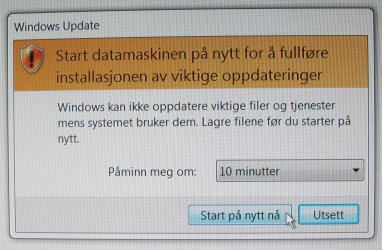
It might be totally unrelated, but a couple of hours later the attached message popped up on my screen. A message type I can not remember to have seen before and with no information on the who's and what's. The text is in Norwegian and reads translated:
I checked what files I had received at the time and it seemed I'd gotten a load of Opera files for an update, but I am vary and sceptical. Does anybody know this kind of update and how to get rid of it? Thanx!
New guy on the block and with a possible problem. A couple of days ago I got an Email stating that unless I paid Euro 326 or something to an account, the sender would freeze my computer in 22 hours. I thought of it as an idle threat and deleted the mail.
It might be totally unrelated, but a couple of hours later the attached message popped up on my screen. A message type I can not remember to have seen before and with no information on the who's and what's. The text is in Norwegian and reads translated:
HTML:
Start your computer again in order til complete the installation of important updates.
Windows can not update important files and services while the3 system is using them. Save the files before you start again.

Remind me in - 10 min

Restart now - Postpone
I checked what files I had received at the time and it seemed I'd gotten a load of Opera files for an update, but I am vary and sceptical. Does anybody know this kind of update and how to get rid of it? Thanx!
Attachments
My Computer
- Computer type
- Laptop
- Computer Manufacturer/Model Number
- HP notebook
- OS
- Windows 7, 64 bit professional
- CPU
- Intel Core 2 Duo
- Memory
- 8 GB
- Browser
- Google Chrome
