Send photos as attachment

Trident1

New member
Local time
5:19 PM
Messages
117
I don't recall if I had done this before on another version.

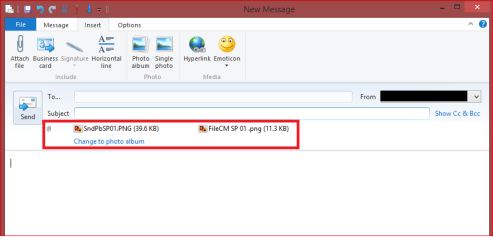
Trying to send several photos as attachments, using WLM, but when selecting the first photo as an attachment, the picture shows in the "body" of the message. I'd like all photos to appear by their name and to be opened by the recipient. (i.e. a1,a1,a2, and etc.)
 

My Computer My Computer

At a glance

Windows 7 Professional, 32bitintel Core i5, i5 3570 3.4GHZ, 6MB Quad Core4GB, (2x2GB) 240 Pin DDR3, 1333Mhzon board
Computer type
PC/Desktop
Computer Manufacturer/Model Number
Custom
OS
Windows 7 Professional, 32bit
CPU
intel Core i5, i5 3570 3.4GHZ, 6MB Quad Core
Motherboard
Asus P8B75-V, LGA 1155
Memory
4GB, (2x2GB) 240 Pin DDR3, 1333Mhz
Graphics Card(s)
on board
Sound Card
Audigy
Monitor(s) Displays
Samsung 21"
Hard Drives
WD 500GB 7200 RPM, 16NB Cache SATA
PSU
Corsair 600W
Case
Cooler Master Storm Scout
Keyboard
MS
Mouse
MS Optical
Antivirus
MS Security Essentials
Browser
IE 10, and Firefox ver. 24
For me they are listed as attachments.
If I click on "Change to photo album", it moves the attachments to pictures displayed in the body.
I clicked on "Attach file" to insert the images.

Did you click on "Photo album" or "Single photo" ?

I'm using WLM 2012 on Win 8.1.1 and attached .png files.

WLMSP01.png
 

My Computer My Computer

At a glance

Multi-Boot W7_Pro_x64 W8.1_Pro_x64 W10_Pro_x6...AMD Athlon II x4 6206GB GSkill DDR2 800AMD 4670 GPU + AMD 4200 IGP
Computer type
PC/Desktop
Computer Manufacturer/Model Number
home built
OS
Multi-Boot W7_Pro_x64 W8.1_Pro_x64 W10_Pro_x64 +Linux_VMs +Chromium_VM
CPU
AMD Athlon II x4 620
Motherboard
Gigabyte GA-MA785G-UD3H
Memory
6GB GSkill DDR2 800
Graphics Card(s)
AMD 4670 GPU + AMD 4200 IGP
Sound Card
on board Realtek ALC889A
Monitor(s) Displays
RCA 40" LCD TV, Insignia 32" LCD TV, HP 15" LCD monitor
Screen Resolution
1680 x 1050
Hard Drives
OCZ Vertex 3 120GB,
Samsung F3 1TB (3),
Several others - WD, Seagate, Hitachi, ...
PSU
Corsair 500 W
Case
Rosewill mid tower
Cooling
CM 90mm rifle
Keyboard
Gyration wireless, Logitech wireless, Dell USB wired
Mouse
Gyration wireless, Logitech wireless, V7 USB wired
Internet Speed
Spectrum - 100Mbps D / 10Mbps U
Antivirus
Avast, MBAM3, EMET, WinPatrol
Browser
Pale Moon, Firefox, IE
Other Info
2 multi-boot PC's
Mainly HTPC/Office/Gen purpose (no gaming).
Trendnet USB KVM.
LG DVD burner/Blue Ray Player.
Tray system for removable SATA backup drives.

Not currently OCd, under-volted.
I use Hybrid sleep, rarely re-boot or shutdown.

Hauppauge HD-PVR, Avermedia PCIe TV Tuner, Hauppauge PCI TV Tuner.
Using WLM 2012 with Windows 7. Tried your suggestion, I guess. Right clicked on the Photo Folder >Send To and I saw the photos (about 2x2) in the body of the e-mail along with a list of all .jpg files. It went through, didn't take too long. But what I've received from others, and I don't know how it's done, but below the subject block there's an area that shows all .jpg files. Clicking on them individually will open that one photo.

Your suggestion helped me get the photos sent anyway, Thank you.
 

My Computer My Computer

At a glance

Windows 7 Professional, 32bitintel Core i5, i5 3570 3.4GHZ, 6MB Quad Core4GB, (2x2GB) 240 Pin DDR3, 1333Mhzon board
Computer type
PC/Desktop
Computer Manufacturer/Model Number
Custom
OS
Windows 7 Professional, 32bit
CPU
intel Core i5, i5 3570 3.4GHZ, 6MB Quad Core
Motherboard
Asus P8B75-V, LGA 1155
Memory
4GB, (2x2GB) 240 Pin DDR3, 1333Mhz
Graphics Card(s)
on board
Sound Card
Audigy
Monitor(s) Displays
Samsung 21"
Hard Drives
WD 500GB 7200 RPM, 16NB Cache SATA
PSU
Corsair 600W
Case
Cooler Master Storm Scout
Keyboard
MS
Mouse
MS Optical
Antivirus
MS Security Essentials
Browser
IE 10, and Firefox ver. 24
I did like you by selecting files in Explorer and clicking Send To.
I get the same results as you, pictures get inserted into the body.

What I did earlier was create a new Message in WLM.
Then click Insert > Attach file
Doing it this way creates the list of attached files below the subject block.
You can see where I highlighted this in my screen print in post #2.
The pictures aren't in the body.
 

My Computer My Computer

At a glance

Multi-Boot W7_Pro_x64 W8.1_Pro_x64 W10_Pro_x6...AMD Athlon II x4 6206GB GSkill DDR2 800AMD 4670 GPU + AMD 4200 IGP
Computer type
PC/Desktop
Computer Manufacturer/Model Number
home built
OS
Multi-Boot W7_Pro_x64 W8.1_Pro_x64 W10_Pro_x64 +Linux_VMs +Chromium_VM
CPU
AMD Athlon II x4 620
Motherboard
Gigabyte GA-MA785G-UD3H
Memory
6GB GSkill DDR2 800
Graphics Card(s)
AMD 4670 GPU + AMD 4200 IGP
Sound Card
on board Realtek ALC889A
Monitor(s) Displays
RCA 40" LCD TV, Insignia 32" LCD TV, HP 15" LCD monitor
Screen Resolution
1680 x 1050
Hard Drives
OCZ Vertex 3 120GB,
Samsung F3 1TB (3),
Several others - WD, Seagate, Hitachi, ...
PSU
Corsair 500 W
Case
Rosewill mid tower
Cooling
CM 90mm rifle
Keyboard
Gyration wireless, Logitech wireless, Dell USB wired
Mouse
Gyration wireless, Logitech wireless, V7 USB wired
Internet Speed
Spectrum - 100Mbps D / 10Mbps U
Antivirus
Avast, MBAM3, EMET, WinPatrol
Browser
Pale Moon, Firefox, IE
Other Info
2 multi-boot PC's
Mainly HTPC/Office/Gen purpose (no gaming).
Trendnet USB KVM.
LG DVD burner/Blue Ray Player.
Tray system for removable SATA backup drives.

Not currently OCd, under-volted.
I use Hybrid sleep, rarely re-boot or shutdown.

Hauppauge HD-PVR, Avermedia PCIe TV Tuner, Hauppauge PCI TV Tuner.
Thanks David, I'll try that when I send a another group of photos.
 

My Computer My Computer

At a glance

Windows 7 Professional, 32bitintel Core i5, i5 3570 3.4GHZ, 6MB Quad Core4GB, (2x2GB) 240 Pin DDR3, 1333Mhzon board
Computer type
PC/Desktop
Computer Manufacturer/Model Number
Custom
OS
Windows 7 Professional, 32bit
CPU
intel Core i5, i5 3570 3.4GHZ, 6MB Quad Core
Motherboard
Asus P8B75-V, LGA 1155
Memory
4GB, (2x2GB) 240 Pin DDR3, 1333Mhz
Graphics Card(s)
on board
Sound Card
Audigy
Monitor(s) Displays
Samsung 21"
Hard Drives
WD 500GB 7200 RPM, 16NB Cache SATA
PSU
Corsair 600W
Case
Cooler Master Storm Scout
Keyboard
MS
Mouse
MS Optical
Antivirus
MS Security Essentials
Browser
IE 10, and Firefox ver. 24
Back
Top