Solved Send to almost empty

Koyfo

New member
Member
Local time
11:13 PM
Messages
38
Hi, my sendto menu is almost empty! I can't remember anything i did to mess it up. I tried to create another system account, but the sendto is ok with this new account.

Check my settings...



I searched for the location of "Desktop (create shortcut)" and found the following

Code:
C:\Windows\ServiceProfiles\LocalService\AppData\Roaming\Microsoft\Windows\SendTo
C:\Windows\ServiceProfiles\NetworkService\AppData\Roaming\Microsoft\Windows\SendTo
C:\Users\Default\AppData\Roaming\Microsoft\Windows\SendTo
C:\Users\Koyfo\AppData\Roaming\Microsoft\Windows\SendTo
C:\Windows\winsxs\amd64_microsoft-windows-sendmail_31bf3856ad364e35_6.1.7600.16385_none_b6de6c0835b43484
 

My Computer

Computer Manufacturer/Model Number
Me
OS
Windows 7 Ultimate SP1 x64
CPU
AMD Phenom(tm) II X4 955
Motherboard
Asus M4A79T Deluxe
Memory
Kingston HyperX 2x4GB 1600MHz
Graphics Card(s)
Asus EAH6970 DCII/2DI4S/2GD5
Sound Card
Realtek ALC1200 @ ATI SB750 - High Definition
Monitor(s) Displays
LG W2253 (Digital) [22" LCD]
Screen Resolution
1920x1080
Hard Drives
OCZ-AGILITY2 ATA Device (50 GB, SATA-II)
ST31000340AS ATA Device (1000 GB, 7200 RPM, SATA-II)
WDC WD1002FBYS-02A6B0 ATA Device (1000 GB, 7200 RPM, SATA-II)
PSU
Enermax Infinity 720Watt
Case
Themaltake Soprano Dx
Cooling
Thermaltake Max Orb
Keyboard
Microsoft Multimedia Keyboard (PS/2)
Mouse
Microsoft USB Basic Optical Mouse (IntelliPoint)
Internet Speed
U/D 18655/1020 Kbps

My Computer

Computer type
PC/Desktop
Computer Manufacturer/Model Number
Self built custom
OS
64-bit Windows 11 Pro for Workstations
CPU
Intel i7-8700K OC'd to 5 GHz
Motherboard
ASUS ROG Maximus XI Formula Z390
Memory
64 GB (4x16GB) G.SKILL TridentZ RGB DDR4 3600 MHz
Graphics Card(s)
ASUS ROG-STRIX-GTX1080TI-O11G-GAMING
Sound Card
Integrated
Monitor(s) Displays
2 x Samsung Odyssey G7 27"
Screen Resolution
2560x1440
Hard Drives
1TB Samsung 990 PRO M.2,
4TB Samsung 990 PRO PRO M.2,
TerraMaster F8 SSD Plus NAS
PSU
Seasonic Prime Titanium 850W
Case
Thermaltake Core P3
Cooling
Corsair Hydro H115i
Keyboard
Logitech wireless K800
Mouse
Logitech MX Master 4
Internet Speed
2 Gb/s Download and 100 Mb/s Upload
Antivirus
Malwarebyte Anti-Malware Premium
Browser
Google Chrome
Other Info
Logitech Z625 speaker system,
Logitech BRIO 4K Pro webcam,
HP Color LaserJet Pro MFP M477fdn,
APC SMART-UPS RT 1000 XL - SURT1000XLI,
Galaxy S23 Plus phone
Hello my friend. Tkanks for the fast reply.

Already tried this. Even in every one of the 5 folders i tried to enter a new shortcut to chechk if it will show up in the sento context menu but it didn't work.
I tried also the function of windows 7 manager under Repair Center -> Context Menu -> Restore all system entries in [Send To] Context Menu but also it didn't work...
 

My Computer

Computer Manufacturer/Model Number
Me
OS
Windows 7 Ultimate SP1 x64
CPU
AMD Phenom(tm) II X4 955
Motherboard
Asus M4A79T Deluxe
Memory
Kingston HyperX 2x4GB 1600MHz
Graphics Card(s)
Asus EAH6970 DCII/2DI4S/2GD5
Sound Card
Realtek ALC1200 @ ATI SB750 - High Definition
Monitor(s) Displays
LG W2253 (Digital) [22" LCD]
Screen Resolution
1920x1080
Hard Drives
OCZ-AGILITY2 ATA Device (50 GB, SATA-II)
ST31000340AS ATA Device (1000 GB, 7200 RPM, SATA-II)
WDC WD1002FBYS-02A6B0 ATA Device (1000 GB, 7200 RPM, SATA-II)
PSU
Enermax Infinity 720Watt
Case
Themaltake Soprano Dx
Cooling
Thermaltake Max Orb
Keyboard
Microsoft Multimedia Keyboard (PS/2)
Mouse
Microsoft USB Basic Optical Mouse (IntelliPoint)
Internet Speed
U/D 18655/1020 Kbps
Also check this video out


I will try to recover the default sendto registry settings from another clean installation of win 7 x64 ultimate
 
Last edited by a moderator:

My Computer

Computer Manufacturer/Model Number
Me
OS
Windows 7 Ultimate SP1 x64
CPU
AMD Phenom(tm) II X4 955
Motherboard
Asus M4A79T Deluxe
Memory
Kingston HyperX 2x4GB 1600MHz
Graphics Card(s)
Asus EAH6970 DCII/2DI4S/2GD5
Sound Card
Realtek ALC1200 @ ATI SB750 - High Definition
Monitor(s) Displays
LG W2253 (Digital) [22" LCD]
Screen Resolution
1920x1080
Hard Drives
OCZ-AGILITY2 ATA Device (50 GB, SATA-II)
ST31000340AS ATA Device (1000 GB, 7200 RPM, SATA-II)
WDC WD1002FBYS-02A6B0 ATA Device (1000 GB, 7200 RPM, SATA-II)
PSU
Enermax Infinity 720Watt
Case
Themaltake Soprano Dx
Cooling
Thermaltake Max Orb
Keyboard
Microsoft Multimedia Keyboard (PS/2)
Mouse
Microsoft USB Basic Optical Mouse (IntelliPoint)
Internet Speed
U/D 18655/1020 Kbps

My Computer

OS
Win7U 64 RTM
CPU
Q9550
Motherboard
GA-EP45-UD3R
Memory
8GB Gskill
Graphics Card(s)
ASUS|EAH4850/HTDI/1GD3/A
Sound Card
xfi Plat
Monitor(s) Displays
Dell 2405fpw
Screen Resolution
1920x1200
Hard Drives
Seagate & WD sata Drives
PSU
Antec
Case
Antec
Keyboard
MS Natural Ergonomic 4000
Mouse
Logitech MX610 USB Cordless
I have disabled system restore :(


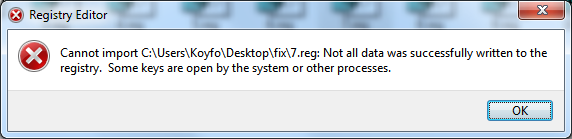
I extracted some registry keys from my clean install, but i couldn't apply some of them that include "M i c r o s o f t S e n d T o S e r v i c e"

I got error

iJprG.png


Problem not yet fixed. Any other ideas about other reg keys?
 

Attachments

My Computer

Computer Manufacturer/Model Number
Me
OS
Windows 7 Ultimate SP1 x64
CPU
AMD Phenom(tm) II X4 955
Motherboard
Asus M4A79T Deluxe
Memory
Kingston HyperX 2x4GB 1600MHz
Graphics Card(s)
Asus EAH6970 DCII/2DI4S/2GD5
Sound Card
Realtek ALC1200 @ ATI SB750 - High Definition
Monitor(s) Displays
LG W2253 (Digital) [22" LCD]
Screen Resolution
1920x1080
Hard Drives
OCZ-AGILITY2 ATA Device (50 GB, SATA-II)
ST31000340AS ATA Device (1000 GB, 7200 RPM, SATA-II)
WDC WD1002FBYS-02A6B0 ATA Device (1000 GB, 7200 RPM, SATA-II)
PSU
Enermax Infinity 720Watt
Case
Themaltake Soprano Dx
Cooling
Thermaltake Max Orb
Keyboard
Microsoft Multimedia Keyboard (PS/2)
Mouse
Microsoft USB Basic Optical Mouse (IntelliPoint)
Internet Speed
U/D 18655/1020 Kbps

My Computer

OS
Win7U 64 RTM
CPU
Q9550
Motherboard
GA-EP45-UD3R
Memory
8GB Gskill
Graphics Card(s)
ASUS|EAH4850/HTDI/1GD3/A
Sound Card
xfi Plat
Monitor(s) Displays
Dell 2405fpw
Screen Resolution
1920x1200
Hard Drives
Seagate & WD sata Drives
PSU
Antec
Case
Antec
Keyboard
MS Natural Ergonomic 4000
Mouse
Logitech MX610 USB Cordless
Koyfo,

Since it works fine in the new account, you might consider to just use the new account or create another new one to use instead. After copying what you want from the old account to the new one, you could delete the old account.

This would probably be less problematic and faster to do.
 

My Computer

Computer type
PC/Desktop
Computer Manufacturer/Model Number
Self built custom
OS
64-bit Windows 11 Pro for Workstations
CPU
Intel i7-8700K OC'd to 5 GHz
Motherboard
ASUS ROG Maximus XI Formula Z390
Memory
64 GB (4x16GB) G.SKILL TridentZ RGB DDR4 3600 MHz
Graphics Card(s)
ASUS ROG-STRIX-GTX1080TI-O11G-GAMING
Sound Card
Integrated
Monitor(s) Displays
2 x Samsung Odyssey G7 27"
Screen Resolution
2560x1440
Hard Drives
1TB Samsung 990 PRO M.2,
4TB Samsung 990 PRO PRO M.2,
TerraMaster F8 SSD Plus NAS
PSU
Seasonic Prime Titanium 850W
Case
Thermaltake Core P3
Cooling
Corsair Hydro H115i
Keyboard
Logitech wireless K800
Mouse
Logitech MX Master 4
Internet Speed
2 Gb/s Download and 100 Mb/s Upload
Antivirus
Malwarebyte Anti-Malware Premium
Browser
Google Chrome
Other Info
Logitech Z625 speaker system,
Logitech BRIO 4K Pro webcam,
HP Color LaserJet Pro MFP M477fdn,
APC SMART-UPS RT 1000 XL - SURT1000XLI,
Galaxy S23 Plus phone
Thanks for the help, but i just noticed something else.
When i made the new account, i didn't try to enter new shortcuts in sendto folder rather than seeing that the default (send to zip, mail, etc) exist properly, now i tried to enter new shortcuts and they didn't display in the sendto menu!
Only the default (zip, desktop, mail etc) work, as you saw in the video (moving the desklink).

Any other ideas?!


PS: Sfc 30%, will edit when ready

Code:
Microsoft Windows [Version 6.1.7600]
Copyright (c) 2009 Microsoft Corporation.  All rights reserved.

C:\Users\Koyfo>sfc /scannow

Beginning system scan.  This process will take some time.

Beginning verification phase of system scan.
Verification 100% complete.

Windows Resource Protection did not find any integrity violations.

C:\Users\Koyfo>
 

My Computer

Computer Manufacturer/Model Number
Me
OS
Windows 7 Ultimate SP1 x64
CPU
AMD Phenom(tm) II X4 955
Motherboard
Asus M4A79T Deluxe
Memory
Kingston HyperX 2x4GB 1600MHz
Graphics Card(s)
Asus EAH6970 DCII/2DI4S/2GD5
Sound Card
Realtek ALC1200 @ ATI SB750 - High Definition
Monitor(s) Displays
LG W2253 (Digital) [22" LCD]
Screen Resolution
1920x1080
Hard Drives
OCZ-AGILITY2 ATA Device (50 GB, SATA-II)
ST31000340AS ATA Device (1000 GB, 7200 RPM, SATA-II)
WDC WD1002FBYS-02A6B0 ATA Device (1000 GB, 7200 RPM, SATA-II)
PSU
Enermax Infinity 720Watt
Case
Themaltake Soprano Dx
Cooling
Thermaltake Max Orb
Keyboard
Microsoft Multimedia Keyboard (PS/2)
Mouse
Microsoft USB Basic Optical Mouse (IntelliPoint)
Internet Speed
U/D 18655/1020 Kbps
Check another video that may help.


Notice when the behavior of mydocs link!!!!!!! It also accepts .exe!
I am running out of ideas... :(
 
Last edited by a moderator:

My Computer

Computer Manufacturer/Model Number
Me
OS
Windows 7 Ultimate SP1 x64
CPU
AMD Phenom(tm) II X4 955
Motherboard
Asus M4A79T Deluxe
Memory
Kingston HyperX 2x4GB 1600MHz
Graphics Card(s)
Asus EAH6970 DCII/2DI4S/2GD5
Sound Card
Realtek ALC1200 @ ATI SB750 - High Definition
Monitor(s) Displays
LG W2253 (Digital) [22" LCD]
Screen Resolution
1920x1080
Hard Drives
OCZ-AGILITY2 ATA Device (50 GB, SATA-II)
ST31000340AS ATA Device (1000 GB, 7200 RPM, SATA-II)
WDC WD1002FBYS-02A6B0 ATA Device (1000 GB, 7200 RPM, SATA-II)
PSU
Enermax Infinity 720Watt
Case
Themaltake Soprano Dx
Cooling
Thermaltake Max Orb
Keyboard
Microsoft Multimedia Keyboard (PS/2)
Mouse
Microsoft USB Basic Optical Mouse (IntelliPoint)
Internet Speed
U/D 18655/1020 Kbps

My Computer

Computer type
PC/Desktop
Computer Manufacturer/Model Number
Bruce ... somewhere in his 40's
OS
Windows 7 Ultimate 32bit SP1
CPU
Intel(R) Core(TM)2 Quad CPU @ 2.40GHz, 2400 MHz
Motherboard
INTEL/D975XBX2
Memory
4 GB
Graphics Card(s)
ATI Radeon HD 2600 Pro
Monitor(s) Displays
Samsung SyncMaster 914v
Screen Resolution
1280 x 1024
Hard Drives
2/500GB each ... ST3500630AS ATA Device.
One is not connected
PSU
Rocketfish 700 W
Case
G.Skill Gigabyte Chassis
Keyboard
Standard PS/2 Keyboard
Mouse
Microsoft PS/2 Mouse
Internet Speed
DSL
Antivirus
Avira Internet Security
Browser
IE 11
Other Info
ATI HDMI Audio

My Computer

Computer Manufacturer/Model Number
Me
OS
Windows 7 Ultimate SP1 x64
CPU
AMD Phenom(tm) II X4 955
Motherboard
Asus M4A79T Deluxe
Memory
Kingston HyperX 2x4GB 1600MHz
Graphics Card(s)
Asus EAH6970 DCII/2DI4S/2GD5
Sound Card
Realtek ALC1200 @ ATI SB750 - High Definition
Monitor(s) Displays
LG W2253 (Digital) [22" LCD]
Screen Resolution
1920x1080
Hard Drives
OCZ-AGILITY2 ATA Device (50 GB, SATA-II)
ST31000340AS ATA Device (1000 GB, 7200 RPM, SATA-II)
WDC WD1002FBYS-02A6B0 ATA Device (1000 GB, 7200 RPM, SATA-II)
PSU
Enermax Infinity 720Watt
Case
Themaltake Soprano Dx
Cooling
Thermaltake Max Orb
Keyboard
Microsoft Multimedia Keyboard (PS/2)
Mouse
Microsoft USB Basic Optical Mouse (IntelliPoint)
Internet Speed
U/D 18655/1020 Kbps
:confused: it works for me ...

Sounds as if something has become corrupted
 

My Computer

Computer type
PC/Desktop
Computer Manufacturer/Model Number
Bruce ... somewhere in his 40's
OS
Windows 7 Ultimate 32bit SP1
CPU
Intel(R) Core(TM)2 Quad CPU @ 2.40GHz, 2400 MHz
Motherboard
INTEL/D975XBX2
Memory
4 GB
Graphics Card(s)
ATI Radeon HD 2600 Pro
Monitor(s) Displays
Samsung SyncMaster 914v
Screen Resolution
1280 x 1024
Hard Drives
2/500GB each ... ST3500630AS ATA Device.
One is not connected
PSU
Rocketfish 700 W
Case
G.Skill Gigabyte Chassis
Keyboard
Standard PS/2 Keyboard
Mouse
Microsoft PS/2 Mouse
Internet Speed
DSL
Antivirus
Avira Internet Security
Browser
IE 11
Other Info
ATI HDMI Audio
:confused: it works for me ...

Sounds as if something has become corrupted

Yea i know that it is normally working. Something has gone wrong with my system files or registry. Chech the above posts to understand better the problem.

I temporarily fixed Notepad++ by copying the whole folder and making all except .exe hidden to sherten the menu.


My Computer

Computer Manufacturer/Model Number
Me
OS
Windows 7 Ultimate SP1 x64
CPU
AMD Phenom(tm) II X4 955
Motherboard
Asus M4A79T Deluxe
Memory
Kingston HyperX 2x4GB 1600MHz
Graphics Card(s)
Asus EAH6970 DCII/2DI4S/2GD5
Sound Card
Realtek ALC1200 @ ATI SB750 - High Definition
Monitor(s) Displays
LG W2253 (Digital) [22" LCD]
Screen Resolution
1920x1080
Hard Drives
OCZ-AGILITY2 ATA Device (50 GB, SATA-II)
ST31000340AS ATA Device (1000 GB, 7200 RPM, SATA-II)
WDC WD1002FBYS-02A6B0 ATA Device (1000 GB, 7200 RPM, SATA-II)
PSU
Enermax Infinity 720Watt
Case
Themaltake Soprano Dx
Cooling
Thermaltake Max Orb
Keyboard
Microsoft Multimedia Keyboard (PS/2)
Mouse
Microsoft USB Basic Optical Mouse (IntelliPoint)
Internet Speed
U/D 18655/1020 Kbps
Thanks to this SendTo context menu shortcuts not showing - Vista Forums & Shortcuts in the "Send To" folder not appearing in the menu? i fixed it! :party:

As you understand from the videos posted before, the problem was the drop handler with shortcut files (.lnk). The drop handler for .exe files was ok.

So what caused the problem? XML Spy from Altova...

My setting was

Code:
[HKEY_CLASSES_ROOT\lnkfile\shellex\DropHandler]
@="{83D96563-DB11-42DF-92F9-32CE7BA54ED8}"

and you need to change it to (i have attached also a fix.reg)

Code:
[HKEY_CLASSES_ROOT\lnkfile\shellex\DropHandler]
@="{00021401-0000-0000-C000-000000000046}"

Othewise, you need to disable this setting while installing,


othewise the sendto menu will be misfunctional.


Note that i tried to change/remove this feature but it can't be removed. You need to remove the whole XML Spy or edit the registry as described above.


Thanks for the help everyone :p
 

Attachments

My Computer

Computer Manufacturer/Model Number
Me
OS
Windows 7 Ultimate SP1 x64
CPU
AMD Phenom(tm) II X4 955
Motherboard
Asus M4A79T Deluxe
Memory
Kingston HyperX 2x4GB 1600MHz
Graphics Card(s)
Asus EAH6970 DCII/2DI4S/2GD5
Sound Card
Realtek ALC1200 @ ATI SB750 - High Definition
Monitor(s) Displays
LG W2253 (Digital) [22" LCD]
Screen Resolution
1920x1080
Hard Drives
OCZ-AGILITY2 ATA Device (50 GB, SATA-II)
ST31000340AS ATA Device (1000 GB, 7200 RPM, SATA-II)
WDC WD1002FBYS-02A6B0 ATA Device (1000 GB, 7200 RPM, SATA-II)
PSU
Enermax Infinity 720Watt
Case
Themaltake Soprano Dx
Cooling
Thermaltake Max Orb
Keyboard
Microsoft Multimedia Keyboard (PS/2)
Mouse
Microsoft USB Basic Optical Mouse (IntelliPoint)
Internet Speed
U/D 18655/1020 Kbps
Glad you got it fixed Koyfo, and as James Colbert so wisely suggested - you should definitely re-enable your System Restore!
 

My Computer

Computer Manufacturer/Model Number
HP Pavillion dv5t (generation 1)
OS
Vista 64 bit and 32 bit (SP2)
CPU
Intel(R) Core(TM)2 Duo Processor T9400 (2.53 GHz
Memory
4GB DDR2 System Memory (2 Dimm)
Graphics Card(s)
512 MB NVIDIA GeForce 9600M GT
Monitor(s) Displays
15.4" diagonal WSXGA+ High-Definition HP BrightView Widescre
Screen Resolution
1680 x 1050
Hard Drives
320GB 5400RPM SATA Hard Drive with HP ProtectSmart Hard Drive Protection
Keyboard
Built-in HP
Mouse
Built in - Synaptics TouchPad V6.5 on PS/2 Port
Internet Speed
Max
Other Info
~ Intel Next-Gen Wireless-N Mini-card w/Bluetooth ~ Blu-Ray ROM DVD+/-R/RW ~ Integ. HDTV Hybrid Tuner ~ 12 Cell Battery ~ MS Office (Home Premium) 2007 ~
Back
Top