
Send To Email not working for WORD and Live Mail

kattmarl

New member
Local time
7:11 PM
Messages
4
Hello everyone, I'm REALLY frustrated :mad: so bear with me.

I have Office 2007 Home & Student Edition. I use Windows Live Mail for my email client.

I installed the office product, and created a new Word Document.
I click on the Office Button on top, select SEND TO EMAIL.. expecting Windows Live Mail to show up (set as my default mail program.) Instead I get this error:

Logon Failed. You Must log on to Microsoft Exchange to Access your
address book. Error Code: "unspecified Error"

:shock:

So I figure, Ok, maybe Office 2007 is new (even thought it's 2010 now), and there might be some fixes. I downloaded the SP2 for Office 2007, thinking this must be a common problem.. as my computer is BRAND new.... I JUST installed Windows Live Mail on it... and Just installed Office 2007. I haven't had it for more than a few hours. ;)

I install the SP2 Patch for OFF2007 fine. Rebooted. Then tried again.
No Joy.
:cry:

I do some searching and find many Microsoft threads which indicate how to "use a Non-MS Email client with Office 2007" - Now wait! Isn't Windows Live Mail an MS product? :geek:

So then, I find many other forums where they indicate you can click SEND TO EMAIL 3 times and it will work. So... Just to confirm the mind of the hive is alive and well.. I try it... Success! But, this does NOT solve the problem! I need this to WORK!

I even try with Send document as PDF and it still takes 3 times to work. WTH? :devil:
Why does it work on try # 3, and not on try # 1?

Has ANYONE actually SOLVED this problem?

I viewed the link: The "E-mail" command is missing or is unavailable in Excel 2007, in PowerPoint 2007, or in Word 2007

Only this describes:
Method 1: Change the default e-mail program to Outlook
Method 2: Verify the registry settings
Method 3? Let me fix it myself

I tried Method 2 - as 1 simply resets your default mail.
No joy! :cry:

This is really bothering me!
Is anyone else having this problem? I mean, if Windows 7 has no default mail client... and everyone is practically forced into Office 2007 these days... I can't be the only person who actually believes MS can fix their software, am I? :(

:party: FREE BEER for anyone who can solve this for me! :party:

Sincerely,
Katt
 

My Computer My Computer

At a glance

Win 7 Ultimate Home Edition
OS
Win 7 Ultimate Home Edition
Hello everyone, I'm REALLY frustrated :mad: so bear with me.

I have Office 2007 Home & Student Edition. I use Windows Live Mail for my email client.

I installed the office product, and created a new Word Document.
I click on the Office Button on top, select SEND TO EMAIL.. expecting Windows Live Mail to show up (set as my default mail program.) Instead I get this error:

Logon Failed. You Must log on to Microsoft Exchange to Access your
address book. Error Code: "unspecified Error"

:shock:

So I figure, Ok, maybe Office 2007 is new (even thought it's 2010 now), and there might be some fixes. I downloaded the SP2 for Office 2007, thinking this must be a common problem.. as my computer is BRAND new.... I JUST installed Windows Live Mail on it... and Just installed Office 2007. I haven't had it for more than a few hours. ;)

I install the SP2 Patch for OFF2007 fine. Rebooted. Then tried again.
No Joy.
:cry:

I do some searching and find many Microsoft threads which indicate how to "use a Non-MS Email client with Office 2007" - Now wait! Isn't Windows Live Mail an MS product? :geek:

So then, I find many other forums where they indicate you can click SEND TO EMAIL 3 times and it will work. So... Just to confirm the mind of the hive is alive and well.. I try it... Success! But, this does NOT solve the problem! I need this to WORK!

I even try with Send document as PDF and it still takes 3 times to work. WTH? :devil:
Why does it work on try # 3, and not on try # 1?

Has ANYONE actually SOLVED this problem?

I viewed the link: The "E-mail" command is missing or is unavailable in Excel 2007, in PowerPoint 2007, or in Word 2007

Only this describes:
Method 1: Change the default e-mail program to Outlook
Method 2: Verify the registry settings
Method 3? Let me fix it myself

I tried Method 2 - as 1 simply resets your default mail.
No joy! :cry:

This is really bothering me!
Is anyone else having this problem? I mean, if Windows 7 has no default mail client... and everyone is practically forced into Office 2007 these days... I can't be the only person who actually believes MS can fix their software, am I? :(

:party: FREE BEER for anyone who can solve this for me! :party:

Sincerely,
Katt

Welcome to the forums katt! Sorry to hear of your issues!

I believe that your problem lies with tha fact that Live Mail isnt an email client... it is web mail!

One thing to check is control panels default programs area... make sure Live mail is set as your default mail app.
 

My Computer My Computer

At a glance

Windows 7 Ultimate 64 bit Steve Ballmer Signa...Intel Core 2 Quad - Q9550 - 2.83GHz stock - O...4GB DDR2 800MHz (PC6400) OCZ ReaperNvidia GE Force 8800 GTS
Computer Manufacturer/Model Number
Homebrew PC - "Alpha_Dawg"
OS
Windows 7 Ultimate 64 bit Steve Ballmer Signature Edition
CPU
Intel Core 2 Quad - Q9550 - 2.83GHz stock - OC'd to 3.6GHz
Motherboard
Gigabyte EP45-UD3P
Memory
4GB DDR2 800MHz (PC6400) OCZ Reaper
Graphics Card(s)
Nvidia GE Force 8800 GTS
Sound Card
Asus Xonar DX
Monitor(s) Displays
Samsung SyncMaster 2333HD
Screen Resolution
1920 x 1080
Hard Drives
WD Caviar Black 750GB - 7200RPM - 32MB cache
WD Caviar Green 1.5TB - 5400RPM - 64MB cache
WD Caviar Green 2.0TB - 5400RPM - 64MB cache
PSU
PC Power & Cooling Silencer 750
Case
Gigabyte 3D Aurora
Cooling
Case is Air - 5ea. 120mm fans (mix of Arctic and Xigmatec)
Keyboard
MS Natural Wireless KB
Mouse
MS Wireless Mouse
Internet Speed
50 mbps down/5 mbps up
Other Info
AVerMedia - AVerTVHD G2 Dual Tuner Card
The email button in older versions of Word only worked with Outlook email. However, you could File - Send as... (or something like that) to use your non-Outlook email program.

I have Thunderbird set up as my default email program, and in Word 2010, I can click on File - Share - Send using email, and it will open Tbird.

If you have WLM set as your default email program, that should open for you.
 

My Computer My Computer

At a glance

Windows 7 Ultimate x64 RTMIntel(R) Pentium(R) D CPU 3.00GHz6 GB dual channel DDR2 333 MHzNVIDIA GeForce 7800 GTX 256 MB
Computer Manufacturer/Model Number
Gateway FX-510X
OS
Windows 7 Ultimate x64 RTM
CPU
Intel(R) Pentium(R) D CPU 3.00GHz
Motherboard
Intel OEMD975XW2G1
Memory
6 GB dual channel DDR2 333 MHz
Graphics Card(s)
NVIDIA GeForce 7800 GTX 256 MB
Sound Card
Creative X-Fi Fatal1ty Extreme Gamer
Monitor(s) Displays
15" Planar PL170 LCD, 17" Gateway FPD1965 LCD
Screen Resolution
1280 x 1024
Hard Drives
64 GB SSD Crucial
2000 GB internal WDC
500 GB internal WDC
[/QUOTE]

Welcome to the forums katt! Sorry to hear of your issues!

I believe that your problem lies with tha fact that Live Mail isnt an email client... it is web mail!

One thing to check is control panels default programs area... make sure Live mail is set as your default mail app.[/QUOTE]

Windows Live Mail is an email client.
Windows Live Hotmail is the webmail service.
 

My Computer My Computer

At a glance

Windows 7 Ultimate x64 RTMIntel(R) Pentium(R) D CPU 3.00GHz6 GB dual channel DDR2 333 MHzNVIDIA GeForce 7800 GTX 256 MB
Computer Manufacturer/Model Number
Gateway FX-510X
OS
Windows 7 Ultimate x64 RTM
CPU
Intel(R) Pentium(R) D CPU 3.00GHz
Motherboard
Intel OEMD975XW2G1
Memory
6 GB dual channel DDR2 333 MHz
Graphics Card(s)
NVIDIA GeForce 7800 GTX 256 MB
Sound Card
Creative X-Fi Fatal1ty Extreme Gamer
Monitor(s) Displays
15" Planar PL170 LCD, 17" Gateway FPD1965 LCD
Screen Resolution
1280 x 1024
Hard Drives
64 GB SSD Crucial
2000 GB internal WDC
500 GB internal WDC
Thank you for replying Dnorris,

WLM is definitely a client. And, it's also set as my default email program. And, Office 2003 worked perfectly fine with it on my XP machine.

I was told I had to upgrade to Office 2007 when I got my Windows 7 machine (found out later, that's not necessarily accurate.) Office 2003 works fine on W7.
Should I uninstall OFF2007 and just go back? Does the SEND TO feature work ok then?

With OFFICE2007, the SEND TO EMAIL link does NOT work the first time. It only works the 3rd time. WTH? If it can work the 3rd time, why not the 1st? It makes absolutely NO sense to me AT ALL.

Yes, Thunderbird would be a possible solution, but I've just migrated everything over to Windows Live Mail.. and kinda got used to it... I've been told by those MS MVP guys that right now there is NO patch for the issue.

It really makes me.... ANGRY, SAD, DISAPPOINTED, and DISGRUNTLED with MS!!! Their product W7 doesn't come with a client, but when you install THEIR OWN, it doesn't work? Come on people! Is this what American inginuity now produces?

I'm seriously thinking of moving over to Open Office for good JUST BECAUSE of that! If a company is going to horse around with crap like that, they don't deserve my money.

If anyone actually creates a patch for this, or finds out WHY you have to do it 3 times to make it work.... I would LOVE TO HEAR about it!

Thanks again everyone for your assistance, suggestions and help.
~ Katt
 

My Computer My Computer

At a glance

Win 7 Ultimate Home Edition
OS
Win 7 Ultimate Home Edition
Windows Live Mail is an email client.
Windows Live Hotmail is the webmail service.

My only exposure to Live Mail is the students email accounts at the college where I teach are thru Live Mail, and I can assure you that the students email isnt a client... they have to visit a website to check their email.

Now Live Mail may be a client in your cases... or perhaps more accurately a hybrid.

My suggestion to the OP, who has office loaded, would be to use Outlook 2007 which is a true email client and a damn good one to boot! Send to works fine in Outlook!
 

My Computer My Computer

At a glance

Windows 7 Ultimate 64 bit Steve Ballmer Signa...Intel Core 2 Quad - Q9550 - 2.83GHz stock - O...4GB DDR2 800MHz (PC6400) OCZ ReaperNvidia GE Force 8800 GTS
Computer Manufacturer/Model Number
Homebrew PC - "Alpha_Dawg"
OS
Windows 7 Ultimate 64 bit Steve Ballmer Signature Edition
CPU
Intel Core 2 Quad - Q9550 - 2.83GHz stock - OC'd to 3.6GHz
Motherboard
Gigabyte EP45-UD3P
Memory
4GB DDR2 800MHz (PC6400) OCZ Reaper
Graphics Card(s)
Nvidia GE Force 8800 GTS
Sound Card
Asus Xonar DX
Monitor(s) Displays
Samsung SyncMaster 2333HD
Screen Resolution
1920 x 1080
Hard Drives
WD Caviar Black 750GB - 7200RPM - 32MB cache
WD Caviar Green 1.5TB - 5400RPM - 64MB cache
WD Caviar Green 2.0TB - 5400RPM - 64MB cache
PSU
PC Power & Cooling Silencer 750
Case
Gigabyte 3D Aurora
Cooling
Case is Air - 5ea. 120mm fans (mix of Arctic and Xigmatec)
Keyboard
MS Natural Wireless KB
Mouse
MS Wireless Mouse
Internet Speed
50 mbps down/5 mbps up
Other Info
AVerMedia - AVerTVHD G2 Dual Tuner Card
Hi Darryl,

In the interest of being informed and clear, I believe you are speaking of the MS sponsored web-mail, which (as MS unfortunately has a gap in creative naming conventions) is called "Windows Live - Hotmail" - this is likely the "Live Mail" of which you're referring. If you go to your students' web mail screen, you'll likely see "Windows Live" with a little "Hotmail" beneath. This is not the product we're all speaking and having issues about.

"Windows Live Mail" IS, in fact, a bonafide email client. It is also, actually, the recommended email client for Home Users of Windows 7 who do not purchase Office 2007 with Outlook. It replaced Outlook Express (which, strangely enough, may work perfectly fine with Office 2007 including the SEND TO feature - but MS won't tell you so.) ;)

WLM Defined: An e-mail client from Microsoft developed as the successor to both Outlook Express in Windows XP and Windows Mail in Vista. Windows Live Mail is a client mail program for installation on the desktop, whereas "Windows Live Hotmail" is Microsoft's Web-based e-mail offering (see Windows Live Hotmail). See Windows Live.

See the link here for reference:
WLM = So long Outlook Express! Introducing Windows Live Mail

Not all Office 2007 flavors contain Outlook, so that is not an option for many users. With luck, MS will fix their glaring mistakes/omissions - but I'm not holding my breath. They might think they're "gently pushing" customers into buying more of their lucrative "Professional" version products - instead, they're turning us off completely and pushing more and more people toward Open Office, Linux and a MAC.

It's not that people shouldn't learn how to use the attach feature of their emails to send documents, but when a car manufacturer gives you turn signal blinker switch... it should work. You shouldn't have to go back to using your arm and hands out the window! And - have the audacity to tell you that the signal blinker is only a "feature" which is available on their cars only - which, of course you own.. and it STILL doesn't work. :confused:

Hope everyone is enjoying their weekend and I look forward to a wonderful solution to this soon.

If anyone reads this at a later date - as of today, MS still has no fix for this. Just learn how to click your heels 3x (click SEND TO 3x) and magically, the feature works, cats and dogs live together, the world has peace again. :party:

- The End?
Katt
 

My Computer My Computer

At a glance

Win 7 Ultimate Home Edition
OS
Win 7 Ultimate Home Edition
Thanks for clarifying!
 

My Computer My Computer

At a glance

Windows 7 Ultimate 64 bit Steve Ballmer Signa...Intel Core 2 Quad - Q9550 - 2.83GHz stock - O...4GB DDR2 800MHz (PC6400) OCZ ReaperNvidia GE Force 8800 GTS
Computer Manufacturer/Model Number
Homebrew PC - "Alpha_Dawg"
OS
Windows 7 Ultimate 64 bit Steve Ballmer Signature Edition
CPU
Intel Core 2 Quad - Q9550 - 2.83GHz stock - OC'd to 3.6GHz
Motherboard
Gigabyte EP45-UD3P
Memory
4GB DDR2 800MHz (PC6400) OCZ Reaper
Graphics Card(s)
Nvidia GE Force 8800 GTS
Sound Card
Asus Xonar DX
Monitor(s) Displays
Samsung SyncMaster 2333HD
Screen Resolution
1920 x 1080
Hard Drives
WD Caviar Black 750GB - 7200RPM - 32MB cache
WD Caviar Green 1.5TB - 5400RPM - 64MB cache
WD Caviar Green 2.0TB - 5400RPM - 64MB cache
PSU
PC Power & Cooling Silencer 750
Case
Gigabyte 3D Aurora
Cooling
Case is Air - 5ea. 120mm fans (mix of Arctic and Xigmatec)
Keyboard
MS Natural Wireless KB
Mouse
MS Wireless Mouse
Internet Speed
50 mbps down/5 mbps up
Other Info
AVerMedia - AVerTVHD G2 Dual Tuner Card
kattmarl, come up with any conclusions for this issue?

I am experiencing the same issue on a Windows 7 computer, using the Send to as attachment feature in MS Word 2003, to Windows Live Mail; except for me, it works the second time, not the third. (And also addresses your question of whether downgrading from 2007 to 2003 with resolve the issue).

Let me know if you've come up with anything.

Thanks
 

My Computer My Computer

At a glance

Windows 7
OS
Windows 7
mfn82,

Sadly, no actual resolutions that I've discovered yet. I was able to test your 2003 on my systems here and found a similar multiple click result. What gives? Come on MS! You can't tell me this is a "feature" - and you broke one of the only NICE methods you used to afford us! :cry:

Sure, everyone should learn to use ATTACH and pick files, but when the option is (or was) right there - why mess with it?

I wish I had better news mfn82, but until MS decides to actually listen to users instead of bowing to short-sighted managers who THINK they're responding to shareholders... I'm afraid we're all just going to have to switch to GoogleDocs. :D Or, OpenOffice for that matter. :p Or, like you said, go right BACK to 2003 and not purchase new, what I consider "incomplete", software packages. XML aside, almost all the basic functions of OFF2007 were included and work well in 2003.
Anyone? Can you help us?
 

My Computer My Computer

At a glance

Win 7 Ultimate Home Edition
OS
Win 7 Ultimate Home Edition
Still having issues!!!!!

Hi All,

I am also having this issue! Its been almost 2 years now and there is no solution? OpenOffice and Thunderbird are the answers here! Well done Microsoft;)

If someone does have the answer please direct me there....

Regards
 

My Computer My Computer

At a glance

Windows 7 Professional 64-bit
OS
Windows 7 Professional 64-bit
I'm posting this possible solution in a few places for anyone still trying to search.

Our office is using Windows 7 Professional, Office 2007, and a mix of Outlook and Windows Live Mail.

With Outlook the "send" function works fine. With Windows Live Mail the "send" function will not automatically open a new email. I wanted to find a fix for WLM instead of having to re-install Outlook and setting it up. I saw the following in a forum somewhere (not quite sure where) that worked for us.

This requires adding entries to the registry and isn't that difficult even for you not-so-savvy users.

Click: Start menu > Accessories > Run
Type: regedit
Click: OK and Yes if Account Control pops up

In the left pane browse to:

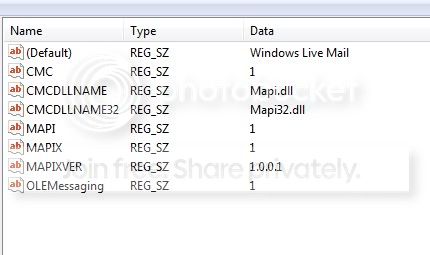
HKEY_LOCAL_MACHINE > Software > Microsoft > Windows Messaging Subsystem

The right pane should contain/look like the following:

mail-key.jpg


***Caution, if there are different entries in your Windows Messaging Subsystem write them down, take a picture or print screen and paste into Paint...something just incase you need to change it back***

Right-click (Default) > Modify...
In the Value data box type: Windows Live Mail
Click: OK

To add the other items right-click in the empty space in the right pane: New > String Value
- Name the new item as stated above
- Once again right-click > Modify...
- Enter the corresponding value
- Rinse and Repeat for all items. Then exit registry.

This has worked for me on three separate systems. Now the "send" function in both Word and Excel opens a new message from WLM.

I also read in another forum (but didn't try it) where someone suggested chagning the registry key:

HKEY_LOCAL_MACHINE > Software > Clients > Mail

from (Default) REG_SZ (value not set)
to (Default) REG_SZ Windows Live Mail

Note: For users who wish to email as PDF or XPS (it's not available by default), simply search for: "office 2007 save as pdf" and download the small 1mb file and run. The link is currently:

Download: 2007 Microsoft Office Add-in: Microsoft Save as PDF or XPS - Microsoft Download Center - Download Details

Hope this helps. Goodluck!
 

My Computer My Computer

At a glance

Windows 7 Professional 32 bit
OS
Windows 7 Professional 32 bit
Send word document to recipient

The option of my default "windows live mail" email is missing...from File, "Send to" in my word document (2003 Office). But if I copy the entire text from word into WordPad Program (found in Programs-Accessories) and click "Send to", the default wlm option works as it used to work sometime before in Microsoft Office 2003 word document. Also opening wlm and then attaching the MS office documents and emailing those, works. I do not have explanation, but it is what it is for now.
 

My Computer My Computer

At a glance

CaliforniaInspirion 36508 GB
Computer type
PC/Desktop
Computer Manufacturer/Model Number
Dell
OS
California
CPU
Inspirion 3650
Memory
8 GB
Antivirus
AV
Browser
Chrome
Back
Top