Sending Issue from Outlook 2010 release

keithox

New member
Local time
4:47 PM
Messages
3
Hi,

Having a strange, intermittent issue with sending mail from Outlook 2010. Every now and again when sending a mail, when you check the "outbox", the mail says there is no date to send the mail, it is marked as "none". The mail will remain there until it is deleted, restart Outlook and re-create the mail.

Any suggestions?

TIA
 

My Computer My Computer

OS
Win 7 RC
I've never known outbox to have a date on it...
I thought email in Outlook was either stamped when it was received or stamped when it's sent...
While in the Outbox, it's in "limbo"...
I think it's a security feature that allows won't allow people to print something like it was sent when it actually wasn't....

I've used Outlook from 97 to 2010 and never remember a date being part of it...
 

My Computer My Computer

Computer Manufacturer/Model Number
Sytemax
OS
7 Pro 64 Bit
CPU
8300 Quad 2.53Ghz
Motherboard
Asus
Memory
4GB DDR Crucial
Graphics Card(s)
Intel
Hi,

Having a strange, intermittent issue with sending mail from Outlook 2010. Every now and again when sending a mail, when you check the "outbox", the mail says there is no date to send the mail, it is marked as "none". The mail will remain there until it is deleted, restart Outlook and re-create the mail.

Any suggestions?

TIA
Keith, are you configured for POP 3 Mail?
 

My Computer My Computer

Computer Manufacturer/Model Number
Custom Build
OS
Windows 7 7600 1 X64
CPU
AMD PHENOM II X 550 PROCESSOR 3.1 ghz
Motherboard
ASUS M4A78-TE
Memory
Corsair 4 gig ddr 3
Graphics Card(s)
ati radeon 3300
Sound Card
ati hd
Monitor(s) Displays
syncmaster 2033sw
Screen Resolution
1600X900 60 hz refresh
Hard Drives
twin_seagates SATA's 1 TB & 500 Gig, hitachi_slimline 160 gig
PSU
antec_550 watt
Case
cooler master GLite
Cooling
stock_heat sink
Internet Speed
20mbs up/ 1.5mbs down
Other Info
favorite child "stewie"
favorite dog "brian"
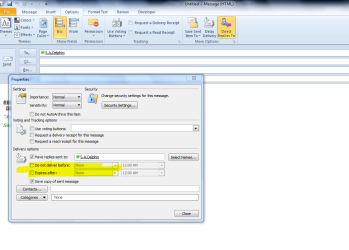
refer the attached screen shot... Anything is checked as i highlighted?...

Capture.PNG
 

My Computer My Computer

Computer Manufacturer/Model Number
wipro
OS
windows 7
CPU
wipro
Motherboard
intel
Memory
8 gb
Hard Drives
580 gb
similar problem

I have a similar problem using Windows 7 and Outlook 2010.
I can identify the cause but not the solution!

I use a laptop - but the ISP at home and work are not the same. At both locations I need to be able to send and receive emails - but do not know how to ensure that the outgoing emails are automatically sent through the right SMTP account for my location. Too often I click reply and forget to check and change the sending account. Previously I could just edit the sending account and then resend the message and it would just go. Recently it sticks in my outbox and show the Sent: none and I now have to delete it and recreate the message for it to go. So if sending fails what must I do to send the same message without recreating it.
 

My Computer My Computer

Computer Manufacturer/Model Number
Sony VGN-Z3
OS
Windows 7
Solution

:D

No one answered but I finally found a solution to my problem (at least on Office 2010):

Drag failed email from Outbox folder to Drafts folder on Outlook

Now you can double-click the message to edit the failed sending account

I just use the From pulldown to select the correct sending account

Now click Send and it should go OK


Now all I need is a rule to try the alternatives automatically or at least pop up a menu!

The Mac is much better because if sending fails it automatically pops up a window to allow an alternative account/server to be selected.
 

My Computer My Computer

Computer Manufacturer/Model Number
Sony VGN-Z3
OS
Windows 7
Back
Top