Sending Mail

Roderunner

Exterminator
Guru
Gold Member
VIP
Local time
7:50 PM
Messages
2,362
Location
Scotland
Hi Folks,

Is it possble to send mail without my address being included ?
 

My Computer

Computer Manufacturer/Model Number
Look in my Signature.
OS
Win7 H.Prem. 32bit+SP1
Yes ... it's just like a postcard.... you can fake the sender address. How do you send email (hotmail, gmail ... tell me)
 

My Computer

Computer type
Laptop
Computer Manufacturer/Model Number
ACER ASPIRE 5742G
OS
Microsoft Windows 7 Home Premium 64-bits 7601 Multiprocessor Free Service Pack 1
CPU
Intel(R) Core(TM) i3 CPU M 370 @ 2.40GHz
Motherboard
Acer Aspire 5742G
Memory
4,00 GB
Graphics Card(s)
ATI Mobility Radeon HD 5400 Series
Sound Card
(1) AMD High Definition Audio Device (2) Realtek High Defi
Screen Resolution
1366 x 768 x 32 bits (4294967296 colors) @ 60 Hz
Hard Drives
WDC WD5000BEVT-22ZAT0
If you are using an E-mail service (online) like G-Mail or Hotmail or Yahoo Mail, I do not think you can do that.
 
I send using WLM 2009 with Gmail.
 

My Computer

Computer Manufacturer/Model Number
Look in my Signature.
OS
Win7 H.Prem. 32bit+SP1

My Computer

Computer type
Laptop
Computer Manufacturer/Model Number
ACER ASPIRE 5742G
OS
Microsoft Windows 7 Home Premium 64-bits 7601 Multiprocessor Free Service Pack 1
CPU
Intel(R) Core(TM) i3 CPU M 370 @ 2.40GHz
Motherboard
Acer Aspire 5742G
Memory
4,00 GB
Graphics Card(s)
ATI Mobility Radeon HD 5400 Series
Sound Card
(1) AMD High Definition Audio Device (2) Realtek High Defi
Screen Resolution
1366 x 768 x 32 bits (4294967296 colors) @ 60 Hz
Hard Drives
WDC WD5000BEVT-22ZAT0
...Is it possble to send mail without my address being included?
Yes. You need to set up a fake account in WLM except for the servers tab. That needs to be for your normal email service provider. This is what the recipient would see upon checking the email properties:
From: "Example Name" <[email protected]>
To: "Recipient Name" <[email protected]>
Subject: test fake send account
Date: Sun, 29 Jul 2012 01:53:56 -0700
MIME-Version: 1.0
Content-Type: multipart/alternative;
boundary="----=_NextPart_000_0012_01CD6D2D.03B657D0"
X-Priority: 3
X-MSMail-Priority: Normal
Importance: Normal
X-Mailer: Microsoft Windows Live Mail 14.0.8117.416
X-MimeOLE: Produced By Microsoft MimeOLE V14.0.8117.416
This is a multi-part message in MIME format.

The email looks like this:
 

Attachments

  • Fake Send.JPG
    Fake Send.JPG
    16.4 KB · Views: 4

My Computer

Computer type
PC/Desktop
Computer Manufacturer/Model Number
OQO 2+
OS
Windows 8 Pro w/MC 32-bit
CPU
Intel Atom 1.86 GHz
Motherboard
OQO 2+
Memory
2 GB
Graphics Card(s)
Intel GMA 500
Sound Card
IDT
Monitor(s) Displays
LCD
Screen Resolution
800 x 480 (portable) 1280 x 1024 (docked)
Hard Drives
64 GB SSD
PSU
9 Ah Battery (portable) or OQO Brick (docked)
Case
Shirt Pocket Sized
Cooling
Tiny Fan
Keyboard
Slide out (portable) DiNovo Edge (docked)
Mouse
Eraser head (portable) Logitech Bluetooth (docked)
Internet Speed
WWAN or 802.11G (portable) T1 (docked)
Browser
IE 10
Other Info
DVD-RW OQO Docking Station
...Is it possble to send mail without my address being included?
Yes. You need to set up a fake account in WLM except for the servers tab. That needs to be for your normal email service provider. This is what the recipient would see upon checking the email properties:
From: "Example Name" <[email protected]>
To: "Recipient Name" <[email protected]>
Subject: test fake send account
Date: Sun, 29 Jul 2012 01:53:56 -0700
MIME-Version: 1.0
Content-Type: multipart/alternative;
boundary="----=_NextPart_000_0012_01CD6D2D.03B657D0"
X-Priority: 3
X-MSMail-Priority: Normal
Importance: Normal
X-Mailer: Microsoft Windows Live Mail 14.0.8117.416
X-MimeOLE: Produced By Microsoft MimeOLE V14.0.8117.416
This is a multi-part message in MIME format.

The email looks like this:
You have to enter your gmail address to send email through gmail smtp-servers! Your trick only works with normal ISP smtp-servers
 

My Computer

Computer type
Laptop
Computer Manufacturer/Model Number
ACER ASPIRE 5742G
OS
Microsoft Windows 7 Home Premium 64-bits 7601 Multiprocessor Free Service Pack 1
CPU
Intel(R) Core(TM) i3 CPU M 370 @ 2.40GHz
Motherboard
Acer Aspire 5742G
Memory
4,00 GB
Graphics Card(s)
ATI Mobility Radeon HD 5400 Series
Sound Card
(1) AMD High Definition Audio Device (2) Realtek High Defi
Screen Resolution
1366 x 768 x 32 bits (4294967296 colors) @ 60 Hz
Hard Drives
WDC WD5000BEVT-22ZAT0
I wasn't actually looking for how its done, just to know if it was possible.
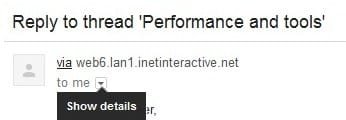
I get notified of new posts on another forum. This is what I get by looking in Gmail directly.

1.jpg
 

My Computer

Computer Manufacturer/Model Number
Look in my Signature.
OS
Win7 H.Prem. 32bit+SP1
...You have to enter your gmail address to send email through gmail smtp-servers! Your trick only works with normal ISP smtp-servers.
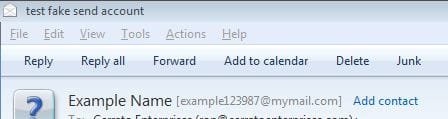
I haven't tried gmail but if they provide smtp/pop3 server names and if your gmail address is part of the authentication process (appearing on the server tab of WLM) then it's essentially the same as my example. I put my real email address in the server tab of the fake account since that is how I authenticate myself with the server. It did not show up as visible to the recipient in the resulting email.
 

My Computer

Computer type
PC/Desktop
Computer Manufacturer/Model Number
OQO 2+
OS
Windows 8 Pro w/MC 32-bit
CPU
Intel Atom 1.86 GHz
Motherboard
OQO 2+
Memory
2 GB
Graphics Card(s)
Intel GMA 500
Sound Card
IDT
Monitor(s) Displays
LCD
Screen Resolution
800 x 480 (portable) 1280 x 1024 (docked)
Hard Drives
64 GB SSD
PSU
9 Ah Battery (portable) or OQO Brick (docked)
Case
Shirt Pocket Sized
Cooling
Tiny Fan
Keyboard
Slide out (portable) DiNovo Edge (docked)
Mouse
Eraser head (portable) Logitech Bluetooth (docked)
Internet Speed
WWAN or 802.11G (portable) T1 (docked)
Browser
IE 10
Other Info
DVD-RW OQO Docking Station
Back
Top
