Solved Sennheiser Mic is way too quiet, but with mic boost on it has static.

Nneummonic

New member
Local time
3:08 PM
Messages
4
I recently got a new microphone, a Sennheiser 360 G4ME, after looking at the great reviews of it online.
I plugged the headset into my computer and the quality of the headphones was absolutely fine.
However, later on I decided to test out the microphone and I noticed a very constant soft static in the background. After doing some research online, I found that the source might be the Decibel booster in the levels tab of microphone options.
I turned the booster completely off, with the actual volume at 100%, and the mic became barely audible. After turning my system sound all the way up, I listened to it again, still fairly quiet, but there was no more static!
So that means my options are to have a good quality, but low volume voice, or a bad quality, but high volume voice!
I looked up mic tests of people with the same microphone as me on Youtube, and their mics are absolutely fine. They have no static in the background at all, their voice is at a good volume, and they review the great quality of the mic.

I'm hoping to either find a solution to this problem, or at least find a way to increase the volume without using microphone boost.

Please Help!
 

My Computer My Computer

At a glance

Windows 7 Professional 64bitIntel Core i7-3630QM @ 2.40GHz8.00 GBGeForce GTX 680M
Computer type
Laptop
Computer Manufacturer/Model Number
Alienware
OS
Windows 7 Professional 64bit
CPU
Intel Core i7-3630QM @ 2.40GHz
Memory
8.00 GB
Graphics Card(s)
GeForce GTX 680M
Antivirus
Malwarebytes Anti-Malware Premium
Browser
Google Chrome
Are you using the correct Dell supplied Sound Driver?

Can you try the headset/mic on a different PC to see what happens. Also, have you used a microphone before with the PC and did it work OK?
 

My Computer My Computer

At a glance

Windows 10 64 bitIntel i7 6700K16GB Corsair DominatorIntel CPU Graphics
Computer type
PC/Desktop
Computer Manufacturer/Model Number
My Own Build
OS
Windows 10 64 bit
CPU
Intel i7 6700K
Motherboard
ASUS ROG Maximus VIII Hero
Memory
16GB Corsair Dominator
Graphics Card(s)
Intel CPU Graphics
Sound Card
RealTek
Monitor(s) Displays
27" Dell S2719dgf
Screen Resolution
2560X1440
Hard Drives
1 TB Samsung 850 EVO SSD for Win 10 Pro
500GB Samsung 850 EVO SSD for Win 10 Insider
2 TB drive for backup
PSU
EVGA Supernova 750G2
Case
BeQuiet Silent Base 600
Cooling
Deepcool Captain 120EX
Keyboard
Microsoft Wireless 2000
Mouse
Microsoft wireless
Internet Speed
100 MB/sec (Cable)
Antivirus
Microsoft Defender and Malwarebytes
Browser
Edge/Firefox
Other Info
Cakewalk (Sonar) by BandLab and Studio One 4.1 Pro recording studio software. MOTU 896Mk3 Hybrid recording interface, Frontier Tranzport wireless control unit, Behringer X-Touch Control Surface.
Five USB connected optical drives for CD Audio production using Nero BurningROM
I reinstalled the sound driver actually, but everything is still the same.

I have a USB mic that I tested, and everything is working on there. I would use that one, but it's like 3 or 4 years old and all torn up. The mic on it is mostly fine, except for the fact that it's half the quality of my current headset.

Unfortunately I have no other computer to test in on, as I bought this laptop after my last one broke.

I really don't want to go back to USB headsets, especially after I spent $250 to get this PC 360.
 

My Computer My Computer

At a glance

Windows 7 Professional 64bitIntel Core i7-3630QM @ 2.40GHz8.00 GBGeForce GTX 680M
Computer type
Laptop
Computer Manufacturer/Model Number
Alienware
OS
Windows 7 Professional 64bit
CPU
Intel Core i7-3630QM @ 2.40GHz
Memory
8.00 GB
Graphics Card(s)
GeForce GTX 680M
Antivirus
Malwarebytes Anti-Malware Premium
Browser
Google Chrome
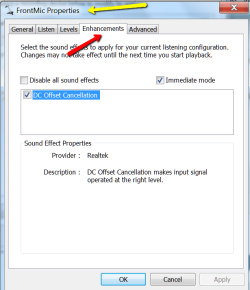
Check whether there are any enhancements - if yes, disable those except for "DC offset cancellation".
 

My Computer My Computer

At a glance

Vista, Windows7, Mint Mate, Zorin, Windows 8from 1.6GHz Duo to i7
Computer Manufacturer/Model Number
HP, Dell, Gateway, Toshiba - 4 laptops and 2 desktops
OS
Vista, Windows7, Mint Mate, Zorin, Windows 8
CPU
from 1.6GHz Duo to i7
Monitor(s) Displays
2x HP w2207
Hard Drives
5x HDD, 7x SSD, 12x Externals
Keyboard
with trackball - no mices
Mouse
Trackball mice
Internet Speed
DSL 6000
My first thought was to look in microphone properties for these enhancements, but I can't find anything about enhancements in there.

Could it be because my sound card doesn't support it? I have a Sound Blaster sound card, by the way.
 

My Computer My Computer

At a glance

Windows 7 Professional 64bitIntel Core i7-3630QM @ 2.40GHz8.00 GBGeForce GTX 680M
Computer type
Laptop
Computer Manufacturer/Model Number
Alienware
OS
Windows 7 Professional 64bit
CPU
Intel Core i7-3630QM @ 2.40GHz
Memory
8.00 GB
Graphics Card(s)
GeForce GTX 680M
Antivirus
Malwarebytes Anti-Malware Premium
Browser
Google Chrome
Not sure what you see. That's the situation on my system.
 

Attachments

  • 2014-04-25_2133.png
    2014-04-25_2133.png
    21.5 KB · Views: 0

My Computer My Computer

At a glance

Vista, Windows7, Mint Mate, Zorin, Windows 8from 1.6GHz Duo to i7
Computer Manufacturer/Model Number
HP, Dell, Gateway, Toshiba - 4 laptops and 2 desktops
OS
Vista, Windows7, Mint Mate, Zorin, Windows 8
CPU
from 1.6GHz Duo to i7
Monitor(s) Displays
2x HP w2207
Hard Drives
5x HDD, 7x SSD, 12x Externals
Keyboard
with trackball - no mices
Mouse
Trackball mice
Internet Speed
DSL 6000
I have the same options as you, just without the enhancements tab.

I seems to me that you have a Realtek sound card, right? I have a Sound Blaster one.
Sound Blaster does have a personal control panel, but I have investigated that and the only noise cancellation it offers makes me sound like I'm speaking through a pillow.

Am I maybe being too picky? My friends say I sound absolutely fine, but that is through skype, which has some noise cancellation built in.
 

My Computer My Computer

At a glance

Windows 7 Professional 64bitIntel Core i7-3630QM @ 2.40GHz8.00 GBGeForce GTX 680M
Computer type
Laptop
Computer Manufacturer/Model Number
Alienware
OS
Windows 7 Professional 64bit
CPU
Intel Core i7-3630QM @ 2.40GHz
Memory
8.00 GB
Graphics Card(s)
GeForce GTX 680M
Antivirus
Malwarebytes Anti-Malware Premium
Browser
Google Chrome
Welll, that's all the help I could offer. Sorry - I ran out of ideas, LOL.
 

My Computer My Computer

At a glance

Vista, Windows7, Mint Mate, Zorin, Windows 8from 1.6GHz Duo to i7
Computer Manufacturer/Model Number
HP, Dell, Gateway, Toshiba - 4 laptops and 2 desktops
OS
Vista, Windows7, Mint Mate, Zorin, Windows 8
CPU
from 1.6GHz Duo to i7
Monitor(s) Displays
2x HP w2207
Hard Drives
5x HDD, 7x SSD, 12x Externals
Keyboard
with trackball - no mices
Mouse
Trackball mice
Internet Speed
DSL 6000
Back
Top