Separate Data Partition - Why???

juanantoniod

Antonio
Power User
Local time
1:12 PM
Messages
300
Location
Los Angeles, CA
Hello,

I have been reading about creating a data partition and an OS partition, but I cannot understand why one would want to do this because even with the system "image", the data files still need to be backed up. Why isn't it okay to back up the data files wth the system image? In my setup, the OS and program files take up more space than the data files I have, and the configuration of the program files changes regularly, so I couldn't just make one system image and stay with that forever. I must make regular system images, as well as backup my data, so why not do it in one process?

Please forgive my confusion. I would appreciate any enlightenment. I am trying to set up my disc so that I have a backup to go to in case a progam or settings change makes my system unusable or unstable.

Currently, I have a 110 GB HD, and am using 25.9 for my system & data, 27.22 for 3 images of my system & data (1 image of original install, 1 or a stable install with all programs, and 1 of the latest configuration).

I have the "full" version of Macrium, which I use for images and backups.

Thanks for your help!
 

My Computer

Computer Manufacturer/Model Number
HP Pavilion Media Center PC m7350n
OS
Microsoft Windows 7 Home Premium 32-bit 7601 Multiprocessor Free Service Pack 1
CPU
Intel(R) Pentium(R) D CPU 2.80GHz
Motherboard
ASUSTek Computer INC. EMERY
Memory
2.00 GB
Graphics Card(s)
NVIDIA GeForce 6200SE TurboCache(TM)
Sound Card
Realtek High Definition Audio
Monitor(s) Displays
HP L1710 LCD Display
Screen Resolution
1280 x 1024 x 32 bits (4294967296 colors) @ 60 Hz
Hard Drives
(1) SAMSUNG SP2504C (2) EPSON Stylus Storage USB Device (3) Generic USB CF Reader USB Device (4) Generic USB MS Reader USB Device (5) Generic USB SD Reader USB Device (6) Generic USB SM Reader USB Device (7) Seagate FA GoFlex Desk USB Dev
Internet Speed
20+mbps
Here I run multiple hard drives and have the backup situation already solved with two drives designated for storage only. When things were first on the new build now in use the first image made was slightly renamed so that the now 3rd could be saved on the first of the two storage HDs.

The second not wanting to overwrite the first right away went to the second storage HD. With a regularly scheduled image being seen that would overwrite the previous image automatically and kept that upto date with your present software environment.

Just prior to the new build an image made during the first week of January was restored bringing everything back to that date except for files stored on the other drives totally isolated from any changes. With the Macrium Reflect program that dates each image created allowing multiple images to be stored on the same partition or drive where you simply select which one will be stored while those created using the Backup & Restore feature in 7 would simply overwrite the previous without renaming that.

The main idea behind any backup to start with is to prevent any catastropic loss of personal data and files. This is why many with a large capacity OS drive will often split it up into two partitions often seeing the second as D or of opting to use that for the optical drive F,G,H, or another work for backups made.

For those that opt to buy a second internal or an external HD spliting up the Host/boot OS drive wouldn't typically be seen especially with small capacity drives unless planning a dual boot setup with another OS if not older version of Windows. If you lack a second drive then a second partition on a large enough drive is often the choice made to preserve the present installation and files on that.
 

My Computers

System One System Two

  • Computer type
    PC/Desktop
    Computer Manufacturer/Model Number
    Custom builds = 2
    OS
    W7 Ultimate x64/W10 Pro x64/W11 Pro Triple Boot - Main PC W7 Remote PC Micro ATX W7 Pro x64/W11 Pro
    CPU
    AMD Phenom II X4 975 Deneb 3.6ghz - 965 2nd remote pc
    Motherboard
    Gigabyte GA-790XTA-UD4-Gigabyte GA-880GM-D2H remote pc
    Memory
    Kingston Hyper X DDR3 1600 1.5v 16gb - Hyper X Fury 8gb 2nd
    Graphics Card(s)
    MSI HD Radeon 5750 1gb - MSI HD Radeon 6450 on mini tower
    Sound Card
    Creative Labs X-Fi Xtreme Audio P - Realtek onooard 2nd case
    Monitor(s) Displays
    ASUS VW199T-P 19" HP 2082a Main-HP 2082a 20" remote pc
    Screen Resolution
    Asus 1440x900 - HP 1600x900
    Hard Drives
    WD Black 1TB HD per OS W7, W10, and pending W11 presently on 500gb OS Drive - Pending Triple 1TB HDs for Spanned Storage/backup volume
    Single 2TB external USB enclosure, single 1TB System 7 Host/Boot drive, Pending 8TB external HD for system image b
    PSU
    Corsair 750TX - primary / Corsair CX600 - second
    Case
    Antec 900-2 - SSD compatible / NZXT Vulcan mini tower
    Cooling
    Zalman CNPS9900A
    Keyboard
    AZIO L70 Backlit Letters Gaming - ONN Cordless/USB
    Mouse
    MSI DS200 Programmable, Logitech Cordless
    Internet Speed
    30mbps upgrade - primary hard wired - mini tower usb WiFi
    Antivirus
    GFI VIPRE Internet Security 2014 on W7 2016 beta on W10,
    Browser
    Cyberfox, WaterFox 64bit FF variants, FireFox x64, Pale Moon
    Other Info
    Accomdata fan cooled usb 2.0 PIDE/Sata II, III external enclosure.
    Sambient usb/eSata PATA/Sata II, III external enclosure.
  • Computer type
    PC/Desktop
    System Manufacturer/Model Number
    CUSTOM ASSEMBLY
    OS
    W7 Pro x64/W11 Pro
    CPU
    AMD Deneb 3.6ghz - 965
    Motherboard
    Gigabyte GA-880GM-D2H remote pc
    Memory
    Kingston Hyper X Fury 8gb
    Graphics Card(s)
    MSI HD Radeon 6450 DVI Output
    Sound Card
    Realtek onooard Creative or Other separate PENDING
    Monitor(s) Displays
    VIZIO 32" LCD TV Separate LCD Pending
    Screen Resolution
    1600x1080
    Hard Drives
    WD 500GB OS Host/Boot WD Green 1TB Storage/Backup
    PSU
    Corsair 600W - THERMALTAKE 600W spare case
    Case
    NZXT Vulcan mini tower
    Cooling
    Twin 120mm Top Fans - 240mm Side Cover
    Keyboard
    ONN Cordless/USB Logitech Cordless
    Mouse
    ONN USB/Cordless - Logitech Cordless
    Internet Speed
    DSL 5G
    Browser
    MS Edge, FireFox, WaterFox x64, FireFox Nightly
    Other Info
    OS Testing-Remote Access to Main TeamViewer
well for me personally, its like this: If windows goes south (and unfortunately it happens :'( ) then i dont want to lose all my personal data, so I have my OS set up like this.

Primary HDD - 500GB: split into 2 partitions, 200GB for Windows and Programs and 300GB for Data
Secondary HDD - 140GB this basically does my backups, because im nowhere near filling my 500GB hard drive, so at the moment total data usage is below the 140GB threshold.

in other words, I can reinstall, uninstall put a new OS on, system image what ever, and all my data will be safe on the Data partition, and if the primary Hard drive DOES fail, its all backed up onto the secondary hard drive anyway
 

My Computer

Computer type
PC/Desktop
Computer Manufacturer/Model Number
Medion Erazer (note to self: insert model number) - with custom additions
OS
Windows 10 Pro x64
CPU
Intel Core i5 7400 @ 3.00GHz
Motherboard
OEM supllied with PC
Memory
8GB 2133Mhz DDR4 (OEM supplied)
Graphics Card(s)
Gygabyte Windforce GTX 1050Ti (Factory Overclocked)
Sound Card
Realtek
Monitor(s) Displays
Acer Al1980 + HKC
Screen Resolution
1360*768(HKC) / 1280*1024(Acer)
Hard Drives
1TB Toshiba
1TB WD Caviar Green
120GB Samsung Evo 840
PSU
OEM supplied (no power rating on case)
Case
OEM Supplied
Cooling
Stock
Keyboard
Logitech Wireless
Mouse
Logitect Wireless
Internet Speed
40Mb/s Down 10Mb/s Up
Antivirus
Defender
Browser
Firefox
Heres my setup -

C: 60 gig ssd containing win 7 ultimate and 2 programs that run too slow on spinners. 60 gig is not a lot so my data is on the next drive. Its is recommended to not exceed 85% capacity so I stay well below that level. Runs nice and fast! :D

f: 320 gig spinner - I moved my profile to this drive ie my documents, my pictures, etc. Also any other data and programs are contained here.

G: 320 gig spinner. Copy of f: Each night I auto run a batch file to copy any new or changed files from f: to G:

If there are issues with C: I prefer to reinstall the OS rather than an image.

F: and G: are identical so if one of them fail, the other contains all of my data.

I am thinking about getting a 1t drive. Then I will raid 0 the 2 320 drives and copy to the large drive each night.

If you copy your data to another partition on the same drive and the drive fails, well you know the rest of the story.....

Just my $.03
 

My Computer

Computer Manufacturer/Model Number
Custom
OS
Windows 7 Ultimate Signature Edition
CPU
AMD Phenom II X4 955 Black Edition Deneb 3.2GHz
Motherboard
MSI 790FX-GD70
Memory
8 gig Corsair
Graphics Card(s)
2 X ATI Radeon 5770
Sound Card
On Board
Monitor(s) Displays
2 (soon 3 in eyefinity) :)
Screen Resolution
multiple
Hard Drives
SSD and spinners
PSU
750 Corsair
Case
XBlade
Cooling
much
Keyboard
G15
Mouse
510
Internet Speed
Cable - Turbo
jrjr, why don't you set up a software raid 1 (mirror) on your windows 7 rather than copying data over night?
 

My Computer

Computer Manufacturer/Model Number
Custom Build
OS
Windows 7 Ultimate x64 SP1 clean install
CPU
AMD Athlon 64 X2 6400+
Motherboard
Asus M2N-E SLI
Memory
4 GB
Graphics Card(s)
2 x NVidia Geforce 8600 GTS
Sound Card
Trust 5.1 Surround USB
Monitor(s) Displays
Benq FP931 19"
Screen Resolution
1280x1024@32bit@75MHz
Hard Drives
1 x Western Digital 500GB SATA (OS installation), 2 x Seagate 320GB SATA, 1 x Seagate 250GB IDE (in external USB box), 1 x TrekStor 750GB USB
PSU
650W
Keyboard
Logitech Cordless Desktop EX 100
Mouse
Logitech Cordless Optical
Internet Speed
8192 kbps / 640 kbps
Raid can go bad too... then all can be lost without a backup. Mirroring is fine for some things but my way is more foolproof. Only better way to backup is to backup to another machine or better yet, offsite.

I did have these drives set up in raid 1 before building this new machine and am familiar with raid. I worried all the time as it was not backing up to another drive. This was my solution until I get another drive. I have a web server on site as well that I use for some things but prefer not to rely on that for backups.
 

My Computer

Computer Manufacturer/Model Number
Custom
OS
Windows 7 Ultimate Signature Edition
CPU
AMD Phenom II X4 955 Black Edition Deneb 3.2GHz
Motherboard
MSI 790FX-GD70
Memory
8 gig Corsair
Graphics Card(s)
2 X ATI Radeon 5770
Sound Card
On Board
Monitor(s) Displays
2 (soon 3 in eyefinity) :)
Screen Resolution
multiple
Hard Drives
SSD and spinners
PSU
750 Corsair
Case
XBlade
Cooling
much
Keyboard
G15
Mouse
510
Internet Speed
Cable - Turbo
Thanks for all the help!

Thanks everyone for all the help everyone! Great insights into data management.
 

My Computer

Computer Manufacturer/Model Number
HP Pavilion Media Center PC m7350n
OS
Microsoft Windows 7 Home Premium 32-bit 7601 Multiprocessor Free Service Pack 1
CPU
Intel(R) Pentium(R) D CPU 2.80GHz
Motherboard
ASUSTek Computer INC. EMERY
Memory
2.00 GB
Graphics Card(s)
NVIDIA GeForce 6200SE TurboCache(TM)
Sound Card
Realtek High Definition Audio
Monitor(s) Displays
HP L1710 LCD Display
Screen Resolution
1280 x 1024 x 32 bits (4294967296 colors) @ 60 Hz
Hard Drives
(1) SAMSUNG SP2504C (2) EPSON Stylus Storage USB Device (3) Generic USB CF Reader USB Device (4) Generic USB MS Reader USB Device (5) Generic USB SD Reader USB Device (6) Generic USB SM Reader USB Device (7) Seagate FA GoFlex Desk USB Dev
Internet Speed
20+mbps
Primary or logical partition?

Hey all!

Thanks again for the help. I was going to partiton my HD so that I would have a data partition, and I need to know if it should be a primary or logical partition? I don't understand the difference. If it makes any difference, my file system is NTFS.

Thanks!

P.S. I currently have 2 primary partitions, one C: for system+data, and one D: for system recovery images. I am going to reduce the size of D: by 20GB for data, then follow the tutorial to move Documents, Pictures, Video, and Music to the 20GB partition. But what about the Outlook PST file? I currently have it in C:...\Documents\Outlook Data. Furthermore, since Windows depends on the C:\users\username\my [documents/pictures/video/music] convention, won't it screw it all up if I move these to another partition?
 
Last edited:

My Computer

Computer Manufacturer/Model Number
HP Pavilion Media Center PC m7350n
OS
Microsoft Windows 7 Home Premium 32-bit 7601 Multiprocessor Free Service Pack 1
CPU
Intel(R) Pentium(R) D CPU 2.80GHz
Motherboard
ASUSTek Computer INC. EMERY
Memory
2.00 GB
Graphics Card(s)
NVIDIA GeForce 6200SE TurboCache(TM)
Sound Card
Realtek High Definition Audio
Monitor(s) Displays
HP L1710 LCD Display
Screen Resolution
1280 x 1024 x 32 bits (4294967296 colors) @ 60 Hz
Hard Drives
(1) SAMSUNG SP2504C (2) EPSON Stylus Storage USB Device (3) Generic USB CF Reader USB Device (4) Generic USB MS Reader USB Device (5) Generic USB SD Reader USB Device (6) Generic USB SM Reader USB Device (7) Seagate FA GoFlex Desk USB Dev
Internet Speed
20+mbps
How large was it to begin with? You are not working with one of the larger drives while you could still more then 20gb for D depending on how large and how much will be put on your C primary.

As far as partition types Windows and any other OS generally go on a primary type partition while extended partitions to add one more when reaching the 4 partition limit hard drives see or when installing a different OS like Linux where some distros easily run off an extended or you are creating a swap partition used for virtual memory by the other OS there.
 

My Computers

System One System Two

  • Computer type
    PC/Desktop
    Computer Manufacturer/Model Number
    Custom builds = 2
    OS
    W7 Ultimate x64/W10 Pro x64/W11 Pro Triple Boot - Main PC W7 Remote PC Micro ATX W7 Pro x64/W11 Pro
    CPU
    AMD Phenom II X4 975 Deneb 3.6ghz - 965 2nd remote pc
    Motherboard
    Gigabyte GA-790XTA-UD4-Gigabyte GA-880GM-D2H remote pc
    Memory
    Kingston Hyper X DDR3 1600 1.5v 16gb - Hyper X Fury 8gb 2nd
    Graphics Card(s)
    MSI HD Radeon 5750 1gb - MSI HD Radeon 6450 on mini tower
    Sound Card
    Creative Labs X-Fi Xtreme Audio P - Realtek onooard 2nd case
    Monitor(s) Displays
    ASUS VW199T-P 19" HP 2082a Main-HP 2082a 20" remote pc
    Screen Resolution
    Asus 1440x900 - HP 1600x900
    Hard Drives
    WD Black 1TB HD per OS W7, W10, and pending W11 presently on 500gb OS Drive - Pending Triple 1TB HDs for Spanned Storage/backup volume
    Single 2TB external USB enclosure, single 1TB System 7 Host/Boot drive, Pending 8TB external HD for system image b
    PSU
    Corsair 750TX - primary / Corsair CX600 - second
    Case
    Antec 900-2 - SSD compatible / NZXT Vulcan mini tower
    Cooling
    Zalman CNPS9900A
    Keyboard
    AZIO L70 Backlit Letters Gaming - ONN Cordless/USB
    Mouse
    MSI DS200 Programmable, Logitech Cordless
    Internet Speed
    30mbps upgrade - primary hard wired - mini tower usb WiFi
    Antivirus
    GFI VIPRE Internet Security 2014 on W7 2016 beta on W10,
    Browser
    Cyberfox, WaterFox 64bit FF variants, FireFox x64, Pale Moon
    Other Info
    Accomdata fan cooled usb 2.0 PIDE/Sata II, III external enclosure.
    Sambient usb/eSata PATA/Sata II, III external enclosure.
  • Computer type
    PC/Desktop
    System Manufacturer/Model Number
    CUSTOM ASSEMBLY
    OS
    W7 Pro x64/W11 Pro
    CPU
    AMD Deneb 3.6ghz - 965
    Motherboard
    Gigabyte GA-880GM-D2H remote pc
    Memory
    Kingston Hyper X Fury 8gb
    Graphics Card(s)
    MSI HD Radeon 6450 DVI Output
    Sound Card
    Realtek onooard Creative or Other separate PENDING
    Monitor(s) Displays
    VIZIO 32" LCD TV Separate LCD Pending
    Screen Resolution
    1600x1080
    Hard Drives
    WD 500GB OS Host/Boot WD Green 1TB Storage/Backup
    PSU
    Corsair 600W - THERMALTAKE 600W spare case
    Case
    NZXT Vulcan mini tower
    Cooling
    Twin 120mm Top Fans - 240mm Side Cover
    Keyboard
    ONN Cordless/USB Logitech Cordless
    Mouse
    ONN USB/Cordless - Logitech Cordless
    Internet Speed
    DSL 5G
    Browser
    MS Edge, FireFox, WaterFox x64, FireFox Nightly
    Other Info
    OS Testing-Remote Access to Main TeamViewer
Thanks, Nighthawk,

I currently have one HD in my notebook with 110GB, which was previously 80 system+ data and 30 for system backup images. Last night I used Partition Magic to expand my system backup images partition to 50, but now realize I do not need to do that if I am going to only image the system and not the data. So, I am going to use Partition Magic to reduce it back to 30, leaving 20 for data, and 60 for system. Then, for now, I am going to subscribe to Mozy online unlimited, currently I am using the Home (limited) version, and backup all of my Data + System Images to Mozy. Then, when I can afford to add hardware, I am probably going to add NAS, so that I can backup in the background over the network, like I now do with Mozy.
 

My Computer

Computer Manufacturer/Model Number
HP Pavilion Media Center PC m7350n
OS
Microsoft Windows 7 Home Premium 32-bit 7601 Multiprocessor Free Service Pack 1
CPU
Intel(R) Pentium(R) D CPU 2.80GHz
Motherboard
ASUSTek Computer INC. EMERY
Memory
2.00 GB
Graphics Card(s)
NVIDIA GeForce 6200SE TurboCache(TM)
Sound Card
Realtek High Definition Audio
Monitor(s) Displays
HP L1710 LCD Display
Screen Resolution
1280 x 1024 x 32 bits (4294967296 colors) @ 60 Hz
Hard Drives
(1) SAMSUNG SP2504C (2) EPSON Stylus Storage USB Device (3) Generic USB CF Reader USB Device (4) Generic USB MS Reader USB Device (5) Generic USB SD Reader USB Device (6) Generic USB SM Reader USB Device (7) Seagate FA GoFlex Desk USB Dev
Internet Speed
20+mbps
Another place I tend to leave files believe it or not is the Windows Live Hotmail's SkyDrive! You can add files all day long and the storage will simply grow as well as managing online folders. Cloud is another thing coming in fast for commercial as well as private there!
 

My Computers

System One System Two

  • Computer type
    PC/Desktop
    Computer Manufacturer/Model Number
    Custom builds = 2
    OS
    W7 Ultimate x64/W10 Pro x64/W11 Pro Triple Boot - Main PC W7 Remote PC Micro ATX W7 Pro x64/W11 Pro
    CPU
    AMD Phenom II X4 975 Deneb 3.6ghz - 965 2nd remote pc
    Motherboard
    Gigabyte GA-790XTA-UD4-Gigabyte GA-880GM-D2H remote pc
    Memory
    Kingston Hyper X DDR3 1600 1.5v 16gb - Hyper X Fury 8gb 2nd
    Graphics Card(s)
    MSI HD Radeon 5750 1gb - MSI HD Radeon 6450 on mini tower
    Sound Card
    Creative Labs X-Fi Xtreme Audio P - Realtek onooard 2nd case
    Monitor(s) Displays
    ASUS VW199T-P 19" HP 2082a Main-HP 2082a 20" remote pc
    Screen Resolution
    Asus 1440x900 - HP 1600x900
    Hard Drives
    WD Black 1TB HD per OS W7, W10, and pending W11 presently on 500gb OS Drive - Pending Triple 1TB HDs for Spanned Storage/backup volume
    Single 2TB external USB enclosure, single 1TB System 7 Host/Boot drive, Pending 8TB external HD for system image b
    PSU
    Corsair 750TX - primary / Corsair CX600 - second
    Case
    Antec 900-2 - SSD compatible / NZXT Vulcan mini tower
    Cooling
    Zalman CNPS9900A
    Keyboard
    AZIO L70 Backlit Letters Gaming - ONN Cordless/USB
    Mouse
    MSI DS200 Programmable, Logitech Cordless
    Internet Speed
    30mbps upgrade - primary hard wired - mini tower usb WiFi
    Antivirus
    GFI VIPRE Internet Security 2014 on W7 2016 beta on W10,
    Browser
    Cyberfox, WaterFox 64bit FF variants, FireFox x64, Pale Moon
    Other Info
    Accomdata fan cooled usb 2.0 PIDE/Sata II, III external enclosure.
    Sambient usb/eSata PATA/Sata II, III external enclosure.
  • Computer type
    PC/Desktop
    System Manufacturer/Model Number
    CUSTOM ASSEMBLY
    OS
    W7 Pro x64/W11 Pro
    CPU
    AMD Deneb 3.6ghz - 965
    Motherboard
    Gigabyte GA-880GM-D2H remote pc
    Memory
    Kingston Hyper X Fury 8gb
    Graphics Card(s)
    MSI HD Radeon 6450 DVI Output
    Sound Card
    Realtek onooard Creative or Other separate PENDING
    Monitor(s) Displays
    VIZIO 32" LCD TV Separate LCD Pending
    Screen Resolution
    1600x1080
    Hard Drives
    WD 500GB OS Host/Boot WD Green 1TB Storage/Backup
    PSU
    Corsair 600W - THERMALTAKE 600W spare case
    Case
    NZXT Vulcan mini tower
    Cooling
    Twin 120mm Top Fans - 240mm Side Cover
    Keyboard
    ONN Cordless/USB Logitech Cordless
    Mouse
    ONN USB/Cordless - Logitech Cordless
    Internet Speed
    DSL 5G
    Browser
    MS Edge, FireFox, WaterFox x64, FireFox Nightly
    Other Info
    OS Testing-Remote Access to Main TeamViewer
Isn't Skydrive pretty slow?
 

My Computer

Computer Manufacturer/Model Number
Custom
OS
Windows 7 Ultimate Signature Edition
CPU
AMD Phenom II X4 955 Black Edition Deneb 3.2GHz
Motherboard
MSI 790FX-GD70
Memory
8 gig Corsair
Graphics Card(s)
2 X ATI Radeon 5770
Sound Card
On Board
Monitor(s) Displays
2 (soon 3 in eyefinity) :)
Screen Resolution
multiple
Hard Drives
SSD and spinners
PSU
750 Corsair
Case
XBlade
Cooling
much
Keyboard
G15
Mouse
510
Internet Speed
Cable - Turbo
I think moving around between folders there is the slow part since you end up reloading the main SkyDrive page while uploading docs and files go rather swiftly. If you already are using the Live Hotmail that's one option to take advantage of however rather then any paid online storage.

With SkyDrive another program someone mentioned sometime back is the Gladinet Cloud Desktop which allows you to have a virtual folder on your main drive for direct uploads into SkyDrive. That came in quite handy when first getting the XP Mode and other VM OSs up and running where only the XP Mode offered the integrated components support for direct access to your regular drives.

Have any files you need on a virtual hard drive but not in the XP Mode? That was a large help for seeing files uploaded and then transferred to the vhd. With something like SkyDrive you can also share things with your regular Live contacts including photos, docs, various files, etc. rather then seeing a file attached being too large to send. There is the size limit of 50mb per file however.
 

My Computers

System One System Two

  • Computer type
    PC/Desktop
    Computer Manufacturer/Model Number
    Custom builds = 2
    OS
    W7 Ultimate x64/W10 Pro x64/W11 Pro Triple Boot - Main PC W7 Remote PC Micro ATX W7 Pro x64/W11 Pro
    CPU
    AMD Phenom II X4 975 Deneb 3.6ghz - 965 2nd remote pc
    Motherboard
    Gigabyte GA-790XTA-UD4-Gigabyte GA-880GM-D2H remote pc
    Memory
    Kingston Hyper X DDR3 1600 1.5v 16gb - Hyper X Fury 8gb 2nd
    Graphics Card(s)
    MSI HD Radeon 5750 1gb - MSI HD Radeon 6450 on mini tower
    Sound Card
    Creative Labs X-Fi Xtreme Audio P - Realtek onooard 2nd case
    Monitor(s) Displays
    ASUS VW199T-P 19" HP 2082a Main-HP 2082a 20" remote pc
    Screen Resolution
    Asus 1440x900 - HP 1600x900
    Hard Drives
    WD Black 1TB HD per OS W7, W10, and pending W11 presently on 500gb OS Drive - Pending Triple 1TB HDs for Spanned Storage/backup volume
    Single 2TB external USB enclosure, single 1TB System 7 Host/Boot drive, Pending 8TB external HD for system image b
    PSU
    Corsair 750TX - primary / Corsair CX600 - second
    Case
    Antec 900-2 - SSD compatible / NZXT Vulcan mini tower
    Cooling
    Zalman CNPS9900A
    Keyboard
    AZIO L70 Backlit Letters Gaming - ONN Cordless/USB
    Mouse
    MSI DS200 Programmable, Logitech Cordless
    Internet Speed
    30mbps upgrade - primary hard wired - mini tower usb WiFi
    Antivirus
    GFI VIPRE Internet Security 2014 on W7 2016 beta on W10,
    Browser
    Cyberfox, WaterFox 64bit FF variants, FireFox x64, Pale Moon
    Other Info
    Accomdata fan cooled usb 2.0 PIDE/Sata II, III external enclosure.
    Sambient usb/eSata PATA/Sata II, III external enclosure.
  • Computer type
    PC/Desktop
    System Manufacturer/Model Number
    CUSTOM ASSEMBLY
    OS
    W7 Pro x64/W11 Pro
    CPU
    AMD Deneb 3.6ghz - 965
    Motherboard
    Gigabyte GA-880GM-D2H remote pc
    Memory
    Kingston Hyper X Fury 8gb
    Graphics Card(s)
    MSI HD Radeon 6450 DVI Output
    Sound Card
    Realtek onooard Creative or Other separate PENDING
    Monitor(s) Displays
    VIZIO 32" LCD TV Separate LCD Pending
    Screen Resolution
    1600x1080
    Hard Drives
    WD 500GB OS Host/Boot WD Green 1TB Storage/Backup
    PSU
    Corsair 600W - THERMALTAKE 600W spare case
    Case
    NZXT Vulcan mini tower
    Cooling
    Twin 120mm Top Fans - 240mm Side Cover
    Keyboard
    ONN Cordless/USB Logitech Cordless
    Mouse
    ONN USB/Cordless - Logitech Cordless
    Internet Speed
    DSL 5G
    Browser
    MS Edge, FireFox, WaterFox x64, FireFox Nightly
    Other Info
    OS Testing-Remote Access to Main TeamViewer
Couple of points in regards to the OP's questions:

The tutorial referenced by another poster above, shows you how to move the location of the main user data folders (e.g., documents, videos, photos, music, downloads) without messing up the pointers (or whatever they're called) that let other programs properly find and interact with these folders.

There are several advantages for separating out the user data in those folders from the partition the OS is on. For one thing, doing so will greatly reduce the size of the OS partition enabling the user to migrate the OS to a smaller, much faster, SSD drive. Even if you don't intend to do that right now, you probably will want to at some point in the future when SSD drives become more affordable. So it doesn't hurt to get that OS partition down to a smaller size to be ready for migrating the OS partition to an SSD eventually.

Another advantage is that once the OS and the data are on separate partitions, you can backup the OS and the data separately on different schedules and, optionally, to different, storage media (perhaps making use of smaller backup drives that wouldn't be able to hold both the OS and data together).

For example, after I split out my user data folders to a second internal D drive, my OS (and installed programs) partition only contained about 80 GB of files. The data partition located on a separate drive contained about 180 GB of data. This enabled me to set up separate schedules and storage locations for the OS backup and the data backup. The OS gets backed up to an old 200 GB laptop drive I wasn't using which is connected to my laptop via a hard drive dock that connects via the esata port on my laptop. If the data was included in that backup, it wouldn't fit on that 200 GB drive. So breaking it apart like that enabled me to make good use of this old 200 GB drive. Also, because of the fast transfer speed of the esata connection as well as the now smaller size of the partition to be backed up, making a complete (not incremental) encrypted backup of the OS partition now takes less than 10 minutes using Acronis TIH. Since backups of that partition now complete so quickly, it makes it more convenient for me to set a more frequent back up schedule and to make more complete (i.e., non incremental) backups, which imo are more reliable than making numerous incremental backups on top of one complete backup.

Also, in my particular case (which might not apply to someone else) I don't feel the need to back up the data partition as frequently as I do the OS/programs partition, so since they are on separate partitions, I can have each of those backups running on a different schedule as appropriate.

If you use a good backup program like Acronis, Macrium or Paragon etc., scheduling these backups is easy and is not really any more complicated than backing up one huge partition that contains everything all in one (more time consuming) shot.

I'm sure there are additional advantages but these are the ones that jump out to me and that have made a real difference and convenience to me since I followed the above mentioned tutorial (thanks Brink) and put my data folders on a separate partition (actually a separate physical drive, in my case).
 
Last edited:

My Computer

Computer Manufacturer/Model Number
HP DV8t quad
OS
Windows 7 Ultimate x64 (Retail)
CPU
i7-Q 720
Motherboard
Motherboard Chipset Intel Ibex Peak-M PM55, Intel Lynnfield
Memory
6 GB
Graphics Card(s)
nVidia GeForce GT 230M (1GB)
Sound Card
IDT High Definition Audio CODEC
Monitor(s) Displays
18.4 inch HP Infinity FHD (Samsung 184HT03-001)
Screen Resolution
1920 x 1080
Hard Drives
Hitachi 500GB 7200 rpm (x2)
Seagate FreeAgent 1.5 TB External USB (x2)
Thermaltake BlacX eSATA/USB 2.0 3.5/2.5 HD dock
Cooling
Zalman NC-2000 notebook cooling pad
Keyboard
laptop
Mouse
Logitech VX Revolution
Other Info
Backup Unit: Lenovo T61p
  • Like
Reactions: JMH
That would work well for the desktop where you have the room for a second even 3rd or 4th and the last build here 5th HD to work with. Unfortunately juanantonoid is only working with a 110gb 2.5" HD in a notebook where only some portable units allow you to remove the optical drive to add in a second HD.

Compact is compact there unfortunately where most simply opt to buy an external usb drive for use as a main storage/backup device. The online option however eliminates the need to carry a portable HD around along with a notebook or laptop where you simply download and open or upload files to be saved until sometime later you can download them for local storage.

Here I invested in extra drives for more then desktop since I still keep XP and Vista updates and other files onhand for older builds in order to wipe their drives and restore them for use. for example one old XP case being set up for a new owner(student use) will first need to be cleaned thoroughly(entire drive wiped clean) once the updates stored locally on that drive no longer available are backed up first.

For preserving an entire drive like the new build's own and while both the Macrium Reflect and Acronis are great programs I have been creating full system images which will restore everything intact the way it was at the time the image is created. A large enough second D partition on a small drive or second drive will store the image until and if needed at some point later.

Images can also be stored on several blank dvd-rws if you have the time and the blank disks onhand and lack the drive space for them. That's one good thing first seen with Vista Ultimate and now in most editions of 7! :D
 

My Computers

System One System Two

  • Computer type
    PC/Desktop
    Computer Manufacturer/Model Number
    Custom builds = 2
    OS
    W7 Ultimate x64/W10 Pro x64/W11 Pro Triple Boot - Main PC W7 Remote PC Micro ATX W7 Pro x64/W11 Pro
    CPU
    AMD Phenom II X4 975 Deneb 3.6ghz - 965 2nd remote pc
    Motherboard
    Gigabyte GA-790XTA-UD4-Gigabyte GA-880GM-D2H remote pc
    Memory
    Kingston Hyper X DDR3 1600 1.5v 16gb - Hyper X Fury 8gb 2nd
    Graphics Card(s)
    MSI HD Radeon 5750 1gb - MSI HD Radeon 6450 on mini tower
    Sound Card
    Creative Labs X-Fi Xtreme Audio P - Realtek onooard 2nd case
    Monitor(s) Displays
    ASUS VW199T-P 19" HP 2082a Main-HP 2082a 20" remote pc
    Screen Resolution
    Asus 1440x900 - HP 1600x900
    Hard Drives
    WD Black 1TB HD per OS W7, W10, and pending W11 presently on 500gb OS Drive - Pending Triple 1TB HDs for Spanned Storage/backup volume
    Single 2TB external USB enclosure, single 1TB System 7 Host/Boot drive, Pending 8TB external HD for system image b
    PSU
    Corsair 750TX - primary / Corsair CX600 - second
    Case
    Antec 900-2 - SSD compatible / NZXT Vulcan mini tower
    Cooling
    Zalman CNPS9900A
    Keyboard
    AZIO L70 Backlit Letters Gaming - ONN Cordless/USB
    Mouse
    MSI DS200 Programmable, Logitech Cordless
    Internet Speed
    30mbps upgrade - primary hard wired - mini tower usb WiFi
    Antivirus
    GFI VIPRE Internet Security 2014 on W7 2016 beta on W10,
    Browser
    Cyberfox, WaterFox 64bit FF variants, FireFox x64, Pale Moon
    Other Info
    Accomdata fan cooled usb 2.0 PIDE/Sata II, III external enclosure.
    Sambient usb/eSata PATA/Sata II, III external enclosure.
  • Computer type
    PC/Desktop
    System Manufacturer/Model Number
    CUSTOM ASSEMBLY
    OS
    W7 Pro x64/W11 Pro
    CPU
    AMD Deneb 3.6ghz - 965
    Motherboard
    Gigabyte GA-880GM-D2H remote pc
    Memory
    Kingston Hyper X Fury 8gb
    Graphics Card(s)
    MSI HD Radeon 6450 DVI Output
    Sound Card
    Realtek onooard Creative or Other separate PENDING
    Monitor(s) Displays
    VIZIO 32" LCD TV Separate LCD Pending
    Screen Resolution
    1600x1080
    Hard Drives
    WD 500GB OS Host/Boot WD Green 1TB Storage/Backup
    PSU
    Corsair 600W - THERMALTAKE 600W spare case
    Case
    NZXT Vulcan mini tower
    Cooling
    Twin 120mm Top Fans - 240mm Side Cover
    Keyboard
    ONN Cordless/USB Logitech Cordless
    Mouse
    ONN USB/Cordless - Logitech Cordless
    Internet Speed
    DSL 5G
    Browser
    MS Edge, FireFox, WaterFox x64, FireFox Nightly
    Other Info
    OS Testing-Remote Access to Main TeamViewer
Actually, I'm on a laptop that has two internal hard drives, plus I'm using a combination of external USB drives (in their own enclosures) plus a Thermaltake 3.5/2.5 inch hard drive dock that connects via either esata or USB 2.0.

Btw, I highly recommend getting a hard drive dock that supports both desktop and laptop sata drives because the docks are inexpensive and they allow using bare desktop or laptop hard drives which are also usually less expensive than buying external hard drives with their own enclosures. The bare drives pop in and out of the "dock" like bread in a toaster. Very convenient for backing up and keeping the drives off (i.e., out of the network) when not actually engaged in backing up.

Also, if the user gets one that has an esata connection as well as USB, one can make use of the much faster esata connection, if available on the user's current machine. I guess USB 3.0 will soon be another commonly available fast connection option.

Anyway, these hard drive docks are really very inexpensive. Newegg had a good one (the same one I'm using) on sale last week for ~$24 after MIR with free shipping to the continental US. But they normally cost in the $30's with free shipping from Amazon which is still very inexpensive for such a useful and versatile piece of equipment.
 

My Computer

Computer Manufacturer/Model Number
HP DV8t quad
OS
Windows 7 Ultimate x64 (Retail)
CPU
i7-Q 720
Motherboard
Motherboard Chipset Intel Ibex Peak-M PM55, Intel Lynnfield
Memory
6 GB
Graphics Card(s)
nVidia GeForce GT 230M (1GB)
Sound Card
IDT High Definition Audio CODEC
Monitor(s) Displays
18.4 inch HP Infinity FHD (Samsung 184HT03-001)
Screen Resolution
1920 x 1080
Hard Drives
Hitachi 500GB 7200 rpm (x2)
Seagate FreeAgent 1.5 TB External USB (x2)
Thermaltake BlacX eSATA/USB 2.0 3.5/2.5 HD dock
Cooling
Zalman NC-2000 notebook cooling pad
Keyboard
laptop
Mouse
Logitech VX Revolution
Other Info
Backup Unit: Lenovo T61p
Followed instructions, now need help.

Hi all,

First, thanks a lot for the discussion about all of the methods of making backups. I ended up breaking up my 110GB HD into 3 partitions, c: for the OS+apps (50GB), d: for windows 7 recovery system images (30GB), of which I will keep 3:first, fresh stable install, latest stable install, and the install before that, and j: for data (30GB). Periodically, I will delete the previous system image and create a new fresh install image. For the short term, I am going to subscribe to Mozy unlimited for backing up both the data and images. Then, when I can afford to buy storage space, and figure out how I want to do it, I will backup to external storage instead.

Now, having "moved" all of my "data" files from c:\users\antonio to j:\, following the instructions in the whs video tutorial to the letter, I have a problem.

This is how I started:

I looked at my C: drive libraries, they each had "folders" in them named My Documents, etc. (from now on when I say this it also applies to Pictures, Videos, and Music as well). So, I went to the new J: partition and created My Documents, etc. folders. [As directed by the video tutorial.] Then, when I went to the properties of the My Documents folder, to "Move Location", and the existing folder location was named simply Documents. So, I renamed the destination folder to Documents, to follow the instructions in the video to the letter. Then I moved the Documents from the C:\users\antonio\documents to J:\documents.

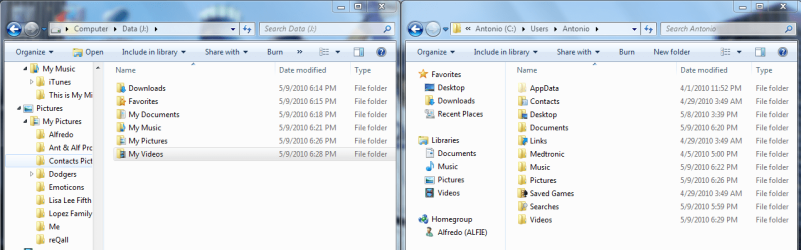
Here is the part I do not understand. the folder in the J: partition is named "My Documents" instead of just Documents. It seems as though the procedure was correct, but somehow the system thought on its own to rename the folder My Documents. (See the attached image of my C: and J: directories after the move.)

I know that the "My" structure was created (I think) by Microsoft when it came out with some version of Windows a while back, but I thoght that I read they dropped the "My" with Windows 7.

What is correct? What should I do?

I also checked in the Documents folder in the tree on the right side and it still has files in it, but as you can see, it no longer has the Documents icon on the folder. Also, when I go to properties, it says they are in the C:\users\antonio\ directory. It appears that they are not the same files. I just created the ~Antonio folder in the C: (right hand side) and it did not appear even after refreshing the J: (left side). Also, the "Auto Purchase 2010" folder is missing from the right side C: , but it is correctly listed (I think) in the left side. Help! :confused:

The other folders (Music, Video, Photos) in the C: drive, are empty. But the ones on the J: partition contain the correct files. I also checked in DOS (otherwise known as command prompt) and these are indeed separate file folder structures.

How did I get a "duplicate" copy of my documents, albeit not the current one, and can I delete the one on C: if the one on J: is correct, or is there some operating system redirect that is not apparent, and I will end up deleting all my documents?

Also, why did it leave behind the empty folders Music, Photos, and Videos, in the source directory? Can these folders be safely deleted?

Please let me know your thought; I appreciate hearing from you all.

Thanks!
 

Attachments

  • Hard Disk File Sturcture.png
    Hard Disk File Sturcture.png
    54 KB · Views: 10
  • Hard Drive Documents Structure.png
    Hard Drive Documents Structure.png
    42.9 KB · Views: 5

My Computer

Computer Manufacturer/Model Number
HP Pavilion Media Center PC m7350n
OS
Microsoft Windows 7 Home Premium 32-bit 7601 Multiprocessor Free Service Pack 1
CPU
Intel(R) Pentium(R) D CPU 2.80GHz
Motherboard
ASUSTek Computer INC. EMERY
Memory
2.00 GB
Graphics Card(s)
NVIDIA GeForce 6200SE TurboCache(TM)
Sound Card
Realtek High Definition Audio
Monitor(s) Displays
HP L1710 LCD Display
Screen Resolution
1280 x 1024 x 32 bits (4294967296 colors) @ 60 Hz
Hard Drives
(1) SAMSUNG SP2504C (2) EPSON Stylus Storage USB Device (3) Generic USB CF Reader USB Device (4) Generic USB MS Reader USB Device (5) Generic USB SD Reader USB Device (6) Generic USB SM Reader USB Device (7) Seagate FA GoFlex Desk USB Dev
Internet Speed
20+mbps
The default folder name under your user account name in 7 is "My Documents". Apparently one attempt saw Windows name the duplicate folder on the other partition correctly. You don't want to delete the one presently found on C however. Any empty duplicates on the other partition are yours to decide on there and if found empty are rather useless if the original still shows files there.

For hand picking individual items like files and folders the Windows Easy Transfer is the tool for selective backups like that while creating a System Image with the Backup & Restore option in the Control Panel takes a snapshot of the entire OS drive or partition actually turning everything into an archive in the location you driect it to.

Note when going to restore an image everything presently seen on C is wiped in order to unpack the image previously created. But you should find all programs working as they had been at the time the image was created. I ran a test on that lately to revert the system from it's March condition back to what was on at the beginning of the year and that was what was seen!

For saving more then one image you can add a letter or number onto the name of the folder name so that the next image won't simply overwrite it since you will be using the exact same location(D) for each new one. Eventually however you have to remove one or more as the 30gb fills rather quickly.
 

My Computers

System One System Two

  • Computer type
    PC/Desktop
    Computer Manufacturer/Model Number
    Custom builds = 2
    OS
    W7 Ultimate x64/W10 Pro x64/W11 Pro Triple Boot - Main PC W7 Remote PC Micro ATX W7 Pro x64/W11 Pro
    CPU
    AMD Phenom II X4 975 Deneb 3.6ghz - 965 2nd remote pc
    Motherboard
    Gigabyte GA-790XTA-UD4-Gigabyte GA-880GM-D2H remote pc
    Memory
    Kingston Hyper X DDR3 1600 1.5v 16gb - Hyper X Fury 8gb 2nd
    Graphics Card(s)
    MSI HD Radeon 5750 1gb - MSI HD Radeon 6450 on mini tower
    Sound Card
    Creative Labs X-Fi Xtreme Audio P - Realtek onooard 2nd case
    Monitor(s) Displays
    ASUS VW199T-P 19" HP 2082a Main-HP 2082a 20" remote pc
    Screen Resolution
    Asus 1440x900 - HP 1600x900
    Hard Drives
    WD Black 1TB HD per OS W7, W10, and pending W11 presently on 500gb OS Drive - Pending Triple 1TB HDs for Spanned Storage/backup volume
    Single 2TB external USB enclosure, single 1TB System 7 Host/Boot drive, Pending 8TB external HD for system image b
    PSU
    Corsair 750TX - primary / Corsair CX600 - second
    Case
    Antec 900-2 - SSD compatible / NZXT Vulcan mini tower
    Cooling
    Zalman CNPS9900A
    Keyboard
    AZIO L70 Backlit Letters Gaming - ONN Cordless/USB
    Mouse
    MSI DS200 Programmable, Logitech Cordless
    Internet Speed
    30mbps upgrade - primary hard wired - mini tower usb WiFi
    Antivirus
    GFI VIPRE Internet Security 2014 on W7 2016 beta on W10,
    Browser
    Cyberfox, WaterFox 64bit FF variants, FireFox x64, Pale Moon
    Other Info
    Accomdata fan cooled usb 2.0 PIDE/Sata II, III external enclosure.
    Sambient usb/eSata PATA/Sata II, III external enclosure.
  • Computer type
    PC/Desktop
    System Manufacturer/Model Number
    CUSTOM ASSEMBLY
    OS
    W7 Pro x64/W11 Pro
    CPU
    AMD Deneb 3.6ghz - 965
    Motherboard
    Gigabyte GA-880GM-D2H remote pc
    Memory
    Kingston Hyper X Fury 8gb
    Graphics Card(s)
    MSI HD Radeon 6450 DVI Output
    Sound Card
    Realtek onooard Creative or Other separate PENDING
    Monitor(s) Displays
    VIZIO 32" LCD TV Separate LCD Pending
    Screen Resolution
    1600x1080
    Hard Drives
    WD 500GB OS Host/Boot WD Green 1TB Storage/Backup
    PSU
    Corsair 600W - THERMALTAKE 600W spare case
    Case
    NZXT Vulcan mini tower
    Cooling
    Twin 120mm Top Fans - 240mm Side Cover
    Keyboard
    ONN Cordless/USB Logitech Cordless
    Mouse
    ONN USB/Cordless - Logitech Cordless
    Internet Speed
    DSL 5G
    Browser
    MS Edge, FireFox, WaterFox x64, FireFox Nightly
    Other Info
    OS Testing-Remote Access to Main TeamViewer
Need Help with Outlook Error Also...

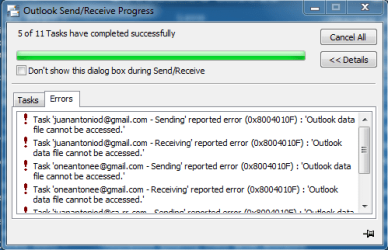
I also moved my Outlook.pst file, but I'm getting an error when I try to check email. (See attached Outlook error message.) What can I do to fix this?

Thanks!
 

Attachments

  • Outlook Error.png
    Outlook Error.png
    13.4 KB · Views: 5

My Computer

Computer Manufacturer/Model Number
HP Pavilion Media Center PC m7350n
OS
Microsoft Windows 7 Home Premium 32-bit 7601 Multiprocessor Free Service Pack 1
CPU
Intel(R) Pentium(R) D CPU 2.80GHz
Motherboard
ASUSTek Computer INC. EMERY
Memory
2.00 GB
Graphics Card(s)
NVIDIA GeForce 6200SE TurboCache(TM)
Sound Card
Realtek High Definition Audio
Monitor(s) Displays
HP L1710 LCD Display
Screen Resolution
1280 x 1024 x 32 bits (4294967296 colors) @ 60 Hz
Hard Drives
(1) SAMSUNG SP2504C (2) EPSON Stylus Storage USB Device (3) Generic USB CF Reader USB Device (4) Generic USB MS Reader USB Device (5) Generic USB SD Reader USB Device (6) Generic USB SM Reader USB Device (7) Seagate FA GoFlex Desk USB Dev
Internet Speed
20+mbps
Back
Top