
September 20, 2018 - KB4457139 (Preview of Monthly Rollup) Windows 7

Brink

Administrator
Staff member
Local time
10:43 AM
Messages
74,946
Location
Oklahoma
September 20, 2018 - KB4457139 (Preview of Monthly Rollup)

Applies to: Windows 7 Service Pack 1, Windows Server 2008 R2 Service Pack 1


Improvements and fixes

This non-security update includes improvements and fixes that were a part of KB4457144 (released September 11, 2018) and also includes these new quality improvements as a preview of the next Monthly Rollup update:

  • Addresses an issue with evaluating the compatibility status of the Windows ecosystem to help ensure application and device compatibility for all updates to Windows.
  • Addresses an issue with the diagnostic pipeline for devices enrolled in Windows Analytics when the CommercialIDregistry key, "HKLM\Software\Microsoft\Windows\CurrentVersion\Policies\DataCollection" is present.
  • Addresses a memory leak issue that occurs when a device with a multilingual UI calls the LoadString API.
  • Addresses an issue in which all Guest Virtual Machines running Unicast dual NIC NLB fail to respond to NLB requests after the Virtual Machines restart.
Known issues in this update

KB4457139.jpg

How to get this update

Before installing this update

Windows cumulative updates require that you install the latest servicing stack update (SSU) for your operating system before installing the latest cumulative update (LCU). This helps to mitigate potential issues while installing the LCU.

If you are using Windows Update, the latest SSU (KB3177467) will be offered to you automatically.

To get the stand-alone package for the latest SSU, go to the Microsoft Update Catalog.

Install this update

This is provided as an Optional update on Windows Update. For more information about how to run Windows Update, see How to get an update through Windows Update.

To get the standalone package for this update, go to the Microsoft Update Catalog website.

File information

For a list of files provided in this update, download the file information for update 4457139.
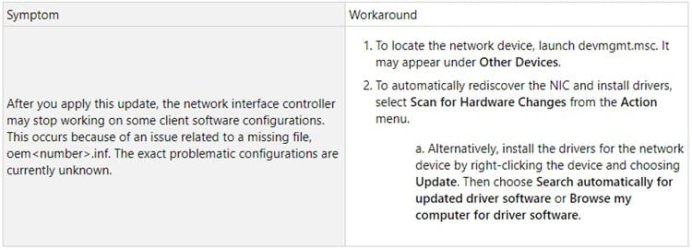

Source: September 20, 2018—KB4457139 (Preview of Monthly Rollup)


Direct download links for KB4457139 MSU file from Microsoft Update Catalog:

:ar: Download KB4457139 MSU for Windows 7 32-bit (x86) - 145.5 MB

:ar: Download KB4457139 MSU for Windows 7 64-bit (x64) - 237.5 MB
 

My Computer My Computer

At a glance

64-bit Windows 11 Pro for WorkstationsIntel i7-8700K OC'd to 5 GHz64 GB (4x16GB) G.SKILL TridentZ RGB DDR4 3600...ASUS ROG-STRIX-GTX1080TI-O11G-GAMING
Computer type
PC/Desktop
Computer Manufacturer/Model Number
Self built custom
OS
64-bit Windows 11 Pro for Workstations
CPU
Intel i7-8700K OC'd to 5 GHz
Motherboard
ASUS ROG Maximus XI Formula Z390
Memory
64 GB (4x16GB) G.SKILL TridentZ RGB DDR4 3600 MHz
Graphics Card(s)
ASUS ROG-STRIX-GTX1080TI-O11G-GAMING
Sound Card
Integrated
Monitor(s) Displays
2 x Samsung Odyssey G7 27"
Screen Resolution
2560x1440
Hard Drives
1TB Samsung 990 PRO M.2,
4TB Samsung 990 PRO PRO M.2,
TerraMaster F8 SSD Plus NAS
PSU
Seasonic Prime Titanium 850W
Case
Thermaltake Core P3
Cooling
Corsair Hydro H115i
Keyboard
Logitech wireless K800
Mouse
Logitech MX Master 4
Internet Speed
2 Gb/s Download and 100 Mb/s Upload
Antivirus
Malwarebyte Anti-Malware Premium
Browser
Google Chrome
Other Info
Logitech Z625 speaker system,
Logitech BRIO 4K Pro webcam,
HP Color LaserJet Pro MFP M477fdn,
APC SMART-UPS RT 1000 XL - SURT1000XLI,
Galaxy S23 Plus phone
I am confused. What is this a preview of? I thought the September rollup already came out. In fact, I already installed it. And had to do a System Restore because it slowed my computer down so badly. I then did the Security Only, and that seems to have worked.

These monthly updates are becoming too confusing and problematic. I'm tempted to go the route of some here who have stopped them altogether. Even restoring to an earlier image from a year ago. It's no wonder folks are fleeing to Linux.
 
Last edited:

My Computer My Computer

At a glance

Windows 7 x64 SP1AMD Athlon 64 X2 6000+ / 3.0 GHz6 GB
Computer type
PC/Desktop
Computer Manufacturer/Model Number
Gateway GT5656
OS
Windows 7 x64 SP1
CPU
AMD Athlon 64 X2 6000+ / 3.0 GHz
Motherboard
NVIDIA GeForce 6150 SE
Memory
6 GB
Monitor(s) Displays
Lenovo LED
Screen Resolution
1920 X 1080
Hard Drives
Windows on 500 GB spinner; Ubuntu 16 on Sandisk 250GB SSD; Bodhi5 on Samsung 250GB SSD; another old spinner for fooling around.
PSU
Original that came with computer
Keyboard
Logitech wireless
Mouse
Logitech wireless
Antivirus
Microsoft Sec Essentials
Browser
Vivaldi
I am confused. What is this a preview of?


Just ignore the Preview updates, they're classed as Optional anyway. They're basically just early access to the fixes in next months monthly rollup (without the security aspects). Just think of MS using you as a beta tester for next months rollup if you choose to install them. For home users they're a complete waste of time to install, in my opinion. If you're going down the rollup route, then it's better to wait until next month when the full rollup is out.

The rollups seem to cause more problems than they're worth. 7 is out of Mainstream support, so it isn't going to get any new features anyway.
I just stick with the Security-only updates + IE Cumulative Security updates every month. Although, I can see why some users have stopped installing them altogether - I've contemplated it myself a few times after some recent bork-ups I've had after installing certain updates!
 

My Computer My Computer

At a glance

Win 7 Ultimate, Win 8.1 Pro, Linux Mint 19 Ci...Intel i5 4690KCorsair Vengeance LP 32GB DDR3MSI GTX 1060 GAMING X 6GB
Computer type
PC/Desktop
Computer Manufacturer/Model Number
Custom Build
OS
Win 7 Ultimate, Win 8.1 Pro, Linux Mint 19 Cinnamon (All 64-Bit)
CPU
Intel i5 4690K
Motherboard
Gigabyte Z97X-UD3H
Memory
Corsair Vengeance LP 32GB DDR3
Graphics Card(s)
MSI GTX 1060 GAMING X 6GB
Sound Card
Onboard
Hard Drives
Samsung 850 EVO 250GB SSD (x2)
Samsung 860 EVO 1TB SSD (x2)
Crucial MX300 525GB SSD
WD Blue 2TB 5400rpm Intellipark Disabled (x2)
PSU
Corsair HX750i
Case
Phanteks Enthoo Pro
Cooling
CM Hyper 212 EVO on CPU, Noctua Redux NF-P14S 1500rpm (x6)
Keyboard
Corsair K70 RGB LUX
Mouse
Corsair Sabre RGB
Antivirus
Avast Free, MalwareBytes, SAS & CryptoPrevent
Browser
Chrome
Other Info
StarTech PEXESAT322I 2 Port PCI-E SATA Card
ASUS PCE-AC56 Dual-band AC1300 Wireless Card
Akasa FC.Six Manual Fan Controller
And a Partridge in a Pear Tree!
Just ignore the Preview updates, they're classed as Optional anyway. They're basically just early access to the fixes in next months monthly rollup (without the security aspects). Just think of MS using you as a beta tester for next months rollup if you choose to install them. For home users they're a complete waste of time to install, in my opinion. If you're going down the rollup route, then it's better to wait until next month when the full rollup is out.

The rollups seem to cause more problems than they're worth. 7 is out of Mainstream support, so it isn't going to get any new features anyway.
I just stick with the Security-only updates + IE Cumulative Security updates every month. Although, I can see why some users have stopped installing them altogether - I've contemplated it myself a few times after some recent bork-ups I've had after installing certain updates!

Thank you. If my computer works ok, I'll call it good and only do the Security Updates. That's what I had been doing in the wake of GWX, then a few months ago I decided to follow someone's advice and try the full rollup. Was working ok for a while. Then again, I may have installed it too soon this month. I usually wait 2-3 weeks to see if there are problems. This time I only wai
ted about 10 days.
 

My Computer My Computer

At a glance

Windows 7 x64 SP1AMD Athlon 64 X2 6000+ / 3.0 GHz6 GB
Computer type
PC/Desktop
Computer Manufacturer/Model Number
Gateway GT5656
OS
Windows 7 x64 SP1
CPU
AMD Athlon 64 X2 6000+ / 3.0 GHz
Motherboard
NVIDIA GeForce 6150 SE
Memory
6 GB
Monitor(s) Displays
Lenovo LED
Screen Resolution
1920 X 1080
Hard Drives
Windows on 500 GB spinner; Ubuntu 16 on Sandisk 250GB SSD; Bodhi5 on Samsung 250GB SSD; another old spinner for fooling around.
PSU
Original that came with computer
Keyboard
Logitech wireless
Mouse
Logitech wireless
Antivirus
Microsoft Sec Essentials
Browser
Vivaldi
Back
Top