Serious hard drive problem

Since I've never cloned anything before, I was under the impression that a clone is basically the same as an image... The fact that it'll reformat and overwrite everything seem's like something that should be emphasized and re-emphasized with bold capital letters in your guides. DDrescue didn't even give any warning either. Usually software let's you know if it deletes or overwrites personal files.

I partially cloned the 500gb hard drive to a 2TB external hard drive, with about 600 gig's free. So where the hell did all that other space go? Did it just evaporate? I didn't even know it was possible for free space to be deleted.


Schofield's Second Law of Computing states that data doesn't really exist unless you have at least two copies of it. Kinda goes along with Murphy's Law if anything can go wrong, it will.
What a pickle. :cool:

I've always been a firm believer in Murphy's law. Now more than ever. Especially the quantized revision "Everything goes wrong all at once". Just this past month alone I've had the worst luck of my entire life... my smartphone got hardcore bricked, my debit card/checking info got leaked from Amazon by hackers, car's breaks failed while I was going down a hill straight into a busy intersection (nearly got me killed), 7.1 surround gaming headset got completely destroyed, lost my 64GB flash drives, and now all this. Either this is the work of a skilled thief/saboteur, or the machines are revolting against me. It almost seems supernatural. Maybe I'm being punished by Santa Clause or Jesus for being naughty or not believing in them. I've actually promised my higher self I'd quit smoking if he threw a miracle my way. That will be my new years resolution... I'm hoping for a fresh start and change of luck this new year, and praying the worst is over.

So yea, this is all going to set me back a pretty penny. I just purchased a new 5TB external hard drive for 138$, but this is just the beggining of my financial setbacks.

Just for the record please post a screenshot of how your external drive looks like in Windows Disk Management.

Your statement also made me think that perhaps you should try GetDataback Simple straightaway. If the MFT (Master File Table) has not been overwritten, it may perhaps find most of the files if any left. Also the author of TestDisk says when PhotoRec fails try GetDataback or Zero Assumption Recovery.

So do this first. Download the trial version of GetDataback Simple and scan your external drive. GetDataback Simple does not write anything to the drive and so it is absolutely safe like PhotoRec. If Getdataback Simple shows the files which you can preview also and assess the integrity, well and good.

With the Trial version you can't copy the files. You have to buy the license for it.

If it is successful in atleast showing most or some of the files with intact integrity, then try PhotoRec which is free. You can consider buying GetDataback after that.

Getdataback Simple: https://www.runtime.org/data-recovery-software.htm

I've acquired a laptop with working windows, as well as a new external hard drive. I'll get to work as soon as I get back home, and post the screenshots you've requested.

I've downloaded several different data recovery software including data recovery wizard. However I'm thinking of trying Seagate recovery first, since it's a Seagate external drive. I've also got Recuva, Data rescue, Stellar Phoenix, Ontrack, and Aid file recovery - which I've heard is best for recovering overwritten files. Not sure if that's true.

Aside from the text and image files, I'd honestly be satisfied if I could just recover fragment's of the media files I've lost, so I know what I'm missing.
 

My Computer

Computer type
PC/Desktop
Computer Manufacturer/Model Number
Asus
OS
Windows 7 64 bit
Graphics Card(s)
AMD Radeon HD 5790
Antivirus
Windows Defender
Browser
Chrome Canary, Firefox Nightly
The bigger the hard drive the bigger the potential losses are with data
Personally I like to keep them down to 1tb to 775gbs. and use western digital blacks

I don't see how one can restore a clone but do know how to restore a system image with a recovery cd :)
 

My Computer

Computer type
PC/Desktop
Computer Manufacturer/Model Number
Custom assembled by me :}
OS
Win-7-Pro64bit 7-H-Prem-64bit
CPU
i7-5930K 2nd i9-9940x both water blocked VRM's too
Motherboard
ASUS SABERTOOTH X99 2nd ASUS x299 Apex
Memory
Trident-z 3200C14 2nd Trident-z 3600C16
Graphics Card(s)
EVGA 1080ti ftw3 2nd Titan Xp both water blocked
Sound Card
Built-in Realtek
Monitor(s) Displays
1-AOC G2460PG 24"G-Sync 144Hz/ 2nd 1-ASUS VG248QE 24" 144Hz
Screen Resolution
1920 x 1080 144Hz
Hard Drives
2-Samsung M.2 Evo & Evo Plus
2-Samsung 850 EVO 500GB SSD's/ 3-2.5 W.D. Black 1tb-&3-1tb/3-3.5 WD Black 1tb hdd's
PSU
EVGA SuperNOVA 1000-P2 2nd 1200-P2
Case
2-Corsair Obsidian Series 450D Black ATX Mid Tower
Cooling
Custom water loops
Keyboard
Logitech G710+/ 2nd Logitech G910
Mouse
2-RedDragon M901 Perdition 16400 dpi Gaming mouse = wired
Internet Speed
Comcast Ping 19ms 89.31mbps download speed 6.12mbps upload
Antivirus
Malwarebytes Pro/ Superantispyware Pro
Browser
FireFox & Pale moon
Other Info
2nd ASUS X299 Apex/Intel i9-9940x with Custom water loop/7H-Prem-x64/Corsair 450D case/Ram Trident-z 3600C16 4x8gb / Samsung970Evo plus 500gb SSD/Dual ssd EZ swap evo/PSU EVGA SuperNova 1200w-P2 80+Platinum/GPU Titan Xp /8-ML-140 on push-pull on 2-280GTX rads
You can clone a hard drive using the imaging process. This is where the confusion may set in and the question arises about whether to clone or image. I use Acronis True Image but it can also clone.
Also @Cybermancer: if you're superstitious there are a million things to do or not do.
I just believe when it rains it pours sometimes. If it wasn't for bad luck you wouldn't have luck at all.
Florida made it against the law for bumper stickers like '**IT HAPPENS'. IT HAPPENS is OK. ;)
New year coming up with mega-changes. (hopefully good ones.):cool:
 

My Computer

Computer type
Laptop
OS
Windows 7
No luck with Recuva or Getbackdata. They're only finding the clone data. Currently trying Seagate data recovery, Aid file recovery, and Phoenix stellar. They're taking a lot longer, so I'm guessing it's finding more stuff than the other software. Aid is finding a lot of media files judging by the extensions, which I think is a good sign, although they're all showing up as string of numbers in the search.

I found this on a forum

"Recovering data itself might be possible in very rare conditions, if by some miracle you stopped the clone before it reached into a second partition. If this is the case, you'd just have to rebuild the partition tables in their exact position. Unfortunately, this is harder than it looks and is usually impossible."

Can anyone tell from what I posted earlier whether ddrescue reached into a second partition? How can I rebuild partition tables?

I'm still not convinced all the files I had on there were overwritten. If I cloned a 500GB hard drive onto a 2TB external which had 1.4TB of data on it, then how could the hard drive clone overwrite more data than it has? This doesn't make sense to me. At least some of the external's data must be somewhere, perhaps on a hidden partition. I'm messing with partition recovery software, hopefully that'll give me a clue.
 
Last edited:

My Computer

Computer type
PC/Desktop
Computer Manufacturer/Model Number
Asus
OS
Windows 7 64 bit
Graphics Card(s)
AMD Radeon HD 5790
Antivirus
Windows Defender
Browser
Chrome Canary, Firefox Nightly
The statement there applies if and only if you had more than one partition on your 2TB external drive.How many partitions did you have on the 2TB external drive and what is their extent?
 

My Computer

OS
Windows 7 Home Premium 32 bit
The destination disk will be deleted (all data and partitions) and the source disk will be cloned (copied) to the destination disk. The first thing done is erasing the MBR. You clone a 100MB drive to a 6TB drive
and the destination drive will be erased/formatted. You just have to hit start/proceed and turn your computer off immediately it is already too late.
Using disk partition software will allow one to create partitions on destination drive and then use the
cloning or imaging program to select source partitions and path to destination drive. No data or
formatting will be done outside the partitions selected.
Probably too late but for next time. Always, Always create a system image of your drive so you can
restore if Murphy's Law kicks in: "Matter will be damaged in direct proportion to its value." :cool:
 

My Computer

Computer type
Laptop
OS
Windows 7
^ What you have stated is not correct. Sector to sector copying does not happen in a millisecond and it is definitely going to take a finite time. It neither erases the full length of the HDD nor formats it before it starts sector by sector copying. These again are time consuming processes which can't happen in a blink. As far as I have experienced ddrescue starts copying the moment you type the command and press enter.. It just copies sector by sector. When the new sector data is copied the original data on that sector is overwritten and therefore lost.

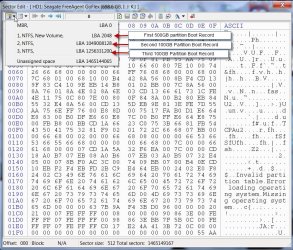
Here is my 750GB external drive with three partitions one 500GB +100GB +100GB

28-12-2015 22-59-01.jpg

Sector 0 contains the MBR code and the Partition Table (in this example the start/end points of the three partitions).

The first volume boot record will always be at Sector 2048.

The screenshot shows the volume boot record sectors of the second and third partitions.

When sector 0 of the source disk is copied on to sector 0 of the destination external drive sure the original MBR code and partition Table of the external drive is lost and what one has now is the MBR Code and partition table of the source drive on the external drive.

Now assuming that that all sectors of the 500GB source drive had been copied to the external drive, I will still have the original volume boot record of my second partition and third partition and if so I should be able to recover all the data in the second partition and third partition.

That is why I asked him whether he had any partitions in his external drive and the extent of such partitions, but the OP has not answered.

I have now read the statement OP has quoted in his post #24 from the original thread. ( even though he did not give the link :))

partitioning - Is it possible to UNDO a (failed) partition cloning made with the dd command to an external hardrive? - Ask Ubuntu

Even assuming that the OP had no partitions, he may try PhotoRec and see whether it can reconstruct the data in the sectors beyond the 500GB or beyond the point where copying was interrupted..

This is also suggested in the above link.

"Recovering data itself might be possible in very rare conditions, if by some miracle you stopped the clone before it reached into a second partition. If this is the case, you'd just have to rebuild the partition tables in their exact position. Unfortunately, this is harder than it looks and is usually impossible. Finally, there have been some reports of photorec working, but that isn't the norm. YMMV."

If the OP had only a single volume on his external drive , then PhotoRec is the only option to try. But he seems to have his own plans - some Forensic and things like that..
 
Last edited:

My Computer

OS
Windows 7 Home Premium 32 bit
The master boot record is always located at cylinder 0, head 0, and sector 1, the first sector on the disk.
If you grab the wrong drive, with critical data on it, and use it for your destination drive, any attempt to
clone or recover an image to that drive will will render it unusable if you suddenly remembered and tried
to stop the process immediately after starting it. And of course cloning or imaging takes a very long time
with huge disks with 500GB, 1,2 or 6 TB drives.
Something will, or should, happen to speed this process up with new higher and higher capacity drives.
I would never put all my eggs in one basket and NEVER, NEVER use your only hard drive to backup on
or save an image on it. If it crashes and burns then your backup never was or will be again. :cool:
 

My Computer

Computer type
Laptop
OS
Windows 7
In HDD parlance, Cylinder 0, head 0, sector 1(as we count), is designated as sector 0 :geek:.( Count starts from 0. The first sector of the HDD is sector 0)

If I accidentally clone my 500GB source drive to my 750GB external drive, even assuming ddrescue completed cloning the full 500GB, my data beyond 500GB on the external drive, will still remain and I can recover it. I will use the Partition Recovery Wizard in Partition Wizard which during the Quick scan will find the volume boot records of the second and third partition and rewrite the partition table strings to sector 0.This will immediately make my drive accessible. The first partition will contain the data from the cloned source drive ( Original data overwritten) and the second and third partition the data that originally existed.

There is only one small uncertainty here on the second partition. Suppose my 500 GB source disk had more than 1049008128 sectors, (this can be a few tens of sectors more or less and never precise) then I would have lost the volume boot record at sector 1049008128 on the external drive. So Partition Wizard cannot find the second partition beginning and therefore cannot write the partition table string for this partition in sector 0.In this case I shall use PhotoRec to reconstruct the files that were in the second partition.

In the case where one has only one single volume starting at sector 2048, one has to necessarily try PhotoRec and check whether it can carve out the files beyond 500GB or the point where copying was interrupted. No partition recovery is possible since there is no second ,third ...........partition.
 
Last edited:

My Computer

OS
Windows 7 Home Premium 32 bit
tumblr_n90ob2H8ZQ1tgncqpo1_1280.jpg


So after Seagate and Phoenix Stellar turned out to be failure's just like the others, I had almost given up hope... I was a bit skeptical about aidsfile due to it's choppy english interface, but I was wrong about it. Either I was right that the files were still hiding somewhere on the drive, or this software really does recover overwritten files like it claims. It had actually managed to locate and recover every single file I had on there before the clone catastrophe, and then some... I'm seeing files I didn't even know I had or forgotten. It's a bona fide miracle. I guess now I have to make good on that resolution to my higher self haha... However, some of the files are corrupt/fragmented and I'm not seeing my odt files, so I guess I only need to cut down rather than quit entirely. Also it only recovered the individual files without their respective folders, so it's a total mess... I'll have to do a lot of reorganizing. Anyway's I was so ecstatic, I almost called Drivesavers just to tell them HA! AND YOU SAID IT COULDN'T BE DONE! Maybe they'd offer me a job, which I could really use right now.

Now I must continue what I originally set out to do... recovering that corrupt hard drive. I'll probably just try photorec again, and transfer the files directly to my new external hard drive. No more damned cloning.
 

My Computer

Computer type
PC/Desktop
Computer Manufacturer/Model Number
Asus
OS
Windows 7 64 bit
Graphics Card(s)
AMD Radeon HD 5790
Antivirus
Windows Defender
Browser
Chrome Canary, Firefox Nightly
That's some real good news :thumbsup:. What is that aidsfile? Can you please post the link to download?
 

My Computer

OS
Windows 7 Home Premium 32 bit
I used the professional edition
 

My Computer

Computer type
PC/Desktop
Computer Manufacturer/Model Number
Asus
OS
Windows 7 64 bit
Graphics Card(s)
AMD Radeon HD 5790
Antivirus
Windows Defender
Browser
Chrome Canary, Firefox Nightly
On closer scrutiny, it seems to have done what PhotoRec would have done exactly. I don't see anything special or different to call it a super software that has escaped our attention so far.

In any case I shall overwrite data deliberately, and run it to determine whether it really brings out any overwritten data in due course and post the results.. The experiment is simple but I have to find sometime to sit tight on it and do.:)

Which of the four options did you choose? Format Recovery, Delete Recovery, Partition Recovery,Full Recovery ?
 

My Computer

OS
Windows 7 Home Premium 32 bit
OK, it says free edition can recover 1GB. So I shall go ahead with my experiment sometime.
 

My Computer

OS
Windows 7 Home Premium 32 bit
I will also experiment and try to replicate this successful recovery with photorec. Perhap's it'll do it faster, and yield more complete files. With aidfile I think I chose the full scan option followed by recover iirc
 

My Computer

Computer type
PC/Desktop
Computer Manufacturer/Model Number
Asus
OS
Windows 7 64 bit
Graphics Card(s)
AMD Radeon HD 5790
Antivirus
Windows Defender
Browser
Chrome Canary, Firefox Nightly
Yep. You are in a better position to try it :).

Off now and we have been without power since morning and I have been running on the inverter . Time now to save the remaining inverter power for any exigency tonight.
 

My Computer

OS
Windows 7 Home Premium 32 bit
Destroying information on a hard drive isn't easy. Hit it with a hammer or disk wipe programs
are not good enough. The FBI and NSA, and others, use forensics that would bedazzle you.
The three best ways to destroy a hard drive are with a drill, where the disc is physically not
capable of being read anymore, microwave oven, or my favorite — thermite. Chemicals are also
a possibility but not really practical.
Any given file occupies less than .0015 square inches,
so even small fragments can be read with advanced equipment. :cool:
 

My Computer

Computer type
Laptop
OS
Windows 7
Photorec seems to be recovering a wider range of file formats, including a lot of useless ones like dll's and other crap that just takes up time/space... it's just haphazardly dumping them all into folders, without any neat categorization like aidfile did. But it's also recovering a lot of files I needed that aidfile couldn't recover, like the aforementioned odt files. However, it freezes when it gets to a certain sector. Others get this problem too, but they say they had better luck with qphotorec, so I'll give that a shot next.

Also, I want to create an image of the failed hard drive, before I attempt repairs. Should I use testdisk, or is there something better? I want to be sure I'm creating an image, and not a clone. Some people have referred to the testdisk imaging as cloning, so I'm not so sure. I have Paragon disk manager, would it be better suited for this purpose?
 
Last edited:

My Computer

Computer type
PC/Desktop
Computer Manufacturer/Model Number
Asus
OS
Windows 7 64 bit
Graphics Card(s)
AMD Radeon HD 5790
Antivirus
Windows Defender
Browser
Chrome Canary, Firefox Nightly
Back
Top