Serious help needed

Win 7 x64

New member
Local time
12:47 AM
Messages
33
Location
Liverpool
Over the past couple of days i've had a serious issue regarding boot up and slao an extraa 200mb partition that is non existant. Two days ago I was unable to boot up because it kept sticking just before the windows starting screen. Upon a fresh install i noticed that there were partitions (extra 2) which i had not created. I delete said partitions so I have one remaining. It saiys unallocated vol 0. So I press next for install and all goes well, installs fine blah blah. Ive done this several times now but after about the sixth boot it will stick. Now each and every time i go for fresh install the 200mb partition is back????? WTF. Any way I have checked disk management out and it is also there. I cant do nothing with it though because it wont let me. I've changed drives but to no avail. What is going on. I'm having to do fresh install every day because of this ghost partition which I cant delete. Does any one have any idea whats going on. Ive just installed x32 thinking that would help but...................................HELP!
 

My Computer

Computer Manufacturer/Model Number
Acer
OS
Win 7 x64 - 7048
CPU
Q6700
Motherboard
Acer
Memory
4g ddr2 6400 hyperx
Graphics Card(s)
9600GT
Sound Card
Onboard 7.1
Monitor(s) Displays
Acer 22"
Screen Resolution
1680-1050
Hard Drives
WD500-Seagate250
PSU
Antec500
Case
Acer
Cooling
Stock
Mouse
Predator
Internet Speed
2mb
Win7 creates a 200MB partition at the start of drive for the boot data. Its normal.
 

My Computer

OS
XP
Hi Win 7 x64 and welcome to the forum!

scaramonga is correct, this is normal.

If you want to avoid the creation of the 200MB partition, you have to pre-format the drive where you want to install the OS to NTFS and make sure that there's no unallocated space.

The reason why Windows 7 creates that partition is for the Windows Recovery Environment (WinRE). This partition holds system files and bootable files essential to boot the Windows 7 properly if you needed to do recovery on the system due to corruption.

Cheers ;)
 

My Computer

Computer Manufacturer/Model Number
Custom Build
OS
Windows 7 Build 7048 x64
CPU
Athlon 64 X2 Dual Core 4600+
Motherboard
EMX-AMD750G-PRO
Memory
4 x 1GB Kingston 400MHz 6-6-6-18 (800MHz)
Graphics Card(s)
ATI Radeon 3650
Sound Card
Realtek HD Audio
Monitor(s) Displays
22" AOC 2216Vw
Screen Resolution
1680x1050
Cooling
Arctic Cooling Freezer 64 Pro PWM
Keyboard
Generic Enhanced Natural Keyboard
Mouse
Logitech VX Nano
Other Info
Edifier M1550
I think the most complete defination for 200 Mb is given in short lines by NosferatuX.
 

My Computer

Computer Manufacturer/Model Number
AMD
OS
Windows 7.
CPU
AMD AM2 X2 4200+ 64Bit
Motherboard
Asus M2A-VM
Memory
Corsiar DRR2
Graphics Card(s)
ATI Radeon X 1250 - 512 Mb DDR 2 (Integrated)
Sound Card
5.1 HD
Monitor(s) Displays
LCD HP L1800 18 Inch Dual Input.
Screen Resolution
1024 - 768
Hard Drives
Western Digital 400 Gb 16Mb Cache 7200 RPM.
PSU
400 Watts
Case
Tower
Keyboard
A4Tech Wireless
Mouse
A4Tech Wireless 8 Button Gaming.
Internet Speed
2 Mbps
Thanx
 

My Computer

Computer Manufacturer/Model Number
Acer
OS
Win 7 x64 - 7048
CPU
Q6700
Motherboard
Acer
Memory
4g ddr2 6400 hyperx
Graphics Card(s)
9600GT
Sound Card
Onboard 7.1
Monitor(s) Displays
Acer 22"
Screen Resolution
1680-1050
Hard Drives
WD500-Seagate250
PSU
Antec500
Case
Acer
Cooling
Stock
Mouse
Predator
Internet Speed
2mb
I think the most complete defination for 200 Mb is given in short lines by NosferatuX.

I'm not saying that it doesnt have *something* to do with the recovery environment but the .wim files for that do not reside on the 200MB system partition. They are in a subdirectory of the Windows directory on the main partition. I've heard it said that the 200MB partition was there more to foil several activation cracks than anything else although I cannot seem to find the reference to that now. Anyone remember seeing that?
 

My Computer

Computer type
Laptop
Computer Manufacturer/Model Number
Apple
OS
El Capitan / Windows 10
CPU
i7-4980HQ
Memory
16GB
Graphics Card(s)
Iris 5200

My Computer

Computer Manufacturer/Model Number
ENIAC
OS
Windows 7 RC 7100 32bit/64bit
CPU
Intel Core2Duo E4500 2.20 GHz
Motherboard
ASUS P5LD2-X/1333
Memory
2x1GB Kinsgston DDR2 800MHz
Graphics Card(s)
Nvidia 8500GT
Sound Card
Onboard High Definition Audio Device
Monitor(s) Displays
Sony Bravia 42"
Case
LINKW 2222
Cooling
Standard Intel
Keyboard
Some cheap one
Mouse
Microsoft Intellimouse something
Internet Speed
24MBps ADSL
Hi baarod,

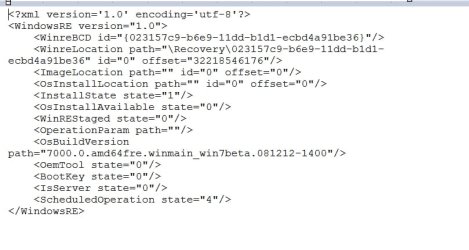
Though I don't have one of those 200mb partitions, I suspect the related .xml file is located there

WINRE-2009-02-15_015220.jpg

SIW2
 

My Computers

System One System Two

  • Computer type
    PC/Desktop
    OS
    7 X64
    CPU
    i5 8400
    Motherboard
    gigabyte b365m ds3h
    Memory
    2x8gb 3200mhz
    Hard Drives
    various
    PSU
    pure power 11 400w cm
    Case
    Coolermaster
    Cooling
    cryorig m9i
  • Computer type
    PC/Desktop
    OS
    7x64
    CPU
    g5400
    Motherboard
    ga b365m ds3h
    Memory
    8gb ddr4 2400
    PSU
    xfx pro 450w
I see a possible misunderstanding perhaps on your procedure. Maybe this is what is causing you to have extra partitions.

When you reinstall, are you deleting all the partitions and just adding back the one you want? After you set them up, Win7 will tell you it is making one for itself, and I don't know what it does if you leave the old 200mb partition on the drive prior to the reinstall.
 

My Computer

Computer Manufacturer/Model Number
Homebuilt
OS
Windows 7 x64
CPU
i7-2600K
Motherboard
Asus P8Z77-v Pro
Memory
8 G
Graphics Card(s)
GTX 480
Sound Card
Onboard
Monitor(s) Displays
LG W2753V
Screen Resolution
1920x1080
Hard Drives
Crucial M4 128 G SSD
32 bit to 64 bit???

How did you install a 32bit setup.exe on your 64bit machine... or did I misunderstand what you said?

I have 32bit disc... then got new 64bit machine and too late to download.

Know of anywhere that I cld get the 64bit dwnld????

ladycd:cry:
 

My Computer

OS
Vista Premium SP1
How did you install a 32bit setup.exe on your 64bit machine... or did I misunderstand what you said?

I have 32bit disc... then got new 64bit machine and too late to download.

Know of anywhere that I cld get the 64bit dwnld????

ladycd:cry:

You need to do a fresh install if you want to go from 32Bit to 64Bit and the only place you will find a free 64Bit copy now is on torrent sites and many of those have been messed with so make sure you read the comments to give an idea of what you are downloading, the file should be 3.15GB and make sure it's an ISO.
 

My Computer

Computer Manufacturer/Model Number
Home Brew
OS
Windows 7 Ultimate Vista Ultimate x64
CPU
Core 2 Duo E8500 3.16Ghz @ 3.8Ghz
Motherboard
eVGA 750i FTW
Memory
2x2Gigs Patriot PC2-6400 LL
Graphics Card(s)
Inno3D GeForce GTX260 216 SP
Monitor(s) Displays
ASUS VW222U 22" 2ms Response time
Screen Resolution
1680x1050
Hard Drives
SATA 150GB
SATA II 250GB
USB IDE 750GB Ext.
PSU
HYTEC 600W & Thermaltake 650W Toughpower Power Exp
Case
Thermaltake Armor LCS (Liquid Cooling System)
Cooling
Liquid Cooling System
Keyboard
Logitech G15 Gaming Keyboard
Mouse
Logitech G9 Gaming Mouse
Hi Ladycd,

The only way to get hold of a 64 bit d/l is as Mr Grim said.

However , you should have no trouble using a 32bit o/s on a 64bit capable machine. I have both 32 and 64 bit o/s on mine.

I assume you already have a 64bit operating system installed (Vista , probably ).

You only need to make another partition and install your 32bit version of Win 7 onto that.

Here is a tutorial

Windows 7 Forums - How to dual-boot Windows 7 BETA on a Vista computer

Hope it helps

SIW2
 

My Computers

System One System Two

  • Computer type
    PC/Desktop
    OS
    7 X64
    CPU
    i5 8400
    Motherboard
    gigabyte b365m ds3h
    Memory
    2x8gb 3200mhz
    Hard Drives
    various
    PSU
    pure power 11 400w cm
    Case
    Coolermaster
    Cooling
    cryorig m9i
  • Computer type
    PC/Desktop
    OS
    7x64
    CPU
    g5400
    Motherboard
    ga b365m ds3h
    Memory
    8gb ddr4 2400
    PSU
    xfx pro 450w
Back
Top