Serious problem with removing 'run' window history.

frupel

New member
Local time
3:16 AM
Messages
4
Hi,
My system is Win 7 Pro 64 bit.
I have a big problem with removing 'run' window history, and I don't mean removing MRU.
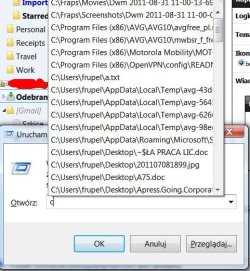
Just after typing the first letter of disk drive, the list of I think any recently used files pops up (and these are not only files accessed from 'run' window, there are also files opened normally from Explorer windows).
I have completely no idea where to look now.
I tried: CCleaner, MRUBlaster. I've even watched what happens to registry and files in ProcessMonitor but unfortunately every spoor was false.
I thougt that this might be related to indexing but the case concerns also drives and directories which are not indexed at all by windows indexing service.

I attach a screen for you to understand better:


any help will be appreciated, i'm starting to despair a little..:confused:
 

Attachments

  • runproblem.jpg
    runproblem.jpg
    61.6 KB · Views: 9
Last edited:

My Computer My Computer

Computer Manufacturer/Model Number
DELL XPS 15 L502X notebook
OS
Windows 7 Professional 64bit
CPU
Intel I7-2630QM
Memory
8GB
Graphics Card(s)
NVIDIA GeForce GT540M
Sound Card
Intel HD Audio
Monitor(s) Displays
(notebook)
Screen Resolution
1920x1080
Hard Drives
500gb
Hi,
My system is Win 7 Pro 32 bit.
I have a big problem with removing 'run' window history, and I don't mean removing MRU.
Just after typing the first letter of disk drive, the list of I think any recently used files pops up (and these are not only files accessed from 'run' window, there are also files opened normally from Explorer windows).
I have completely no idea where to look now.
I tried: CCleaner, MRUBlaster. I've even watched what happens to registry and files in ProcessMonitor but unfortunately every spoor was false.
I thougt that this might be related to indexing but the case concerns also drives and directories which are not indexed at all by windows indexing service.

I attach a screen for you to understand better:
http://dl.dropbox.com/u/1846654/runproblem.jpg

any help will be appreciated, i'm starting to despair a little..:confused:

Welcome to SevenForums.

I need you to perform the following, using one of the tools listed:
Update your SevenForums System Specs
User CP (3rd item in the top menu bar) |
Your Profile | Edit System Spec
(left-hand column)

To gather info, use SIW or Speccy or System Info

Add the word laptop or desktop or netbook to the
“system manufacturer” block, for example,
Toshiba Satellite L305D notebook.

Provide full windows version info, for example:
MS Windows 7 Ultimate SP1 64-bit

Use the “Other Info” block for Optical Reader,
Mouse, touchpad, wifi adapter, speakers, monitor, etc

Scroll down and click on the SAVE CHANGES button.


=========================================
=========================================

Next please use the procedure in this tutorial to post a screenshot:

Upload a File or Screenshot in Seven Forums
How to Upload and Attach Files and Screenshots to a Post in Seven Forums
 

My Computer My Computer

Computer Manufacturer/Model Number
Toshiba Satellite S875D-S7239 laptop
OS
MS Windows 7 Ultimate SP1 64-bit
CPU
AMD A10-4600M
Motherboard
AMD Pumori (Socket FT1)
Memory
6.00 GB Dual-Channel DDR3 @ 798MHz (11-11-12-28)
Graphics Card(s)
AMD Radeon HD 7660G
Sound Card
High Definition Audio Device
Monitor(s) Displays
Generic PnP Monitor (1600x900@60Hz)
Screen Resolution
1600x900@60Hz
Hard Drives
SSD 119GB Corsair CSSD-V128GB2 ATA Device
Keyboard
Standard PS/2 Keyboard
Mouse
HP Wireless Optical Mobile Mouse Model FHA-3410
Internet Speed
What the local pub, local coffee shop offers.
Other Info
Optical Drive:MATSHITA BD-CMB UJ160B ATA Device


Also have an Asus ha1002xp netbook with Win 7 Ultimate installed.
Hardware specs have nothing to do about it but ok - rules are rules ;) I think everything is alright now.

Just to add: I tried, of course, unchecking 'Store and display..' checkboxes in 'Taskbar menu and Start Menu Properties' on Start Menu tab. That changes nothing, even after reboot.
 

My Computer My Computer

Computer Manufacturer/Model Number
DELL XPS 15 L502X notebook
OS
Windows 7 Professional 64bit
CPU
Intel I7-2630QM
Memory
8GB
Graphics Card(s)
NVIDIA GeForce GT540M
Sound Card
Intel HD Audio
Monitor(s) Displays
(notebook)
Screen Resolution
1920x1080
Hard Drives
500gb
frupel,

I can not duplicate your problem. When I checkmark Run (in Start Menu) under Windows Explorer using CCleaner, then the list is cleaned.

I can show you how to remove the run option using GPEdit.msc

I do recall seeing something about this somewhere. But a definitive answer I do not have.
 

My Computer My Computer

Computer Manufacturer/Model Number
Toshiba Satellite S875D-S7239 laptop
OS
MS Windows 7 Ultimate SP1 64-bit
CPU
AMD A10-4600M
Motherboard
AMD Pumori (Socket FT1)
Memory
6.00 GB Dual-Channel DDR3 @ 798MHz (11-11-12-28)
Graphics Card(s)
AMD Radeon HD 7660G
Sound Card
High Definition Audio Device
Monitor(s) Displays
Generic PnP Monitor (1600x900@60Hz)
Screen Resolution
1600x900@60Hz
Hard Drives
SSD 119GB Corsair CSSD-V128GB2 ATA Device
Keyboard
Standard PS/2 Keyboard
Mouse
HP Wireless Optical Mobile Mouse Model FHA-3410
Internet Speed
What the local pub, local coffee shop offers.
Other Info
Optical Drive:MATSHITA BD-CMB UJ160B ATA Device


Also have an Asus ha1002xp netbook with Win 7 Ultimate installed.
You've got to admit it's interesting.

I know how to block run - I've temporarily done this in gpedit, but thank you ;)

But did BOTH history lists vanish? Or have you clicked arrow on the right of the run window to check - this list is from MRU in registry and is cleared.
Did it also clean records which are shown when the first drive letter is typed?

Sorry for asking but if it's true it's really weird.

CCleaner analysis show that there's nothing to remove ;/

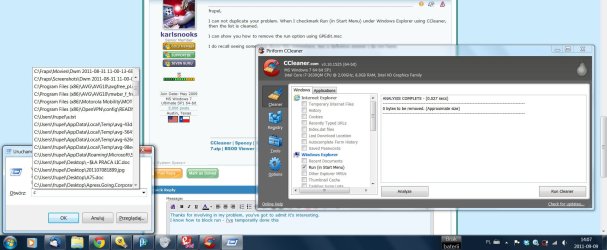
Proof screens:

MRU is removed alright:
run2.jpg

But there are records which CCleaner doesn't recognize:
run1.jpg
 

My Computer My Computer

Computer Manufacturer/Model Number
DELL XPS 15 L502X notebook
OS
Windows 7 Professional 64bit
CPU
Intel I7-2630QM
Memory
8GB
Graphics Card(s)
NVIDIA GeForce GT540M
Sound Card
Intel HD Audio
Monitor(s) Displays
(notebook)
Screen Resolution
1920x1080
Hard Drives
500gb
I have used CCenhancer to add more than 500 new programs to my CCleaner program. This program copies a small file called winapp2.ini to the CCleaner program folder.

You can download this program from the website and enhance the CCleaner program.

Or alternatively you can add this file to your CCleaner program folder in Program Files.

As attaching the winapp2.ini failed for me, I have added an extra .txt extension to the file and have uploaded to this post. Before copying the file, remove the extra .txt extension and copy the file to your CCleaner folder.

This will give you extra items for cleaning in CCleaner program. Select all the items (leaving items for which you get a message and you don't want to apply cleaning) and run the program.

Hopefully this should solve your problem.
 

Attachments

My Computer My Computer

Computer Manufacturer/Model Number
Toshiba Satellite P775-S7232
OS
MS Windows 7 Ultimate 64-bit SP1
CPU
i5-2410M 2.3GHz (2.9GHz Turbo-Boost) Sandy Bridge 32nm
Motherboard
Toshiba PHRAA ver. PSBY1U-00F003
Memory
4GB+4GB Samsung DDR3 PC3-10700 (1333 MHz)
Graphics Card(s)
Video Intel(R) HD Graphics Family, 1696MB available memory
Sound Card
Realtek High Definition Audio version=6.0.1.6323
Monitor(s) Displays
17.3 " Trubrite TFT LCD, LED Backlit
Screen Resolution
1600x900 32 bit, Native support for 720P content
Hard Drives
TOSHIBA MK6476GSXN
580.614 [GB] partitioned C: 80GB and D: 500GB with hidden recovery partitons.

Spare bay for 2nd HDD but no SATA connector :-(
PSU
Toshiba AC/DC Adapter
Case
Notebook
Cooling
Built-in Fan
Keyboard
Premium Raised Tile keyboard
Mouse
Logitech M215 wireless mouse
Internet Speed
Not fast enough
Other Info
Built-in Harman Kardon speakers with Dolby Advanced Audio, Waves MaxxAudio® 3. HDMI, 1xUSB3+3xUSB2 ports, WebCam, Battery life 4hrs 11mins, 4GB Readyboost SDHC card, WD My Book Essential Ext HDDs 2 TB, 2x1TB, My Passport SE 1TB and WDTV 1st Gen for Multimedia playing on a Sony Wega 32" LCD.
Recent addition to my toys are Asus Transformer Pad TF300T with 32GB onboard sd card + 32GB microsd card.
WOW it helped, thank you so much. :)
 

My Computer My Computer

Computer Manufacturer/Model Number
DELL XPS 15 L502X notebook
OS
Windows 7 Professional 64bit
CPU
Intel I7-2630QM
Memory
8GB
Graphics Card(s)
NVIDIA GeForce GT540M
Sound Card
Intel HD Audio
Monitor(s) Displays
(notebook)
Screen Resolution
1920x1080
Hard Drives
500gb
I am happy to know that.
 

My Computer My Computer

Computer Manufacturer/Model Number
Toshiba Satellite P775-S7232
OS
MS Windows 7 Ultimate 64-bit SP1
CPU
i5-2410M 2.3GHz (2.9GHz Turbo-Boost) Sandy Bridge 32nm
Motherboard
Toshiba PHRAA ver. PSBY1U-00F003
Memory
4GB+4GB Samsung DDR3 PC3-10700 (1333 MHz)
Graphics Card(s)
Video Intel(R) HD Graphics Family, 1696MB available memory
Sound Card
Realtek High Definition Audio version=6.0.1.6323
Monitor(s) Displays
17.3 " Trubrite TFT LCD, LED Backlit
Screen Resolution
1600x900 32 bit, Native support for 720P content
Hard Drives
TOSHIBA MK6476GSXN
580.614 [GB] partitioned C: 80GB and D: 500GB with hidden recovery partitons.

Spare bay for 2nd HDD but no SATA connector :-(
PSU
Toshiba AC/DC Adapter
Case
Notebook
Cooling
Built-in Fan
Keyboard
Premium Raised Tile keyboard
Mouse
Logitech M215 wireless mouse
Internet Speed
Not fast enough
Other Info
Built-in Harman Kardon speakers with Dolby Advanced Audio, Waves MaxxAudio® 3. HDMI, 1xUSB3+3xUSB2 ports, WebCam, Battery life 4hrs 11mins, 4GB Readyboost SDHC card, WD My Book Essential Ext HDDs 2 TB, 2x1TB, My Passport SE 1TB and WDTV 1st Gen for Multimedia playing on a Sony Wega 32" LCD.
Recent addition to my toys are Asus Transformer Pad TF300T with 32GB onboard sd card + 32GB microsd card.
You can clean up the Run list without external programs.

You can get rid of the recent files in the Run list by:
Internet options > General tab: Browsing history: click Delete button. Tick "History", then click OK.
I don't use IE, so deleting "Browsing history" doesn't affect me, but if you use IE this may be a problem for you. You could try instead: Internet options > Content tab > AutoComplete Settings button > Delete AutoComplete history button: tick History; OK

To get rid of the typed paths in the list without wiping the RunMRU as well, you need to delete this registry key:
HKEY_CURRENT_USER\Software\Microsoft\Windows\CurrentVersion\Explorer\TypedPaths
You can make a .reg file to do this easily.

If you don't want typed paths to be stored at all:
Internet options > Content tab > AutoComplete Settings button > untick "Address bar"

If you do want to store a list of typed paths, but don't want to use IE, you have to set this registry string:
[HKEY_CURRENT_USER\Software\Microsoft\Windows\CurrentVersion\Explorer\AutoComplete]
"AutoSuggest"="yes"
Or make it "no" to prevent storing typed paths.

If you want to keep Recent items, by ticking: Start > properties > Privacy: "Store and display recently opened items...", you will find opened files (try just typing f), and typed paths (addresses) in the Run list according to their drive letter. This would include any files you opened with the address bar directly, like pasting in their complete address including file extension.
Unticking "Store and display recently opened items..." should prevent recent files getting into the Run list, but not typed paths.
 

My Computer My Computer

OS
Windows 7
Back
Top