billybong001
New member
- Local time
- 7:27 PM
- Messages
- 36
Hi guys, last night I ran into a baffling problem, hopefully someone more experienced can shed some light on it.
Build (all brand new parts):
ASUS P8B75-M and i5 3570
1x 8GB Kingston DDR3-1333
Using onboard iGP HDMI output
1x Kingston V300 120GB
3x WD Red 3TB
1x PS/2 keyboard
1x USB mouse
Seasonic 550W Gold
Problem:
Created bootable Win7 x64 image using Rufus in NTFS format for UEFI+BIOS on 8GB thumb drive
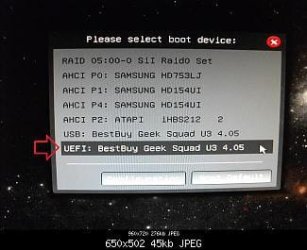
Select boot from flash drive using boot device selection menu
Appear screen "Windows is loading files"
Appear Windows 7 logo animation beginning
Immediately after (before logo animation is complete) screen is blanked (but still on)
No response thereafter, no HDD activity either.
Obviously I googled this and it seems like half the universe is having this stupid issue.
Already tried:
Load Optimized Defaults
SATA IDE and AHCI modes
Disable secure boot
Disable quick boot
Disable intelligent fan control
Graphics option Auto and iGP modes
CSM set to Legacy and UEFI modes
Connecting a different keyboard
Connecting a VGA display instead of HDMI TV
Connecting flash drive to rear ports
Disconnecting all drives except SSD
Disconnecting all drives
Burning Windows image to another flash drive
Starting Windows install in safe mode
What should I do now?
Build (all brand new parts):
ASUS P8B75-M and i5 3570
1x 8GB Kingston DDR3-1333
Using onboard iGP HDMI output
1x Kingston V300 120GB
3x WD Red 3TB
1x PS/2 keyboard
1x USB mouse
Seasonic 550W Gold
Problem:
Created bootable Win7 x64 image using Rufus in NTFS format for UEFI+BIOS on 8GB thumb drive
Select boot from flash drive using boot device selection menu
Appear screen "Windows is loading files"
Appear Windows 7 logo animation beginning
Immediately after (before logo animation is complete) screen is blanked (but still on)
No response thereafter, no HDD activity either.
Obviously I googled this and it seems like half the universe is having this stupid issue.
Already tried:
Load Optimized Defaults
SATA IDE and AHCI modes
Disable secure boot
Disable quick boot
Disable intelligent fan control
Graphics option Auto and iGP modes
CSM set to Legacy and UEFI modes
Connecting a different keyboard
Connecting a VGA display instead of HDMI TV
Connecting flash drive to rear ports
Disconnecting all drives except SSD
Disconnecting all drives
Burning Windows image to another flash drive
Starting Windows install in safe mode
What should I do now?
My Computer
At a glance
Windows 7 Ultimate x64
- Computer type
- PC/Desktop
- OS
- Windows 7 Ultimate x64