Server 2008 R2

Gbsnplr

New member
Member
Local time
1:07 PM
Messages
71
I know this is a Win & forum but I am thinking about setting up a Win Server 2008 R2 server to learn how to administer a server. As you might guess I really know nothing about how to even get started and am not an IT person, just someone that likes to tinker with computers.

Can someone recommend a path ie books, classes, online classes etc to get me started?

Thanks
 

My Computer

OS
Windows 7 x64
CPU
i7 950
Motherboard
Gigabyte X58A-UD3R
Memory
6 gig
Graphics Card(s)
ATI 6870
Sound Card
On Board
Monitor(s) Displays
Gateway 24"
Screen Resolution
1920x1200
Ok you might think Im nuts, but look into the "For Dummies" Books I own a few myself and they are great for giving you ideas and hints on setting things up and remembering things with the way they are worded.
Also since 2008r2 is still so new it might be hard to find info on it. I would look into Server 2003 first then you can grab a book on 2008 since 90% of server stuff is just updated from one to another with added items here and there. Also grabbing the older copy will be a bit cheaper on the wallet then you can go from there about spending the extra cash.
 

My Computer

Computer Manufacturer/Model Number
Custom Build
OS
Windows 7 Ultimate x64 SP1
CPU
AMD Phenom II 1090 3.2 six core
Motherboard
MSI 890FXA-GD65
Memory
16 gig DDR3
Graphics Card(s)
MSI R6950 2gig
Sound Card
on board
Monitor(s) Displays
Acer 23inch led
Screen Resolution
1900x1080 widescreen
Hard Drives
Seagate 1tb SATA6
2x 1tb HITACHI Deskstar
PSU
CORSAIR Enthusiast Series TX750 V2 750W
Case
CoolMaster HAF 922
Cooling
Box AMD Heatsink/Fan
Internet Speed
Cable 12Mbps/3Mbps
Server 2008

How did you come out on this? I am looking to do the same thing. I am very, very new.
Thanks
 

My Computer

OS
Windows 7 Home Prem.
Other than the post above I have not receiced any other help.
 

My Computer

OS
Windows 7 x64
CPU
i7 950
Motherboard
Gigabyte X58A-UD3R
Memory
6 gig
Graphics Card(s)
ATI 6870
Sound Card
On Board
Monitor(s) Displays
Gateway 24"
Screen Resolution
1920x1200
Server 2008R2 is kinda like having a semi-truck , its nice, and cool, but unless your are going to use it for things that win7 can NOT do (such as use more than 128gb of memory, more than 2 physical processors, run a domain, be a large file server, etc ) there is no real “point” to running R2 other than to play around with it.


The question you asked was, “how to administer a server” , that is akin to saying “how do I pilot a 787”. The answers that you will get to such vague and open ended questions will be like
“ You go that way really really fast, when something gets in your way, turn!” True, accurate, piratical, but not the help you were looking for.

More direct questions such as “in server 2008R2 build 869, my gigE connection is not serving more than 140mb/s off of my SSD array (16x512gb raid0) when directly connected to my win7 box, with gigE , what could be wrong?” will result in more answers, that are more directed at your issues.

If you have some specific questions about how to do stuff with R2, perhaps some people here could help out, but since this is a win7 centric forum, not a lot of people here (out of the whole population) have run R2, let alone admin it (vs running it as a desktop). You might have better luck going to a R2 forum, such as Windows Server 2008 R2 General Forum
 

My Computer

OS
win 7, R2
CPU
4x 885
Motherboard
uniwide
Memory
64gb
Graphics Card(s)
generic pny 9500gt
Sound Card
road7
Monitor(s) Displays
generic
Screen Resolution
80 columns
Hard Drives
4x 300gb raid0
PSU
3x500w , hot swap
Case
, nut
Cooling
, very
Keyboard
qwerty
Mouse
, eak, a!
Internet Speed
70 baud
It's like using a steamroller to crack a nut,
There are some very helpful posts on this forum about Windows Home Server that might suit your purpose better,it's designed for Home and small office use (up to ten computers.
 

My Computer

Computer type
PC/Desktop
Computer Manufacturer/Model Number
Self Built Custom Computer.
OS
Windows 10 Pro x64
CPU
i7-4770K
Motherboard
Asus Z87 Sabertooth
Memory
16Gig DDR3-2400
Graphics Card(s)
Gigabyte GT740
Sound Card
Onboard
Monitor(s) Displays
Benq 27" - Dell 23' - Benq 22"
Screen Resolution
1680x1050
Hard Drives
Samsung 840 Pro 128g SSD
1xWestern Digital Caviar Green 1tb
2xWestern Digital Caviar Green 2 tb
PSU
Seasonic 760 watt Platinum
Case
Coolermaster Haf - X
Cooling
Noctua NH-C12P CPU Cooler
Keyboard
Logitech illuminated keyboard
Mouse
Logitech Perfomance MX
Internet Speed
Cable = speeds to 20Mbps downsteam and 512kbps upsteam
Antivirus
Avast Internet Security
Browser
Firefox
Hi
Some of the real gurus might laugh at this - but I'd try and make it behave more like a Workstation whilst you are learning -- operating a Server on a Workstation can be a little bit frustrating if you don't make some tweaks since essentially servers are meant to be left up and running for long periods of time. While testing you might want to start and stop them loads of times.

A normal server usually has a load of nag questions when you try and stop them for re-boot. Running as a workstation you can change the settings to bypass / disable this sort of stuff.

You can also add things like Themes etc so you can make it similar to W7. The basic look of W2008 server is quite bland --not normally an issue when the server is just a server locked out of the way just doing its job. Again while learning having it behave somewhat similarly to W7 IMO is a good idea (although I'm sure "purists" out there will say you should learn to use it as a server right from the start).

To get started I suggest you "customise" your W2008 server for workstation use by going through this link. (I've done this myself - on HOME not WORK servers of course.

I always try and make them behave more like Workstations.

Convert your Windows Server 2008 to a Workstation!

You don't LOSE any server functionality -- but it will certainly make things a lot easier for you whilst you are learning.

I'd also recommend if you can to create your server in a Virtual machine - but that's another whole ball game.

Once you've got your server up and running you need to start say an application (MySQL for example or a WAMP server) on it and then try acessing the application from another machine as a USER - you shouldn't actually have to logon to the server itself - that's why doing it from a VM is a good idea as you can test everything on one machine.

Once it's up and running just google around - there's loads of help on the web.

Another advantage BTW of running it as a Virtual Machine is that you won't have to hunt around for any obscure drivers.

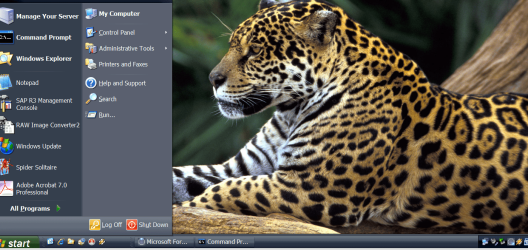
Here's a snapshot of a W2K3 server running on Windows 7 X-64 enterprise as a Virtual Machine using an XP theme (Royal Noire) with a Brazilian / Cost Rican Jaguar (taken from the W7 Brazil regional theme - pinched the wallpaper) desktop. The menu has all the standard Windows XP stuff (inc games --shows Spider solitaire for example) as well as server specific stuff. Multi-media also works BTW.


Cheers
jimbo.
 

Attachments

  • jag.PNG
    jag.PNG
    422.3 KB · Views: 145
Last edited:

My Computer

Computer type
PC/Desktop
Computer Manufacturer/Model Number
Custom built, several laptops HP/ASUS
OS
Linux CENTOS 7 / various Windows OS'es and servers
CPU
Intel i7 Intel i5
Memory
8GB, 16GB
Graphics Card(s)
On Motherboard
Sound Card
Realtek HD audio
Monitor(s) Displays
Apple Cinema display, Samsung LCD
Screen Resolution
1920 X 1080
Hard Drives
4 X 1TB SATA
Mouse
Toshiba wireless laser
Internet Speed
> 20MB up
Thank you for the replys. This is what I am trying to find out. I know nothing about administering Server 2008 so I am looking for guidance as to where to start the educational process. I would love to ask more direct or pointed qustions but I can't. I guess what I am looking for is back when you started working with server admin how did you start.
 

My Computer

OS
Windows 7 x64
CPU
i7 950
Motherboard
Gigabyte X58A-UD3R
Memory
6 gig
Graphics Card(s)
ATI 6870
Sound Card
On Board
Monitor(s) Displays
Gateway 24"
Screen Resolution
1920x1200
back when you started working with server admin how did you start.


[FONT=Arial, sans-serif]Oh, that question is easy to answer, the conversation in the mid 1990's went something like this[/FONT]


[FONT=Arial, sans-serif]THEM : Your a unix server guy, right?[/FONT]
[FONT=Arial, sans-serif]ME: Uuuh, yah, why are you looking at me like that....[/FONT]
[FONT=Arial, sans-serif]THEM: This is “windows nt server 3.51” , make it work like our “Novell server”[/FONT]


[FONT=Arial, sans-serif]Since then I've just included win server in the bunch of stuff I use.[/FONT]
 

My Computer

OS
win 7, R2
CPU
4x 885
Motherboard
uniwide
Memory
64gb
Graphics Card(s)
generic pny 9500gt
Sound Card
road7
Monitor(s) Displays
generic
Screen Resolution
80 columns
Hard Drives
4x 300gb raid0
PSU
3x500w , hot swap
Case
, nut
Cooling
, very
Keyboard
qwerty
Mouse
, eak, a!
Internet Speed
70 baud
I guess what I am looking for is back when you started working with server admin how did you start.

For me, this was back in 1997. I worked tech support for a software company and got interested in working on some other projects. At the time, I talked to a coworker who had taken the Windows NT 4.0 Server and Windows NT 4.0 workstation exams and got some book suggestions from him on studying for the Microsoft certification exams.

Because I had used the desktop OS the most, (Windows 98), I started with the Microsoft Certified Professional Study guide for Windows 98. I read and read and read, eventually registered for the exam and I passed it. From there, I took a test box, got an eval copy of Windows NT 4.0 Server and another MS certification book for this test. I read, read, played, poked and got comfortable and eventually took the exam. From their, I just kept taking exams (TCP/IP, Networking Essentials, Proxy Server, etc), until I had earned the MCSE (Microsoft Certified Systems Engineer).

After that was complete, I studied in some other areas and got a few other certs. Citrix Certified Admin and Cisco Certified Network Associate. I also bought the books for the CCNP (Cisco Certified Network Professional) certification and read them...even though I didn't plan to get that cert.

From there, I recertified on Windows 2000 and took all 7 exams to earn the Windows 2000 MCSE.

Shortly thereafter, I got the opportunity to take over some of our Linux stuff in our shop as the main Linux/Unix guy was leaving...so I spent a few years learning this system. Took a few classes, read numerous books and just lived and breathed Linux for a couple of years. Took the RHCE exam and passed on my first attempt (this was by far the most challenging of any of the exams that I have ever taken).

So, all in all, I studied, learned, tested, and spent lab time for about 6 years getting my systems admin and networking experience. And that is what I do professionally for a living...so along with the paper certs I also have the real-world hands-on experience.

So, that's my story about how I got started. And it's a never ending ride...there is always new stuff to learn and products change all the time.

 

My Computer

Computer Manufacturer/Model Number
Self-Built in July 2009
OS
Windows 7 Ultimate x64
CPU
Intel Q9550 2.83Ghz OC'd to 3.40Ghz
Motherboard
Gigabyte GA-EP45-UD3R rev. 1.1, F12 BIOS
Memory
8GB G.Skill PI DDR2-800, 4-4-4-12 timings
Graphics Card(s)
EVGA 1280MB Nvidia GeForce GTX570
Sound Card
Realtek ALC899A 8 channel onboard audio
Monitor(s) Displays
23" Acer x233H
Screen Resolution
1920x1080
Hard Drives
Intel X25-M 80GB Gen 2 SSD
Western Digital 1TB Caviar Black, 32MB cache. WD1001FALS
PSU
Corsair 620HX modular
Case
Antec P182
Cooling
stock
Keyboard
ABS M1 Mechanical
Mouse
Logitech G9 Laser Mouse
Internet Speed
15/2 cable modem
Other Info
Windows and Linux enthusiast. Logitech G35 Headset.
Back
Top