
Solved Server - my own Wireless network

I searched the dd-wrt site and found this
Router Database | www.dd-wrt.com
and search for
Code:
TP-Link TL-WR1043
your going to have do a lot of reading to make sure that that is your router and also even more reading on how to do it properly because it is pretty easy to brick your device if you don't follow every step
 
Last edited:

My Computer

Computer type
PC/Desktop
Computer Manufacturer/Model Number
Compac
OS
Microsoft Windows 7 Ultimate 32-bit 7601
CPU
Intel(R) Pentium(R) Dual CPU E2160 @ 1.80GHz
Motherboard
MSI Boston
Memory
4.00 GB
Graphics Card(s)
(1) VNC Mirror Driver (2) Intel(R) G33/G31 Express Chipset
Sound Card
Disabled
Monitor(s) Displays
Headless
Screen Resolution
1280 x 960 x 32 bits (4294967296 colors) @ 60 Hz
Hard Drives
ST3320820AS ATA Device
Keyboard
Headless
Mouse
Headless
Antivirus
Malwarebytes pro
Other Info
Also
Windows 8.1 Laptop and Desktop both Acer
Ok, so the router cannot do that out of the box? I am asking because in the meantime i found this tut made for my router. Afaiu this wds bridging should be the function i need. I cannot test it at the moment thats why i am asking.
Am i gonna have the typical problems that bridging is said to have? So that the back and forth communication of the bridging device with the primary device consumes a lot of bandwidth hence the available speed will be significantly decreased?
If so, an AP-replication as i did before would be better i suppose...

Edit: i understand that custom firmware would fix other issues as well, like security and so on but at the moment i just need a proof of concept and if possible with the device at factory settings. On the longrun i understand that ddwrt is for sure the better solution.
 

My Computer

Computer type
PC/Desktop
OS
Windows 7 Prof. 64bit SP1
CPU
i7 2600K
Motherboard
Asus P8Z68-V Pro Gen3
Memory
4x2GB Kingston 1333
Graphics Card(s)
onboard
Sound Card
onboard
Monitor(s) Displays
LG 27"
Screen Resolution
1920x1080
Hard Drives
Samsung 840 EVO 256GB
WD Green 2TB
PSU
Corsair TX850W
Case
open air
Cooling
Intel
Internet Speed
10Mbit
Antivirus
Avira
Browser
Firefox
Other Info
WIFI router: TP-Link TL-WR1043ND Ver:1.8
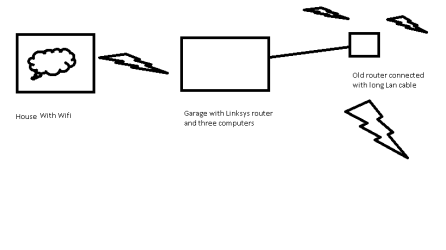
The bridge between your TP Link Lan connected computers should be the same speed as you are getting with your desktop connection but anything you connect ( like your android ) over the TP link WiFi bridge will suffer at least half the band width. I kind of forgot about that little problem. A few years ago I setup a Linksys router setup as a repeater to connect my Garage to the house worked great with three computers connected with the lan ports but I wanted a WIFi connection that went further so I used a long lan cable to connect another old wifi router to the Linksys I used the old router as an access point and that did not suffer from halving the signal
Here is a crude made by paint pic of my old setup that worked good
 

Attachments

  • my connection.png
    my connection.png
    7 KB · Views: 1

My Computer

Computer type
PC/Desktop
Computer Manufacturer/Model Number
Compac
OS
Microsoft Windows 7 Ultimate 32-bit 7601
CPU
Intel(R) Pentium(R) Dual CPU E2160 @ 1.80GHz
Motherboard
MSI Boston
Memory
4.00 GB
Graphics Card(s)
(1) VNC Mirror Driver (2) Intel(R) G33/G31 Express Chipset
Sound Card
Disabled
Monitor(s) Displays
Headless
Screen Resolution
1280 x 960 x 32 bits (4294967296 colors) @ 60 Hz
Hard Drives
ST3320820AS ATA Device
Keyboard
Headless
Mouse
Headless
Antivirus
Malwarebytes pro
Other Info
Also
Windows 8.1 Laptop and Desktop both Acer
Completely forgot to post the link but i cannot paste for whatever reason.
"Create a wireless bridge with a cheap tp-link router"

The most important info is whether my router can act as a wireless bridge out of the box. The mentioned tut seems to speak in favour of the router :-). I hope i understood it right.
And secondly if i replicate an AP as i did before i have full bandwidth but i need the router and the dongle.
If i want to use a single device it has to act as a bridge with the consequence that wifi bandwidth is affected.
 

My Computer

Computer type
PC/Desktop
OS
Windows 7 Prof. 64bit SP1
CPU
i7 2600K
Motherboard
Asus P8Z68-V Pro Gen3
Memory
4x2GB Kingston 1333
Graphics Card(s)
onboard
Sound Card
onboard
Monitor(s) Displays
LG 27"
Screen Resolution
1920x1080
Hard Drives
Samsung 840 EVO 256GB
WD Green 2TB
PSU
Corsair TX850W
Case
open air
Cooling
Intel
Internet Speed
10Mbit
Antivirus
Avira
Browser
Firefox
Other Info
WIFI router: TP-Link TL-WR1043ND Ver:1.8
So, I went on and tried the bridging approach instead of AP replication to be able to have the router stand-alone without a PC and ICS.
I followed the instructions from: Create a wireless bridge with a cheap TP-Link router | blog.jeffcosta.com
great tutorial, it worked flawlessly. My internet connection has never been fast (10MBit up, 1MBit down) as a result I dont see any truncation in internet bandwidth even in bridge mode.
I had a Sharkoon Network USB 2.0 server with a gigabit ethernet port at hand and wanted to try whether I can attach it to my router/bridge and use my USB devices wirelessly. That worked as well BUT the speed is a nightmare. 1,4MByte write, 1,2MByte read, tested both on USB 3 and USB 2 devices with FlashBench.
With some tweaking in the player settings I am able to play back even large high definition movies (>7GB) but I am still interested in the reasons for these low values. I know, if I connect it directly to the ethernet port of my pc the speed is much higher.
Could it be that the communication of the USB server goes over the AP of my landlord (USB server - bridge - AP - bridge - my laptop) or is the main reason the bridged internet connection the router has to handle in parallel?
I had a look with fing and saw that while connected to my landlord directly, I still see the USB server that is connected to my router/bridge - obviously because it is in the same subnet as all other devices.

Edit: checked the following - USB 2.0 server remained connected to LAN1 of router, disabled wifi on my laptop and connected the laptop to LAN2 on router via ethernet cable and reran the speedtests for my USB server. The USB device connected to the USB server was a SanDisk USB 3.0 200MB read/write. The results of the speedtest were 27-30MByte read/write which is the practical maximum of USB2.0. So far so good. The extremely low speeds I obtained before have to be related to the bridge mode I suppose...
 
Last edited:

My Computer

Computer type
PC/Desktop
OS
Windows 7 Prof. 64bit SP1
CPU
i7 2600K
Motherboard
Asus P8Z68-V Pro Gen3
Memory
4x2GB Kingston 1333
Graphics Card(s)
onboard
Sound Card
onboard
Monitor(s) Displays
LG 27"
Screen Resolution
1920x1080
Hard Drives
Samsung 840 EVO 256GB
WD Green 2TB
PSU
Corsair TX850W
Case
open air
Cooling
Intel
Internet Speed
10Mbit
Antivirus
Avira
Browser
Firefox
Other Info
WIFI router: TP-Link TL-WR1043ND Ver:1.8
Back
Top