Solved Services restore

Zyrandiel

New member
Local time
4:44 PM
Messages
175
Location
K.S.A.
Hey guys, I have a stupid mistake and I wonder if you could point me the right way. We were playing COD 4 LAN game and I served the game but I needed to reduce the system load by disabling some services and some windows features. Now we've finished the game I returned those services from the list that I got from a website but the problem is that the option to ENABLE DESKTOP COMPOSITION and ENABLE TRANSPARENT GLASS cannot be seen from the visual effects tab. I'm just hoping anybody here knows the default services and windows features that are running and activated in windows 7 home premium so I could follow them. I should have made a list, I'm kinda stupid I know... Please help out...
 

My Computer

Computer Manufacturer/Model Number
Samsung Electronics - NP-R580-JS01SA
OS
Windows 7 Home Premium 32bit
CPU
Intel(R) Core(TM) i5 M 520 @ 2.40Ghz
Motherboard
SAMSUNG ELECTRONICS CO. R580
Memory
4GB DDR3 RAM
Graphics Card(s)
1 GB NVidia Geforce GT 330M
Sound Card
Realtek High Definition V. 6.6
Monitor(s) Displays
Generic PnP monitor
Screen Resolution
1366 x 768
Hard Drives
500 GB IDE/SATA
The easiest solution is a system restore to a point before you started disabling any services.

You could also go into msconfig, click the Services tab and check Enable All.
 

My Computer

Computer Manufacturer/Model Number
HP Pavilion Elite 495UK
OS
Windows 7 Ultimate SP1 64-Bit
CPU
Intel Core i7 870 @ 2.93GHz
Motherboard
MSI 2A9C (CPU1)
Memory
8Gb Dual-Channel DDR3 @ 664MHz
Graphics Card(s)
nVidia GeForce GTX 460 1024MB dedicated RAM
Sound Card
Realtek HD Audio
Monitor(s) Displays
HP2310i
Screen Resolution
1920 x 1080
Hard Drives
1x1954GB Hitachi HDS22020ALA 330 (RAID), 1x1954GB Hitachi External for backup and storage
PSU
460W
Case
HP Elite
Cooling
Air cooled
Keyboard
Logitech K750 solar-powered keyboard
Mouse
Logitech Wireless M180 mouse
Internet Speed
2Mb
Other Info
Pure Avanti Flow Internet Radio with iPod Dock, 64Gb iPod, HP USB Speakers, Sony MDR-V500 Headphones, Sony Vaio F-Series Laptop
My guess is that one of the services you disabled is Desktop Window Manager?
 

My Computer

Computer type
PC/Desktop
Computer Manufacturer/Model Number
Custom-built
OS
Windows 7 Professional SP1 32-bit
CPU
Intel Core 2 Duo E6600 2.4GHz
Motherboard
Asus PL5D2
Memory
4GB DDR2-667 (4x1GB in dual-channel config)
Graphics Card(s)
nVidia GeForce 9800 GT
Sound Card
Creative X-Fi XtremeMusic
Monitor(s) Displays
Acer P236H
Screen Resolution
1920x1200 (DVI)
Hard Drives
OCZ SSD Vertex Plus 60GB SATA (Firmware 3.55), 64MB cache
Hitachi HD321KJ SATA, 320GB, 7200rpm, 16MB cache
PSU
Antec TruePower 2.0
Case
Cooler Master Centurion
Cooling
Too many fans
Keyboard
Standard
Mouse
Microsoft wireless optical mouse
Internet Speed
AT&T U-verse (18mbit/sec)
Antivirus
Microsoft Security Essentials
Browser
Firefox
Other Info
Other devices:
Compaq CQ-60 laptop
Google Nexus 7 (2012) tablet
Nvidia SHIELD tablet (US/LTE)
Hardkernel ODROID-XU single-board computer (Samsung Exynos 5420)
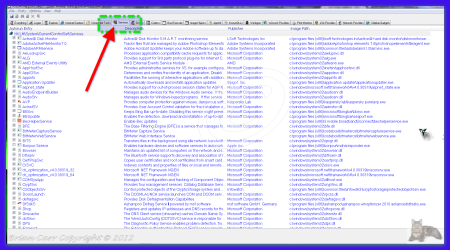
hi there is a great program to check your start-up services etc its Autoruns for Windows v11 By Mark Russinovich and Bryce Cogswell
DOWNLOAD LINK >>> http://download.sysinternals.com/Files/Autoruns.zip

WEBSITE >>> Autoruns for Windows
This utility, which has the most comprehensive knowledge of auto-starting locations of any startup monitor, shows you what programs are configured to run during system bootup or login, and shows you the entries in the order Windows processes them. These programs include ones in your startup folder, Run, RunOnce, and other Registry keys. You can configure Autoruns to show other locations, including Explorer shell extensions, toolbars, browser helper objects, Winlogon notifications, auto-start services, and much more. Autoruns goes way beyond the MSConfig utility bundled with Windows Me and XP.

Autoruns' Hide Signed Microsoft Entries option helps you to zoom in on third-party auto-starting images that have been added to your system and it has support for looking at the auto-starting images configured for other accounts configured on a system. Also included in the download package is a command-line equivalent that can output in CSV format, Autorunsc.

You'll probably be surprised at how many executables are launched automatically!
 

Attachments

  • brys Snap2011.11.0710h21m06s001.png
    brys Snap2011.11.0710h21m06s001.png
    101.1 KB · Views: 70

My Computer

Computer Manufacturer/Model Number
packard bell IXTREME M5722
OS
Operating System : Windows 7 Home Premium Edition 6.01.7600 SP1 (x64)
CPU
Processor : Intel Core 2 Quad Q8300 @ 2500 MHz
Motherboard
Mainboard : Packard Bell (Acer EG43M )
Memory
Physical Memory :8GB Corsair4x 2GB 800MHz C5 DDR2
Graphics Card(s)
Video Card : XFX 6700 AMD
Monitor(s) Displays
Maestro 234DL - BenQ V2220 - BenQ VW2420H
Screen Resolution
Current Display :1920x1080p pixels at 60 Hz in HD LED
Hard Drives
Hard Disks : WDC (1000 GB)
Drive C: (Hard Disk) : 428 GB available on 491 GB
Drive D: (Hard Disk) : 426 GB available on 492 GB
SAMSUNG spinpoint HD103SJ 1000.2 GB
(X 2) KINGSTON SSD NOW V 30GB
PSU
XFX ProSeries 550W PSU
Case
PACKARD BELL IXTREME
Cooling
System Blower Current: 150mA Air Flow16CFM ;Akasa 90mm rear
Keyboard
Gigabyte Aivia K8100
Mouse
TRUST-Wireless Laser Mouse - Carbon edition MI-7770C
Internet Speed
TP-LINK > TL-WN951N / AV500 Gigabit Powerline Adapters
Browser
chrome dev
Other Info
EXTRA COOLING>(FAN CONTROLLER) PC Bay Cooler 3 x 40mm fans; Akasa AK-HD-BL Blue hard drive cooler 2 x 40 mm fan 4500 rpm 29.7 dBA
Bios> American Megatrends Inc.
Version : P01-A1
Date : 08/31/2009
  • Like
Reactions: whs
My guess is that one of the services you disabled is Desktop Window Manager?

Thanks CORAZON that was bullseye... Thanks also for the ideas brian and seavixen.. :D It's cool now, I just change DESKTOP WINDOWS MANAGER from MANUAL to AUTOMAITC start. Thanks ya'll!:D
 

My Computer

Computer Manufacturer/Model Number
Samsung Electronics - NP-R580-JS01SA
OS
Windows 7 Home Premium 32bit
CPU
Intel(R) Core(TM) i5 M 520 @ 2.40Ghz
Motherboard
SAMSUNG ELECTRONICS CO. R580
Memory
4GB DDR3 RAM
Graphics Card(s)
1 GB NVidia Geforce GT 330M
Sound Card
Realtek High Definition V. 6.6
Monitor(s) Displays
Generic PnP monitor
Screen Resolution
1366 x 768
Hard Drives
500 GB IDE/SATA
Back
Top