Set a "Windows Explorer" default pointer

bobk544

New member
Local time
5:32 PM
Messages
5
Hello, is there a systems setting where i can specify a default directory that "Windows Explorer" will always got to when i select the "Windows Explorer" icon?

It just seem like i'm continually having to find and select the "C:/" then find the directory i'm mainly working in for the day or week at least 5 times per day!

And so it would be nice to be able to select a key combination and a screen would pop up asking if "Use this current directory as your default directory?'

Thanks for any ideas or maybe i could write a python or powerscipt routine to do this?
BobK
 

My Computer

Computer type
PC/Desktop
Computer Manufacturer/Model Number
dell
OS
windows 7
Hi bobk544 and welcome to Seven Forums.

So basically your looking for a shortcut to a certain directory?
 

My Computer

Computer type
PC/Desktop
Computer Manufacturer/Model Number
Dell / Lenovo g550
OS
Windows 7 Ultimate 64-bit
CPU
Intel Core 2 Duo E6550 @2.33GHz
Motherboard
foxconn g33m02
Memory
4GB DDR"
Graphics Card(s)
NVIDIA GeForce 8600 GS
Hard Drives
HDD 1 = 150GB
HDD 2 = 1.5TB
PSU
450W
Cooling
Stock fan
Internet Speed
12Mb
Antivirus
AVG Internet Security
yes pretty much that's it and of course if the same "Windows Explorer" is active that i used before, it will be pointing to where i left off, but it seems like i'm continually having to refind the directory that i mainly am working in for that day and more often for the week!

and i just did some "testing" and it looks like i sometimes have to open 3 or 4 "Windows Explorer" sessions, but often to address files within a given parent directory with many children diriectories and each time i have to reset that parent directory for each newly opened WE.

thanks benjy!
 

My Computer

Computer type
PC/Desktop
Computer Manufacturer/Model Number
dell
OS
windows 7
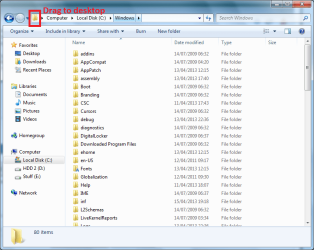
well for instance the way I'm think is like this. If you drag the icon to the desktop that will make a shortcut
 

Attachments

  • Untitled.png
    Untitled.png
    37.8 KB · Views: 1

My Computer

Computer type
PC/Desktop
Computer Manufacturer/Model Number
Dell / Lenovo g550
OS
Windows 7 Ultimate 64-bit
CPU
Intel Core 2 Duo E6550 @2.33GHz
Motherboard
foxconn g33m02
Memory
4GB DDR"
Graphics Card(s)
NVIDIA GeForce 8600 GS
Hard Drives
HDD 1 = 150GB
HDD 2 = 1.5TB
PSU
450W
Cooling
Stock fan
Internet Speed
12Mb
Antivirus
AVG Internet Security
Right click on the Windows Explorer icon and select Properties.
On the Shortcut tab, click in the Target field.
Change %windir%\explorer.exe to %windir%\explorer.exe /e,/n,x:\path

x:\path
is wherever you want it to open to.

For instance, I have mine set to

%windir%\explorer.exe /e,/n,c:\


so Explorer opens to the root of C: rather then Libraries.
 

My Computer

Computer type
PC/Desktop
Computer Manufacturer/Model Number
Lenovo IdeaCenter 450
OS
Windows 10 Pro X64
CPU
Intel Quad Core i7-4770 @ 3.4Ghz
Memory
16.0GB PC3-12800 DDR3 SDRAM 1600 MHz
Graphics Card(s)
Intel Integrated HD Graphics
Sound Card
Realtek HD Audio
Monitor(s) Displays
HP 22" LCD
Screen Resolution
1680 x 1050
Hard Drives
250GB Samsung EVO SATA-3 SSD
2TB Seagate ST2000DM001 SATA-2
1.5TB Seagate ST3150041AS SATA
Keyboard
Dell USB
Mouse
Lenovo USB
Internet Speed
Cable via Road Runner 3MB Upload, 30MB Download
Antivirus
Windows Defender, MBAM Pro, MBAE
Browser
Seamonkey
Other Info
UEFI/GPT
PLDS DVD-RW DH16AERSH
Just edit the command line on the shortcut you want to use, and add a parameter containing the initially displayed directory you want.

For example, if it reads:
%windir%\explorer.exe
Modifiy it to:
%windir%\explorer.exe c:\windows\system32
For this shortcut to go directly to system upon opening. Enclose that path in quotes if it contains spaces.
 

My Computer

Computer type
Laptop
Computer Manufacturer/Model Number
Toshiba Sattelite A665-S6092
OS
Windows 7 Ultimate x64
CPU
Intel Core i7-740QM
Memory
8 GB DDR3
Graphics Card(s)
NVIDIA GeForce 330GT
Screen Resolution
1366x768
Hard Drives
Samsung 840 SSD 500GB
1TB USB3 external HD
Cooling
Coolermaster Notepal U3 notebook cooling pad
Internet Speed
3mbps ASDL
Antivirus
ClamWin 0.98.7
Browser
Opera 12.17 x86 (main), Firefox 38 (sec), IE11 (last resort)
I don't think he always want's it to go to this path. I think :confused:
 

My Computer

Computer type
PC/Desktop
Computer Manufacturer/Model Number
Dell / Lenovo g550
OS
Windows 7 Ultimate 64-bit
CPU
Intel Core 2 Duo E6550 @2.33GHz
Motherboard
foxconn g33m02
Memory
4GB DDR"
Graphics Card(s)
NVIDIA GeForce 8600 GS
Hard Drives
HDD 1 = 150GB
HDD 2 = 1.5TB
PSU
450W
Cooling
Stock fan
Internet Speed
12Mb
Antivirus
AVG Internet Security
Well all of these are worth a try and at least i'm finally trying to do something about it cos all totalled i'd bet i spend 2 weeks per year just reseting that Windows Explorer access setting, so let me try these out and see, but yes benjy you're right because i may change daily in addition to weekly, but let me ask you this, is there a Windows Explorer scripting language like there's a VBA tooling for Word, where if i select a key combination, i can run a script that may even pop up a window like Word VBA does? and that way i could select a key combo, a window would pop up and ask, do you want this directory as your default Windows Explorer directory, after i selected the keys, or actually i wouldn't even need a Y/N cos i would have selected the keys unless i wanted to make that directory my WE default, ok thanks all and let me play around with this, but i quess it makes me now wonder if there is a scripting language that could do this?
 

My Computer

Computer type
PC/Desktop
Computer Manufacturer/Model Number
dell
OS
windows 7
I can't answer that. Not that I know of. You could make a .bat file on your desktop to open up a place. But it is easier to do as to what I showed you with the shortcut.
 

My Computer

Computer type
PC/Desktop
Computer Manufacturer/Model Number
Dell / Lenovo g550
OS
Windows 7 Ultimate 64-bit
CPU
Intel Core 2 Duo E6550 @2.33GHz
Motherboard
foxconn g33m02
Memory
4GB DDR"
Graphics Card(s)
NVIDIA GeForce 8600 GS
Hard Drives
HDD 1 = 150GB
HDD 2 = 1.5TB
PSU
450W
Cooling
Stock fan
Internet Speed
12Mb
Antivirus
AVG Internet Security
Ok thanks again all, really appreciaite your time and consideration! have a nice wekk!:D
 

My Computer

Computer type
PC/Desktop
Computer Manufacturer/Model Number
dell
OS
windows 7
You too hope it works out for you
 

My Computer

Computer type
PC/Desktop
Computer Manufacturer/Model Number
Dell / Lenovo g550
OS
Windows 7 Ultimate 64-bit
CPU
Intel Core 2 Duo E6550 @2.33GHz
Motherboard
foxconn g33m02
Memory
4GB DDR"
Graphics Card(s)
NVIDIA GeForce 8600 GS
Hard Drives
HDD 1 = 150GB
HDD 2 = 1.5TB
PSU
450W
Cooling
Stock fan
Internet Speed
12Mb
Antivirus
AVG Internet Security
Hi bobk554.

Although I haven't personaly tried doing this, but the following may achieve what you want as far as I understand:

:ar: Click Start orb :orb:

:ar: Type in "folder options" and hit Enter.

:ar: Now click on the "View" tab at the top.

:ar: Now checkmark "Restore previous folder windows at logon" under Advanced settings.

As the name says, it should restore the last used folder location at every logon.
 

My Computer

Computer type
PC/Desktop
OS
Windows 7 Home Premium x64
Well all of these are worth a try and at least i'm finally trying to do something about it cos all totalled i'd bet i spend 2 weeks per year just reseting that Windows Explorer access setting, so let me try these out and see, but yes benjy you're right because i may change daily in addition to weekly, but let me ask you this, is there a Windows Explorer scripting language like there's a VBA tooling for Word, where if i select a key combination, i can run a script that may even pop up a window like Word VBA does? and that way i could select a key combo, a window would pop up and ask, do you want this directory as your default Windows Explorer directory, after i selected the keys, or actually i wouldn't even need a Y/N cos i would have selected the keys unless i wanted to make that directory my WE default, ok thanks all and let me play around with this, but i quess it makes me now wonder if there is a scripting language that could do this?

As far as I know, Explorer hasn't any kind of scripting capabilities or other public API.
The best I can think of, and not completely it meets your idea, is a program like AutoHotKey (AutoHotkey), which allows for some key combinations to create macro-like shortcuts for many other programs, by simulating keystrokes into them. Maybe it's worth a try, I have only a (very) little experience with it.
 

My Computer

Computer type
Laptop
Computer Manufacturer/Model Number
Toshiba Sattelite A665-S6092
OS
Windows 7 Ultimate x64
CPU
Intel Core i7-740QM
Memory
8 GB DDR3
Graphics Card(s)
NVIDIA GeForce 330GT
Screen Resolution
1366x768
Hard Drives
Samsung 840 SSD 500GB
1TB USB3 external HD
Cooling
Coolermaster Notepal U3 notebook cooling pad
Internet Speed
3mbps ASDL
Antivirus
ClamWin 0.98.7
Browser
Opera 12.17 x86 (main), Firefox 38 (sec), IE11 (last resort)
Ok thanks again all, i will definitely give these various approaches a try, great!:D
 

My Computer

Computer type
PC/Desktop
Computer Manufacturer/Model Number
dell
OS
windows 7
Back
Top