
I like the way the taskbar works in windows 7, but for one program (my messenger, icq) the new behaviour is quite annoying. When someone writes to me, i only see who it is after i hover over the icq-icon in the taskbar and only then i can see where to click to open the message-window in question. Much more "work" than with the old taskbar, where the blinking area of the message-window tells you instantly where to click and who it is that has texted you.
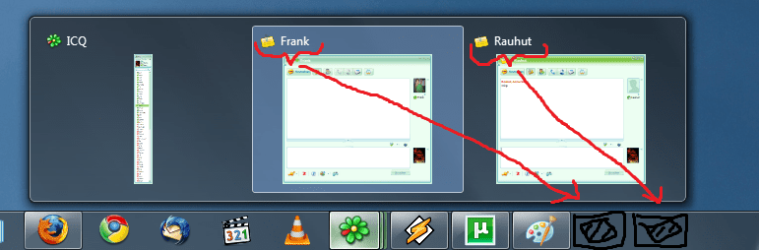
I'd like the icq-icon only to affect the icq-contact-list, while the message-windows open on the empty right side of the taskbar. The behaviour of everything else shouldn't be changed (i don't want the taskbar to be completely vista-style).
Old taskbar behaviour for icq, new taskbar behaviour for everything else would be ok too.
Is this possible?
Thank you!
/edit: even if i only chat with only one person, i still cant reach the conversation in one click. I still have to hover over the icq-icon and decide between opening the contact-list od the message-window. Annoying.
I'd like the icq-icon only to affect the icq-contact-list, while the message-windows open on the empty right side of the taskbar. The behaviour of everything else shouldn't be changed (i don't want the taskbar to be completely vista-style).
Old taskbar behaviour for icq, new taskbar behaviour for everything else would be ok too.
Is this possible?
Thank you!
/edit: even if i only chat with only one person, i still cant reach the conversation in one click. I still have to hover over the icq-icon and decide between opening the contact-list od the message-window. Annoying.
Attachments
My Computer
- OS
- Windows 7 x86 (7100)
