Set-Up File Keeps Re-Installing Itself

ml440

New member
Local time
1:10 PM
Messages
2
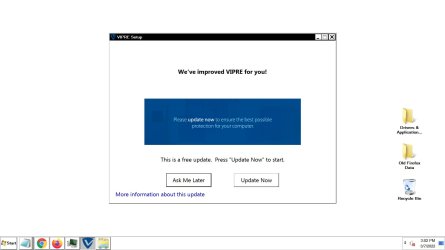
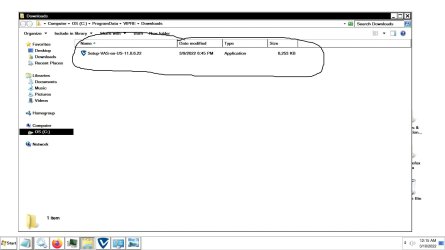
I'm using a third party paid Internet Security, Vipre Internet Security. Attempted to install the latest version of the software. This was a no-go, because the installer file could not complete because the installer could not confirm something (I forget what it's called) on my hard drive--it has something to do with my hard drive being out of date. Sought help with Vipre's customer phone support. I allowed him to remote-into my system. Suggested trying an older version of the Vipre software. Was able to get an older version installed. Works fine, However, I cannot stop a set-up file from Re-Installing Itself. In the properties menu of this annoying re-installing file, I changed (and saved over course, i.e., hit "Apply" and "OK") the file name slightly, thinking this would stop it from re-installing, and then re-appearing in on my screen. (and reappearing in my system tray) Not only did it not that stop it from re-installing, it revered back to it's Vipre given file name! A few days later, I contacted Vipre phone customer support, and a different customer service representative said there is no way to stop this from happening. I find this hard to believe. Possible to make an effective change in the registry? And if so, how do I do this? (i.e., what key I should look for, and change it or value to what, etc.)
 

Attachments
  • Vipre Setup File -  Keeps Reinstalling Itself - File Location.jpg
    Vipre Setup File - Keeps Reinstalling Itself - File Location.jpg
    192.8 KB · Views: 2
  • Vipre Setup File - Keeps Re-Installing Itself - Desktop Window.jpg
    Vipre Setup File - Keeps Re-Installing Itself - Desktop Window.jpg
    139.6 KB · Views: 1

My Computers

System One System Two

  • Computer type
    PC/Desktop
    Computer Manufacturer/Model Number
    Dell Opti Plex 755
    OS
    Windows 7 Home Premium 64 bit
    Keyboard
    Wired
    Mouse
    Wired
    Internet Speed
    Latency: 84 ms - Download: 68 Mbps - Upload: 18 Mbps
    Antivirus
    Vipre
    Browser
    Firefox, is Updated
    Other Info
    I plugged directly into the cable service; i.e., Ethernet; hard-wired from my desktop, to the router, then to the cable modem.
  • Computer type
    PC/Desktop
Hi
there is likely a scheduled Task thats phoning home to Vipre, problem is that it will check for definition and version upadates therfore a vicious circle
It would be handy to know the exact failure message
note from what i've found you need Net 4.6 or higher
 

My Computer

Computer type
PC/Desktop
Computer Manufacturer/Model Number
medionl/Aspire 6930G/acer x55a
OS
W7 home premium 32bit/W7HP 64bit/w10 tp insider ring
CPU
E5300 dual core
Motherboard
medion MS7366
Memory
3gb
Graphics Card(s)
Nvidia Geforce 7100 Nforce 630i
Monitor(s) Displays
avixc
Internet Speed
n (isp resticted to 72)
Antivirus
mse/pands
Browser
palemoon
Other Info
Belkin Fd7050 n USB using Railink RT2870 drivers, more upto date
Hi - Yes, I figured it was a scheduled task, lol, but Is There A Way To Stop the Annoying thing Somewhere In The Registry Or Within the Program File itself, etc., lol!?

I need what "4.6 or higher? If you are referring to the Vipre software, I Cannot Install the latest Update of the program because there is Something Outdated on my hard drive, Thus the Installer for that Current updated Vipre program Cannot confirm something, so the installation was aborted (by the installer) and I don't remember what the error window stated. I should have saved the screenshot of the error window. I'll see if I can determine what that error was.
 

My Computers

System One System Two

  • Computer type
    PC/Desktop
    Computer Manufacturer/Model Number
    Dell Opti Plex 755
    OS
    Windows 7 Home Premium 64 bit
    Keyboard
    Wired
    Mouse
    Wired
    Internet Speed
    Latency: 84 ms - Download: 68 Mbps - Upload: 18 Mbps
    Antivirus
    Vipre
    Browser
    Firefox, is Updated
    Other Info
    I plugged directly into the cable service; i.e., Ethernet; hard-wired from my desktop, to the router, then to the cable modem.
  • Computer type
    PC/Desktop
No
Netframework 4.6 or higher is an MS program, open your programs it will be there and show which you are currently running
(click on Features top left --- new window opens)

As for the task--- open Taskscheduler, Vipre will be there click on it will give the option to dissable/delete --- just dissable it
you can update manually

I am intrigued tho if you were allready running Vipre as to why its in your download folder, most AV's will auto update within themselves, base version 11 0 6 00 was released a long while back
 
Last edited:

My Computer

Computer type
PC/Desktop
Computer Manufacturer/Model Number
medionl/Aspire 6930G/acer x55a
OS
W7 home premium 32bit/W7HP 64bit/w10 tp insider ring
CPU
E5300 dual core
Motherboard
medion MS7366
Memory
3gb
Graphics Card(s)
Nvidia Geforce 7100 Nforce 630i
Monitor(s) Displays
avixc
Internet Speed
n (isp resticted to 72)
Antivirus
mse/pands
Browser
palemoon
Other Info
Belkin Fd7050 n USB using Railink RT2870 drivers, more upto date
Back
Top