Solved Volume Manager keeps re-installing

joanie

New member
Local time
10:29 PM
Messages
11
At every startup, over the past 2 weeks, a process runs (rundll32.exe) to install Volume Manager. A display box prompts to restart now or later. A few seconds later, I get a Task Manager display, indicating the installation of Volume Manager completed successfully. I tried a clean boot - same problem. I'm not sure where the re-install is originating from. I believe this problem began after the most recent Windows update completed successfully.
 

My Computer

Computer type
Laptop
Computer Manufacturer/Model Number
Toshiba
OS
windows 7 pro 32 bit
Antivirus
Vipre
Browser
Firefox 30
Hi Joanie,

How long has it been since you ran a virus scan? It's odd that rundll32.exe would execute and try to install the volume manager on each boot.

There are a couple of things that I would try first off:

1. Unplug any portable hard drives attached to the USB ports if you have any attached.
2. From an elevated command prompt, run chkdsk c: /r and then reboot. Windows will check your drive and look for bad sectors when the system reboots. See the report at the end of the procedure.
2. Download and run Malwarebytes free version. Do a full scan of the system. You can get it here: Malwarebytes | Free Cyber Security & Anti-Malware Software

Please try these things and report back to us so we can help further.
 

My Computer

Computer type
PC/Desktop
Computer Manufacturer/Model Number
Mellon Labs (custom build)
OS
Win 7 Pro x64/Win 10 Pro x64 dual boot
CPU
AMD FX 8350 Vishera @ 4200
Motherboard
ASUS M5A97 R2.0
Memory
16 GB Mushkin Blackline DDR3-2400 @ 1866 (9-10-10-10-31)
Graphics Card(s)
XFX Radeon R9 280 Double D Black Edition
Sound Card
Realtek HD Audio on MB. Sounds great.
Monitor(s) Displays
Acer 24", Acer 22"
Screen Resolution
3840 x 1080
Hard Drives
1 x Mushkin Chronos 120 GB SSD (Win 10)
1 x Samsung 850 EVO 250 GB SSD (Win 7)
1 x WD 1TB SATA Blue
1 x WD 1TB SATA Green
PSU
Corsair TX-750
Case
CoolerMaster HAF 912+
Cooling
Coolermaster Seidon 240M Liquid AIO. 6 case fans
Keyboard
Logitech G710+
Mouse
Logitech G500s
Internet Speed
Much better since I got fiber, but still way overpriced.
Antivirus
MSE, Malware Bytes for scanning
Browser
Firefox
Other Info
Corsair VOID USB headphones.

A Mellon Labs X-1 - LCD Smartie driven system status display.

Brought to you by the letter E
Thanks for responding. I run a quick virus scan daily and a full virus scan weekly. I don't have any USB portable drives plugged in.
I'll run chkdsk.
 

My Computer

Computer type
Laptop
Computer Manufacturer/Model Number
Toshiba
OS
windows 7 pro 32 bit
Antivirus
Vipre
Browser
Firefox 30
I ran chkdsk and malwarebytes. Same issue - re-installs volume manager.
 

My Computer

Computer type
Laptop
Computer Manufacturer/Model Number
Toshiba
OS
windows 7 pro 32 bit
Antivirus
Vipre
Browser
Firefox 30
I have to admit that I am puzzled. I've asked for some help from some other knowledgeable members. We'll see what they hopefully have to say. Maybe we can find a solution.

Stay tuned. Help is on the way.
 

My Computer

Computer type
PC/Desktop
Computer Manufacturer/Model Number
Mellon Labs (custom build)
OS
Win 7 Pro x64/Win 10 Pro x64 dual boot
CPU
AMD FX 8350 Vishera @ 4200
Motherboard
ASUS M5A97 R2.0
Memory
16 GB Mushkin Blackline DDR3-2400 @ 1866 (9-10-10-10-31)
Graphics Card(s)
XFX Radeon R9 280 Double D Black Edition
Sound Card
Realtek HD Audio on MB. Sounds great.
Monitor(s) Displays
Acer 24", Acer 22"
Screen Resolution
3840 x 1080
Hard Drives
1 x Mushkin Chronos 120 GB SSD (Win 10)
1 x Samsung 850 EVO 250 GB SSD (Win 7)
1 x WD 1TB SATA Blue
1 x WD 1TB SATA Green
PSU
Corsair TX-750
Case
CoolerMaster HAF 912+
Cooling
Coolermaster Seidon 240M Liquid AIO. 6 case fans
Keyboard
Logitech G710+
Mouse
Logitech G500s
Internet Speed
Much better since I got fiber, but still way overpriced.
Antivirus
MSE, Malware Bytes for scanning
Browser
Firefox
Other Info
Corsair VOID USB headphones.

A Mellon Labs X-1 - LCD Smartie driven system status display.

Brought to you by the letter E
Hello Joanie now in addition what Mellon Head has asked to run coyls also run these
[FONT=Arial, sans-serif]http://www.sevenforums.com/tutorials/1538-sfc-scannow-command-system-file-checker.html[/FONT]
[FONT=Arial, sans-serif]
[/FONT]

[FONT=Arial, sans-serif]Run these in safe mode and the sfc often best run for two to three runs [/FONT]


[FONT=Arial, sans-serif]if no fix then these [/FONT]


[FONT=Arial, sans-serif]http://www.superantispyware.com/ [/FONT]
[FONT=Arial, sans-serif]
[/FONT]

[FONT=Arial, sans-serif]http://www.bleepingcomputer.com/download/adwcleaner/[/FONT]
[FONT=Arial, sans-serif]ADW download from bleeping computer delete any rubbish found with the malware scans[/FONT]
[FONT=Arial, sans-serif](NB If you are running Kaspersky as the main AV then it might need disabling it when trying ADW because it does not like it at times)[/FONT]
[FONT=Arial, sans-serif]
[/FONT]

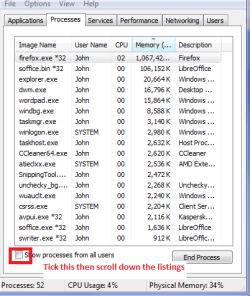
[FONT=Arial, sans-serif]Now can you open up your task manager then Processes and then Show all processes from all users and then go down that listing and look for any [/FONT][FONT=Arial, sans-serif]rundll32.exe and see what is linked to it - you can do that by hovering the cursor over that process. Then let us know what thaose links if any are for I have seen in the past that .exe linked to malware though. [/FONT]

 

Attachments

  • TM.PNG
    TM.PNG
    14.5 KB · Views: 21

My Computer

Computer type
PC/Desktop
Computer Manufacturer/Model Number
Own build (new) Desk1 / Asus ROG Win 7 / Desk2 1st build
OS
Desk1 7 Home Prem / Desk2 10 Pro / Main lap Asus ROG 10 Pro 2 laptop Toshiba 7 Pro Asus P2520 7 & 10
CPU
Desk1 i5 3750K / Laptop i7 GTX 860M / Desk2 i5 2500
Motherboard
Desk1 Asus P877-V / Desk2 Gigabyte H67 UD3H / Laptop ?
Memory
Desk1 8GB (1866) / Desk2 16GB (1333) / Laptop 8Gb DDR3
Graphics Card(s)
Desk 1& 2NVidia GTX 650 & Laptops on board Intel
Sound Card
Desk 1 & 2 -XONAR DG Realtek High Def audio Laptop
Monitor(s) Displays
Desk 1 Benq HD 2450 / Desk2 Philips 24" / Laptop 17.5"
Screen Resolution
1920x1080 D1 & D2 & Laptop 1
Hard Drives
Desk1 Samsung 120GB 830 SSD
Asus ROG 256GB 850 Pro SSD
Desk2 Samsung 840 256 SSD
Toshiba 120GB EVO
PSU
Desk 1 Corsair HX 1050/ Laptop ? / Desk 2 Corsair HX 650
Case
Desk 1 Cooler HAF XM ? Toshiba laptop / Desk2 Coolermaster
Cooling
Fans on all Desk1 -2 Desk2 - all Coolermasters 5 Laptop ?
Keyboard
Desk 1 MS Sidewinder X6 Desk 2 MS Sidewinder X 4
Mouse
Desk 1&2 - Gigabyte MS 900 gamer - laptop - Logitec wireless
Internet Speed
ADSL2+
Other Info
One other Desktop (tester) and spare Toshba laptop both with SSD's
Running Kaspersky 2016 ISS on all machines config'd identically
Logitec audio stereo systems on each machine (x3)
Canon MG5250MFC
Router/modem TP-Link running WPA2SK
Thanks for giving me some possible solutions. I need to re-think this. I'll mark thiss as solved since I don't see other choices.
 

My Computer

Computer type
Laptop
Computer Manufacturer/Model Number
Toshiba
OS
windows 7 pro 32 bit
Antivirus
Vipre
Browser
Firefox 30
Back
Top