Setpoint setting program appear randomly at startup.

madmax2

New member
Member
Local time
4:14 PM
Messages
96
Hi

I installed setpoint 6.61 and I notice sometimes
Setpoint settings program would randomly appear at startup.
I don't know why it appears, it would appear randomly
and it would sometime change my settings to the default.


I have tried search in logitech forum..
But the solutions don't seem to have fix it.

Since logitech is a big keyboard/mouse manufacturer..
I think many people would have the same setpoint software.

If anyone has the same issue or solution.
Please post here...
 

My Computer

OS
Microsoft Windows 7 Ultimate 64-bit 7601 Multiprocessor Free Service Pack 1
CPU
Intel(R) Core(TM) i5-2500K CPU @ 3.30GHz
Motherboard
ASUSTeK Computer INC. P8Z68-V PRO
Memory
16.00 GB
Graphics Card(s)
AMD Radeon HD 6950
Sound Card
(1) AMD High Definition Audio Device (2) Webcam 250 (3)
Screen Resolution
1920 x 1080 x 32 bits (4294967296 colors) @ 60 Hz
Hard Drives
(1) M4-CT064M4SSD2 ATA Device (2) M4-CT128M4SSD2 ATA Device (3) SAMSUNG HD103SJ ATA Device (4) WDC WD20EARX-00PASB0 ATA Device (5) WDC WD20EARX-00PASB0 ATA Device (6) WDC WD20 EARS-00MVWB0 SCSI Disk Device (7) Generic USB CF Reader USB De
PSU
Corsair HX 650
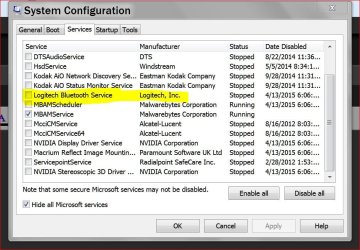
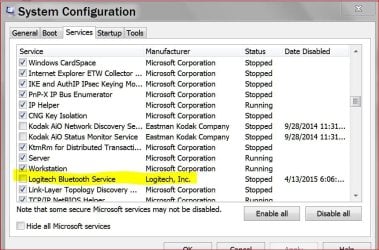
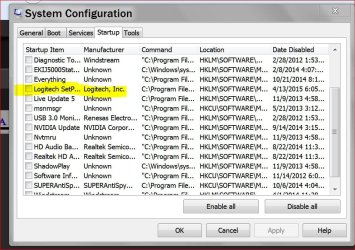
All I did once I had my mouse as I wanted it was go into msconfig/Startup and Services unchecked Set Point and Logitech. That way it will only open when you select it to. It will not open by itself.
 

My Computer

Computer type
PC/Desktop
Computer Manufacturer/Model Number
Home made Desktop
OS
Windows 10 Pro. 64/ version 1709 Windows 7 Pro/64
CPU
Intel i7-6800K @ 4.3
Motherboard
ASUS X-99 Deluxe II
Memory
Corsair Platinum 16 gig @2400
Graphics Card(s)
EVGA GTX 1070 OC
Monitor(s) Displays
Asus 27" LED LCD/VE278Q
Screen Resolution
1920-1080 or 1280-720 HDMI
Hard Drives
INTEL SSD 730-240 Gb Sata 3.0/
PSU
EVGA Platium 1200W
Case
Phanteks Luxe Tempered Glass 8 fans/ one radiator
Cooling
XSPC/ Water Cooled CPU
Keyboard
Das 4 Professional
Mouse
Logitech M705/MX Anywhere 2-S
Internet Speed
100 mbits
Antivirus
Microsoft Security Essentials/ Malwarebytes Premium 3.0/ SAS
Browser
I.E. 11 default/Firefox/ ISP Time Warner Cable/Spectrum
Other Info
LG BluRay Burner/
Sound system-KLipsch-THX/
Icy Dock ssd Hot Swap bays.
All I did once I had my mouse as I wanted it was go into msconfig/Startup and Services unchecked Set Point and Logitech. That way it will only open when you select it to. It will not open by itself.

Do u mean uncheck all logitech setpoint entries in STARTUP of msconfig?

But if I do that then it would not load setpoint software..
and there the mouse would be sluggish cos it would use microsoft driver..

Can you post some picture of what you mean?

Also in the entry, what does it say for your setpoint software?
e.g. /launchGaming

Here's mine

nZnLC2t.png
 
Last edited:

My Computer

OS
Microsoft Windows 7 Ultimate 64-bit 7601 Multiprocessor Free Service Pack 1
CPU
Intel(R) Core(TM) i5-2500K CPU @ 3.30GHz
Motherboard
ASUSTeK Computer INC. P8Z68-V PRO
Memory
16.00 GB
Graphics Card(s)
AMD Radeon HD 6950
Sound Card
(1) AMD High Definition Audio Device (2) Webcam 250 (3)
Screen Resolution
1920 x 1080 x 32 bits (4294967296 colors) @ 60 Hz
Hard Drives
(1) M4-CT064M4SSD2 ATA Device (2) M4-CT128M4SSD2 ATA Device (3) SAMSUNG HD103SJ ATA Device (4) WDC WD20EARX-00PASB0 ATA Device (5) WDC WD20EARX-00PASB0 ATA Device (6) WDC WD20 EARS-00MVWB0 SCSI Disk Device (7) Generic USB CF Reader USB De
PSU
Corsair HX 650
These settings work for me. They may or may not work for you.
If they don't work for you just recheck them and put things back the way they were.

services only today.JPG

Services today only.JPG

today only msconfig start.JPG
 

My Computer

Computer type
PC/Desktop
Computer Manufacturer/Model Number
Home made Desktop
OS
Windows 10 Pro. 64/ version 1709 Windows 7 Pro/64
CPU
Intel i7-6800K @ 4.3
Motherboard
ASUS X-99 Deluxe II
Memory
Corsair Platinum 16 gig @2400
Graphics Card(s)
EVGA GTX 1070 OC
Monitor(s) Displays
Asus 27" LED LCD/VE278Q
Screen Resolution
1920-1080 or 1280-720 HDMI
Hard Drives
INTEL SSD 730-240 Gb Sata 3.0/
PSU
EVGA Platium 1200W
Case
Phanteks Luxe Tempered Glass 8 fans/ one radiator
Cooling
XSPC/ Water Cooled CPU
Keyboard
Das 4 Professional
Mouse
Logitech M705/MX Anywhere 2-S
Internet Speed
100 mbits
Antivirus
Microsoft Security Essentials/ Malwarebytes Premium 3.0/ SAS
Browser
I.E. 11 default/Firefox/ ISP Time Warner Cable/Spectrum
Other Info
LG BluRay Burner/
Sound system-KLipsch-THX/
Icy Dock ssd Hot Swap bays.
Quick question, what keyboard and mouse do you have? Seeing as you also have Logitech Gaming Software installed (the replacement for Setpoint on most keyboards and mice), You may not even need Setpoint.
 

My Computer

Computer type
PC/Desktop
Computer Manufacturer/Model Number
Me
OS
Win 7 Ultimate x64
CPU
FX-8350 @ 4.6 GHz so far
Motherboard
Asus M5A97 EVO
Memory
ADATA XPG V1 Series Black 8GB DDR3 1600
Graphics Card(s)
Sapphire R9 270x Dual-X
Sound Card
Xonar DGX w/ Corsair Vengence 1300
Monitor(s) Displays
Acer S232HL Abid
Screen Resolution
1920x1080
Hard Drives
120 GB OCZ Vertex 3
500 GB Seagate 7200.12
PSU
Antec Earthwatts 650W Green
Case
Antec Three Hundred
Cooling
Cooler Master 212 EVO
Keyboard
Logitech G510
Mouse
Logitech G500s
Internet Speed
35000/3000
Quick question, what keyboard and mouse do you have? Seeing as you also have Logitech Gaming Software installed (the replacement for Setpoint on most keyboards and mice), You may not even need Setpoint.

Actually I need setpoint 6

cos I have the following item

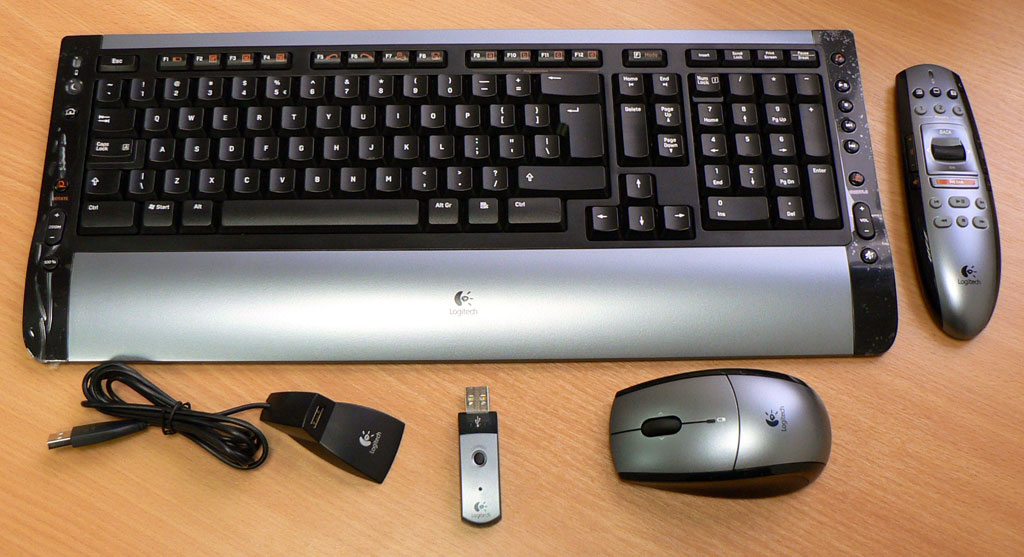
-MX5500 Revolution mouse and keyboard combo (though I decided to use another keyboard s510)
7833d1311543413-logitech-mx-5500-bluetooth-desktop-keyboard-remapping-logitech-cordless-des-r95751-1.jpg


-S510 Keyboard (I use this one from an old keyboard combo I bought) from this combo
-S510 remote control (for media playback)
14.jpg


I keep the MX5500 keyboard from that combo above for another PC cos I have another bluetooth dongle.

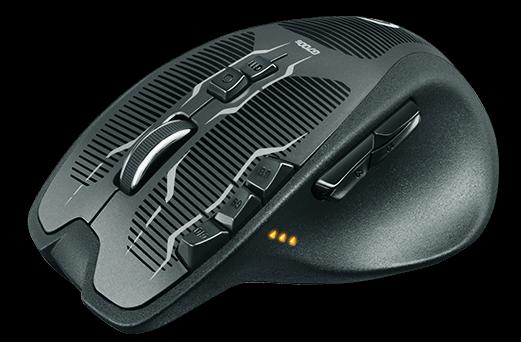
I also use a g700s occasionally for gaming and as a temp replacement for the MX Revolution while it is charging in the cradle.
logitech-g700s-gaming-mouse-lingloong-1305-25-lingloong@2.jpg


Rechargable Wireless Gaming Mouse - G700s - Logitech


I need to use the Setpoint 6 software because it is required for logitech standard mouse and keyboards.

The g700s has it is own software which only works and is required for their gaming products.
-Logitech Gaming Software 8.50.281
 

My Computer

OS
Microsoft Windows 7 Ultimate 64-bit 7601 Multiprocessor Free Service Pack 1
CPU
Intel(R) Core(TM) i5-2500K CPU @ 3.30GHz
Motherboard
ASUSTeK Computer INC. P8Z68-V PRO
Memory
16.00 GB
Graphics Card(s)
AMD Radeon HD 6950
Sound Card
(1) AMD High Definition Audio Device (2) Webcam 250 (3)
Screen Resolution
1920 x 1080 x 32 bits (4294967296 colors) @ 60 Hz
Hard Drives
(1) M4-CT064M4SSD2 ATA Device (2) M4-CT128M4SSD2 ATA Device (3) SAMSUNG HD103SJ ATA Device (4) WDC WD20EARX-00PASB0 ATA Device (5) WDC WD20EARX-00PASB0 ATA Device (6) WDC WD20 EARS-00MVWB0 SCSI Disk Device (7) Generic USB CF Reader USB De
PSU
Corsair HX 650

My Computer

OS
Microsoft Windows 7 Ultimate 64-bit 7601 Multiprocessor Free Service Pack 1
CPU
Intel(R) Core(TM) i5-2500K CPU @ 3.30GHz
Motherboard
ASUSTeK Computer INC. P8Z68-V PRO
Memory
16.00 GB
Graphics Card(s)
AMD Radeon HD 6950
Sound Card
(1) AMD High Definition Audio Device (2) Webcam 250 (3)
Screen Resolution
1920 x 1080 x 32 bits (4294967296 colors) @ 60 Hz
Hard Drives
(1) M4-CT064M4SSD2 ATA Device (2) M4-CT128M4SSD2 ATA Device (3) SAMSUNG HD103SJ ATA Device (4) WDC WD20EARX-00PASB0 ATA Device (5) WDC WD20EARX-00PASB0 ATA Device (6) WDC WD20 EARS-00MVWB0 SCSI Disk Device (7) Generic USB CF Reader USB De
PSU
Corsair HX 650
No it doesn't load on the Windows tray. I do keep it on the Taskbar just in case I want to make changes. I just tick on the icon and it opens the program. Make my changes and close it again.
Some times for what ever reason after making changes I need to reboot to keep changes.
 

My Computer

Computer type
PC/Desktop
Computer Manufacturer/Model Number
Home made Desktop
OS
Windows 10 Pro. 64/ version 1709 Windows 7 Pro/64
CPU
Intel i7-6800K @ 4.3
Motherboard
ASUS X-99 Deluxe II
Memory
Corsair Platinum 16 gig @2400
Graphics Card(s)
EVGA GTX 1070 OC
Monitor(s) Displays
Asus 27" LED LCD/VE278Q
Screen Resolution
1920-1080 or 1280-720 HDMI
Hard Drives
INTEL SSD 730-240 Gb Sata 3.0/
PSU
EVGA Platium 1200W
Case
Phanteks Luxe Tempered Glass 8 fans/ one radiator
Cooling
XSPC/ Water Cooled CPU
Keyboard
Das 4 Professional
Mouse
Logitech M705/MX Anywhere 2-S
Internet Speed
100 mbits
Antivirus
Microsoft Security Essentials/ Malwarebytes Premium 3.0/ SAS
Browser
I.E. 11 default/Firefox/ ISP Time Warner Cable/Spectrum
Other Info
LG BluRay Burner/
Sound system-KLipsch-THX/
Icy Dock ssd Hot Swap bays.
No it doesn't load on the Windows tray. I do keep it on the Taskbar just in case I want to make changes. I just tick on the icon and it opens the program. Make my changes and close it again.
Some times for what ever reason after making changes I need to reboot to keep changes.

But if the setpoint is not in the system tray then the mouse is not using the logitech driver or acceleration...

if I quite setpoint from the system tray, the mouse would move very slowly..
cos it is would be using the microsoft driver
 

My Computer

OS
Microsoft Windows 7 Ultimate 64-bit 7601 Multiprocessor Free Service Pack 1
CPU
Intel(R) Core(TM) i5-2500K CPU @ 3.30GHz
Motherboard
ASUSTeK Computer INC. P8Z68-V PRO
Memory
16.00 GB
Graphics Card(s)
AMD Radeon HD 6950
Sound Card
(1) AMD High Definition Audio Device (2) Webcam 250 (3)
Screen Resolution
1920 x 1080 x 32 bits (4294967296 colors) @ 60 Hz
Hard Drives
(1) M4-CT064M4SSD2 ATA Device (2) M4-CT128M4SSD2 ATA Device (3) SAMSUNG HD103SJ ATA Device (4) WDC WD20EARX-00PASB0 ATA Device (5) WDC WD20EARX-00PASB0 ATA Device (6) WDC WD20 EARS-00MVWB0 SCSI Disk Device (7) Generic USB CF Reader USB De
PSU
Corsair HX 650
If for what ever reason you need Setpoint on the system try then put it there.

I'm just showing you how I have mine set up and it works for me.
If you need to make changes for your system to work properly, then by all means please do so.
 

My Computer

Computer type
PC/Desktop
Computer Manufacturer/Model Number
Home made Desktop
OS
Windows 10 Pro. 64/ version 1709 Windows 7 Pro/64
CPU
Intel i7-6800K @ 4.3
Motherboard
ASUS X-99 Deluxe II
Memory
Corsair Platinum 16 gig @2400
Graphics Card(s)
EVGA GTX 1070 OC
Monitor(s) Displays
Asus 27" LED LCD/VE278Q
Screen Resolution
1920-1080 or 1280-720 HDMI
Hard Drives
INTEL SSD 730-240 Gb Sata 3.0/
PSU
EVGA Platium 1200W
Case
Phanteks Luxe Tempered Glass 8 fans/ one radiator
Cooling
XSPC/ Water Cooled CPU
Keyboard
Das 4 Professional
Mouse
Logitech M705/MX Anywhere 2-S
Internet Speed
100 mbits
Antivirus
Microsoft Security Essentials/ Malwarebytes Premium 3.0/ SAS
Browser
I.E. 11 default/Firefox/ ISP Time Warner Cable/Spectrum
Other Info
LG BluRay Burner/
Sound system-KLipsch-THX/
Icy Dock ssd Hot Swap bays.
If for what ever reason you need Setpoint on the system try then put it there.

I'm just showing you how I have mine set up and it works for me.
If you need to make changes for your system to work properly, then by all means please do so.

Yes, I am not trying to argue with you..

What I want to know is if

-The mouse is slower to move when the tray icon is not showing?
Because I don't believe the logitech mouse drivers are getting used, the mouse moves much more slower..

-Does your custom settings get saved if the tray icon is not running?
I just tested it by quiting setpoint in tray icon and my customised mouse buttons are not working.

Can you do those tests for me please...

I think setpoint needs to be in the tray (therefore it is running) in order to use the logitech mouse/keyboard properly.
 

My Computer

OS
Microsoft Windows 7 Ultimate 64-bit 7601 Multiprocessor Free Service Pack 1
CPU
Intel(R) Core(TM) i5-2500K CPU @ 3.30GHz
Motherboard
ASUSTeK Computer INC. P8Z68-V PRO
Memory
16.00 GB
Graphics Card(s)
AMD Radeon HD 6950
Sound Card
(1) AMD High Definition Audio Device (2) Webcam 250 (3)
Screen Resolution
1920 x 1080 x 32 bits (4294967296 colors) @ 60 Hz
Hard Drives
(1) M4-CT064M4SSD2 ATA Device (2) M4-CT128M4SSD2 ATA Device (3) SAMSUNG HD103SJ ATA Device (4) WDC WD20EARX-00PASB0 ATA Device (5) WDC WD20EARX-00PASB0 ATA Device (6) WDC WD20 EARS-00MVWB0 SCSI Disk Device (7) Generic USB CF Reader USB De
PSU
Corsair HX 650
All I have is a Logitech mouse no Logitech keyboard. I have never heard of a slow keyboard.
I have no problems with my mouse. (Logitech M705)

I have no idea how else I can address your problem.
Have you checked the Logitech Forum.
 

My Computer

Computer type
PC/Desktop
Computer Manufacturer/Model Number
Home made Desktop
OS
Windows 10 Pro. 64/ version 1709 Windows 7 Pro/64
CPU
Intel i7-6800K @ 4.3
Motherboard
ASUS X-99 Deluxe II
Memory
Corsair Platinum 16 gig @2400
Graphics Card(s)
EVGA GTX 1070 OC
Monitor(s) Displays
Asus 27" LED LCD/VE278Q
Screen Resolution
1920-1080 or 1280-720 HDMI
Hard Drives
INTEL SSD 730-240 Gb Sata 3.0/
PSU
EVGA Platium 1200W
Case
Phanteks Luxe Tempered Glass 8 fans/ one radiator
Cooling
XSPC/ Water Cooled CPU
Keyboard
Das 4 Professional
Mouse
Logitech M705/MX Anywhere 2-S
Internet Speed
100 mbits
Antivirus
Microsoft Security Essentials/ Malwarebytes Premium 3.0/ SAS
Browser
I.E. 11 default/Firefox/ ISP Time Warner Cable/Spectrum
Other Info
LG BluRay Burner/
Sound system-KLipsch-THX/
Icy Dock ssd Hot Swap bays.
All I have is a Logitech mouse no Logitech keyboard. I have never heard of a slow keyboard.
I have no problems with my mouse. (Logitech M705)

I have no idea how else I can address your problem.
Have you checked the Logitech Forum.

Yes, I didn't say slow keyboard

I tested it with my mouse.
If logitech setpoint tray icon not showing
then the mouse moves slower..

I have look at the forum as mention in my first post.
 

My Computer

OS
Microsoft Windows 7 Ultimate 64-bit 7601 Multiprocessor Free Service Pack 1
CPU
Intel(R) Core(TM) i5-2500K CPU @ 3.30GHz
Motherboard
ASUSTeK Computer INC. P8Z68-V PRO
Memory
16.00 GB
Graphics Card(s)
AMD Radeon HD 6950
Sound Card
(1) AMD High Definition Audio Device (2) Webcam 250 (3)
Screen Resolution
1920 x 1080 x 32 bits (4294967296 colors) @ 60 Hz
Hard Drives
(1) M4-CT064M4SSD2 ATA Device (2) M4-CT128M4SSD2 ATA Device (3) SAMSUNG HD103SJ ATA Device (4) WDC WD20EARX-00PASB0 ATA Device (5) WDC WD20EARX-00PASB0 ATA Device (6) WDC WD20 EARS-00MVWB0 SCSI Disk Device (7) Generic USB CF Reader USB De
PSU
Corsair HX 650

My Computer

Computer type
PC/Desktop
Computer Manufacturer/Model Number
Me
OS
Win 7 Ultimate x64
CPU
FX-8350 @ 4.6 GHz so far
Motherboard
Asus M5A97 EVO
Memory
ADATA XPG V1 Series Black 8GB DDR3 1600
Graphics Card(s)
Sapphire R9 270x Dual-X
Sound Card
Xonar DGX w/ Corsair Vengence 1300
Monitor(s) Displays
Acer S232HL Abid
Screen Resolution
1920x1080
Hard Drives
120 GB OCZ Vertex 3
500 GB Seagate 7200.12
PSU
Antec Earthwatts 650W Green
Case
Antec Three Hundred
Cooling
Cooler Master 212 EVO
Keyboard
Logitech G510
Mouse
Logitech G500s
Internet Speed
35000/3000
Please forgive me for not remembering exactly what was in your first post.
 

My Computer

Computer type
PC/Desktop
Computer Manufacturer/Model Number
Home made Desktop
OS
Windows 10 Pro. 64/ version 1709 Windows 7 Pro/64
CPU
Intel i7-6800K @ 4.3
Motherboard
ASUS X-99 Deluxe II
Memory
Corsair Platinum 16 gig @2400
Graphics Card(s)
EVGA GTX 1070 OC
Monitor(s) Displays
Asus 27" LED LCD/VE278Q
Screen Resolution
1920-1080 or 1280-720 HDMI
Hard Drives
INTEL SSD 730-240 Gb Sata 3.0/
PSU
EVGA Platium 1200W
Case
Phanteks Luxe Tempered Glass 8 fans/ one radiator
Cooling
XSPC/ Water Cooled CPU
Keyboard
Das 4 Professional
Mouse
Logitech M705/MX Anywhere 2-S
Internet Speed
100 mbits
Antivirus
Microsoft Security Essentials/ Malwarebytes Premium 3.0/ SAS
Browser
I.E. 11 default/Firefox/ ISP Time Warner Cable/Spectrum
Other Info
LG BluRay Burner/
Sound system-KLipsch-THX/
Icy Dock ssd Hot Swap bays.

I don't think it has anything to do with 6.65

I found this

https://forums.logitech.com/t5/Mice...unchgaming-Is-this-command-option/td-p/882852

It says
/s = -starts SetPoint and opens the settings window

But my msconfig doesn't have /s...

e.g.
-starts SetPoint and opens the settings window:

"C:\Program Files\Logitech\SetPoint\SetPoint.exe" /s
 

My Computer

OS
Microsoft Windows 7 Ultimate 64-bit 7601 Multiprocessor Free Service Pack 1
CPU
Intel(R) Core(TM) i5-2500K CPU @ 3.30GHz
Motherboard
ASUSTeK Computer INC. P8Z68-V PRO
Memory
16.00 GB
Graphics Card(s)
AMD Radeon HD 6950
Sound Card
(1) AMD High Definition Audio Device (2) Webcam 250 (3)
Screen Resolution
1920 x 1080 x 32 bits (4294967296 colors) @ 60 Hz
Hard Drives
(1) M4-CT064M4SSD2 ATA Device (2) M4-CT128M4SSD2 ATA Device (3) SAMSUNG HD103SJ ATA Device (4) WDC WD20EARX-00PASB0 ATA Device (5) WDC WD20EARX-00PASB0 ATA Device (6) WDC WD20 EARS-00MVWB0 SCSI Disk Device (7) Generic USB CF Reader USB De
PSU
Corsair HX 650
Back
Top