Settiings

Hal1

New member
Local time
10:38 PM
Messages
32
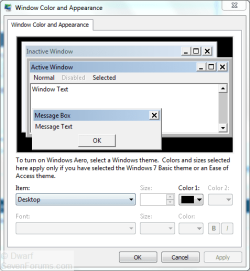
In XP I was able to adjust the size settings for icons, scroll bars, menus and more. How do I get into that window to make those adjustments on Windows 7 ? Thanks. Hal.
 

My Computer

Computer Manufacturer/Model Number
HP PavillionHPE 410y
OS
Windows 7-64 bit
Last edited by a moderator:

My Computer

Computer type
PC/Desktop
Computer Manufacturer/Model Number
Custom Build
OS
Windows 10 Pro x64, Arch Linux
CPU
Intel Core 2 Quad Q8200 OC'd 3.08GHz
Motherboard
Asus Rampage formula LGA775
Memory
8GB DDR2 900Mhz
Graphics Card(s)
MSI GT730 2GB GDDR5 (Kepler)
Sound Card
Supreme FX2
Monitor(s) Displays
Samsung LS22F350 LED
Screen Resolution
1080P
Hard Drives
Kingston SSDNow UV400 120GB, 500GB Hitachi, 2TB Samsung, 500GB Seagate FreeAgent, 640GB Samsung, 160GB Toshiba (Arch)
PSU
AeroCool 500W Bronze
Cooling
Cooler Master V6 + 3X fans
Keyboard
Prolink keyboard
Mouse
Logitech M705
Internet Speed
1MiB/s
Browser
Chrome Beta
Have you played around with personalize - just right-click,,what exactly can't you do...?

Yowanvista's got it even better!!!:tip:
 

My Computer

Computer Manufacturer/Model Number
Custom
OS
Windows 7 Ultimate 32bit
CPU
INTEL Pentium4 3.2ghz(QuadCore MonthEnd!!!)
Motherboard
Asus P5QL-EM
Memory
2gb kingston DDR2 800
Graphics Card(s)
hd powercolour 5570 512MB
Sound Card
8ch onboard
Monitor(s) Displays
21" Samsung
Screen Resolution
Change alot
Hard Drives
samsung 500GB 7200rpm
PSU
Sparta 500w
Case
Alienware
Cooling
Aero cooling
Keyboard
Microsoft Multi-Media
Mouse
Scorpion 3000dpi
Internet Speed
none
Other Info
Xforce-5 5.1 Surround
Press control+scroll.. changes the icon size.

YBL.
 

My Computer

Computer Manufacturer/Model Number
AMD _(Assembled)_
OS
Dual Booting Windows 7 64-Bit Ultimate Edition and Fedora 16.
CPU
AMD Phenom X4 925
Motherboard
MSI 785g-E53
Memory
4gb DDR3 G.skill RipJaws
Graphics Card(s)
ATI Radeon HD 6770
Sound Card
Realtek
Monitor(s) Displays
Dell IN2020M LED
Screen Resolution
1600*900 20"
Hard Drives
Seagate 500 Gibs
External 320 Gb Western Digital(Got Glitchy)
PSU
Cooler Master
Case
Cooler Master
Cooling
Cooler Master
Keyboard
Logitech K100
Mouse
Razor Death Adder v2 3500 dPi (Razer Goliathus Pad)
Internet Speed
Back to college Internet with Cyberroam X|
Right-click on desktop, click Personalize, Window Color, Advanced appearance settings...

Capture.PNG
 

My Computer

Computer type
PC/Desktop
Computer Manufacturer/Model Number
Dwarf Dwf/11/2012 r09/2013
OS
Windows 8.1 Pro RTM x64
CPU
Intel Core-i5-3570K 4-core @ 3.4GHz (Ivy Bridge) (OC 4.4GHz)
Motherboard
ASRock Z77 Extreme4-M
Memory
4 x 4GB DDR3-1600 Corsair Vengeance CMZ8GX3M2A1600C9B (16GB)
Graphics Card(s)
MSI GeForce GTX770 Gaming OC 2GB
Sound Card
Realtek High Definition on board solution (ALC 898)
Monitor(s) Displays
ViewSonic VA1912w Widescreen (VGA)
Screen Resolution
1440x900
Hard Drives
OCZ Agility 3 SSD 120GB SATA III x2 (RAID 0)
Samsung HD501LJ 500GB SATA II x2
Hitachi HDS721010CLA332 1TB SATA II
Iomega 1.5TB Ext USB 2.0
WD 2.0TB Ext USB 3.0
PSU
XFX Pro Series 850W Semi-Modular
Case
Gigabyte IF233
Cooling
1 x 120mm Front Inlet 1 x 120mm Rear Exhaust
Keyboard
Microsoft Comfort Curve Keyboard 3000 (USB)
Mouse
Microsoft Comfort Mouse 3000 for Business (USB)
Internet Speed
NetGear DG834Gv3 ADSL Modem/Router (Ethernet) ~4.0 Mb/s (O2)
Antivirus
Avast! 8.0.1497
Browser
IE 11
Other Info
Optical Drive: HL-DT-ST BD-RE BH10LS30 SATA Bluray
Lexmark S305 Printer/Scanner/Copier (USB)
WEI Score: 8.1/8.1/8.5/8.5/8.25
Asus Eee PC 1011PX Netbook (Windows 7 x86 Starter)
Back
Top