
jdUnionngaden
New member
- Local time
- 6:52 PM
- Messages
- 17
Hi All!
Apologies if I've chosen the wrong location for this post!
-
I just Installed a Solid State Drive replacing/cloning my previous Primary Disk Drive.
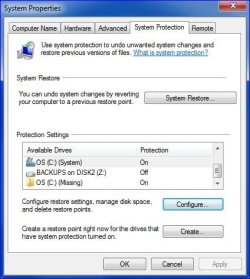
Apparently the Restore Point setup "window" still thinks the old Disk Drive is there, but "(Missing)".
Screen grab attached.
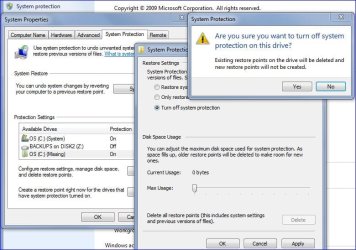
"Configure" shows zero current usage, but when I tried to turn it off I was warned that all restore points will be deleted and new Restore Points won't be created.
Perhaps that only means Restore Points won't be created (only) for the "(Missing)" drive and I'm worried about nothing. I want to be safe rather than sorry.
FWIW: The original Drive is still installed but renamed to a new name & letter.
-
Any thoughts or suggestions would be greatly appreciated.
Thanks
/jdU
Apologies if I've chosen the wrong location for this post!
-
I just Installed a Solid State Drive replacing/cloning my previous Primary Disk Drive.
Apparently the Restore Point setup "window" still thinks the old Disk Drive is there, but "(Missing)".
Screen grab attached.
"Configure" shows zero current usage, but when I tried to turn it off I was warned that all restore points will be deleted and new Restore Points won't be created.
Perhaps that only means Restore Points won't be created (only) for the "(Missing)" drive and I'm worried about nothing. I want to be safe rather than sorry.
FWIW: The original Drive is still installed but renamed to a new name & letter.
-
Any thoughts or suggestions would be greatly appreciated.
Thanks
/jdU
Attachments
My Computer
- Computer Manufacturer/Model Number
- HP
- OS
- Windows 7 Pro 64bit
- CPU
- 2nd Gen Intel quad core 3.4GB i7-2600, 8MB Shared Cache
- Memory
- 8 Gig RAM
- Graphics Card(s)
- 3GB NIVIDA GeForce GT545
- Monitor(s) Displays
- 23" HP
- Hard Drives
- Two 1TB 7200 RPM SATA HD
- Cooling
- HeatSink Air Cooling Solution
