Solved Setting Screen Resolution to Max my Screen is not responding.

thenortonsetup

New member
Local time
12:48 PM
Messages
7
Location
New York
Hey Guys,
I was reading document on my PC, but content to the right was not readable, as it was hiding in edge of browser. So I thought it is happening because of my PC resolution. Than On main screen I did Right click and select option of screen resolution and selected max. And done it. After that my screen show error of "RESOLUTION OUT OF RANGE" than black blank screen. I thought in some second it will auto retrieve to last resolution setting. But no, now my PC is ON but i can't see anything except than black screen, just like it is off. But all monitor functions are working. Help me out with this. What should I do now?

Thankyou
thenortonsetup
 

My Computer My Computer

Computer type
PC/Desktop
Computer Manufacturer/Model Number
Unknown
OS
Windows 7 Ultimate x 64
CPU
i7 960
Motherboard
Gigabyte
Memory
16GB
Graphics Card(s)
ATI Saphire 780
Hard Drives
1TB WD
Antivirus
Norton
Browser
Chrome, Waterfox
Disconnect from your graphics card and plug into the motherboard port.

Uninstall the drivers for the 780 and start over.

You may or may not have to remove the card.

Unless someone comes up with a better idea.
 

My Computer My Computer

Computer type
PC/Desktop
Computer Manufacturer/Model Number
Skylake Special #666
OS
Windows 10 Pro x64
CPU
Intel Core i7 6700K
Motherboard
Asus Sabertooth Z170 Mark 1
Memory
GSkill TridentZ RGB 16GB 3600 16-16-16-36
Graphics Card(s)
EVGA GTX 980 Ti SC x2
Sound Card
Realtek High Definition
Monitor(s) Displays
AOC G2460PG
Screen Resolution
1920 x 1080 144Hz
Hard Drives
Samsung 860 Pro 256GB, Seagate Barracuda 4TB x2
PSU
EVGA 1000 P2, EVGA White Custom Braided Cables
Case
Corsair Vengeance C70 Gunmetal Black
Cooling
Corsair H100i v2, Corsair ML120 x2, Thermal Grizzly Kryonaut
Keyboard
Logitech G910 Orion Spectrum
Mouse
Logitech G700s
Internet Speed
Verizon Fios Quantum Gateway 75/75
Antivirus
Windows Defender, Malwarebytes Free 3.8.3
Browser
Chrome
Other Info
Corsair SP120 x4, LG Blu-ray Drive, Durabrand HT-395 100 Watt Dolby Digital Amp, Corsair H2100 Wireless 7.1 Headset
I tried this but not work for me..
 

My Computer My Computer

Computer type
PC/Desktop
Computer Manufacturer/Model Number
Unknown
OS
Windows 7 Ultimate x 64
CPU
i7 960
Motherboard
Gigabyte
Memory
16GB
Graphics Card(s)
ATI Saphire 780
Hard Drives
1TB WD
Antivirus
Norton
Browser
Chrome, Waterfox
When you hook it to the MB, you still don`t get a picture ?

That`s odd.
 

My Computer My Computer

Computer type
PC/Desktop
Computer Manufacturer/Model Number
Skylake Special #666
OS
Windows 10 Pro x64
CPU
Intel Core i7 6700K
Motherboard
Asus Sabertooth Z170 Mark 1
Memory
GSkill TridentZ RGB 16GB 3600 16-16-16-36
Graphics Card(s)
EVGA GTX 980 Ti SC x2
Sound Card
Realtek High Definition
Monitor(s) Displays
AOC G2460PG
Screen Resolution
1920 x 1080 144Hz
Hard Drives
Samsung 860 Pro 256GB, Seagate Barracuda 4TB x2
PSU
EVGA 1000 P2, EVGA White Custom Braided Cables
Case
Corsair Vengeance C70 Gunmetal Black
Cooling
Corsair H100i v2, Corsair ML120 x2, Thermal Grizzly Kryonaut
Keyboard
Logitech G910 Orion Spectrum
Mouse
Logitech G700s
Internet Speed
Verizon Fios Quantum Gateway 75/75
Antivirus
Windows Defender, Malwarebytes Free 3.8.3
Browser
Chrome
Other Info
Corsair SP120 x4, LG Blu-ray Drive, Durabrand HT-395 100 Watt Dolby Digital Amp, Corsair H2100 Wireless 7.1 Headset
Maybe be because my friend tried to do something with BIOS settings.. He disabled something..
 

My Computer My Computer

Computer type
PC/Desktop
Computer Manufacturer/Model Number
Unknown
OS
Windows 7 Ultimate x 64
CPU
i7 960
Motherboard
Gigabyte
Memory
16GB
Graphics Card(s)
ATI Saphire 780
Hard Drives
1TB WD
Antivirus
Norton
Browser
Chrome, Waterfox
He may have disabled the on board graphics. Just re enable it.

But usually when you switch back it switches automatically, but maybe not for you.
 

My Computer My Computer

Computer type
PC/Desktop
Computer Manufacturer/Model Number
Skylake Special #666
OS
Windows 10 Pro x64
CPU
Intel Core i7 6700K
Motherboard
Asus Sabertooth Z170 Mark 1
Memory
GSkill TridentZ RGB 16GB 3600 16-16-16-36
Graphics Card(s)
EVGA GTX 980 Ti SC x2
Sound Card
Realtek High Definition
Monitor(s) Displays
AOC G2460PG
Screen Resolution
1920 x 1080 144Hz
Hard Drives
Samsung 860 Pro 256GB, Seagate Barracuda 4TB x2
PSU
EVGA 1000 P2, EVGA White Custom Braided Cables
Case
Corsair Vengeance C70 Gunmetal Black
Cooling
Corsair H100i v2, Corsair ML120 x2, Thermal Grizzly Kryonaut
Keyboard
Logitech G910 Orion Spectrum
Mouse
Logitech G700s
Internet Speed
Verizon Fios Quantum Gateway 75/75
Antivirus
Windows Defender, Malwarebytes Free 3.8.3
Browser
Chrome
Other Info
Corsair SP120 x4, LG Blu-ray Drive, Durabrand HT-395 100 Watt Dolby Digital Amp, Corsair H2100 Wireless 7.1 Headset
At that time BIOS windows can be seen. But after that setting, It is just black dead screen. I dno't know how to enable it.
 

My Computer My Computer

Computer type
PC/Desktop
Computer Manufacturer/Model Number
Unknown
OS
Windows 7 Ultimate x 64
CPU
i7 960
Motherboard
Gigabyte
Memory
16GB
Graphics Card(s)
ATI Saphire 780
Hard Drives
1TB WD
Antivirus
Norton
Browser
Chrome, Waterfox
Pull the battery or use the jumper pin if the MB has one, it should set it back to defaults and you should see something on the screen.
 

My Computer My Computer

Computer type
PC/Desktop
Computer Manufacturer/Model Number
Skylake Special #666
OS
Windows 10 Pro x64
CPU
Intel Core i7 6700K
Motherboard
Asus Sabertooth Z170 Mark 1
Memory
GSkill TridentZ RGB 16GB 3600 16-16-16-36
Graphics Card(s)
EVGA GTX 980 Ti SC x2
Sound Card
Realtek High Definition
Monitor(s) Displays
AOC G2460PG
Screen Resolution
1920 x 1080 144Hz
Hard Drives
Samsung 860 Pro 256GB, Seagate Barracuda 4TB x2
PSU
EVGA 1000 P2, EVGA White Custom Braided Cables
Case
Corsair Vengeance C70 Gunmetal Black
Cooling
Corsair H100i v2, Corsair ML120 x2, Thermal Grizzly Kryonaut
Keyboard
Logitech G910 Orion Spectrum
Mouse
Logitech G700s
Internet Speed
Verizon Fios Quantum Gateway 75/75
Antivirus
Windows Defender, Malwarebytes Free 3.8.3
Browser
Chrome
Other Info
Corsair SP120 x4, LG Blu-ray Drive, Durabrand HT-395 100 Watt Dolby Digital Amp, Corsair H2100 Wireless 7.1 Headset
I pulled out every component of motherboard and assemble them again. Now i can access BIOS. And screen is working fine in safe mode. But when i switch to normal windows it is showing same resolution out of range and black screen than.
 

My Computer My Computer

Computer type
PC/Desktop
Computer Manufacturer/Model Number
Unknown
OS
Windows 7 Ultimate x 64
CPU
i7 960
Motherboard
Gigabyte
Memory
16GB
Graphics Card(s)
ATI Saphire 780
Hard Drives
1TB WD
Antivirus
Norton
Browser
Chrome, Waterfox
Now just a suggestion can you adjust the monitor res by the monitors own controls??

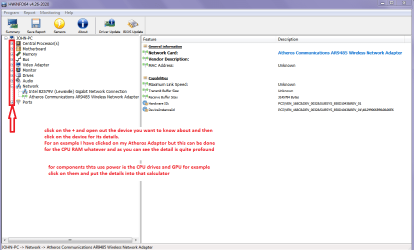
Now you also mention in the specs you don'y know what the machine is made up from? ie the manufacturer is not known. Now if you want some in depth info on your machine this might be handy.
Using HW Info
PART A:
You can test the volts on the PSU with HW Info HWiNFO, HWiNFO32/64 - Download < download the right bit version and close the right hand window select Sensors and scroll down to the power section where you will see what the volts are doing see my pic. In my pic the section (Nuvoton) with VBATT as a dead give away you are in the section for the rail voltages. There are other section titles and one that pops up often is ITE (sometimes the usual one for Gigabyte boards)
Now the voltage on the different rails have to be within 5% =+/- of what is required or the machine will not work properly if at all.
Limits +/-
12v = 11.4 – 12.6v
5v = 4.74 – 5.25v
3.3v = 3.135 – 3.465v
The Power good signal voltage at pin 8 on the 24 pin plug (grey cable) should be the same as the 5v rail reading/s
See this for the rail voltage info
PSUs 101: A Detailed Look Into Power Supplies (Section 2.)
The original right hand window shows the machine running and is handy for that but for looking at the components in some detail close it and use the main left hand side panel
FOR OTHER COMPONENTS
PART B:
Open each small square with + in it on the section the components are in and then click on the individual component/s (it will highlight in blue) - in the right hand side will appear all sorts of details including brands speeds and other essential info that particular device. See pic for example.

PART B: is particularly handy for your purposes:)
 

Attachments

  • HW INFO DEVICES.PNG
    HW INFO DEVICES.PNG
    32.3 KB · Views: 0

My Computer My Computer

Computer type
PC/Desktop
Computer Manufacturer/Model Number
Own build (new) Desk1 / Asus ROG Win 7 / Desk2 1st build
OS
Desk1 7 Home Prem / Desk2 10 Pro / Main lap Asus ROG 10 Pro 2 laptop Toshiba 7 Pro Asus P2520 7 & 10
CPU
Desk1 i5 3750K / Laptop i7 GTX 860M / Desk2 i5 2500
Motherboard
Desk1 Asus P877-V / Desk2 Gigabyte H67 UD3H / Laptop ?
Memory
Desk1 8GB (1866) / Desk2 16GB (1333) / Laptop 8Gb DDR3
Graphics Card(s)
Desk 1& 2NVidia GTX 650 & Laptops on board Intel
Sound Card
Desk 1 & 2 -XONAR DG Realtek High Def audio Laptop
Monitor(s) Displays
Desk 1 Benq HD 2450 / Desk2 Philips 24" / Laptop 17.5"
Screen Resolution
1920x1080 D1 & D2 & Laptop 1
Hard Drives
Desk1 Samsung 120GB 830 SSD
Asus ROG 256GB 850 Pro SSD
Desk2 Samsung 840 256 SSD
Toshiba 120GB EVO
PSU
Desk 1 Corsair HX 1050/ Laptop ? / Desk 2 Corsair HX 650
Case
Desk 1 Cooler HAF XM ? Toshiba laptop / Desk2 Coolermaster
Cooling
Fans on all Desk1 -2 Desk2 - all Coolermasters 5 Laptop ?
Keyboard
Desk 1 MS Sidewinder X6 Desk 2 MS Sidewinder X 4
Mouse
Desk 1&2 - Gigabyte MS 900 gamer - laptop - Logitec wireless
Internet Speed
ADSL2+
Other Info
One other Desktop (tester) and spare Toshba laptop both with SSD's
Running Kaspersky 2016 ISS on all machines config'd identically
Logitec audio stereo systems on each machine (x3)
Canon MG5250MFC
Router/modem TP-Link running WPA2SK
Try to reset BIOS's factory defaults or use optimized defaults or whatever name is. You should have one. Then reinstall your motherboard drivers and video drivers.
 

My Computer My Computer

Computer type
PC/Desktop
OS
windows 7 Ultimate x64
CPU
Intel i7 4790k
Motherboard
Asrock z97 extreme4
Memory
Corsair ddr3
Graphics Card(s)
Gtx 780
Hard Drives
Samsung 840 Evo 120gb
Western Digital 500gb
Thanks guy to help me out..
 

My Computer My Computer

Computer type
PC/Desktop
Computer Manufacturer/Model Number
Unknown
OS
Windows 7 Ultimate x 64
CPU
i7 960
Motherboard
Gigabyte
Memory
16GB
Graphics Card(s)
ATI Saphire 780
Hard Drives
1TB WD
Antivirus
Norton
Browser
Chrome, Waterfox
Did you fix the problem?
 

My Computer My Computer

Computer type
PC/Desktop
OS
windows 7 Ultimate x64
CPU
Intel i7 4790k
Motherboard
Asrock z97 extreme4
Memory
Corsair ddr3
Graphics Card(s)
Gtx 780
Hard Drives
Samsung 840 Evo 120gb
Western Digital 500gb
Yes!!
 

My Computer My Computer

Computer type
PC/Desktop
Computer Manufacturer/Model Number
Unknown
OS
Windows 7 Ultimate x 64
CPU
i7 960
Motherboard
Gigabyte
Memory
16GB
Graphics Card(s)
ATI Saphire 780
Hard Drives
1TB WD
Antivirus
Norton
Browser
Chrome, Waterfox
Could you tell the rest of the world what you did to solve the problem.

Jack
 

My Computer My Computer

Computer type
PC/Desktop
Computer Manufacturer/Model Number
Home made Desktop
OS
Windows 10 Pro. 64/ version 1709 Windows 7 Pro/64
CPU
Intel i7-6800K @ 4.3
Motherboard
ASUS X-99 Deluxe II
Memory
Corsair Platinum 16 gig @2400
Graphics Card(s)
EVGA GTX 1070 OC
Monitor(s) Displays
Asus 27" LED LCD/VE278Q
Screen Resolution
1920-1080 or 1280-720 HDMI
Hard Drives
INTEL SSD 730-240 Gb Sata 3.0/
PSU
EVGA Platium 1200W
Case
Phanteks Luxe Tempered Glass 8 fans/ one radiator
Cooling
XSPC/ Water Cooled CPU
Keyboard
Das 4 Professional
Mouse
Logitech M705/MX Anywhere 2-S
Internet Speed
100 mbits
Antivirus
Microsoft Security Essentials/ Malwarebytes Premium 3.0/ SAS
Browser
I.E. 11 default/Firefox/ ISP Time Warner Cable/Spectrum
Other Info
LG BluRay Burner/
Sound system-KLipsch-THX/
Icy Dock ssd Hot Swap bays.
I would hear it too:)
 

My Computer My Computer

Computer type
PC/Desktop
OS
windows 7 Ultimate x64
CPU
Intel i7 4790k
Motherboard
Asrock z97 extreme4
Memory
Corsair ddr3
Graphics Card(s)
Gtx 780
Hard Drives
Samsung 840 Evo 120gb
Western Digital 500gb
Back
Top