
Setting several password requirements vi a REG import file

Coram Daes

.i hate fanbois.
Power User
Local time
10:50 AM
Messages
126
I read the tutorial: http://www.sevenforums.com/tutorials/73368-password-history-enforcement-enable-disable.html and in that same page there are several related tutorial's for password management.

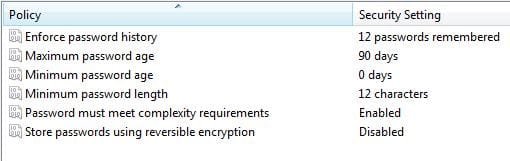
Looking for a REG import that would set:
- pwd min char = 12
- pwd max age = 90 days
- pwd complexity = yes
- pwd unique = 12 (a year)
-

I know these settings are here
HKEY_LOCAL_MACHINE\SOFTWARE\Microsoft\Windows NT\CurrentVersion\SeCEdit\Reg Values and I also know that one can do it via secpol.msc or via cmd, as Brink wrote in the Tutorial, but I am after the REG import way to do it, since it would be the quickest way for my environment.

I assume I could export the REG key from a machine that has been set up that way, but would it work with all machines? I have W7P and W7U and W S 2012 to consider. (No I am not yet implementing it as GP since I am still messing with AD construction).
 

Attachments
  • screenshot.17-11-2013 11.02.49.jpg
    screenshot.17-11-2013 11.02.49.jpg
    13.5 KB · Views: 16

My Computer My Computer

At a glance

W10 ProAMD Ryzen 5 2600X32 GB DDR4AMD Radeon RX 5600 XT
Computer type
PC/Desktop
Computer Manufacturer/Model Number
Main WKS/Gaming Sloth
OS
W10 Pro
CPU
AMD Ryzen 5 2600X
Motherboard
Asus TUF B450M-PRO-GAMING
Memory
32 GB DDR4
Graphics Card(s)
AMD Radeon RX 5600 XT
Sound Card
Generic Motherboard
Monitor(s) Displays
2 x Dell 24" LED P2415Q
Screen Resolution
2 x 3840 x 2160
Hard Drives
Samsung NVME
PSU
750 W
Case
Fractal Design
Cooling
Fractal Design
Keyboard
Roccat Horde AIMO
Mouse
Logitech G703
Internet Speed
ADSL 30 MBit
Antivirus
Bitdefender
Browser
Firefox
Never tried it, but it should work right away, no matter the edition. All Windows edition are in fact the very same thing, just with certain features hidden, but the registry is the same. I'm not 100% sure about Server 2012 (since it's really a Windows 8), but it may be as well work. Have a look at eightforums for that one.
 

My Computer My Computer

At a glance

Windows 7 Ultimate x64Intel Core i7-740QM8 GB DDR3NVIDIA GeForce 330GT
Computer type
Laptop
Computer Manufacturer/Model Number
Toshiba Sattelite A665-S6092
OS
Windows 7 Ultimate x64
CPU
Intel Core i7-740QM
Memory
8 GB DDR3
Graphics Card(s)
NVIDIA GeForce 330GT
Screen Resolution
1366x768
Hard Drives
Samsung 840 SSD 500GB
1TB USB3 external HD
Cooling
Coolermaster Notepal U3 notebook cooling pad
Internet Speed
3mbps ASDL
Antivirus
ClamWin 0.98.7
Browser
Opera 12.17 x86 (main), Firefox 38 (sec), IE11 (last resort)
What should work right away?
Making an export of the key from a comp that has it and then import it on a comp that has not?
 

My Computer My Computer

At a glance

W10 ProAMD Ryzen 5 2600X32 GB DDR4AMD Radeon RX 5600 XT
Computer type
PC/Desktop
Computer Manufacturer/Model Number
Main WKS/Gaming Sloth
OS
W10 Pro
CPU
AMD Ryzen 5 2600X
Motherboard
Asus TUF B450M-PRO-GAMING
Memory
32 GB DDR4
Graphics Card(s)
AMD Radeon RX 5600 XT
Sound Card
Generic Motherboard
Monitor(s) Displays
2 x Dell 24" LED P2415Q
Screen Resolution
2 x 3840 x 2160
Hard Drives
Samsung NVME
PSU
750 W
Case
Fractal Design
Cooling
Fractal Design
Keyboard
Roccat Horde AIMO
Mouse
Logitech G703
Internet Speed
ADSL 30 MBit
Antivirus
Bitdefender
Browser
Firefox
Yes, it's just changing a registry value after all, via a reg file instead of manually. I don't see why it would fail.
 

My Computer My Computer

At a glance

Windows 7 Ultimate x64Intel Core i7-740QM8 GB DDR3NVIDIA GeForce 330GT
Computer type
Laptop
Computer Manufacturer/Model Number
Toshiba Sattelite A665-S6092
OS
Windows 7 Ultimate x64
CPU
Intel Core i7-740QM
Memory
8 GB DDR3
Graphics Card(s)
NVIDIA GeForce 330GT
Screen Resolution
1366x768
Hard Drives
Samsung 840 SSD 500GB
1TB USB3 external HD
Cooling
Coolermaster Notepal U3 notebook cooling pad
Internet Speed
3mbps ASDL
Antivirus
ClamWin 0.98.7
Browser
Opera 12.17 x86 (main), Firefox 38 (sec), IE11 (last resort)
Where are these in the registry though. The screen shot shows the secpol window. The names as shown do not appear in the registry. I scanned the registry for Enforce password history and it was not found.

I did find these though: HKEY_LOCAL_MACHINE\SYSTEM\ControlSet001\Services\Netlogon\Parameters
 

My Computer My Computer

At a glance

Windows 10 Pro X64Intel Quad Core i7-4770 @ 3.4Ghz16.0GB PC3-12800 DDR3 SDRAM 1600 MHzIntel Integrated HD Graphics
Computer type
PC/Desktop
Computer Manufacturer/Model Number
Lenovo IdeaCenter 450
OS
Windows 10 Pro X64
CPU
Intel Quad Core i7-4770 @ 3.4Ghz
Memory
16.0GB PC3-12800 DDR3 SDRAM 1600 MHz
Graphics Card(s)
Intel Integrated HD Graphics
Sound Card
Realtek HD Audio
Monitor(s) Displays
HP 22" LCD
Screen Resolution
1680 x 1050
Hard Drives
250GB Samsung EVO SATA-3 SSD
2TB Seagate ST2000DM001 SATA-2
1.5TB Seagate ST3150041AS SATA
Keyboard
Dell USB
Mouse
Lenovo USB
Internet Speed
Cable via Road Runner 3MB Upload, 30MB Download
Antivirus
Windows Defender, MBAM Pro, MBAE
Browser
Seamonkey
Other Info
UEFI/GPT
PLDS DVD-RW DH16AERSH
Migtht be easier to run a batch file from an elevated command prompt with a line like this in it:

net accounts /UNIQUEPW:12 /MAXPWAGE:90 /MINPWLEN:12 /MINPWAGE:0
 

My Computer My Computer

At a glance

Windows 10 Pro X64Intel Quad Core i7-4770 @ 3.4Ghz16.0GB PC3-12800 DDR3 SDRAM 1600 MHzIntel Integrated HD Graphics
Computer type
PC/Desktop
Computer Manufacturer/Model Number
Lenovo IdeaCenter 450
OS
Windows 10 Pro X64
CPU
Intel Quad Core i7-4770 @ 3.4Ghz
Memory
16.0GB PC3-12800 DDR3 SDRAM 1600 MHz
Graphics Card(s)
Intel Integrated HD Graphics
Sound Card
Realtek HD Audio
Monitor(s) Displays
HP 22" LCD
Screen Resolution
1680 x 1050
Hard Drives
250GB Samsung EVO SATA-3 SSD
2TB Seagate ST2000DM001 SATA-2
1.5TB Seagate ST3150041AS SATA
Keyboard
Dell USB
Mouse
Lenovo USB
Internet Speed
Cable via Road Runner 3MB Upload, 30MB Download
Antivirus
Windows Defender, MBAM Pro, MBAE
Browser
Seamonkey
Other Info
UEFI/GPT
PLDS DVD-RW DH16AERSH
Back
Top