
You are using an out of date browser. It may not display this or other websites correctly.
You should upgrade or use an alternative browser.
You should upgrade or use an alternative browser.
Setting Static address via Windows or Router?
- Thread starter user0x12
- Start date
What are the differences and what is a better practice and why? Thanks for your thoughts.
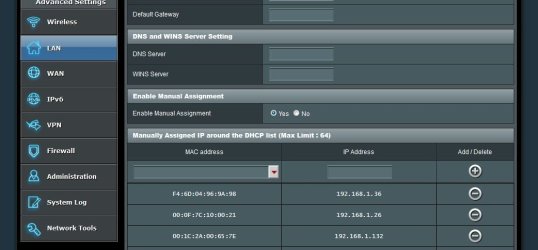
I use the (router) LAN - dhcp server to set my static ip . Have use the windows for setting up my static ip , but when you get a nic update , all your settings are re-set . The router method works great for me , nothing to reset ever ..
My Computer
- Computer type
- PC/Desktop
- Computer Manufacturer/Model Number
- Custom Build
- OS
- Windows 10 Pro - 64 bit
- CPU
- Intel i7 2600K
- Motherboard
- Asus P8P67
- Memory
- 8 Gig ddr3 1600 mhz - viper extreme (Patriot)
- Graphics Card(s)
- EVGA 980 TI
- Monitor(s) Displays
- 2 - Lg 21" LED , sony 48 " bravia LED
- Hard Drives
- one - samsung 840 series 465.76 GB SSD
two - wd 2 tB black
one - wd 1.5 tb black
one - wb 1 tb black
- PSU
- 1000 Watt Coolmaster : Silent Pro Gold
- Case
- antec 1200
- Cooling
- watercooled
- Mouse
- logitech wireless
- Antivirus
- Norton Security 2015
- Other Info
- powerware 3.1 KVA FERRUPS with 4 - 1000 Amp Deep cycle batteries ...
Each device sets its own IP and both have its uses.
Setting the IP in Windows (or any OS really) provides the local IP address, while setting the IP of the router sets the external address, depending on your network wiring configuration. Each serves its purpose, so what are you trying to set?
Normally, the external IP is given by your ISP and most likely you'll use DHCP there to get whatever address it gives to you, unless you're using a dedicated connection. The local address is entirely up to you, because it's private to your network.
Setting the IP in Windows (or any OS really) provides the local IP address, while setting the IP of the router sets the external address, depending on your network wiring configuration. Each serves its purpose, so what are you trying to set?
Normally, the external IP is given by your ISP and most likely you'll use DHCP there to get whatever address it gives to you, unless you're using a dedicated connection. The local address is entirely up to you, because it's private to your network.
My Computer
- Computer type
- Laptop
- Computer Manufacturer/Model Number
- Toshiba Sattelite A665-S6092
- OS
- Windows 7 Ultimate x64
- CPU
- Intel Core i7-740QM
- Memory
- 8 GB DDR3
- Graphics Card(s)
- NVIDIA GeForce 330GT
- Screen Resolution
- 1366x768
- Hard Drives
- Samsung 840 SSD 500GB
1TB USB3 external HD
- Cooling
- Coolermaster Notepal U3 notebook cooling pad
- Internet Speed
- 3mbps ASDL
- Antivirus
- ClamWin 0.98.7
- Browser
- Opera 12.17 x86 (main), Firefox 38 (sec), IE11 (last resort)
Each device sets its own IP and both have its uses.
Setting the IP in Windows (or any OS really) provides the local IP address, while setting the IP of the router sets the external address, depending on your network wiring configuration. Each serves its purpose, so what are you trying to set?
Normally, the external IP is given by your ISP and most likely you'll use DHCP there to get whatever address it gives to you, unless you're using a dedicated connection. The local address is entirely up to you, because it's private to your network.
Oh, I wasn't talking about private versus public (internet facing) IPs, but rather the setting of static IPs on client workstations, whether that be done through Windows or the router pushing the static IPs to the workstations in LAN.
My Computer
- Computer type
- PC/Desktop
- OS
- Windows 7 64-bit
Oh, I wasn't talking about private versus public (internet facing) IPs, but rather the setting of static IPs on client workstations, whether that be done through Windows or the router pushing the static IPs to the workstations in LAN.
That's always determined by each workstation itself. The router, at most, can configure a DHCP server defining a range of IPs that each computer can pick from, if it choses to. But for statics I think the only way is to define it in Windows.
For a large number of computers, DHCP is the preferred way for ease of use and prevention of conflicts (this gets dynamic IPs however).
My Computer
- Computer type
- Laptop
- Computer Manufacturer/Model Number
- Toshiba Sattelite A665-S6092
- OS
- Windows 7 Ultimate x64
- CPU
- Intel Core i7-740QM
- Memory
- 8 GB DDR3
- Graphics Card(s)
- NVIDIA GeForce 330GT
- Screen Resolution
- 1366x768
- Hard Drives
- Samsung 840 SSD 500GB
1TB USB3 external HD
- Cooling
- Coolermaster Notepal U3 notebook cooling pad
- Internet Speed
- 3mbps ASDL
- Antivirus
- ClamWin 0.98.7
- Browser
- Opera 12.17 x86 (main), Firefox 38 (sec), IE11 (last resort)
My Computer
- Computer type
- PC/Desktop
- Computer Manufacturer/Model Number
- Custom Build
- OS
- Windows 10 Pro - 64 bit
- CPU
- Intel i7 2600K
- Motherboard
- Asus P8P67
- Memory
- 8 Gig ddr3 1600 mhz - viper extreme (Patriot)
- Graphics Card(s)
- EVGA 980 TI
- Monitor(s) Displays
- 2 - Lg 21" LED , sony 48 " bravia LED
- Hard Drives
- one - samsung 840 series 465.76 GB SSD
two - wd 2 tB black
one - wd 1.5 tb black
one - wb 1 tb black
- PSU
- 1000 Watt Coolmaster : Silent Pro Gold
- Case
- antec 1200
- Cooling
- watercooled
- Mouse
- logitech wireless
- Antivirus
- Norton Security 2015
- Other Info
- powerware 3.1 KVA FERRUPS with 4 - 1000 Amp Deep cycle batteries ...

I prefer DHCP reservations too (fixed IP from DHCP according to MAC address). The difference would be if you set static from Windows you can set it outside of DHCP IP pool, with reservation you have to assign an IP from the pool.
My Computer
- Computer type
- PC/Desktop
- Computer Manufacturer/Model Number
- Custom Build
- OS
- Windows 7 Ultimate x64 SP1
- CPU
- AMD Phenom 2 1090T
- Motherboard
- Gigabyte GA-890FXA-UD5
- Memory
- 2x8GB Kingston HyperX Fury Black 1600Mhz Unganged
- Graphics Card(s)
- MSI GTX 970 Gaming 4G
- Sound Card
- Realtek On-Board HD 7.1 Audio / Logitech G35
- Monitor(s) Displays
- 3xAcer GD245HQ
- Screen Resolution
- 1920x1080
- Hard Drives
- Samsung 850 Pro 512GB SSD - OS /
WD Caviar Black SATA 3 - 1 TBx2 - Dynamic RAID 0 /
WD Caviar Green SATA 2 - 640GBx2 - Dynamic RAID 0 /
WD Caviar Green SATA 2 - 640GB - Internal Backup /
Seagate Barracude SATA 3 - 3TB - External Backup/ Sync
- PSU
- HighPower 1000W
- Case
- Cooler Master HAF 932
- Cooling
- Noctua NH-D14
- Keyboard
- Logitech G19
- Mouse
- Logitech G500
- Internet Speed
- 100/4 Mbit Cable (100GB quota)
- Antivirus
- ZoneAlarm Extreme Security / MBAM Pro / MBAE Free / SAS Free
- Browser
- IE 11 - Firefox - Chrome
- Other Info
- Logitech F710/ G27/ G940/ Z5500 // TrackIR 5 // Nvidia 3D Surround Vision