Solved setting the clock

jojo6

New member
Local time
11:01 PM
Messages
13
Hello there! Could you please help?It might sound stupid but i set the clock to the right time and when i turned on the computer at different times (next day afternoon or any other time) it shows different time?:confused:
Cheers!
 

My Computer

OS
windows 7 home premium
Are any other settings not being retained?

I'm guessing that your CMOS battery needs to be replaced.
 

My Computer

Computer Manufacturer/Model Number
homegrown
OS
Windows 7 Pro X64 SP1
CPU
Intel Core I7-3930k
Motherboard
Asus P9X79 Pro
Memory
16 GB Gskill DDR3-2133
Graphics Card(s)
eVGA GTX680
Sound Card
Creative X-Fi Titanium
Monitor(s) Displays
As PA246Q
Screen Resolution
1920 X 1200
Hard Drives
Corsair Force GT, 120 GB
WDC 1.5TB Caviar Black
PSU
PCP&C Silencer 750 Crossfire
Case
Silverstone FT02
Cooling
Noctua NH-D14
Keyboard
cheap Logitech USB
Mouse
Microsoft Intellimouse Explorer (old optical) USB
Internet Speed
6Mb cable
Other Info
Pioneer BDR-205
Samsung SH-203B
Monsoon 5.1 speakers
Maybe check in Services under Windows Time, that the service isn't stopped or disabled. You can also see if changing to another time server for the time to synch to would help.

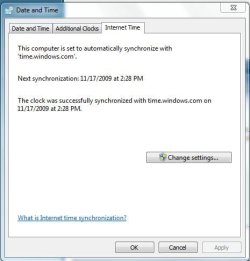
Right click on the time, Adjust date/time -Internet time/change settings

time.JPG


If none of that works, suggest you check your cmos battery, like bobkn said. It's the little coin shaped battery on your motherboard, to see if it needs replacing. They are pretty cheap to get.
 

My Computer

Computer type
PC/Desktop
Computer Manufacturer/Model Number
Airbot 2.0
OS
Windows 7 Ultimate x64 SP1
CPU
Core i7 920 (D0) @ 4Ghz, *26c idle *65c full load on air
Motherboard
Asus P6X58D Premium - Sata 6Gb/s - USB 3.0
Memory
12GB DDR3 Corsair Dominator -CMD12GX3M6A1600C8 at 1600MHz
Graphics Card(s)
Zotac Geforce GTX 770
Sound Card
ASUS Xonar D2X
Monitor(s) Displays
1 LG 24" Flatron W2453V-PF 1 Samsung 24" P2450H both 2ms RT
Screen Resolution
1920x1080@60hz
Hard Drives
1 Samsung 250GB 840 Evo SSD
1 OCZ Vertex2 180GB SSD
1 TB Samsung Spinpoint F1 7200RPM 32MB cache
2 500GB WD Caviar Blacks 7200RPM 32MB cache (WD5001AALS)

Pioneer DVD Burner DVR-S18M
PSU
Corsair HX1000W
Case
Cooler Master HAF 932
Cooling
Case Fans *3 230mm, *1 140mm/CPU - *Tuniq Tower 120 Extreme
Keyboard
Logitech Wireless MK700
Mouse
Logitech Wireless MK700
Internet Speed
DL 15 Mbps UL 0.98 Mbps
Antivirus
None
Browser
Firefox Nightly
Other Info
Processor-7.7 *RAM- 7.9 *Graphics-7.9 *Gaming Graphics- 7.9 *SSD- 7.8 W.E.I final score= 7.7
*Phone- LG Nexus 5
How to set clock for 12 hour read ????

HELLO :

HOW CAN I FIX THE MS CLOCK ON MY TASK BAR TO READ ONLY FROM 1 TO 12PM AND 1 TO 12 AM ??????????????????


I HATE A 24:00 TIME CLOCK READ OUT !! :(

SEND ME EMAIL BECAUSE I AM ALMOST NEVER ON THIS WEB SITE BECAUSE I ALWAYS FORGET WHERE THIS WEB SITE IS .. :cry:


Last edited by a moderator:

My Computer

OS
win 7 ultimate
HELLO :

HOW CAN I FIX THE MS CLOCK ON MY TASK BAR TO READ ONLY FROM 1 TO 12PM AND 1 TO 12 AM ??????????????????


I HATE A 24:00 TIME CLOCK READ OUT !! :(

SEND ME EMAIL BECAUSE I AM ALMOST NEVER ON THIS WEB SITE BECAUSE I ALWAYS FORGET WHERE THIS WEB SITE IS .. :cry:

just add the site to your Favorites and then your one click away from the site.
if i were you i would never put your email address on any fourm. and not sure about the time thing cause mine shows it right.

scrooge
 
Last edited by a moderator:

My Computer

Computer Manufacturer/Model Number
home build
OS
win 7 ( 64 bit)
CPU
Intel Core i7-870 Lynnfield 2.93GHz 8MB L3 Cache LGA 1156 95
Motherboard
ASUS P7P55 LX LGA 1156
Memory
G.SKILL Sniper Series 16GB (4 x 4GB) 240-Pin DDR3 SDRAM
Graphics Card(s)
ATI Radeon HD6800 Series
Sound Card
hdmi
Monitor(s) Displays
42" lg 3d tv
Screen Resolution
1920 x 1080
Hard Drives
1 ssd pci-e revodrive
4 seagate 1.5 tb
PSU
Rosewill BRONZE Series RBR1000-M 1000W Continuous@40°C, 80Pl
Case
CoolMaster 922
Cooling
CORSAIR CWCH60 Hydro Series H60 High Performance Liquid CPU
Keyboard
logtech
Mouse
logitect
Internet Speed
5 mbit
I FOUND THE ANSWER ALL BY MYSELF !!! :D

CLICK " START " THEN TYPE TIME IN THE BOX UNDER " ALL PROGRAMS " ,, THEN CLICK ,, CHANGE THE DATE , TIME OR NUMBER FORMAT CHANGE THE DATE , TIME OR NUMBER FORMAT ,, then click
Long time: h:mm:ss tt

ALL DONE !!!! ;)

PS: I AM NOT A PC GEEK LIKE SOME PEOPLE HERE WHO COULD NOT !! HELP...:rolleyes:
 

My Computer

OS
win 7 ultimate
Back
Top