Setting up user accounts

OnTheRopes

New member
Member
Local time
4:56 AM
Messages
95
I have setup my hdd into 3 partitions, one for OS and applications, one for user a and one for user b. Not sure if this is correct but this is what I have done.

I would like it so that any data created is automatically saved in their partition.

So presumably that would entail each persons Username / Documents folders would default to the correct drive, therefore if user one downloads a file and saves it to My Photos it will go on the correct drive.
Does that make sense?
If it does how do you do that
I would also like so that person b cannot access any other drive

Thanks
 

My Computer

Computer type
PC/Desktop
Computer Manufacturer/Model Number
Self Build
OS
Windows Prox64
CPU
i5 760 2.8Ghz
Motherboard
Asus P7P55D-E
Memory
Corsair XTS 2x4 Gb
Graphics Card(s)
Asus GTX 460 1024Mb
Monitor(s) Displays
HP LP2475w
Hard Drives
Samsung HD103SJ Spinpoint F3 1TB
PSU
Corsair 600CX
Case
Corsair Graphite 600T
Antivirus
Kaspersky IS
Browser
Chrome
Hello OnTheRopes,

You could use OPTION ONE in the tutorial below to move the user profile of each user to be on the drive letter of your choice as you described.

http://www.sevenforums.com/tutorials/87555-user-profile-change-default-location.html

Afterwards, you can use the tutorial below to set permissions of the drive letter of each user's drive to Deny access permission of the other user accounts. Be sure to only deny the user accounts that you do not want to be able to access that drive letter, and not anything else. Do not deny access of the Windows 7 C: drive for any user either, or they may not be able to log on to Windows 7 anymore.

http://www.sevenforums.com/tutorials/122666-permissions-allow-deny-users-groups.html

Hope this helps,
Shawn
 

My Computer

Computer type
PC/Desktop
Computer Manufacturer/Model Number
Self built custom
OS
64-bit Windows 11 Pro for Workstations
CPU
Intel i7-8700K OC'd to 5 GHz
Motherboard
ASUS ROG Maximus XI Formula Z390
Memory
64 GB (4x16GB) G.SKILL TridentZ RGB DDR4 3600 MHz
Graphics Card(s)
ASUS ROG-STRIX-GTX1080TI-O11G-GAMING
Sound Card
Integrated
Monitor(s) Displays
2 x Samsung Odyssey G7 27"
Screen Resolution
2560x1440
Hard Drives
1TB Samsung 990 PRO M.2,
4TB Samsung 990 PRO PRO M.2,
TerraMaster F8 SSD Plus NAS
PSU
Seasonic Prime Titanium 850W
Case
Thermaltake Core P3
Cooling
Corsair Hydro H115i
Keyboard
Logitech wireless K800
Mouse
Logitech MX Master 4
Internet Speed
2 Gb/s Download and 100 Mb/s Upload
Antivirus
Malwarebyte Anti-Malware Premium
Browser
Google Chrome
Other Info
Logitech Z625 speaker system,
Logitech BRIO 4K Pro webcam,
HP Color LaserJet Pro MFP M477fdn,
APC SMART-UPS RT 1000 XL - SURT1000XLI,
Galaxy S23 Plus phone
Worked through the first tutorial and that worked perfectly, one more user to move and then on to the second tutorial.

Many thanks for your help
 

My Computer

Computer type
PC/Desktop
Computer Manufacturer/Model Number
Self Build
OS
Windows Prox64
CPU
i5 760 2.8Ghz
Motherboard
Asus P7P55D-E
Memory
Corsair XTS 2x4 Gb
Graphics Card(s)
Asus GTX 460 1024Mb
Monitor(s) Displays
HP LP2475w
Hard Drives
Samsung HD103SJ Spinpoint F3 1TB
PSU
Corsair 600CX
Case
Corsair Graphite 600T
Antivirus
Kaspersky IS
Browser
Chrome
You're most welcome. Please let us know how it went. :)
 

My Computer

Computer type
PC/Desktop
Computer Manufacturer/Model Number
Self built custom
OS
64-bit Windows 11 Pro for Workstations
CPU
Intel i7-8700K OC'd to 5 GHz
Motherboard
ASUS ROG Maximus XI Formula Z390
Memory
64 GB (4x16GB) G.SKILL TridentZ RGB DDR4 3600 MHz
Graphics Card(s)
ASUS ROG-STRIX-GTX1080TI-O11G-GAMING
Sound Card
Integrated
Monitor(s) Displays
2 x Samsung Odyssey G7 27"
Screen Resolution
2560x1440
Hard Drives
1TB Samsung 990 PRO M.2,
4TB Samsung 990 PRO PRO M.2,
TerraMaster F8 SSD Plus NAS
PSU
Seasonic Prime Titanium 850W
Case
Thermaltake Core P3
Cooling
Corsair Hydro H115i
Keyboard
Logitech wireless K800
Mouse
Logitech MX Master 4
Internet Speed
2 Gb/s Download and 100 Mb/s Upload
Antivirus
Malwarebyte Anti-Malware Premium
Browser
Google Chrome
Other Info
Logitech Z625 speaker system,
Logitech BRIO 4K Pro webcam,
HP Color LaserJet Pro MFP M477fdn,
APC SMART-UPS RT 1000 XL - SURT1000XLI,
Galaxy S23 Plus phone
Well it all seems to be working fine,it was a near miss at one point because asfter altering the registry I could not get access back into my main account but it turned out I had made anerror on copying the files across the drives so that was easily rectified. Phew, bit of a moment that! :shock:

There is one question, now that I have users moved across to thier respective drives can I / should I delete C:\users\username as I assume these are no longer required?

Thanks
Steve
 

My Computer

Computer type
PC/Desktop
Computer Manufacturer/Model Number
Self Build
OS
Windows Prox64
CPU
i5 760 2.8Ghz
Motherboard
Asus P7P55D-E
Memory
Corsair XTS 2x4 Gb
Graphics Card(s)
Asus GTX 460 1024Mb
Monitor(s) Displays
HP LP2475w
Hard Drives
Samsung HD103SJ Spinpoint F3 1TB
PSU
Corsair 600CX
Case
Corsair Graphite 600T
Antivirus
Kaspersky IS
Browser
Chrome
Actually I do have a slight issue / problem

Whe I log out of the admin account and logon as a user I now get a screen comes up ' AsLoader is requesting permission... blah blah'
This can be canceeled out of and doesnt seem to stop anything working but is clearly wrong and an irritation it is some asus software by the look of it.
Any ideas?
 

My Computer

Computer type
PC/Desktop
Computer Manufacturer/Model Number
Self Build
OS
Windows Prox64
CPU
i5 760 2.8Ghz
Motherboard
Asus P7P55D-E
Memory
Corsair XTS 2x4 Gb
Graphics Card(s)
Asus GTX 460 1024Mb
Monitor(s) Displays
HP LP2475w
Hard Drives
Samsung HD103SJ Spinpoint F3 1TB
PSU
Corsair 600CX
Case
Corsair Graphite 600T
Antivirus
Kaspersky IS
Browser
Chrome
Steve,

Sounds good so far. :)

Yes, you could delete the old C:\Users\(user-name) locations as in step 15 after moving them if you like.

If the AsLoader is a startup program and you are not having any issues with it not running, then you could just disable it to stop it from running at startup.


If you wanted to keep AsLoader as a startup program without the UAC prompt, then you could also create a elevated task shortcut for the AsLoader and place that elevated task shortcut to run at startup instead.
 

My Computer

Computer type
PC/Desktop
Computer Manufacturer/Model Number
Self built custom
OS
64-bit Windows 11 Pro for Workstations
CPU
Intel i7-8700K OC'd to 5 GHz
Motherboard
ASUS ROG Maximus XI Formula Z390
Memory
64 GB (4x16GB) G.SKILL TridentZ RGB DDR4 3600 MHz
Graphics Card(s)
ASUS ROG-STRIX-GTX1080TI-O11G-GAMING
Sound Card
Integrated
Monitor(s) Displays
2 x Samsung Odyssey G7 27"
Screen Resolution
2560x1440
Hard Drives
1TB Samsung 990 PRO M.2,
4TB Samsung 990 PRO PRO M.2,
TerraMaster F8 SSD Plus NAS
PSU
Seasonic Prime Titanium 850W
Case
Thermaltake Core P3
Cooling
Corsair Hydro H115i
Keyboard
Logitech wireless K800
Mouse
Logitech MX Master 4
Internet Speed
2 Gb/s Download and 100 Mb/s Upload
Antivirus
Malwarebyte Anti-Malware Premium
Browser
Google Chrome
Other Info
Logitech Z625 speaker system,
Logitech BRIO 4K Pro webcam,
HP Color LaserJet Pro MFP M477fdn,
APC SMART-UPS RT 1000 XL - SURT1000XLI,
Galaxy S23 Plus phone
Brink
Should i delete the actual 'Users' folder as that has Public and default folders in?

I cant find AsLoader its not in the programs folder.

Incidentally whats the difference between Program files and program Files (86) as I have both?
Cheers
 

My Computer

Computer type
PC/Desktop
Computer Manufacturer/Model Number
Self Build
OS
Windows Prox64
CPU
i5 760 2.8Ghz
Motherboard
Asus P7P55D-E
Memory
Corsair XTS 2x4 Gb
Graphics Card(s)
Asus GTX 460 1024Mb
Monitor(s) Displays
HP LP2475w
Hard Drives
Samsung HD103SJ Spinpoint F3 1TB
PSU
Corsair 600CX
Case
Corsair Graphite 600T
Antivirus
Kaspersky IS
Browser
Chrome
No, you would not want to delete the C:\Users folder. Only the old C:\Users\(user-name) user profile folder locatioin for the user account that you moved.

The Program Files folder is where 64-bit programs are installed to by default, and the Program Files (x86) folder is where 32-bit programs are installed to by default.

For AsLoader, click on the "Startup Program" link above to see if you spot AsLoader listed as a startup program using any or one or more of the methods in the tutorial at that link. If it is, then disable it to stop it from running at startup or log in. :)
 

My Computer

Computer type
PC/Desktop
Computer Manufacturer/Model Number
Self built custom
OS
64-bit Windows 11 Pro for Workstations
CPU
Intel i7-8700K OC'd to 5 GHz
Motherboard
ASUS ROG Maximus XI Formula Z390
Memory
64 GB (4x16GB) G.SKILL TridentZ RGB DDR4 3600 MHz
Graphics Card(s)
ASUS ROG-STRIX-GTX1080TI-O11G-GAMING
Sound Card
Integrated
Monitor(s) Displays
2 x Samsung Odyssey G7 27"
Screen Resolution
2560x1440
Hard Drives
1TB Samsung 990 PRO M.2,
4TB Samsung 990 PRO PRO M.2,
TerraMaster F8 SSD Plus NAS
PSU
Seasonic Prime Titanium 850W
Case
Thermaltake Core P3
Cooling
Corsair Hydro H115i
Keyboard
Logitech wireless K800
Mouse
Logitech MX Master 4
Internet Speed
2 Gb/s Download and 100 Mb/s Upload
Antivirus
Malwarebyte Anti-Malware Premium
Browser
Google Chrome
Other Info
Logitech Z625 speaker system,
Logitech BRIO 4K Pro webcam,
HP Color LaserJet Pro MFP M477fdn,
APC SMART-UPS RT 1000 XL - SURT1000XLI,
Galaxy S23 Plus phone
Brink
AsLoader seems to be sorted now.

I have been having a frew problems since altering user accounts, in themselves everything seemed normal however I was having problems with IE.

I use a website with streaming data (Java) and i have several browser windows open at the same time, once logged on for one, then they are all logged on. However since the edits I would log on one page and then open another page on the same site and it would ask for log on again, once i logged on it would log off on the other window. I tried deleting cookies etc etc but to no avail.

Also another site i use that uses java to display realtime charts refused to open.

I have since edited things back to how they were and the sites are working normally again.

Do you have any ideas whats causing this?

Cheers
 

My Computer

Computer type
PC/Desktop
Computer Manufacturer/Model Number
Self Build
OS
Windows Prox64
CPU
i5 760 2.8Ghz
Motherboard
Asus P7P55D-E
Memory
Corsair XTS 2x4 Gb
Graphics Card(s)
Asus GTX 460 1024Mb
Monitor(s) Displays
HP LP2475w
Hard Drives
Samsung HD103SJ Spinpoint F3 1TB
PSU
Corsair 600CX
Case
Corsair Graphite 600T
Antivirus
Kaspersky IS
Browser
Chrome
This is why I usually prefer to leave the user profiles in their default locations instead of moving them. You just never know when something may not like the new location.

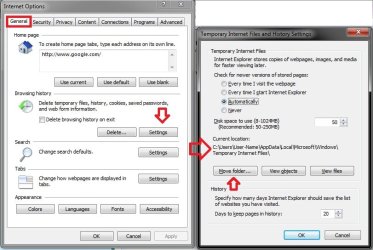
Double check to see if the IE temp file below has the correct location to where you moved it. If not, then click on Move to change it's location.
IE_Options.jpg
As a test, you might also see how it works using Firefox.
 

My Computer

Computer type
PC/Desktop
Computer Manufacturer/Model Number
Self built custom
OS
64-bit Windows 11 Pro for Workstations
CPU
Intel i7-8700K OC'd to 5 GHz
Motherboard
ASUS ROG Maximus XI Formula Z390
Memory
64 GB (4x16GB) G.SKILL TridentZ RGB DDR4 3600 MHz
Graphics Card(s)
ASUS ROG-STRIX-GTX1080TI-O11G-GAMING
Sound Card
Integrated
Monitor(s) Displays
2 x Samsung Odyssey G7 27"
Screen Resolution
2560x1440
Hard Drives
1TB Samsung 990 PRO M.2,
4TB Samsung 990 PRO PRO M.2,
TerraMaster F8 SSD Plus NAS
PSU
Seasonic Prime Titanium 850W
Case
Thermaltake Core P3
Cooling
Corsair Hydro H115i
Keyboard
Logitech wireless K800
Mouse
Logitech MX Master 4
Internet Speed
2 Gb/s Download and 100 Mb/s Upload
Antivirus
Malwarebyte Anti-Malware Premium
Browser
Google Chrome
Other Info
Logitech Z625 speaker system,
Logitech BRIO 4K Pro webcam,
HP Color LaserJet Pro MFP M477fdn,
APC SMART-UPS RT 1000 XL - SURT1000XLI,
Galaxy S23 Plus phone
But if you leave the user profiles in the default locations how do people keep all data in a seperate partition, which i believe is common practice?
 

My Computer

Computer type
PC/Desktop
Computer Manufacturer/Model Number
Self Build
OS
Windows Prox64
CPU
i5 760 2.8Ghz
Motherboard
Asus P7P55D-E
Memory
Corsair XTS 2x4 Gb
Graphics Card(s)
Asus GTX 460 1024Mb
Monitor(s) Displays
HP LP2475w
Hard Drives
Samsung HD103SJ Spinpoint F3 1TB
PSU
Corsair 600CX
Case
Corsair Graphite 600T
Antivirus
Kaspersky IS
Browser
Chrome

My Computer

Computer type
PC/Desktop
Computer Manufacturer/Model Number
Self built custom
OS
64-bit Windows 11 Pro for Workstations
CPU
Intel i7-8700K OC'd to 5 GHz
Motherboard
ASUS ROG Maximus XI Formula Z390
Memory
64 GB (4x16GB) G.SKILL TridentZ RGB DDR4 3600 MHz
Graphics Card(s)
ASUS ROG-STRIX-GTX1080TI-O11G-GAMING
Sound Card
Integrated
Monitor(s) Displays
2 x Samsung Odyssey G7 27"
Screen Resolution
2560x1440
Hard Drives
1TB Samsung 990 PRO M.2,
4TB Samsung 990 PRO PRO M.2,
TerraMaster F8 SSD Plus NAS
PSU
Seasonic Prime Titanium 850W
Case
Thermaltake Core P3
Cooling
Corsair Hydro H115i
Keyboard
Logitech wireless K800
Mouse
Logitech MX Master 4
Internet Speed
2 Gb/s Download and 100 Mb/s Upload
Antivirus
Malwarebyte Anti-Malware Premium
Browser
Google Chrome
Other Info
Logitech Z625 speaker system,
Logitech BRIO 4K Pro webcam,
HP Color LaserJet Pro MFP M477fdn,
APC SMART-UPS RT 1000 XL - SURT1000XLI,
Galaxy S23 Plus phone
Thanks again, is there anything you dont have a tutorial for? ;)

What a great site for windows 7, your a star :D
 

My Computer

Computer type
PC/Desktop
Computer Manufacturer/Model Number
Self Build
OS
Windows Prox64
CPU
i5 760 2.8Ghz
Motherboard
Asus P7P55D-E
Memory
Corsair XTS 2x4 Gb
Graphics Card(s)
Asus GTX 460 1024Mb
Monitor(s) Displays
HP LP2475w
Hard Drives
Samsung HD103SJ Spinpoint F3 1TB
PSU
Corsair 600CX
Case
Corsair Graphite 600T
Antivirus
Kaspersky IS
Browser
Chrome
You're most welcome. Thank you.

LOL, yeah I try to write up a tutorial for anything that I think can be useful to help.
 

My Computer

Computer type
PC/Desktop
Computer Manufacturer/Model Number
Self built custom
OS
64-bit Windows 11 Pro for Workstations
CPU
Intel i7-8700K OC'd to 5 GHz
Motherboard
ASUS ROG Maximus XI Formula Z390
Memory
64 GB (4x16GB) G.SKILL TridentZ RGB DDR4 3600 MHz
Graphics Card(s)
ASUS ROG-STRIX-GTX1080TI-O11G-GAMING
Sound Card
Integrated
Monitor(s) Displays
2 x Samsung Odyssey G7 27"
Screen Resolution
2560x1440
Hard Drives
1TB Samsung 990 PRO M.2,
4TB Samsung 990 PRO PRO M.2,
TerraMaster F8 SSD Plus NAS
PSU
Seasonic Prime Titanium 850W
Case
Thermaltake Core P3
Cooling
Corsair Hydro H115i
Keyboard
Logitech wireless K800
Mouse
Logitech MX Master 4
Internet Speed
2 Gb/s Download and 100 Mb/s Upload
Antivirus
Malwarebyte Anti-Malware Premium
Browser
Google Chrome
Other Info
Logitech Z625 speaker system,
Logitech BRIO 4K Pro webcam,
HP Color LaserJet Pro MFP M477fdn,
APC SMART-UPS RT 1000 XL - SURT1000XLI,
Galaxy S23 Plus phone
Back
Top