Setting up users win7

ckrudelux

New member
Local time
1:41 AM
Messages
5
Location
Sweden
Hi,

I was wondering if anyone can guide/explain setting up user groups.

(I have low experience so bare with me)

This is how far I have got:

StartMenu > right click on computer > Manage > Local users and groups > Groups:

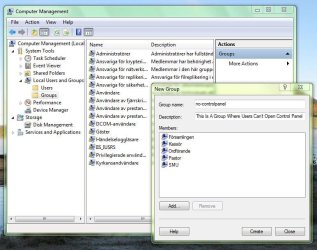
Here I can create a group and add users as members to the group.

This where I get kind of lost cause there is no point in creating a group if you cant apply any settings to it.. so I search on the web for some information and got to this:

Typing "mmc" in run opens a console, I go to file and chose add/delete snapin-module and I add editor for group.. something object thingy.

I can add where I want to apply settings to local computer or other computer even user.

After this I get a list for alot of settings which tells what the user can do but I have to set this to every user which is a pain in the ass.


So what is my question? I wanted to create a new user group which should be applied to some users, I have no clue on how to do this and I can't find a freaking tutorial on it.

So can someone help me step by step on how to do this?? Connecting the dots!
 

My Computer

OS
windows 7
Hi,

I was wondering if anyone can guide/explain setting up user groups.

(I have low experience so bare with me)

This is how far I have got:

StartMenu > right click on computer > Manage > Local users and groups > Groups:

Here I can create a group and add users as members to the group.

This where I get kind of lost cause there is no point in creating a group if you cant apply any settings to it.. so I search on the web for some information and got to this:

Typing "mmc" in run opens a console, I go to file and chose add/delete snapin-module and I add editor for group.. something object thingy.

I can add where I want to apply settings to local computer or other computer even user.

After this I get a list for alot of settings which tells what the user can do but I have to set this to every user which is a pain in the ass.


So what is my question? I wanted to create a new user group which should be applied to some users, I have no clue on how to do this and I can't find a freaking tutorial on it.

So can someone help me step by step on how to do this?? Connecting the dots!

You seek the group policy editor. go to search and type group policy.
 

My Computer

Computer Manufacturer/Model Number
HP Pavillion dv-7 1005 Tx
OS
Win 8 Release candidate 8400
CPU
[email protected]
Memory
4 gigs
Graphics Card(s)
Nvidia 9600M
Sound Card
HD built-in
Monitor(s) Displays
17" Wxga
Screen Resolution
1440x900
Cooling
none
Internet Speed
45Mb down 5Mb up

My Computer

Computer type
PC/Desktop
Computer Manufacturer/Model Number
Me
OS
Win 7 Ultimate x64
CPU
FX-8350 @ 4.6 GHz so far
Motherboard
Asus M5A97 EVO
Memory
ADATA XPG V1 Series Black 8GB DDR3 1600
Graphics Card(s)
Sapphire R9 270x Dual-X
Sound Card
Xonar DGX w/ Corsair Vengence 1300
Monitor(s) Displays
Acer S232HL Abid
Screen Resolution
1920x1080
Hard Drives
120 GB OCZ Vertex 3
500 GB Seagate 7200.12
PSU
Antec Earthwatts 650W Green
Case
Antec Three Hundred
Cooling
Cooler Master 212 EVO
Keyboard
Logitech G510
Mouse
Logitech G500s
Internet Speed
35000/3000
I know where to find "computer management" and the local user and groups part... but how do I say everyone which is the group lets say we call it "myawesomeusers" and they are not allowed to get to the "control panel" I can this with the gpedit but I have to do it to every user and yet I just want to apply this settings to the group and the member of this group will be affected by the options I set.
 

My Computer

OS
windows 7
So here I have created a group:
Cgroup.JPG
So I do know how to that so I don't need a three different way description on how to get there.

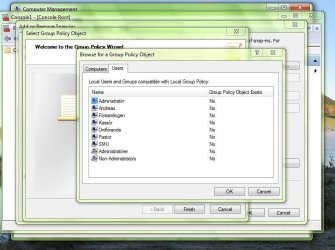
Getinglist.JPG
If I could select a group here I wouldn't need mush help but I can only select this computer, an other computer or a user.


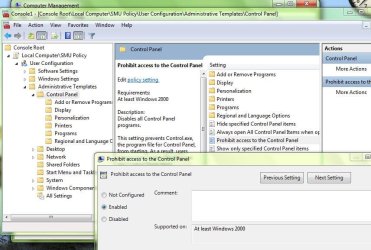
I have obviously found the list where I set the that my users can't use the control panel.
nocontrolp.JPG

So what I can't find out is how I set the groups options in windows.. I mean there's no meaning in having groups if you can't do anything with them. :p


So can anyone please tell me how this works instead of how I can get to the place where I make groups in twelve different ways, which is the only thing I seems to find tutorials on how to get there. :confused:
 

My Computer

OS
windows 7
Back
Top