Setting up wireless just won't work

Cornelia

New member
Local time
5:17 PM
Messages
15
I have a new Win 7 64bit computer, with an older Belkin-g router. The router works fine, can connect with my laptop, but the Win 7 system simply will not find any wireless signals. I have tried the old USB adapter, and 3 brands of other USB adapters that claim to work with Win 7 64bit, but I cannot get this computer to find any signal. No matter what I try, it just says "no connections available".

I have updated drivers, talked to technical support at 2 of the 3 brands of new adapters I tried, and no one seems to know what is wrong. I've been though all the links in the N&SC, looked at Services (not that I know much about that) and Device Managers, and I simply cannot find anything else to try.

Can anyone help?
 

My Computer

OS
Windows 7 64 bit
Hi,

You might want to try and right-click the network icon on the notification area and select 'Troubleshoot Problems'. This will search for any hardware issues and should give more detailed info on any issues connecting to your router.

Hope it helps :)


OS
 

My Computer

Computer Manufacturer/Model Number
Compaq Desktop
OS
Windows 7 Ultimate x64
CPU
AMD Sempron Dual Core
Memory
3GB
Graphics Card(s)
NVIDIA GeForce 6150SE nForce 430
Screen Resolution
1024x768
Hard Drives
150GB Sata
Already tried that, it finds no problems. Device reports as working correctly. Is there any other information that I can find/post to help solve this?
 

My Computer

OS
Windows 7 64 bit
double check you router settings make sure that it's broadcasting the SSID see what wireless settings are as far as band and channel and set the laptop adapter to match restart all device modem router and laptop
 

My Computer

Computer Manufacturer/Model Number
Custom Built
OS
Windows 7 Ultimate 32 bit
CPU
AMD Athlon 64 X2 4200+ Overclocked to 3.0Ghz
Motherboard
Biostar TF560 A2+
Memory
2 Gigs of G.Skill DDR2 800
Graphics Card(s)
HIS ATI Radeon HD 2600 Pro With IceQ cooler
Sound Card
6.1 Channel Sound Blaster Live 24 Bit
Monitor(s) Displays
Dual 20.5 " LG Flatrons W2052TO
Screen Resolution
1152x864
Hard Drives
Dual 36 Gig 10,000 RPM Raptors
PSU
430 watt Seasonic 80%+ Dual 12v Rails 2x80mm fans
Case
CHIEFMAX YA-5X
Cooling
4-80mm case fans 1-140mm case fan freezer 64 Pro CPU cooler
Keyboard
Saitek Eclipse II
Mouse
A4Tech wireless battery free optical scroll mouse
Internet Speed
1.5 meg down 384 up
Other Info
Logisys LED fan/light controller and dual 16" LED sticks mounted inside top of case all fans are LED all lighting is blue
DVD RW and CD RW both and Memory card reader
please provide your complete system specs and router and or modem make and model
 

My Computer

Computer Manufacturer/Model Number
Custom Built
OS
Windows 7 Ultimate 32 bit
CPU
AMD Athlon 64 X2 4200+ Overclocked to 3.0Ghz
Motherboard
Biostar TF560 A2+
Memory
2 Gigs of G.Skill DDR2 800
Graphics Card(s)
HIS ATI Radeon HD 2600 Pro With IceQ cooler
Sound Card
6.1 Channel Sound Blaster Live 24 Bit
Monitor(s) Displays
Dual 20.5 " LG Flatrons W2052TO
Screen Resolution
1152x864
Hard Drives
Dual 36 Gig 10,000 RPM Raptors
PSU
430 watt Seasonic 80%+ Dual 12v Rails 2x80mm fans
Case
CHIEFMAX YA-5X
Cooling
4-80mm case fans 1-140mm case fan freezer 64 Pro CPU cooler
Keyboard
Saitek Eclipse II
Mouse
A4Tech wireless battery free optical scroll mouse
Internet Speed
1.5 meg down 384 up
Other Info
Logisys LED fan/light controller and dual 16" LED sticks mounted inside top of case all fans are LED all lighting is blue
DVD RW and CD RW both and Memory card reader
The router is
Belkin Wireless G Router Model#F5D7230-4

The adapter is
Rosewill RNX-N1 802.11N 2.0 (box states "backward compatible with Wireless-G hotspots"
 

Attachments

  • SystemInfo.jpg
    SystemInfo.jpg
    194.3 KB · Views: 68

My Computer

OS
Windows 7 64 bit
I know you said you checked the services, have you checked WLAN Config services?.

If W7 simply can't detect the SSID, it could be (as comp+ said), a mis-match of the network SSID security type and W7's.

Have you tried connecting directly to the router via ethernet?
 

My Computer

Computer Manufacturer/Model Number
Lenovo ThinkPad T60
OS
Windows 7 Ultimate 64Bit
CPU
GenuineIntel Intel(R) Core(TM) DuoCore T2400 @ 1.83GHz
Motherboard
Intel(R) 82801G (ICH7 Family)
Memory
2.00 GB
Graphics Card(s)
Mobile Intel(R) 945 Express Chipset
Sound Card
SoundMAX Integrated Digital HD Audio
Monitor(s) Displays
ThinkPad Display
Screen Resolution
1400x1050
Hard Drives
100Gb SATA
Keyboard
Standard Keyboard
Mouse
HID-compliant Mouse
Internet Speed
Cable Broadband - 54Mbps
Other Info
Intel(R) PRO/1000 PL Network Connection
11a/b/g Wireless LAN Mini PCI Express Adapter
there has been issues with N devices if the router is only B/G in the adapter properties hit the configure button and go to advanced and set the radio to G band only not auto
 

My Computer

Computer Manufacturer/Model Number
Custom Built
OS
Windows 7 Ultimate 32 bit
CPU
AMD Athlon 64 X2 4200+ Overclocked to 3.0Ghz
Motherboard
Biostar TF560 A2+
Memory
2 Gigs of G.Skill DDR2 800
Graphics Card(s)
HIS ATI Radeon HD 2600 Pro With IceQ cooler
Sound Card
6.1 Channel Sound Blaster Live 24 Bit
Monitor(s) Displays
Dual 20.5 " LG Flatrons W2052TO
Screen Resolution
1152x864
Hard Drives
Dual 36 Gig 10,000 RPM Raptors
PSU
430 watt Seasonic 80%+ Dual 12v Rails 2x80mm fans
Case
CHIEFMAX YA-5X
Cooling
4-80mm case fans 1-140mm case fan freezer 64 Pro CPU cooler
Keyboard
Saitek Eclipse II
Mouse
A4Tech wireless battery free optical scroll mouse
Internet Speed
1.5 meg down 384 up
Other Info
Logisys LED fan/light controller and dual 16" LED sticks mounted inside top of case all fans are LED all lighting is blue
DVD RW and CD RW both and Memory card reader
@aem: Yes, I can connect through an ethernet cable to the router .. it's strung across my living room floor at the moment.

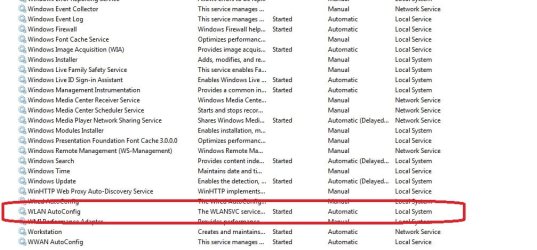
In Services, WLAN AutoConfig is started automatically, and so is WWan AutoConfig. There is also something called Wired AutoConfig that is not started and is listed as Manual.

@computersplus: The only thing I can see is a line Radio ON/OFF, and the choices are Enabled or Disabled. I tried changing it to Disabled, but didn't make any difference.
 

My Computer

OS
Windows 7 64 bit
Has the adapter worked in the past, just not with W7? does it see any other SSIDs like your neighbours?

Check event viewers for errors.
 

My Computer

Computer Manufacturer/Model Number
Lenovo ThinkPad T60
OS
Windows 7 Ultimate 64Bit
CPU
GenuineIntel Intel(R) Core(TM) DuoCore T2400 @ 1.83GHz
Motherboard
Intel(R) 82801G (ICH7 Family)
Memory
2.00 GB
Graphics Card(s)
Mobile Intel(R) 945 Express Chipset
Sound Card
SoundMAX Integrated Digital HD Audio
Monitor(s) Displays
ThinkPad Display
Screen Resolution
1400x1050
Hard Drives
100Gb SATA
Keyboard
Standard Keyboard
Mouse
HID-compliant Mouse
Internet Speed
Cable Broadband - 54Mbps
Other Info
Intel(R) PRO/1000 PL Network Connection
11a/b/g Wireless LAN Mini PCI Express Adapter
This adapter is new, and the third one I've tried, all the same results. And no, I don't see any wireless signals, not mine nor my neighbors (and I have always seen them on my old XP and on my laptop).

The little light on the adapter blinks just like it should when receiving a signal.
 

My Computer

OS
Windows 7 64 bit
Well i was hoping to hear that it picks up the neighbours at the very least. since it works thru ethernet, and not wireless, could it be the router hasn't learnt of the wireless adapter trying to connect to it. This is a MAC related option.
 

My Computer

Computer Manufacturer/Model Number
Lenovo ThinkPad T60
OS
Windows 7 Ultimate 64Bit
CPU
GenuineIntel Intel(R) Core(TM) DuoCore T2400 @ 1.83GHz
Motherboard
Intel(R) 82801G (ICH7 Family)
Memory
2.00 GB
Graphics Card(s)
Mobile Intel(R) 945 Express Chipset
Sound Card
SoundMAX Integrated Digital HD Audio
Monitor(s) Displays
ThinkPad Display
Screen Resolution
1400x1050
Hard Drives
100Gb SATA
Keyboard
Standard Keyboard
Mouse
HID-compliant Mouse
Internet Speed
Cable Broadband - 54Mbps
Other Info
Intel(R) PRO/1000 PL Network Connection
11a/b/g Wireless LAN Mini PCI Express Adapter
In the Event Viewer for Administrative Services, and there are a few Warning EventID 4001 saying "WLAN AutoConfig service has successfully stopped.", but when I check Services WLAN AutoConfig shows as Started. Nothing else that looks remotely connected to this problem.
 

My Computer

OS
Windows 7 64 bit
I have reset the router a couple of times, just to see if that had any effect, but Win 7 doesn't find anything, and my laptop still connects to these signals just fine (mine and others).
 

My Computer

OS
Windows 7 64 bit
I have reset the router a couple of times, just to see if that had any effect, but Win 7 doesn't find anything, and my laptop still connects to these signals just fine (mine and others).

If W7 can't find any SSIDs, what signals is the laptop connected fine to?

Are you sure the WLAN autoconfig service doesn't Starting...as supposed to Started?
 

My Computer

Computer Manufacturer/Model Number
Lenovo ThinkPad T60
OS
Windows 7 Ultimate 64Bit
CPU
GenuineIntel Intel(R) Core(TM) DuoCore T2400 @ 1.83GHz
Motherboard
Intel(R) 82801G (ICH7 Family)
Memory
2.00 GB
Graphics Card(s)
Mobile Intel(R) 945 Express Chipset
Sound Card
SoundMAX Integrated Digital HD Audio
Monitor(s) Displays
ThinkPad Display
Screen Resolution
1400x1050
Hard Drives
100Gb SATA
Keyboard
Standard Keyboard
Mouse
HID-compliant Mouse
Internet Speed
Cable Broadband - 54Mbps
Other Info
Intel(R) PRO/1000 PL Network Connection
11a/b/g Wireless LAN Mini PCI Express Adapter
I don't know what you mean by "what signals", but my router is working fine, the laptop connects to it normally and automatically, and there are plenty of other router signals in my neighborhood that show to the laptop but not to win 7 machine.

I've attached a screenshot of the Services ....
 

Attachments

  • Services.jpg
    Services.jpg
    79 KB · Views: 23

My Computer

OS
Windows 7 64 bit
I thought all along you are having issue with the laptop, this "w7 machine" is it a desktop?
 

My Computer

Computer Manufacturer/Model Number
Lenovo ThinkPad T60
OS
Windows 7 Ultimate 64Bit
CPU
GenuineIntel Intel(R) Core(TM) DuoCore T2400 @ 1.83GHz
Motherboard
Intel(R) 82801G (ICH7 Family)
Memory
2.00 GB
Graphics Card(s)
Mobile Intel(R) 945 Express Chipset
Sound Card
SoundMAX Integrated Digital HD Audio
Monitor(s) Displays
ThinkPad Display
Screen Resolution
1400x1050
Hard Drives
100Gb SATA
Keyboard
Standard Keyboard
Mouse
HID-compliant Mouse
Internet Speed
Cable Broadband - 54Mbps
Other Info
Intel(R) PRO/1000 PL Network Connection
11a/b/g Wireless LAN Mini PCI Express Adapter
Yes, my Win 7 machine is a new ASUS desktop, using a wireless LAN adapter to (try to) connect to the wireless router.

My laptop has the usual builtin wireless connection, and is what I have been using to verify that the router itself is working fine.
 

My Computer

OS
Windows 7 64 bit
Was it Paul Harvey that used to say, ".... and now the rest of the story"?

Since my last post here 3 days ago, I have been through every forum and help site I could find, on Win 7, on ASUS computers, on routers and adapters, and yesterday as a last resort, I call the ASUS technical support for help.

After an hour on the phone with their support engineer, who went through a lot of ideas, and verifying on my laptop that the Rosewill adapter did in fact work, he finally also gave up. But he gave me a service number to take the computer back to the retail store and have them work on it.

Today I did that, and after once again doing all the same things, downloading drivers, checking the adapter in other machines, checking each USB port, and finally trying the adapter in another new ASUS of the same model (which worked), they have finally concluded that it is my specific ASUS computer that is the problem.

The good news is that the problem is finally solved. The bad news is that I have to once again save all my data to transfer to my 2nd brand new computer, and go through installing everything all over again.

I really can't thank you all enough for trying to help, and for all the ideas, suggestions, and pointers that you have given.
 

My Computer

OS
Windows 7 64 bit
How was the problem solved? I know that with my ASUS eeepc, it wasn't compatible with WPA securty network. It could only use WEP. Is this what you have concluded also?

The other was a registration of the wireless MAC address to your router, usually this is neccessary for LAN but i guess you could also try the wireless as well.
 

My Computer

Computer Manufacturer/Model Number
Lenovo ThinkPad T60
OS
Windows 7 Ultimate 64Bit
CPU
GenuineIntel Intel(R) Core(TM) DuoCore T2400 @ 1.83GHz
Motherboard
Intel(R) 82801G (ICH7 Family)
Memory
2.00 GB
Graphics Card(s)
Mobile Intel(R) 945 Express Chipset
Sound Card
SoundMAX Integrated Digital HD Audio
Monitor(s) Displays
ThinkPad Display
Screen Resolution
1400x1050
Hard Drives
100Gb SATA
Keyboard
Standard Keyboard
Mouse
HID-compliant Mouse
Internet Speed
Cable Broadband - 54Mbps
Other Info
Intel(R) PRO/1000 PL Network Connection
11a/b/g Wireless LAN Mini PCI Express Adapter
Back
Top