Setting user name on folders

Status
Not open for further replies.
I don't quite make that data distinction (especially since windows seems to grow quickly, suddenly my C drive had balloned and was taking up most of the space, a lot of seemed to that constant stream of patches) . Nor does some of the developers it seems, Google Earth just automatically (without asking) installs the entire program in the data folder! (not even in the program folder). That seems rather stupid.

And what did you say, does Mike the Mechanic work at redmond?

Most of this weeks patches claim to be related to MS Office components & MSSE. I don't see any evidence that Windows disk usage has grown much. But I have had some problems in 3rd party software that are unrelated to Office or MSSE suddenly fix themselves. Which is welcome, even though its a bit odd.

I've not installed GoogleEarth on Win 7, but on XP it installed the software in Program Files\Google\GoogleEarth and it put its data into Documents and Settings\<myuserid>\Application Data\Google\GoogleEarth - i.e. it was a well behaved application. I'm very surprised that an install on Win7 wouldn't do more or less the same thing.

Re Mike the Mechanic - MS has trivialised its Technet knowledge base via the introduction of FixIt's, they are what used be called patches. These days you can get a chap in blue overalls carrying a spanner to apply the Fixits for you. So I christened him "Mike the Mechanic", it's a parody of the child cartoon character Bob the Builder, and a sarcasm harking back to Microsoft's BOB which was a failed version of Windows. :cool:

MS's FixIts are an example of large corporates dumbing down the the masses -- so they can keep them in the dark and feed them bullshit.

I first met Mike in this kb article You receive an error message when you click a hyperlink in Outlook, so I bookmarked it - but I must also say that he did resolve my Outlook hyperlink problem :)

pjd
 

My Computer My Computer

Computer type
PC/Desktop
Computer Manufacturer/Model Number
generic - made to spec
OS
Win 7 Professional 64bit
CPU
I5 650 @ 3.2GHz
Motherboard
Gigabyte H55M-UD2H
Memory
6G
Graphics Card(s)
AMD Radeon R7 200 Series
Sound Card
whatever is on mobo
Monitor(s) Displays
1 x 24" Samsung
Screen Resolution
1920x1200
Hard Drives
Internal 1x256GB Toshiba SSD
Internal 1x2TB
External 2 slot USB 3.0 dock (various drives)
External 1 500GB USB 2.0 drive
PSU
850W Antech Modular
Case
Shiny Black Aluminium
Cooling
extra fans - sucker in front, blower at back - noisy & cool
Keyboard
Microsoft USB Dual Receiver Wireless Keyboard
Mouse
Microsoft USB Dual Receiver Wireless Mouse
Internet Speed
20/1Mbps down/up
Antivirus
MSE
Browser
Firefox and Chrome
Other Info
Hitachi USB 3.0 adapter
Most of this weeks patches claim to be related to MS Office components & MSSE. I don't see any evidence that Windows disk usage has grown much. But I have had some problems in 3rd party software that are unrelated to Office or MSSE suddenly fix themselves. Which is welcome, even though its a bit odd.

Well, I was just observing that from install and then a few days space used had increased a lot and the most space was eaten by windows\winsxs and since it contains a ton of "x86_microsoft-windows etc" files, I assume updates. As John Dvorak said, microsoft OS are quick when you buy them, then a year of updates and they are slow ;)


I've not installed GoogleEarth on Win 7, but on XP it installed the software in Program Files\Google\GoogleEarth and it put its data into Documents and Settings\<myuserid>\Application Data\Google\GoogleEarth - i.e. it was a well behaved application. I'm very surprised that an install on Win7 wouldn't do more or less the same thing.

Well, I just tested and it installs the program into

C:\Users\<username>\AppData\Local\Google\

Which I think is very bad. But on XP at least you could copy it out and run it somewhere else - of course they haven't made the data portable.
 

My Computer My Computer

OS
Windows
Memory
4g
Epicentre,

Just checked my install and Google Earth is installed exactly where I would expect it to be - the program in program files & it's data in user/appdata.

Also you should not be concerned with the WinSXS folder size - it is not anything like the size it shows in explorer or most other file managers. WinSXS is merely a directory of DLL and related items that are actually in many disparate locations. As the directory is formed with the use of symbolic links which are designed to look to applications as the actual files then the system will report the size of the target file.

The whole reason for the WinSXS system is due to the failure of application developers to fully follow windows programming etiquette, and directly code links to shared code libraries to specific DLLs. What this means is an application could fail if the shared DLL was updated to a different file name.

Imagine the scenario where you have three applications using the same 10 MB DLL which has been updated several times, Application 1 looks for DLLv1.DLL application 2 looks for DLLv2.dll and application 3 looks for DLLv3.dll. In reality they should all user the latest DLLv3.DLL. WinSXS will contain three symbolic links DLLv1.DLL, DLLv2.DLL, DLLv3.DLL, which all point to the actual DLLv3.DLL located elsewhere on the disk The file manager will see three items and will show the combined size of 30MB whereas the real sozeis 10MB plus the size of the 3 symbolic links which are a few bytes or KB each.

A similar technique but using folder level rather than file level symbolic links, is used for redirecting old XP applications to the correct location for Documents & settings or Application Data on win7, this enables badly coded apps that would not work, due to hard coded links rather than the %% variable that should be used, to be used on win7
 

My Computers My Computers

System One System Two

  • Computer type
    PC/Desktop
    Computer Manufacturer/Model Number
    ChillBlast - Custom to my design
    OS
    Windows 11 Pro x64 [Latest Release and Release Preview]
    CPU
    Ryzen 9 5950X, 3.8 - 5.2 MHz
    Motherboard
    Asus Prime X570-Pro
    Memory
    64GB [2 x 32GB] DDR4 3200MHz
    Graphics Card(s)
    4GB NVIDIA GEFORCE GTX 1650 Ti
    Sound Card
    On-board SPDIF to 5.1 System + HDMI [5.1 system]
    Monitor(s) Displays
    32" UHD 32 Bit HDR Monitor + 43" UHD 4K 32Bit HDR TV
    Screen Resolution
    2 x 3840 x 2160 @60Hz
    Hard Drives
    1TB M2 SSD OS, 500GB Fast Access SSD, 2 x 8TB Data + Various Externals from 1TB to 4TB, 10TB NAS
    PSU
    NZXT C750 80 PLUS Gold 750W Modular PSU
    Case
    Workstation Case [Matt Black]
    Cooling
    NZXT Kraken X63 280mm CPU Cooler +2x Quiet Case fans
    Keyboard
    Logitech Wireless MX Keys & K400 + others
    Mouse
    Logitech Wireless MX Master 3S
    Internet Speed
    920 MB Down 50 MB Up
    Antivirus
    BitDefender Total Security Pro
    Browser
    Chrome (always run latest Non-Beta)
    Other Info
    Also run ...
    Laptop - Quad 8GB - Windows 10 Pro x64
    Nexus 7 Android tablet x2
    Samsung 10.2" tablet
    Blackview TAB 8 4G Android Tablet c/w Keyboard
    Wacom Intuos Pro Medium Pen Pad
    Wacom Intuos Pro Small Pen Pad
    Wacom Expresskeys Remote
    Loopdeck+ Graphics Controller
    Shuttle Pro v2 Control
  • Computer type
    Laptop
    System Manufacturer/Model Number
    Dell XPS 17 10750H
    OS
    Windows 11 Pro x64 Latest RP
    CPU
    Intel I7 10750H 5.0GHz
    Motherboard
    Dell XPS
    Memory
    32GB [2x16GB] DDR4 2933 MHz
    Graphics Card(s)
    nVidia GTX1650Ti 4 GB GDDR6
    Sound Card
    Stock [Realtek] 4 Speaker
    Monitor(s) Displays
    17" IPS UHD+ Infinity Edge Touchscreen
    Screen Resolution
    3840 x 2400
    Hard Drives
    2TB M2 NVMe, 4TB External + various 500GB & 1TB External NVMe (also have access to spinner HDD from
    PSU
    Stock
    Case
    Stock XPS Aluminium & Carbon Fibre
    Cooling
    Stock - Active Fan Control
    Keyboard
    Backlit + Various Logitech
    Mouse
    Stock Track Pad + Logitech MX Trackball
    Internet Speed
    72 MB Down 18MB Up
    Browser
    Chrome
    Other Info
    Also run ...
    Laptop - Quad 8GB - Windows 10 Pro x64
    Nexus 7 Android tablet x2
    10.2" tablet
    Sony Z3 Android Smartphone
    Wacom Intuos Pro Medium Pen Pad
    Wacom Intuos Pro Small Pen Pad
    Wacom Expresskeys Remote
    Loopdeck+ Graphics Controller
    Shuttle Pro v2 Control Pad
    10TB NAS
Most of this weeks patches claim to be related to MS Office components & MSSE. I don't see any evidence that Windows disk usage has grown much. But I have had some problems in 3rd party software that are unrelated to Office or MSSE suddenly fix themselves. Which is welcome, even though its a bit odd.

Well, I was just observing that from install and then a few days space used had increased a lot and the most space was eaten by windows\winsxs and since it contains a ton of "x86_microsoft-windows etc" files, I assume updates. As John Dvorak said, microsoft OS are quick when you buy them, then a year of updates and they are slow ;)


I've not installed GoogleEarth on Win 7, but on XP it installed the software in Program Files\Google\GoogleEarth and it put its data into Documents and Settings\<myuserid>\Application Data\Google\GoogleEarth - i.e. it was a well behaved application. I'm very surprised that an install on Win7 wouldn't do more or less the same thing.

Well, I just tested and it installs the program into

C:\Users\<username>\AppData\Local\Google\

Which I think is very bad. But on XP at least you could copy it out and run it somewhere else - of course they haven't made the data portable.

I just downloaded and installed Google Earth. On my system the software is installed in Program Files (x86)\Google\Google Earth - it is about 90MB, it is software and static data. In C:\Users\<MyUserId>\AppData\LocalLow\Google there's about 140KB of data but no software, and in C:\Users\<MyUserId>\AppData\Local\Google there's about 2K of data but no software.

I have no idea why GE does not install similarly on your system.

Now to the question of what's this WinSxS thing all about and why is it so big. BTW you had it on Windows XP, it is not Win7 specific although as time passes it will appear to grown - just wait until Weight comes along - but it doesn't consume as much real space as it seems.

Note to Windows aficionados - what follows is a conceptual explanation of what the WinSxS folder is about, it is not a treatise on all the wrinkles and subtleties of NTFS or Windows itself.

Most (all ?) computer systems implement common functionality via some form of software library, in Windows they are called dynamic link libraries (dll's). Over time these libraries change to incorporate new features, to deal with new hardware fix obscure defects etc. An application developer uses these libraries to perform common tasks (open a file, print a line of text, convert degrees into radians etc), but on a platform like Windows it is madness to expect the squillions of programmers will all target the same version of the same libraries. Some libraries are from MS but many are from other vendors, like Adobe, hardware manufacturers etc.

To address the issue of different applications targeting different versions of the same software libraries, Windows incorporates a feature called Side-by-Side, its primary manifestation is the WinSxS folder. It allows multiple versions of the same software library to be installed and be concurrently executed on a system without any impact on client applications. Hence my clunky old spreadsheet program can coexist with your shiny new browser - even though I use version 1.3 of the file i/o library and you use version 6.9 of the same library.

All application software development would have ground to halt many years ago were it not for WinSxS and similar facilities in other OS's, although in some cases that would be no bad thing ;)

Most (all ??) files in WinSxS are hardlinks, ie its a link to a file that's also referenced elsewhere - so the same file is counted twice if your looking at folder sizes, once in its "original location" and again in WinSxS - but there is only one copy on your hard drive. There maybe occasions where there are more than two links to the same file, so if there are 4 links to a file then it will get counted four times in a folder size, but there will only be one copy on the disk.

Learn to love your WinSxS, for without it you'd be sitting bare naked in barbed wire canoe in the middle of a fast flowing crick with no paddle :)

For the record my WinSxS references 6GB of files

cya pjd

Squarrks - Barman58 beat me again!!

No matter we're more or less in furious agreement. Athough he suggests that programmers should use the same version of the libraries, I disagree. Even if they did you'd then have to have everyone using the same versions of every applications - sounds like what the likes of Stalin, Mao and Pol Pot were trying to do.

Anarchy is the best form of democracy - its just that it doesn't work in politics due to power crazed egos that inhabit that domain.

cya
 
Last edited:

My Computer My Computer

Computer type
PC/Desktop
Computer Manufacturer/Model Number
generic - made to spec
OS
Win 7 Professional 64bit
CPU
I5 650 @ 3.2GHz
Motherboard
Gigabyte H55M-UD2H
Memory
6G
Graphics Card(s)
AMD Radeon R7 200 Series
Sound Card
whatever is on mobo
Monitor(s) Displays
1 x 24" Samsung
Screen Resolution
1920x1200
Hard Drives
Internal 1x256GB Toshiba SSD
Internal 1x2TB
External 2 slot USB 3.0 dock (various drives)
External 1 500GB USB 2.0 drive
PSU
850W Antech Modular
Case
Shiny Black Aluminium
Cooling
extra fans - sucker in front, blower at back - noisy & cool
Keyboard
Microsoft USB Dual Receiver Wireless Keyboard
Mouse
Microsoft USB Dual Receiver Wireless Mouse
Internet Speed
20/1Mbps down/up
Antivirus
MSE
Browser
Firefox and Chrome
Other Info
Hitachi USB 3.0 adapter
Epicentre,

Just checked my install and Google Earth is installed exactly where I would expect it to be - the program in program files & it's data in user/appdata.

Good for you. But as I wrote that is not the case here, there is nothing in program files, it is all installed in appdata. Perhaps it because I chose the version which does not install Googles update service.

Also you should not be concerned with the WinSXS folder size - it is not anything like the size it shows in explorer or most other file managers.

So windows is unable to report the correct folder size? Annoying. But if it looks as if the drive is filled up I'm going to assume it probably is.

WinSXS is merely a directory of DLL and related items that are actually in many disparate locations. As the directory is formed with the use of symbolic links which are designed to look to applications as the actual files then the system will report the size of the target file.

Hm.. well it does look as if they are there, from CMD properties etc. Gonna have to boot from my Linux USB stick and check out what it says about them.

Imagine the scenario where you have three applications using the same 10 MB DLL which has been updated several times, Application 1 looks for DLLv1.DLL application 2 looks for DLLv2.dll and application 3 looks for DLLv3.dll. In reality they should all user the latest DLLv3.DLL. WinSXS will contain three symbolic links DLLv1.DLL, DLLv2.DLL, DLLv3.DLL, which all point to the actual DLLv3.DLL located elsewhere on the disk The file manager will see three items and will show the combined size of 30MB whereas the real sozeis 10MB plus the size of the 3 symbolic links which are a few bytes or KB each.

Handy hack, but its a bit difficult to figure out disk use if Windows is actually fooling itself, no?

A similar technique but using folder level rather than file level symbolic links, is used for redirecting old XP applications to the correct location for Documents & settings or Application Data on win7, this enables badly coded apps that would not work, due to hard coded links rather than the %% variable that should be used, to be used on win7

Can you make a symbolic link for a drive? Ie, get something to use "H:" instead of "R:" - not for lowlevel access, just high level file access.
 

My Computer My Computer

OS
Windows
Memory
4g
C:\Users\<username>\AppData\Local\Google\

I just downloaded and installed Google Earth. On my system the software is installed in Program Files (x86)\Google\Google Earth - it is about 90MB, it is software and static data. In C:\Users\<MyUserId>\AppData\LocalLow\Google there's about 140KB of data but no software, and in C:\Users\<MyUserId>\AppData\Local\Google there's about 2K of data but no software.

I have no idea why GE does not install similarly on your system.

It didn't offer you a choice of where to install did it? I think its very bad as well that they just default to a location.

Anyway, I went to
Google Earth

Click download google earth 5

Uncheck Include Google Chrome
Uncheck Make Chrome my default browser

Click on Advanced Setup

Uncheck Allow Google Earth to automatically install recommended updates.

Can't remember if i checked or unchecked "Make Google Earth available to all users' profiles" - I might have since I'm the only user profile.

Download file "googleearthwin-peruser.exe".
Files installed to Program Files = nothing.

Where as here
C:\Users\<userid>\AppData\Local\Google\Google Earth\client
I find googleearth.exe and the rest of the files it needs to start.


Learn to love your WinSxS, for without it you'd be sitting bare naked in barbed wire canoe in the middle of a fast flowing crick with no paddle :)

Well, I see the usefulness of its function on the system, but to me it sounds like a hell of a bad hack.
I would prefer the old Amiga way, when program asked for access to version 1.3 of a library, it would get access to version 1.3 OR any higher version, ie 6.9 and no symbolic links required. Sure there might be a few routine stubs for compatibility access. Still seems smarter to me.


For the record my WinSxS references 6GB of files

Mine, is 4,7GB after less than week.

But then I think about space, now it appears to me that NTFS is storing user IDs on the drive, which means its taking up space there. If it wasn't for the fact I have a few very large files I'd be tempted to go back to FAT32


No matter we're more or less in furious agreement. Athough he suggests that programmers should use the same version of the libraries, I disagree. Even if they did you'd then have to have everyone using the same versions of every applications - sounds like what the likes of Stalin, Mao and Pol Pot were trying to do.

Hm... what software was it Stalin wanted us to use? ;)

Anyway, time to repartition and reformat - yet again!
This time I guess I'll let windows user data stay on C - though I find it a bad concept.
 

My Computer My Computer

OS
Windows
Memory
4g
It's not only windows that gets confused over symbolic links - it's been a problem ever since the were first introduced in Unix, though you may be luckier with Linux.

As for the drive substitution you have the built in subst command which will substitute a folder path with a drive letter - not sure if the drive path x:\ would be acceptable but x:\thisis the path I want to access\ is which may do what you want
 

My Computers My Computers

System One System Two

  • Computer type
    PC/Desktop
    Computer Manufacturer/Model Number
    ChillBlast - Custom to my design
    OS
    Windows 11 Pro x64 [Latest Release and Release Preview]
    CPU
    Ryzen 9 5950X, 3.8 - 5.2 MHz
    Motherboard
    Asus Prime X570-Pro
    Memory
    64GB [2 x 32GB] DDR4 3200MHz
    Graphics Card(s)
    4GB NVIDIA GEFORCE GTX 1650 Ti
    Sound Card
    On-board SPDIF to 5.1 System + HDMI [5.1 system]
    Monitor(s) Displays
    32" UHD 32 Bit HDR Monitor + 43" UHD 4K 32Bit HDR TV
    Screen Resolution
    2 x 3840 x 2160 @60Hz
    Hard Drives
    1TB M2 SSD OS, 500GB Fast Access SSD, 2 x 8TB Data + Various Externals from 1TB to 4TB, 10TB NAS
    PSU
    NZXT C750 80 PLUS Gold 750W Modular PSU
    Case
    Workstation Case [Matt Black]
    Cooling
    NZXT Kraken X63 280mm CPU Cooler +2x Quiet Case fans
    Keyboard
    Logitech Wireless MX Keys & K400 + others
    Mouse
    Logitech Wireless MX Master 3S
    Internet Speed
    920 MB Down 50 MB Up
    Antivirus
    BitDefender Total Security Pro
    Browser
    Chrome (always run latest Non-Beta)
    Other Info
    Also run ...
    Laptop - Quad 8GB - Windows 10 Pro x64
    Nexus 7 Android tablet x2
    Samsung 10.2" tablet
    Blackview TAB 8 4G Android Tablet c/w Keyboard
    Wacom Intuos Pro Medium Pen Pad
    Wacom Intuos Pro Small Pen Pad
    Wacom Expresskeys Remote
    Loopdeck+ Graphics Controller
    Shuttle Pro v2 Control
  • Computer type
    Laptop
    System Manufacturer/Model Number
    Dell XPS 17 10750H
    OS
    Windows 11 Pro x64 Latest RP
    CPU
    Intel I7 10750H 5.0GHz
    Motherboard
    Dell XPS
    Memory
    32GB [2x16GB] DDR4 2933 MHz
    Graphics Card(s)
    nVidia GTX1650Ti 4 GB GDDR6
    Sound Card
    Stock [Realtek] 4 Speaker
    Monitor(s) Displays
    17" IPS UHD+ Infinity Edge Touchscreen
    Screen Resolution
    3840 x 2400
    Hard Drives
    2TB M2 NVMe, 4TB External + various 500GB & 1TB External NVMe (also have access to spinner HDD from
    PSU
    Stock
    Case
    Stock XPS Aluminium & Carbon Fibre
    Cooling
    Stock - Active Fan Control
    Keyboard
    Backlit + Various Logitech
    Mouse
    Stock Track Pad + Logitech MX Trackball
    Internet Speed
    72 MB Down 18MB Up
    Browser
    Chrome
    Other Info
    Also run ...
    Laptop - Quad 8GB - Windows 10 Pro x64
    Nexus 7 Android tablet x2
    10.2" tablet
    Sony Z3 Android Smartphone
    Wacom Intuos Pro Medium Pen Pad
    Wacom Intuos Pro Small Pen Pad
    Wacom Expresskeys Remote
    Loopdeck+ Graphics Controller
    Shuttle Pro v2 Control Pad
    10TB NAS
It's not only windows that gets confused over symbolic links - it's been a problem ever since the were first introduced in Unix, though you may be luckier with Linux.

@Barman58, a small correction - WinSxS uses hardlinks, not symlinks. Example - have a look at the Link Properties sheet for any of the files in :-

C:\Windows\winsxs\wow64_microsoft-windows-p..ecounters.resources_31bf3856ad364e35_6.1.7600.16385_en-us_8bddf128255b438f

Symlinks and hardlinks are similar but not the same.

  1. a symlink can span volumes whereas a hardlink must be on the same volume(**).
  2. a symlink will show a size of zero where as a hardlink will show a size of the file in question. Hardlinks have no concept of an original file and a pointer thereto, each directory entry references the same starting block of data for the file in question. In the first data block there's a reference count, when it's decremented to zero the space becomes free space and can be reused.
  3. a symlink can reference a file or a folder, where as a hardlink can only reference a file.
  4. when a hard link is deleted to the recycle bin the reference count is unchanged, so its easy to fall into the trap of thinking a file has multiple references, I always Shift/Del a hardlink to overcome this anomaly. How do I know the file has multiple links, I run Link Shell Extension that gives them a little red arrow in the bottom left corner and I use xplorer2 rather than windows explorer.
It would be better if WinSxS used symlinks, but symlinks are only supported in the version of NTFS (5 ?) that's shipped with Vista and later. They are not available the version of NTFS (4 ?) that shipped in earlier versions of Windows, whereas WinSxS is implemented on those systems. But the use of links in WinSxS is a mere detail of how Windows deals with the problem of multiple versions of shared software libraries

Incidentally the multiple version software library issue predates Unix by at least a decade. I first struck it on a Ferranti Sirius system in the early '60s, the solution then was, if the drum did not have the version of the library you wanted then you spliced the version you wanted onto the back of the paper tape from which your program was loaded. I think OS/360 dealt with the issue somewhat more elegantly, it too pre-dates Unix.

Its a pity that MS don't provide discernibly different icon overlays for hardlinks, symlinks, junctions, shortcuts, mount points etc. I think Win7 uses the same one for shortcuts & symlinks - that's a daft thing to do, a symlink definitely ain't a shortcut!!

It's also a pity that Windows Explorer doesn't have a column for for the Reference Count property - perhaps some young bright spark will add one - its shouldn't be too hard.

@Epicenter - did you look in Program Files (x86), Google Earth is a 32bit program. Program Files is where Windows keeps 64bit apps. Why would MS do that - so you can choose to have both versions installed, without forcing the app vendors to use different file names for their executables etc.

I installed it just for me, but in all other respects I did the same as you. I downloaded and ran GoogleEarthSetup.exe. It downloaded some more stuff, to where I've no idea. I would assume temp, unfortunately that gets cleaned up on a shut down so I cant tell, and I've uninstalled it with Revo, so its all gone now anyway.

What are you using to determine the size of the WinSxS folder, AFAIK Windows Explorer doesn't report folder sizes in Win7, much to many peoples annoyance. It's probably using something closer to 4.7MB - most of the files in it are references to files that you have elsewhere, look at the Link Properties sheets.

I use xplorer2 to see folder sizes. I guess it could detect hardlinks, then look in the Link Properties and only include the file size in the folder size if the file is the first in the list, and its not in the recycle bin. IMO that's a big ask, and it would make the enumeration even slower than it already is.

Epicenter said:
I would prefer the old Amiga way, when program asked for access to version 1.3 of a library, it would get access to version 1.3 OR any higher version, ie 6.9 and no symbolic links required. Sure there might be a few routine stubs for compatibility access. Still seems smarter to me.

That would require MS to take responsibility for ensuring that every software library from every software vendor was 100% backwards compatible with every earlier version of those libraries. The Windows SidebySide facility is not just for MS s/w, its available to everyone, i.e. Adobe, Apple, Oracle, etc. I don't think they would want MS to dictate how they must do things.

I'm not saying that WinSxS is ideal, but from a s/w configuration management perspective its a heck of lot better than shims and adaption layers. And its not using the space that you persist in saying it is using.

pjd

** - actually a hardlink can be on another disk, if its accessed via an SMB network, but that's a trade secret, a can of snakes and spiders, a herd of cats et al.
 
Last edited:

My Computer My Computer

Computer type
PC/Desktop
Computer Manufacturer/Model Number
generic - made to spec
OS
Win 7 Professional 64bit
CPU
I5 650 @ 3.2GHz
Motherboard
Gigabyte H55M-UD2H
Memory
6G
Graphics Card(s)
AMD Radeon R7 200 Series
Sound Card
whatever is on mobo
Monitor(s) Displays
1 x 24" Samsung
Screen Resolution
1920x1200
Hard Drives
Internal 1x256GB Toshiba SSD
Internal 1x2TB
External 2 slot USB 3.0 dock (various drives)
External 1 500GB USB 2.0 drive
PSU
850W Antech Modular
Case
Shiny Black Aluminium
Cooling
extra fans - sucker in front, blower at back - noisy & cool
Keyboard
Microsoft USB Dual Receiver Wireless Keyboard
Mouse
Microsoft USB Dual Receiver Wireless Mouse
Internet Speed
20/1Mbps down/up
Antivirus
MSE
Browser
Firefox and Chrome
Other Info
Hitachi USB 3.0 adapter
Symlinks and hardlinks are similar but not the same.

Is there an easy way to determine this?

@Epicenter - did you look in Program Files (x86), Google Earth is a 32bit program. Program Files is where Windows keeps 64bit apps. Why would MS do that - so you can choose to have both versions installed, without forcing the app vendors to use different file names for their executables etc.

I don't have a "Program Files (x86)" folder, only a "Program Files" (and I monitored install, so i saw where they ended up - although that drive has since been formatted)

I installed it just for me, but in all other respects I did the same as you. I downloaded and ran GoogleEarthSetup.exe. It downloaded some more stuff, to where I've no idea. I would assume temp, unfortunately that gets cleaned up on a shut down so I cant tell, and I've uninstalled it with Revo, so its all gone now anyway.

What does that Revo do - any good?

What are you using to determine the size of the WinSxS folder, AFAIK Windows Explorer doesn't report folder sizes in Win7, much to many peoples annoyance. It's probably using something closer to 4.7MB - most of the files in it are references to files that you have elsewhere, look at the Link Properties sheets.

Either WinDirStat or just right clicking and choosing properties.

Or Explorer for that matter, in thew view which shows all drives, suddenly the drive was in the red.


That would require MS to take responsibility for ensuring that every software library from every software vendor was 100% backwards compatible with every earlier version of those libraries.

No no. They just say "This is the way it works do it right or your customers will hate you" - and good companies would do it (the correct thing to do btw), and bad companies would get a bad rep.


The Windows SidebySide facility is not just for MS s/w, its available to everyone, i.e. Adobe, Apple, Oracle, etc. I don't think they would want MS to dictate how they must do things.

I'm sure Ballmer could learn to quote Jobs and tell them: You are free to find another platform to develop for.

I'm not saying that WinSxS is ideal, but from a s/w configuration management perspective its a heck of lot better than shims and adaption layers. And its not using the space that you persist in saying it is using.

Hello! I have not persisted in saying anything. I started by saying it seemed the space had disappeared because the tools told me it had, I repeated that all tools tells me the folder has a certain size - but I have not persisted or claimed that i knew what was going on on a technical level. I simply say if the system says it takes up that space, and there is no much left the technical difference is not that important to me.

However now W7 has a 100G partition, we'll see how long that lasts.
 

My Computer My Computer

OS
Windows
Memory
4g
Symlinks and hardlinks are similar but not the same.

Is there an easy way to determine this?

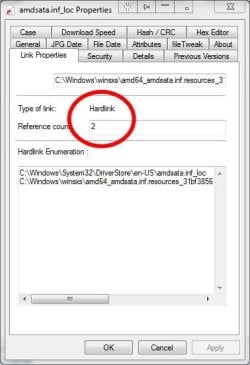
If you open the folder I suggested in prior post and look at the Link Properties for any of the files you will see that they are hardlinks - I am attaching an example. The file in question has an directory entry in these folders :-

C:\Windows\System32\DriverStore\.....
C:\Windows\winsxs\....

But let me assure you that there is only one copy of the data. There is no GUI method in vanilla windows to create hardlinks, symlinks and junctions - you have to use mklink command.

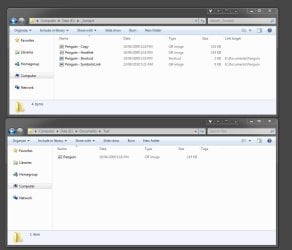
Create a test document and put something in it, now use mklink to create a hardlink of the file in another folder - now organise your desktop so you can see both folders - now edit the file to add some more text, doesn't matter which one - now save the file - you should see the same modify date and file sizes in both places, and you'll find they have the same content because they are the same thing.

As previously explained hardlinks have no concept of original and reference or master and slave etc. All files will have at least one link in a disk directory, a hard link is just another disk directory entry to the same data. Try to think of them as directory entries and recognise that the same file can have entries in many directories. The problem is that we've been mistaught to think of files as being kept in folders. NTFS and other POSIX complaint file systems store files independently from the folders (aka directories) in which they are referenced.

The second attachment shows a hardlink of, a symlink to and a shortcut to a file called penguins,gif in my Documents/Test folder. You can see the differences for yourself. The red arrow icon overlay you see on the hardlinks (in the Test & _Sandpit folders) are NOT provided by Win7, they are provided by a 3rd party product.


I don't have a "Program Files (x86)" folder, only a "Program Files" (and I monitored install, so i saw where they ended up - although that drive has since been formatted)

Are you running 32bit or 64 bit Windows - I think I've been wrongly assuming it was 64 bit. I cant add any more on this one

What does that Revo do - any good?

Its an uninstaller, it works for me - but I suggest you steer clear of it, you have enough problems, more software wont fix them - less might though ;)

Either WinDirStat or just right clicking and choosing properties.

Or Explorer for that matter, in thew view which shows all drives, suddenly the drive was in the red.
As previously explained determining the size of a folder is not easy if the folder references files that are also referenced elsewhere (hardlinks). You really need to show three numbers - total size of files with one link, total size of files with multiple links, the sum of the two - can you imagine how much confusion that would cause in the general population. BTW Solaris (Unix) suffers the same problem, as from memory did VMS.

However now W7 has a 100G partition, we'll see how long that lasts.
For quite a long time I would hope - providing its just for software and program data

Use the Location Property sheets to redirect Documents, Pictures etc elsewhere. Then you don't need worry about where or what's in the Users folders

If you find that an app is putting your data where you don't want it then find an alternative app, I'm talking about your data - ie documents, scripts, pictures etc - not the data the app creates in %APPDATA% which is its data.

Also establish a process to cleans up the temp directories, empty the recycle bin etc, there are plenty of utilities to do that - might even be one built into Win7.

pjd
 

Attachments

  • 1.jpg
    1.jpg
    28.5 KB · Views: 7
  • 2.jpg
    2.jpg
    60.9 KB · Views: 4

My Computer My Computer

Computer type
PC/Desktop
Computer Manufacturer/Model Number
generic - made to spec
OS
Win 7 Professional 64bit
CPU
I5 650 @ 3.2GHz
Motherboard
Gigabyte H55M-UD2H
Memory
6G
Graphics Card(s)
AMD Radeon R7 200 Series
Sound Card
whatever is on mobo
Monitor(s) Displays
1 x 24" Samsung
Screen Resolution
1920x1200
Hard Drives
Internal 1x256GB Toshiba SSD
Internal 1x2TB
External 2 slot USB 3.0 dock (various drives)
External 1 500GB USB 2.0 drive
PSU
850W Antech Modular
Case
Shiny Black Aluminium
Cooling
extra fans - sucker in front, blower at back - noisy & cool
Keyboard
Microsoft USB Dual Receiver Wireless Keyboard
Mouse
Microsoft USB Dual Receiver Wireless Mouse
Internet Speed
20/1Mbps down/up
Antivirus
MSE
Browser
Firefox and Chrome
Other Info
Hitachi USB 3.0 adapter
Nice property sheet, would have been nice to have it.

Anyway I'm unsubscribing from this thread, it makes me upset to read it now.
And I know what a ****ing hardlink is, no need to explain it for the 500 th time.
 

My Computer My Computer

OS
Windows
Memory
4g
Nope, no need to explain it anymore at all with that attitude. Good bye.
 

My Computer My Computer

Computer type
PC/Desktop
Computer Manufacturer/Model Number
Self built custom
OS
64-bit Windows 11 Pro for Workstations
CPU
Intel i7-8700K OC'd to 5 GHz
Motherboard
ASUS ROG Maximus XI Formula Z390
Memory
64 GB (4x16GB) G.SKILL TridentZ RGB DDR4 3600 MHz
Graphics Card(s)
ASUS ROG-STRIX-GTX1080TI-O11G-GAMING
Sound Card
Integrated
Monitor(s) Displays
2 x Samsung Odyssey G7 27"
Screen Resolution
2560x1440
Hard Drives
1TB Samsung 990 PRO M.2,
4TB Samsung 990 PRO PRO M.2,
TerraMaster F8 SSD Plus NAS
PSU
Seasonic Prime Titanium 850W
Case
Thermaltake Core P3
Cooling
Corsair Hydro H115i
Keyboard
Logitech wireless K800
Mouse
Logitech MX Master 4
Internet Speed
2 Gb/s Download and 100 Mb/s Upload
Antivirus
Malwarebyte Anti-Malware Premium
Browser
Google Chrome
Other Info
Logitech Z625 speaker system,
Logitech BRIO 4K Pro webcam,
HP Color LaserJet Pro MFP M477fdn,
APC SMART-UPS RT 1000 XL - SURT1000XLI,
Galaxy S23 Plus phone
Status
Not open for further replies.
Back
Top