Hi. I have Win7 Ultimate with Windows Media Player version 12.0.7601.18840. I've tried and failed to associate .wma files to WMP and wonder if someone could tell me if it can be done.
Here's what I've tried:
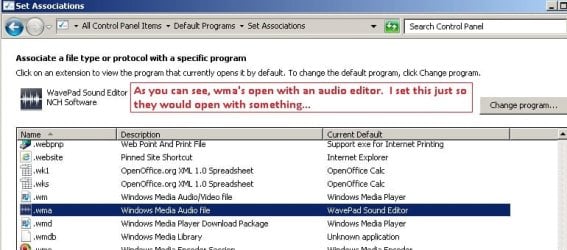
Set Associations – highlight 'wma' – click 'Change program'. This takes me to the 'Open with..' screen but WMP does not appear in either 'Recommended Programs' or 'Other Programs'.
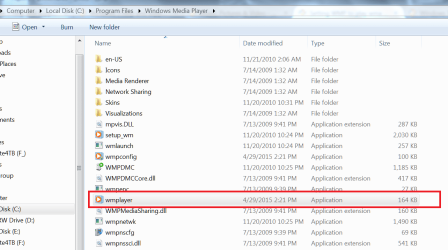
I therefore click 'Browse' and navigate to WMP (whether in 32 or 64 bit 'Program Files' the outcome is the same) and select 'wmplayer.exe'. Nothing happens except I jump back to the 'Open with..' screen.
I tried selecting 'Microsoft Windows Media Configuration Utility' and 'Windows Media Player Launcher' but with no effect other than I now have these embedded in my 'Open with..' screen and in my Context Menu for .wma files (any idea how to get them off?).
If someone shows me how to get WMP to autoplay wma I'd be forever grateful. Thank you.
My Computer
At a glance
Microsoft Windows 7 Ultimate 64-bit 7601 Mult...Intel(R) Core(TM) i3-4150 CPU @ 3.50GHz8.00 GBIntel(R) HD Graphics 4400
Computer type
PC/Desktop
Computer Manufacturer/Model Number
self build
OS
Microsoft Windows 7 Ultimate 64-bit 7601 Multiprocessor Free Service Pack 1
CPU
Intel(R) Core(TM) i3-4150 CPU @ 3.50GHz
Motherboard
ASUSTeK COMPUTER INC. H97M-PLUS
Memory
8.00 GB
Graphics Card(s)
Intel(R) HD Graphics 4400
Sound Card
(1) High Definition Audio Device (2) USB Audio Device
Screen Resolution
1024 x 768 x 32 bits (4294967296 colors) @ 75 Hz
Hard Drives
(1) SAMSUNG HD103SI ATA Device (2) Samsung SSD 840 EVO 120GB ATA Device (3) ST31000528AS ATA Device (4) GENERIC USB Storage-CFC USB Device (5) GENERIC USB Storage-MSC USB Device (6) GENERIC USB Storage-SDC USB Device (7) GENERIC USB Stora
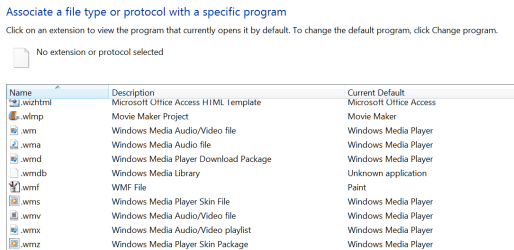
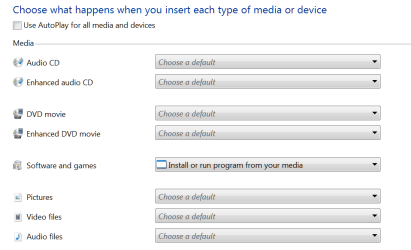
pooksahib, give a couple of screenshots, like below, of where you are making these settings. I have the same OS and WMP versions. I have default program set to WMP, but I don't use autoplay, the setting is available for WMP.
My Computer
At a glance
Microsoft Windows 7 Ultimate 64-bit 7601 Mult...AMD FX(tm)-6100 Six-Core Processor4.00 GBAMD Radeon HD 6450
Computer type
PC/Desktop
Computer Manufacturer/Model Number
custom build
OS
Microsoft Windows 7 Ultimate 64-bit 7601 Multiprocessor Free Service Pack 1
CPU
AMD FX(tm)-6100 Six-Core Processor
Motherboard
ASUSTeK Computer INC. M5A78L-M LX PLUS
Memory
4.00 GB
Graphics Card(s)
AMD Radeon HD 6450
Sound Card
(1) AMD High Definition Audio Device (2) Realtek High Defi
Monitor(s) Displays
Toshiba 47ZV650U 47" LCD 240Hz
Screen Resolution
1920 x 1080 x 32 bits (4294967296 colors) @ 60 Hz
Hard Drives
(1) HDT722516DLA380 ATA Device (2) Hitachi HDS721025CLA382 ATA Device (3) ST4000VN000-1H4168 ATA Device (4) Generic STORAGE DEVICE USB Device (5) Generic STORAGE DEVICE USB Device (6) Generic STORAGE DEVICE USB Device (7) Generic STORAGE
PSU
Corsair CX430M
Case
WMI (Waste Management Incorporated)
Cooling
Yes, it's very cool.
Keyboard
Bluetooth KB & Mousepad
Internet Speed
Fios 15/5 and it sucks when Verizon is throttling it down
OK, some screenshots as requested. I hope this clarifies matters and thanks for your assistance..
Attachments
A1 Set Assoc.jpg
48.2 KB
· Views: 1
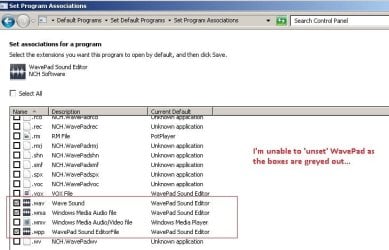
A2 Cant unset Wavepad.jpg
47.3 KB
· Views: 2
A3 Open With.jpg
49.1 KB
· Views: 1
My Computer
At a glance
Microsoft Windows 7 Ultimate 64-bit 7601 Mult...Intel(R) Core(TM) i3-4150 CPU @ 3.50GHz8.00 GBIntel(R) HD Graphics 4400
Computer type
PC/Desktop
Computer Manufacturer/Model Number
self build
OS
Microsoft Windows 7 Ultimate 64-bit 7601 Multiprocessor Free Service Pack 1
CPU
Intel(R) Core(TM) i3-4150 CPU @ 3.50GHz
Motherboard
ASUSTeK COMPUTER INC. H97M-PLUS
Memory
8.00 GB
Graphics Card(s)
Intel(R) HD Graphics 4400
Sound Card
(1) High Definition Audio Device (2) USB Audio Device
Screen Resolution
1024 x 768 x 32 bits (4294967296 colors) @ 75 Hz
Hard Drives
(1) SAMSUNG HD103SI ATA Device (2) Samsung SSD 840 EVO 120GB ATA Device (3) ST31000528AS ATA Device (4) GENERIC USB Storage-CFC USB Device (5) GENERIC USB Storage-MSC USB Device (6) GENERIC USB Storage-SDC USB Device (7) GENERIC USB Stora
Good news – I fixed it. In the second screenshot above you'll see that I couldn't disassociate WavePad as the boxes were greyed out. I had a flash of inspiration and went to the equivalent screen for WMP and clicked the 'Select All' box. My wma's now open with WMP. Nice.
However, that still leaves me with a question – why am I able to use Control Panel/Default Programs/Set Your Default Programs to make an association but not to UNMAKE an association? Once the association is made, the checkbox is greyed out for that program. It seems you have to do what I did and 'remake' the association with an alternative program. Is that how it is for you guys?
My Computer
At a glance
Microsoft Windows 7 Ultimate 64-bit 7601 Mult...Intel(R) Core(TM) i3-4150 CPU @ 3.50GHz8.00 GBIntel(R) HD Graphics 4400
Computer type
PC/Desktop
Computer Manufacturer/Model Number
self build
OS
Microsoft Windows 7 Ultimate 64-bit 7601 Multiprocessor Free Service Pack 1
CPU
Intel(R) Core(TM) i3-4150 CPU @ 3.50GHz
Motherboard
ASUSTeK COMPUTER INC. H97M-PLUS
Memory
8.00 GB
Graphics Card(s)
Intel(R) HD Graphics 4400
Sound Card
(1) High Definition Audio Device (2) USB Audio Device
Screen Resolution
1024 x 768 x 32 bits (4294967296 colors) @ 75 Hz
Hard Drives
(1) SAMSUNG HD103SI ATA Device (2) Samsung SSD 840 EVO 120GB ATA Device (3) ST31000528AS ATA Device (4) GENERIC USB Storage-CFC USB Device (5) GENERIC USB Storage-MSC USB Device (6) GENERIC USB Storage-SDC USB Device (7) GENERIC USB Stora