
You are using an out of date browser. It may not display this or other websites correctly.
You should upgrade or use an alternative browser.
You should upgrade or use an alternative browser.
Settings when windows can't find driver...
- Thread starter unko
- Start date

Just perform a Windows update - it will usually find and install all the functional drivers you need
My Computer
- Computer type
- PC/Desktop
- Computer Manufacturer/Model Number
- Golden Mk. I.4
- OS
- Windows 10 Pro x64 ; Xubuntu x64
- CPU
- Intel i7 860 @ 2.80 GHz O/C'ed to 4.0GHz
- Motherboard
- Gigabyte P55A-UD3R Rev.1. Award BIOS F13
- Memory
- 16GB Corsair Vengance DDR3 @ 661 MHz Dual Channel (9-9-9-24)
- Graphics Card(s)
- EVGA NVidia GTX 560 1024MB
- Sound Card
- Realtek Integrated
- Monitor(s) Displays
- Dual Samsung SyncMaster 2494HS
- Screen Resolution
- 1920*1080 and 1920*1080
- Hard Drives
- 1*Samsung 840 EVO 120GB SSD;
1*OCZ Vertex 2 60GB SSD;
2*Samsung F3 SpinPoint 1TB in RAID0;
1*Samsung F1 SpinPoint 1TB;
2*Western Digital 1TB External USB 3.0
1*Western Digital 500GB External USB 3.0
1*Seagate 500GB External USB 2.0
- PSU
- Thermaltake ToughPower QFan 750W
- Case
- Thermaltake Element S VK60001W2Z
- Cooling
- Corsair H60 Water Cooling, 2*230mm and 2*80mm case fans
- Keyboard
- Logitech G110
- Mouse
- Logitech MX518

Start and type in Device Manager. Tick on Device Manager and you should see what you are looking for. On the left tick on the device you are looking for a driver (example, disk) and then right click on the disk of choice and you will see options.
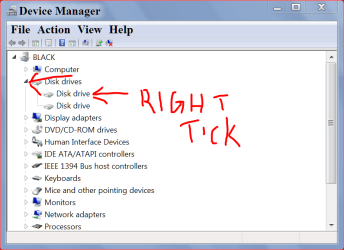
I hope I understood your question correctly.
I hope I understood your question correctly.
My Computer
- Computer type
- PC/Desktop
- Computer Manufacturer/Model Number
- Home made Desktop
- OS
- Windows 10 Pro. 64/ version 1709 Windows 7 Pro/64
- CPU
- Intel i7-6800K @ 4.3
- Motherboard
- ASUS X-99 Deluxe II
- Memory
- Corsair Platinum 16 gig @2400
- Graphics Card(s)
- EVGA GTX 1070 OC
- Monitor(s) Displays
- Asus 27" LED LCD/VE278Q
- Screen Resolution
- 1920-1080 or 1280-720 HDMI
- Hard Drives
- INTEL SSD 730-240 Gb Sata 3.0/
- PSU
- EVGA Platium 1200W
- Case
- Phanteks Luxe Tempered Glass 8 fans/ one radiator
- Cooling
- XSPC/ Water Cooled CPU
- Keyboard
- Das 4 Professional
- Mouse
- Logitech M705/MX Anywhere 2-S
- Internet Speed
- 100 mbits
- Antivirus
- Microsoft Security Essentials/ Malwarebytes Premium 3.0/ SAS
- Browser
- I.E. 11 default/Firefox/ ISP Time Warner Cable/Spectrum
- Other Info
- LG BluRay Burner/
Sound system-KLipsch-THX/
Icy Dock ssd Hot Swap bays.

unko,
right click computer in start menu >properties >advanced system settings on the side menu >hardware >device installation settings. Then select "No, let me choose what to do and pick your choice
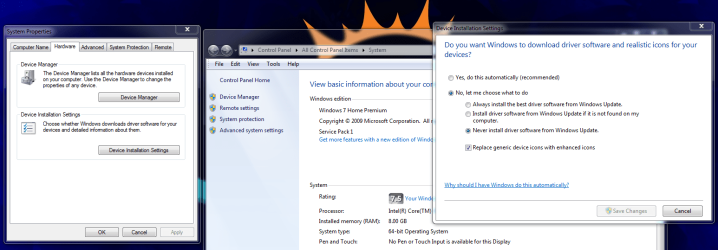
right click computer in start menu >properties >advanced system settings on the side menu >hardware >device installation settings. Then select "No, let me choose what to do and pick your choice
My Computer
- Computer type
- PC/Desktop
- Computer Manufacturer/Model Number
- Dude Build
- OS
- Windows 10 Pro X64
- CPU
- Intel(R) Core(TM) i5-3570K CPU OC@ 4.5GHZ Turbo
- Motherboard
- MSI Z77A-G45 Gaming
- Memory
- 8.00 GB DDR3 1600Mhz
- Graphics Card(s)
- MSI Gaming X GTX 1070
- Sound Card
- Realtek High Definition
- Monitor(s) Displays
- Dell S23O9W, HP L1710
- Screen Resolution
- DELL-1920 x 1080 HP-1280 x1024
- Hard Drives
- Crucial m4 256 SSD, WD 7200RPM 500GB WD 1TB
- PSU
- Seasonic X650 GOLD
- Case
- Zalman Z12
- Cooling
- Antec Kuhler 920
- Keyboard
- Logitech
- Mouse
- MSI DS100 Interceptor
- Internet Speed
- 50 down and 5 up
- Antivirus
- MSE
- Browser
- Chrome, IE 11
- Other Info
- Logitech X-620 Speakers
That's what i was looking for, dude (haha), thanks!
You're welcome, glad that helped you.
My Computer
- Computer type
- PC/Desktop
- Computer Manufacturer/Model Number
- Dude Build
- OS
- Windows 10 Pro X64
- CPU
- Intel(R) Core(TM) i5-3570K CPU OC@ 4.5GHZ Turbo
- Motherboard
- MSI Z77A-G45 Gaming
- Memory
- 8.00 GB DDR3 1600Mhz
- Graphics Card(s)
- MSI Gaming X GTX 1070
- Sound Card
- Realtek High Definition
- Monitor(s) Displays
- Dell S23O9W, HP L1710
- Screen Resolution
- DELL-1920 x 1080 HP-1280 x1024
- Hard Drives
- Crucial m4 256 SSD, WD 7200RPM 500GB WD 1TB
- PSU
- Seasonic X650 GOLD
- Case
- Zalman Z12
- Cooling
- Antec Kuhler 920
- Keyboard
- Logitech
- Mouse
- MSI DS100 Interceptor
- Internet Speed
- 50 down and 5 up
- Antivirus
- MSE
- Browser
- Chrome, IE 11
- Other Info
- Logitech X-620 Speakers