Setup.exe unresponsive

cthayer

New member
Local time
5:22 PM
Messages
2
I'm trying to install a game for my kid on a Windows 7 64-bit machine. It's an older game (copyright 1998), so I know it could just be out of support. But when I try to run setup, I get an administrator warning asking if I want to continue running the program. I click yes, and nothing happens. The disk doesn't even get scanned in the tray. Any help would be greatly appreciated.
 

My Computer

OS
Windows 7 64 bit
Hello and welcome to the forums cthayer.

May I ask what the game is?

Could the installation media be faulty? Try checking it for scratches or any deformities..
 

My Computer

Computer Manufacturer/Model Number
DELL SXPS 1640
OS
Windows 7 x64 Professional SP1
CPU
Intel C2D T9550 2.66 GHz @ 2.793 GHz (Thanks ThrottleStop!!)
Motherboard
Intel PM45
Memory
8 GB DDR3
Graphics Card(s)
ATI MOBILITY RADEON 4670
Sound Card
CREATIVE XFI AUDIO NOTEBOOK
Monitor(s) Displays
16.1 WLED
Screen Resolution
1920x1080
Hard Drives
Seagate ST9500420AS 500GB (465GiBi) 7200 RPM Drive

External Drives:-
2 TB WD Essentials x 3
1 TB WD Mybook Gen 1
1 TB WD Mybook Gen 2
1 TB Seagate
1 TB Seagate
320 GB WD Scorpio Black (enclosed)
PSU
90W Dell Power Brick
Case
Dell Chassis
Cooling
Coolermaster Cooling Pad
Keyboard
Built-in backlighted Keyboard
Mouse
Logitech Wireless Mini Mouse
Internet Speed
4/0.5
The game is Army Men, and it looks okay. Some small wear and tear, but no major scratching.
 

My Computer

OS
Windows 7 64 bit
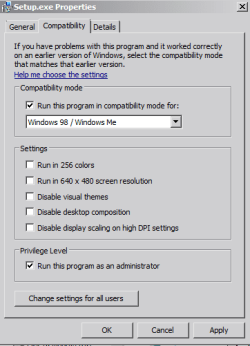
Okay then, could you try running the setup.exe in administrator mode with compatibility set for windows 98?

Right click on the setup.exe file|Properties|Compatibility Tab|Tick the box for Run this program in compatibility mode and a select Windows 98 from the drop box|and at the very bottom of the box tick the Run this program as an administrator|Apply|OK

Capture.PNG

Next, try to disable any active anti-virus/malware software you have on the system for the duration of the installation; it may be interfering with the setup process. This is just temporary, you will of course need to re-enable protections after you're done installing the software.

Hope that helps!
 
Last edited:

My Computer

Computer Manufacturer/Model Number
DELL SXPS 1640
OS
Windows 7 x64 Professional SP1
CPU
Intel C2D T9550 2.66 GHz @ 2.793 GHz (Thanks ThrottleStop!!)
Motherboard
Intel PM45
Memory
8 GB DDR3
Graphics Card(s)
ATI MOBILITY RADEON 4670
Sound Card
CREATIVE XFI AUDIO NOTEBOOK
Monitor(s) Displays
16.1 WLED
Screen Resolution
1920x1080
Hard Drives
Seagate ST9500420AS 500GB (465GiBi) 7200 RPM Drive

External Drives:-
2 TB WD Essentials x 3
1 TB WD Mybook Gen 1
1 TB WD Mybook Gen 2
1 TB Seagate
1 TB Seagate
320 GB WD Scorpio Black (enclosed)
PSU
90W Dell Power Brick
Case
Dell Chassis
Cooling
Coolermaster Cooling Pad
Keyboard
Built-in backlighted Keyboard
Mouse
Logitech Wireless Mini Mouse
Internet Speed
4/0.5
Back
Top