
setup for a cloud storage

david622

New member
Local time
3:21 PM
Messages
19
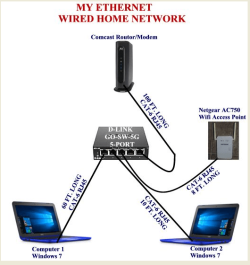
This image is the layout of my home network, I have a spare “Internal 1T Hard Drive” that I would like to setup for a cloud storage for both computers. My question is:
Where would I install the hard drive?
How would I install it?
Once installed how to set it up so both computes can us it ?
Thanks In Advance!
 

Attachments
  • my network setup.PNG
    my network setup.PNG
    209 KB · Views: 31

My Computer

Computer type
PC/Desktop
Computer Manufacturer/Model Number
Gateway
OS
Windows 7 Home Premium 64-bit SP1
CPU
Intel Core i3 2120
Motherboard
Gateway ZX6970 (CPU 1)
Memory
DDR3
Graphics Card(s)
AIO LCD on Intel HD Graphics
Hard Drives
Western Digital WDC WD20EADS-00R6B0 ATA Device
Antivirus
Microsoft Essentials
Browser
Chrome
Does the router or switch have a USB port so you could put the drive in a USB enclosure so it's always on? How much data do you need to backup the simple safe way is to use free Google drive install the sync app and tell it what to backup then forget it as it will do it automatically
 

My Computer

Computer type
PC/Desktop
OS
win 8 32 bit
The router has 2 usb ports but the switch dosen't, I do have Google Drive but I don't use the paid gb's.
 

My Computer

Computer type
PC/Desktop
Computer Manufacturer/Model Number
Gateway
OS
Windows 7 Home Premium 64-bit SP1
CPU
Intel Core i3 2120
Motherboard
Gateway ZX6970 (CPU 1)
Memory
DDR3
Graphics Card(s)
AIO LCD on Intel HD Graphics
Hard Drives
Western Digital WDC WD20EADS-00R6B0 ATA Device
Antivirus
Microsoft Essentials
Browser
Chrome
When you say "cloud storage", do you mean your own personal cloud for your network only, or do you mean putting it on a cloud service?
  • If you want only your own personal cloud, all you need to do is make the drive shareable (this is done from the computer it is installed in), then map a drive to it from each of the other computers (so that they can access it).
  • If you want the contents of the drive shared to a cloud service, then you would simply subscribe to that service and make that drive part of the cloud service.
 

My Computer

Computer type
PC/Desktop
Computer Manufacturer/Model Number
Dell
OS
Linux Mint 18.2 xfce 64-bit (VMWare host) / Windows 8.1 Pro 32-bit (VMWare guest)
CPU
Haswell
Memory
4 GB
Monitor(s) Displays
Acer 23"
Screen Resolution
1920 x 1080
Hard Drives
Two hard drives, 1TB each: One for Linux, one for my data.
Keyboard
IBM Model M
Antivirus
Sophos (Linux), Trend Micro (Windows)
Browser
Firefox, Opera
Other Info
I use Samba to share my data drive with the other computers at my house and with my guest session in VMWare Workstation Player.
Thank You!
 

My Computer

Computer type
PC/Desktop
Computer Manufacturer/Model Number
Gateway
OS
Windows 7 Home Premium 64-bit SP1
CPU
Intel Core i3 2120
Motherboard
Gateway ZX6970 (CPU 1)
Memory
DDR3
Graphics Card(s)
AIO LCD on Intel HD Graphics
Hard Drives
Western Digital WDC WD20EADS-00R6B0 ATA Device
Antivirus
Microsoft Essentials
Browser
Chrome
Looking at your diagram above, you don't have any way currently to install an internal hard drive on this network. Also, you don't have a router, you have a switch. So I'm not sure how you are able to get on the internet with both computers. One computer might get on in the current configuration, but not both. The same goes with the wireless access point. You need a router in order to connect multiple devices to the internet from one actual internet connection.

Here is an example of a router which has a USB port:
https://www.amazon.com/TRENDnet-Wireless-TEW-812DRU-Certified-Refurbished/dp/B016WVHQ52/ref=sr_1_10?s=pc&ie=UTF8&qid=1518803456&sr=1-10&keywords=router+with+usb+port&refinements=p_n_feature_four_browse-bin%3A5662324011

You could plug in a USB hard drive to this router, and then share it over your network. This would likely be the easiest way to share a drive. But since your drive is an internal drive, you would have to convert it into a USB external drive, such as by using a docking station for the drive. Something like this would be your best bet:

https://www.amazon.com/Cable-Matter...ons&keywords=sata+drive+docking+station&psc=1

I'm not familiar with this particular dock, but this would be your easiest and most successful way to share your drive over your network.
 

My Computer

Computer type
PC/Desktop
Computer Manufacturer/Model Number
Dell
OS
Linux Mint 18.2 xfce 64-bit (VMWare host) / Windows 8.1 Pro 32-bit (VMWare guest)
CPU
Haswell
Memory
4 GB
Monitor(s) Displays
Acer 23"
Screen Resolution
1920 x 1080
Hard Drives
Two hard drives, 1TB each: One for Linux, one for my data.
Keyboard
IBM Model M
Antivirus
Sophos (Linux), Trend Micro (Windows)
Browser
Firefox, Opera
Other Info
I use Samba to share my data drive with the other computers at my house and with my guest session in VMWare Workstation Player.
Google gives you 15gig free and you can use ms inscribe for another 15 Google photos are separate and totally free and unlimited I have 86,000. As stated get a USB caddy for the drive and plug into the router so it allways on
 

My Computer

Computer type
PC/Desktop
OS
win 8 32 bit
Thank You,
I'm thinking about trying a Addonics NAS40ESU NAS 4.0 Gigabit Ethernet Adapter, it might be what I need I can hook it up at the switch, I think, I'm still researching.
 

My Computer

Computer type
PC/Desktop
Computer Manufacturer/Model Number
Gateway
OS
Windows 7 Home Premium 64-bit SP1
CPU
Intel Core i3 2120
Motherboard
Gateway ZX6970 (CPU 1)
Memory
DDR3
Graphics Card(s)
AIO LCD on Intel HD Graphics
Hard Drives
Western Digital WDC WD20EADS-00R6B0 ATA Device
Antivirus
Microsoft Essentials
Browser
Chrome
A switch is dumb a router isnt it should have setting for a HD the switch wont
 

My Computer

Computer type
PC/Desktop
OS
win 8 32 bit
Ok, I just looked again at your setup and noticed that you have a "Comcast/router modem". For some reason I didn't notice that you have a router.

With this in mind, here is the easiest way that you can connect your internal drive to your network as a shared drive: Get a docking station which will connect to your network. Something like this:

https://www.amazon.com/Cable-Matters-Wireless-Docking-SuperSpeed/dp/B00KNCVFL8

As best as I can understand, you can either use an Ethernet cable or wifi to connect this docking station to your network; once you have done that, you can access it from all computers which are connected to your network.
 

My Computer

Computer type
PC/Desktop
Computer Manufacturer/Model Number
Dell
OS
Linux Mint 18.2 xfce 64-bit (VMWare host) / Windows 8.1 Pro 32-bit (VMWare guest)
CPU
Haswell
Memory
4 GB
Monitor(s) Displays
Acer 23"
Screen Resolution
1920 x 1080
Hard Drives
Two hard drives, 1TB each: One for Linux, one for my data.
Keyboard
IBM Model M
Antivirus
Sophos (Linux), Trend Micro (Windows)
Browser
Firefox, Opera
Other Info
I use Samba to share my data drive with the other computers at my house and with my guest session in VMWare Workstation Player.
ThankYou, I'll check into that
 

My Computer

Computer type
PC/Desktop
Computer Manufacturer/Model Number
Gateway
OS
Windows 7 Home Premium 64-bit SP1
CPU
Intel Core i3 2120
Motherboard
Gateway ZX6970 (CPU 1)
Memory
DDR3
Graphics Card(s)
AIO LCD on Intel HD Graphics
Hard Drives
Western Digital WDC WD20EADS-00R6B0 ATA Device
Antivirus
Microsoft Essentials
Browser
Chrome
Ok Thanks for the help
 

My Computer

Computer type
PC/Desktop
Computer Manufacturer/Model Number
Gateway
OS
Windows 7 Home Premium 64-bit SP1
CPU
Intel Core i3 2120
Motherboard
Gateway ZX6970 (CPU 1)
Memory
DDR3
Graphics Card(s)
AIO LCD on Intel HD Graphics
Hard Drives
Western Digital WDC WD20EADS-00R6B0 ATA Device
Antivirus
Microsoft Essentials
Browser
Chrome
I would actually suggest that rather than the open Caddy style connection unit you go for a suitable enclosed case with a USB connection, this would give better knock protection and also better prevent dust access to the Drive internals, and may also be a bit more economic ;)

CiT 3.5 inch USB 3.0 U3PD SATA HDD Enclosure: Amazon.co.uk: Computers Accessories

I have a Dock on my desk to temporarily access customer drives for files transfer Etc , (USB3 & eSata connections ), but my "NAS" drives are all in enclosures for their protection
 

My Computers

System One System Two

  • Computer type
    PC/Desktop
    Computer Manufacturer/Model Number
    ChillBlast - Custom to my design
    OS
    Windows 11 Pro x64 [Latest Release and Release Preview]
    CPU
    Ryzen 9 5950X, 3.8 - 5.2 MHz
    Motherboard
    Asus Prime X570-Pro
    Memory
    64GB [2 x 32GB] DDR4 3200MHz
    Graphics Card(s)
    4GB NVIDIA GEFORCE GTX 1650 Ti
    Sound Card
    On-board SPDIF to 5.1 System + HDMI [5.1 system]
    Monitor(s) Displays
    32" UHD 32 Bit HDR Monitor + 43" UHD 4K 32Bit HDR TV
    Screen Resolution
    2 x 3840 x 2160 @60Hz
    Hard Drives
    1TB M2 SSD OS, 500GB Fast Access SSD, 2 x 8TB Data + Various Externals from 1TB to 4TB, 10TB NAS
    PSU
    NZXT C750 80 PLUS Gold 750W Modular PSU
    Case
    Workstation Case [Matt Black]
    Cooling
    NZXT Kraken X63 280mm CPU Cooler +2x Quiet Case fans
    Keyboard
    Logitech Wireless MX Keys & K400 + others
    Mouse
    Logitech Wireless MX Master 3S
    Internet Speed
    920 MB Down 50 MB Up
    Antivirus
    BitDefender Total Security Pro
    Browser
    Chrome (always run latest Non-Beta)
    Other Info
    Also run ...
    Laptop - Quad 8GB - Windows 10 Pro x64
    Nexus 7 Android tablet x2
    Samsung 10.2" tablet
    Blackview TAB 8 4G Android Tablet c/w Keyboard
    Wacom Intuos Pro Medium Pen Pad
    Wacom Intuos Pro Small Pen Pad
    Wacom Expresskeys Remote
    Loopdeck+ Graphics Controller
    Shuttle Pro v2 Control
  • Computer type
    Laptop
    System Manufacturer/Model Number
    Dell XPS 17 10750H
    OS
    Windows 11 Pro x64 Latest RP
    CPU
    Intel I7 10750H 5.0GHz
    Motherboard
    Dell XPS
    Memory
    32GB [2x16GB] DDR4 2933 MHz
    Graphics Card(s)
    nVidia GTX1650Ti 4 GB GDDR6
    Sound Card
    Stock [Realtek] 4 Speaker
    Monitor(s) Displays
    17" IPS UHD+ Infinity Edge Touchscreen
    Screen Resolution
    3840 x 2400
    Hard Drives
    2TB M2 NVMe, 4TB External + various 500GB & 1TB External NVMe (also have access to spinner HDD from
    PSU
    Stock
    Case
    Stock XPS Aluminium & Carbon Fibre
    Cooling
    Stock - Active Fan Control
    Keyboard
    Backlit + Various Logitech
    Mouse
    Stock Track Pad + Logitech MX Trackball
    Internet Speed
    72 MB Down 18MB Up
    Browser
    Chrome
    Other Info
    Also run ...
    Laptop - Quad 8GB - Windows 10 Pro x64
    Nexus 7 Android tablet x2
    10.2" tablet
    Sony Z3 Android Smartphone
    Wacom Intuos Pro Medium Pen Pad
    Wacom Intuos Pro Small Pen Pad
    Wacom Expresskeys Remote
    Loopdeck+ Graphics Controller
    Shuttle Pro v2 Control Pad
    10TB NAS
Oh Yes!Thank You!
 

My Computer

Computer type
PC/Desktop
Computer Manufacturer/Model Number
Gateway
OS
Windows 7 Home Premium 64-bit SP1
CPU
Intel Core i3 2120
Motherboard
Gateway ZX6970 (CPU 1)
Memory
DDR3
Graphics Card(s)
AIO LCD on Intel HD Graphics
Hard Drives
Western Digital WDC WD20EADS-00R6B0 ATA Device
Antivirus
Microsoft Essentials
Browser
Chrome
Back
Top