Setup - Need to uninstall RAID?

Zachafer

New member
Local time
6:15 PM
Messages
6
Everytime I do the custom setup to format, I get this message:

Windows cannot be installed to this disk. Windows needs the driver for device [Intel(R) 82801ER SATA RAID Controller]. Click 'Load Driver' and load the required device driver.

I downloaded the driver, put it on a USB drive, and it never detected the .exe on the drive.

My options are:

  • Uninstall RAID
  • Fix driver issue
Please help. I'm installing from WINXP.
 

My Computer

OS
WXP
Everytime I do the custom setup to format, I get this message:

Windows cannot be installed to this disk. Windows needs the driver for device [Intel(R) 82801ER SATA RAID Controller]. Click 'Load Driver' and load the required device driver.
I downloaded the driver, put it on a USB drive, and it never detected the .exe on the drive.

My options are:

  • Uninstall RAID
  • Fix driver issue
Please help. I'm installing from WINXP.

Z


Maybe it cant read the driver file from the usb. try putting it on a cd.

You 32bit or 64?

Ken
 

My Computer

Computer Manufacturer/Model Number
HP Pavillion dv-7 1005 Tx
OS
Win 8 Release candidate 8400
CPU
[email protected]
Memory
4 gigs
Graphics Card(s)
Nvidia 9600M
Sound Card
HD built-in
Monitor(s) Displays
17" Wxga
Screen Resolution
1440x900
Cooling
none
Internet Speed
45Mb down 5Mb up
Hey, and welcome to the forums! ;)

First things first.. Please fill in your system specs so we know what we're dealing with...Help us help you... without your specs, were just shooting in the dark...
What version are you trying to install etc, etc .... information Will Robinson, we need more information!!
 

My Computer

Computer type
PC/Desktop
Computer Manufacturer/Model Number
LENOVO K450 @3.0GHZ
OS
64-bit Windows 8.1 Pro
CPU
Core(TM) i5 CPU 4330 Haswell @ 3.20GHz
Motherboard
LENOVO
Memory
12.00 GB
Graphics Card(s)
Intel(R) HD Graphics
Sound Card
Intel HD integtrated
Monitor(s) Displays
HP 25' ISP Monitor
Screen Resolution
1900/1020
Hard Drives
(1) ST1000DM003-1CH162 (2) Generic STORAGE DEVICE USB Device (3) Generic STORAGE DEVICE USB Device
Internet Speed
100mb down/10mb up
I'm x84 (32bit). I'm installing the 7022 build.

I only have one CD drive. If I put the driver on a CD, won't it screw up the setup process since I will have to eject the windows7 cd?
 

My Computer

OS
WXP
Hi zachafer

There is no .exe file.
Quote from the readme doc.

Pre-Installation Using the F6 Method.
Note: The Steps 1 and 2 can be skipped if you use the F6 Floppy
disk utility provided by Intel. This utility can also be
downloaded from the following website. These methods
are applicable to systems configured for RAID or
AHCI mode.
http://downloadfinder.intel.com/scripts-df/Product_Filter.asp?
ProductID=2101
1. Extract all driver files from the installation package.
See section 7.2 for instructions on extracting the
files.
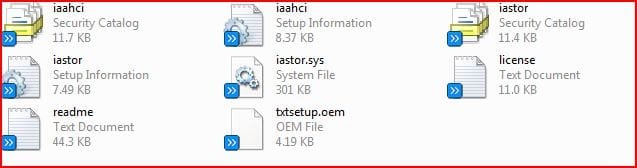
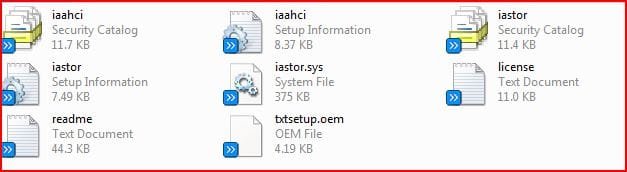
2. Create a floppy* containing the following files in the root
directory:
iaAhci.inf, iaAhci.cat,
iaStor.inf, iaStor.cat,
iaStor.sys, and
TxtSetup.oem.
* Note: For Windows Vista you can use a floppy, CD/DVD or USB.
3. For Windows XP or later operating systems:
- At the beginning of the operating system installation,
press F6 to install a third party SCSI or RAID driver.
- When prompted, select 'S' to Specify Additional Device.
- Continue to step 5.
4. For Windows Vista:
- During the operating system installation, after selecting the
location to install Vista, click Load Driver to
install a third
party SCSI or RAID driver.
- Continue to step 5.
5. When prompted, insert the media (floppy, CD/DVD
or USB) you
created in step 2 and press Enter.
6. At this point you should be presented with a selection
for one of the following depending on your hardware
version and configuration:
- Intel(R) 82801IR/IO SATA RAID Controller (Desktop ICH9R)
- Intel(R) 82801IR/IO SATA AHCI Controller (Desktop ICH9R)
- Intel(R) 82801HEM SATA RAID Controller (Mobile ICH8M-E)
- Intel(R) 82801HEM SATA AHCI Controller (Mobile ICH8M-E)
- Intel(R) 82801HBM SATA AHCI Controller (Mobile ICH8M)
- Intel(R) 82801HR/HH/HO SATA RAID Controller (Desktop ICH8R)
- Intel(R) 82801HR/HH/HO SATA AHCI Controller (Desktop ICH8R)
- Intel(R) 631xESB/632xESB SATA RAID Controller (Workstation ESB2)
- Intel(R) 82801GHM SATA RAID Controller (Mobile ICH7RM)
- Intel(R) 82801GBM SATA AHCI Controller (Mobile ICH7M)
- Intel(R) 82801GR/GH SATA RAID Controller (Desktop ICH7R/DH)
- Intel(R) 82801GR/GH SATA AHCI Controller (Desktop ICH7R/DH)
7. Highlight the selection that is appropriate for the
hardware in your system and press Enter.
8. Press Enter again to continue. Leave the floppy disk in
the system until the next reboot as the software will
need to be copied from the floppy disk again when setup
is copying files.

 

My Computer

OS
ME/XP/Vista/Win7
Thanks, theog. Do you think you could link me to where I can download the driver file or whatever?
 

My Computer

OS
WXP
I've got the files on the floppy. Let's hope this works.

Will post back soon!
 

My Computer

OS
WXP
I followed the steps. Extracted the files to the floppy, and then it asked where the drivers were and I said the A:/ Floppy. Then it searches the drive (and I can hear the floppy drive) and then it says:
No device drivers were found. Make sure that the installation media contains the correct drivers, and then click OK.

dfdpoz.jpg


Maybe I could just remove my RAID drive somehow?
 

My Computer

OS
WXP
It's currently installing. I managed to disabled the RAID drive thru BIOS
 

My Computer

OS
WXP
Hi Zachafer

32bit
 

Attachments

  • Capture001.JPG
    Capture001.JPG
    23.5 KB · Views: 40

My Computer

OS
ME/XP/Vista/Win7
64bit
 

Attachments

  • Capture002.JPG
    Capture002.JPG
    23.8 KB · Views: 31

My Computer

OS
ME/XP/Vista/Win7
Back
Top