
Setup was unable to create a new system partition

Gumy

New member
Local time
10:13 AM
Messages
2
Hi folks!

I've been experiencing some troubles installing Windows 7 from a bootable USB.
I was so clever that I deleted all the partitions even with my Windows 8.

I was trying to downgrade and had loads of issues getting the USB to work, but that's fine now and I got to the setup. However, I had problems with partitions unable to be written onto. I have cleaned and formatted and set the partition to ntsf as I found somewhere in these forums. At The end, I'm still getting the same old error setup was unable to create a new system partition..............
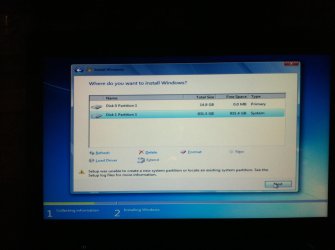
image.jpg


Any help would be greatly appreciated
 

My Computer My Computer

At a glance

Hopefully Windows 7 64bit
Computer type
Laptop
Computer Manufacturer/Model Number
Lenovo
OS
Hopefully Windows 7 64bit
Hmmm, is this a UEFI based system? If so you need to do things differently to install Windows 7.
See here: http://www.sevenforums.com/tutorial...e-firmware-interface-install-windows-7-a.html

If no help, try this.

Delete both partitions.
Create one single partition encompasing the entire drive (you can re-size it later if you want another partition or two).
DO NOT format, just click next and let the install program do what it needs.
See if that works.
 

My Computer My Computer

At a glance

Windows 10 Pro X64Intel Quad Core i7-4770 @ 3.4Ghz16.0GB PC3-12800 DDR3 SDRAM 1600 MHzIntel Integrated HD Graphics
Computer type
PC/Desktop
Computer Manufacturer/Model Number
Lenovo IdeaCenter 450
OS
Windows 10 Pro X64
CPU
Intel Quad Core i7-4770 @ 3.4Ghz
Memory
16.0GB PC3-12800 DDR3 SDRAM 1600 MHz
Graphics Card(s)
Intel Integrated HD Graphics
Sound Card
Realtek HD Audio
Monitor(s) Displays
HP 22" LCD
Screen Resolution
1680 x 1050
Hard Drives
250GB Samsung EVO SATA-3 SSD
2TB Seagate ST2000DM001 SATA-2
1.5TB Seagate ST3150041AS SATA
Keyboard
Dell USB
Mouse
Lenovo USB
Internet Speed
Cable via Road Runner 3MB Upload, 30MB Download
Antivirus
Windows Defender, MBAM Pro, MBAE
Browser
Seamonkey
Other Info
UEFI/GPT
PLDS DVD-RW DH16AERSH
If that is an UEFI system you may have to set the BIOS to Legacy Mode.
 

My Computer My Computer

At a glance

Vista, Windows7, Mint Mate, Zorin, Windows 8from 1.6GHz Duo to i7
Computer Manufacturer/Model Number
HP, Dell, Gateway, Toshiba - 4 laptops and 2 desktops
OS
Vista, Windows7, Mint Mate, Zorin, Windows 8
CPU
from 1.6GHz Duo to i7
Monitor(s) Displays
2x HP w2207
Hard Drives
5x HDD, 7x SSD, 12x Externals
Keyboard
with trackball - no mices
Mouse
Trackball mice
Internet Speed
DSL 6000
Thanks guys...worked like a charm! For some reason I considered that first partition to be my USB (just cause of the similar size - although....I have no idea why - was scared comp. recognised it somehow)

It's all well now. I'm all set. Thanks for The help again
 

My Computer My Computer

At a glance

Hopefully Windows 7 64bit
Computer type
Laptop
Computer Manufacturer/Model Number
Lenovo
OS
Hopefully Windows 7 64bit
Back
Top