Several errors with Media Center, can't get it to function

Circle

New member
Local time
2:42 PM
Messages
24
I haven't used Media Center for over a month. Yesterday I started it and it had no TV listings. It said it was going to download new listings but it never did. I decided I would just watch some recordings instead, since I was over a month behind on my shows that I haven't watched yet. It is set to record 5 shows regularly.

I found that it has not recorded a single show since Saturday Night Live on 5/15/2013. Ok, so I decided I would just watch TV even though the guide wasn't working. That worked fine.

Today I set out to fix this problem. I've tried to reset Media Center, below is what I have done, and now it pretty much doesn't work at all.

1st try: going into windows programs and features and uninstalling it, restarting the PC, reinstalling it, restarting the PC, then starting Media Center. During setup it got stuck at downloading TV setup data. I then ran c:\windows\ehome\mcupdate.exe , and it started downloading the information. After it downloads I get, "Windows Media Center Store Update Manager has stopped working." Windows Media Center keeps working, and I set up my cable provider. Immediately after I get, "TV Setup Cannot Continue, has encountered a serious problem."

2nd Try: I uninstalled it again, then went to C:\ProgramData\Microsoft\eHome\ and deleted all the files. Reinstalled Media Center. Then tried again. I got the same issue as before.

3rd Try: I ran %systemroot%\eHome\mcupdate.exe -MediaCenterRecoveryTask this also did not work

4th Try: Using CMD, I did:
a. schtasks /delete /tn "microsoft\windows\media center\mcupdate" /f
b. cd /d %WINDIR%\ehome
c. start /wait mcupdate –u

This also did not work.

How do I get my media center working again?
 

My Computer

OS
Windows 7 Pro x64

My Computer

Computer type
PC/Desktop
Computer Manufacturer/Model Number
Own build (new) Desk1 / Asus ROG Win 7 / Desk2 1st build
OS
Desk1 7 Home Prem / Desk2 10 Pro / Main lap Asus ROG 10 Pro 2 laptop Toshiba 7 Pro Asus P2520 7 & 10
CPU
Desk1 i5 3750K / Laptop i7 GTX 860M / Desk2 i5 2500
Motherboard
Desk1 Asus P877-V / Desk2 Gigabyte H67 UD3H / Laptop ?
Memory
Desk1 8GB (1866) / Desk2 16GB (1333) / Laptop 8Gb DDR3
Graphics Card(s)
Desk 1& 2NVidia GTX 650 & Laptops on board Intel
Sound Card
Desk 1 & 2 -XONAR DG Realtek High Def audio Laptop
Monitor(s) Displays
Desk 1 Benq HD 2450 / Desk2 Philips 24" / Laptop 17.5"
Screen Resolution
1920x1080 D1 & D2 & Laptop 1
Hard Drives
Desk1 Samsung 120GB 830 SSD
Asus ROG 256GB 850 Pro SSD
Desk2 Samsung 840 256 SSD
Toshiba 120GB EVO
PSU
Desk 1 Corsair HX 1050/ Laptop ? / Desk 2 Corsair HX 650
Case
Desk 1 Cooler HAF XM ? Toshiba laptop / Desk2 Coolermaster
Cooling
Fans on all Desk1 -2 Desk2 - all Coolermasters 5 Laptop ?
Keyboard
Desk 1 MS Sidewinder X6 Desk 2 MS Sidewinder X 4
Mouse
Desk 1&2 - Gigabyte MS 900 gamer - laptop - Logitec wireless
Internet Speed
ADSL2+
Other Info
One other Desktop (tester) and spare Toshba laptop both with SSD's
Running Kaspersky 2016 ISS on all machines config'd identically
Logitec audio stereo systems on each machine (x3)
Canon MG5250MFC
Router/modem TP-Link running WPA2SK
Here are the results:

SFC /scannow: Windows Resource Protection did not find any integrity violations

Chkdsk: Not sure, but it ran. I have event log disabled because it causes lag with GTA IV when keys are pressed.

MalwareBytes:
Code:
Malwarebytes Anti-Malware 1.75.0.1300
www.malwarebytes.org

Database version: v2013.08.03.06

Windows 7 Service Pack 1 x64 NTFS
Internet Explorer 10.0.9200.16635
Circle :: CIRCLE-PC [administrator]

8/3/2013 2:38:03 PM
mbam-log-2013-08-03 (14-38-03).txt

Scan type: Full scan (C:\|)
Scan options enabled: Memory | Startup | Registry | File System | Heuristics/Extra | Heuristics/Shuriken | PUP | PUM
Scan options disabled: P2P
Objects scanned: 991669
Time elapsed: 45 minute(s), 36 second(s)

Memory Processes Detected: 0
(No malicious items detected)

Memory Modules Detected: 0
(No malicious items detected)

Registry Keys Detected: 0
(No malicious items detected)

Registry Values Detected: 0
(No malicious items detected)

Registry Data Items Detected: 0
(No malicious items detected)

Folders Detected: 0
(No malicious items detected)

Files Detected: 0
(No malicious items detected)

AdwCleaner:
Code:
# AdwCleaner v2.306 - Logfile created 08/03/2013 at 15:26:36
# Updated 19/07/2013 by Xplode
# Operating system : Windows 7 Professional Service Pack 1 (64 bits)
# User : Circle- CIRCLE-PC
# Boot Mode : Normal
# Running from : C:\Downloads\AdwCleaner.exe
# Option [Delete]


***** [Services] *****


***** [Files / Folders] *****

Folder Deleted : C:\ProgramData\boost_interprocess

***** [Registry] *****

Key Deleted : HKLM\SOFTWARE\Classes\AppID\{4D076AB4-7562-427A-B5D2-BD96E19DEE56}
Key Deleted : HKLM\SOFTWARE\Classes\AppID\secman.DLL
Key Deleted : HKLM\SOFTWARE\Classes\TypeLib\{11549FE4-7C5A-4C17-9FC3-56FC5162A994}
Key Deleted : HKLM\SOFTWARE\Wow6432Node\Classes\CLSID\{66EEF543-A9AC-4A9D-AA3C-1ED148AC8EEE}
Key Deleted : HKLM\SOFTWARE\Wow6432Node\Classes\CLSID\{826D7151-8D99-434B-8540-082B8C2AE556}
Key Deleted : HKLM\SOFTWARE\Wow6432Node\Classes\Interface\{66EEF543-A9AC-4A9D-AA3C-1ED148AC8EEE}
Key Deleted : HKLM\SOFTWARE\Wow6432Node\Classes\Interface\{79FB5FC8-44B9-4AF5-BADD-CCE547F953E5}
Key Deleted : HKLM\SOFTWARE\Wow6432Node\Microsoft\Windows\CurrentVersion\Uninstall\Freemake Video Converter_is1
Key Deleted : HKLM\SOFTWARE\Classes\Interface\{66EEF543-A9AC-4A9D-AA3C-1ED148AC8EEE}

***** [Internet Browsers] *****

-\\ Internet Explorer v10.0.9200.16635

[OK] Registry is clean.

-\\ Google Chrome v28.0.1500.95

File : C:\Users\Circle\AppData\Local\Google\Chrome\User Data\Default\Preferences

[OK] File is clean.

*************************

AdwCleaner[R1].txt - [1611 octets] - [03/08/2013 15:26:02]
AdwCleaner[S1].txt - [1564 octets] - [03/08/2013 15:26:36]

########## EOF - C:\AdwCleaner[S1].txt - [1624 octets] ##########


SuperAntiSpyware only found a bunch of tracking cookies but I chose to keep them because I don't want to have to re-sign in to all my websites.

Media Center is still stuck on Downloading TV setup data. I had to run the command: c:\windows\ehome\mcupdate.exe to get it to download the data. After it downloads, I get:

Windows Media Center Store Update Manager has stopped working:
Code:
Description:
  Stopped working

Problem signature:
  Problem Event Name:	CLR20r3
  Problem Signature 01:	mcupdate.exe
  Problem Signature 02:	6.1.7601.17514
  Problem Signature 03:	4ce7af4a
  Problem Signature 04:	mcstore
  Problem Signature 05:	6.1.0.0
  Problem Signature 06:	4ce7b873
  Problem Signature 07:	880
  Problem Signature 08:	eb
  Problem Signature 09:	K00FQ3SX1BBMZSVVMZ43XMPES0XM1TGN
  OS Version:	6.1.7601.2.1.0.256.48
  Locale ID:	1033

Read our privacy statement online:
  http://go.microsoft.com/fwlink/?linkid=104288&clcid=0x0409

If the online privacy statement is not available, please read our privacy statement offline:
  C:\Windows\system32\en-US\erofflps.txt


At this point, Windows Media Center is still running and is examining TV Signals. After the TV Signals have been examined, I get "TV Setup Cannot Continue. Windows Media Center has encountered a serious problem."
 

My Computer

OS
Windows 7 Pro x64
Apparently, disabling the event log causes this problem or clearing the DRM catch solves the problem. Not sure which one fixed it since I did both before trying. Here's how I fixed it:

1st Went into safe mode and deleted the contents of: C:\ProgramData\Microsoft\Windows\DRM\Cache

2nd Googled, "mcupdate not starting automatically." Found thread stating how to disable it, so I planned on doing the opposite of:
Control Panel > Administration Tools > Task Scheduler Expand Windows then find Media Center then..look in the list for mcupdate, right-click > disable.. then restart.
Except, my Task Scheduler gave the error, "Could not connect to remote PC" I had a suspicion that had to do with the event log.

3rd Went into msconfig and turned back on eventlog then rebooted.

4th Task Scheduler was now working and I could see that mcupdate was already enabled. I started media center with the task manager open on another screen. As soon as I clicked Media Center setup I saw the process mcupdate.exe start. Now all is good.
 

My Computer

OS
Windows 7 Pro x64
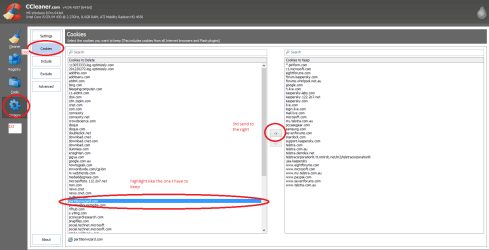
Good stuff mate well doen. Now if you want to clear cookies and don't want to lose pass worded sites then just use CCleaner CCleaner - Download

If you run Analyse then go to Options when it is finished scanning click on cookies look at the list down the left and the ones you know you have a password for say Ebay for example save to the right by highlighting it and send to the right hand list where it is saved.
See my pic and then go back to the brush and Run cleaner:D
 

Attachments

  • CC.PNG
    CC.PNG
    31.3 KB · Views: 2

My Computer

Computer type
PC/Desktop
Computer Manufacturer/Model Number
Own build (new) Desk1 / Asus ROG Win 7 / Desk2 1st build
OS
Desk1 7 Home Prem / Desk2 10 Pro / Main lap Asus ROG 10 Pro 2 laptop Toshiba 7 Pro Asus P2520 7 & 10
CPU
Desk1 i5 3750K / Laptop i7 GTX 860M / Desk2 i5 2500
Motherboard
Desk1 Asus P877-V / Desk2 Gigabyte H67 UD3H / Laptop ?
Memory
Desk1 8GB (1866) / Desk2 16GB (1333) / Laptop 8Gb DDR3
Graphics Card(s)
Desk 1& 2NVidia GTX 650 & Laptops on board Intel
Sound Card
Desk 1 & 2 -XONAR DG Realtek High Def audio Laptop
Monitor(s) Displays
Desk 1 Benq HD 2450 / Desk2 Philips 24" / Laptop 17.5"
Screen Resolution
1920x1080 D1 & D2 & Laptop 1
Hard Drives
Desk1 Samsung 120GB 830 SSD
Asus ROG 256GB 850 Pro SSD
Desk2 Samsung 840 256 SSD
Toshiba 120GB EVO
PSU
Desk 1 Corsair HX 1050/ Laptop ? / Desk 2 Corsair HX 650
Case
Desk 1 Cooler HAF XM ? Toshiba laptop / Desk2 Coolermaster
Cooling
Fans on all Desk1 -2 Desk2 - all Coolermasters 5 Laptop ?
Keyboard
Desk 1 MS Sidewinder X6 Desk 2 MS Sidewinder X 4
Mouse
Desk 1&2 - Gigabyte MS 900 gamer - laptop - Logitec wireless
Internet Speed
ADSL2+
Other Info
One other Desktop (tester) and spare Toshba laptop both with SSD's
Running Kaspersky 2016 ISS on all machines config'd identically
Logitec audio stereo systems on each machine (x3)
Canon MG5250MFC
Router/modem TP-Link running WPA2SK
Thanks for everything!

I have a few other questions:

1st When I close Media Center, sometimes it doesn't let go of the tuner or something. So when I relaunch it, I can't watch TV because it says there are no available tuners. The only way I can fix the problem is by restarting the PC. Which is an inconvenience to save all my work and then relaunch everything again.

However the bigger problem is that when I restart, during shutdown, I get BSOD 0xFE BUGCODE_USB_DRIVER. My tuner is the WinTV-HVR-950Q USB TV Tuner Stick. So I'm pretty sure it's the BSOD source. I tried updating drivers already.

2nd I keep Media Center on an extended desktop monitor with a 16:10 ratio. How can I full screen Media Center without it locking the mouse inside its window so I can still use my computer? Alternatively, how can I stretch the window to use a 16:10 ratio instead of 16:9?

3rd: Is there a better alternative to Media Center? One that is still compatible with using an Xbox360 as a Media Extender
 

My Computer

OS
Windows 7 Pro x64

My Computer

Computer type
PC/Desktop
Computer Manufacturer/Model Number
Own build (new) Desk1 / Asus ROG Win 7 / Desk2 1st build
OS
Desk1 7 Home Prem / Desk2 10 Pro / Main lap Asus ROG 10 Pro 2 laptop Toshiba 7 Pro Asus P2520 7 & 10
CPU
Desk1 i5 3750K / Laptop i7 GTX 860M / Desk2 i5 2500
Motherboard
Desk1 Asus P877-V / Desk2 Gigabyte H67 UD3H / Laptop ?
Memory
Desk1 8GB (1866) / Desk2 16GB (1333) / Laptop 8Gb DDR3
Graphics Card(s)
Desk 1& 2NVidia GTX 650 & Laptops on board Intel
Sound Card
Desk 1 & 2 -XONAR DG Realtek High Def audio Laptop
Monitor(s) Displays
Desk 1 Benq HD 2450 / Desk2 Philips 24" / Laptop 17.5"
Screen Resolution
1920x1080 D1 & D2 & Laptop 1
Hard Drives
Desk1 Samsung 120GB 830 SSD
Asus ROG 256GB 850 Pro SSD
Desk2 Samsung 840 256 SSD
Toshiba 120GB EVO
PSU
Desk 1 Corsair HX 1050/ Laptop ? / Desk 2 Corsair HX 650
Case
Desk 1 Cooler HAF XM ? Toshiba laptop / Desk2 Coolermaster
Cooling
Fans on all Desk1 -2 Desk2 - all Coolermasters 5 Laptop ?
Keyboard
Desk 1 MS Sidewinder X6 Desk 2 MS Sidewinder X 4
Mouse
Desk 1&2 - Gigabyte MS 900 gamer - laptop - Logitec wireless
Internet Speed
ADSL2+
Other Info
One other Desktop (tester) and spare Toshba laptop both with SSD's
Running Kaspersky 2016 ISS on all machines config'd identically
Logitec audio stereo systems on each machine (x3)
Canon MG5250MFC
Router/modem TP-Link running WPA2SK
Back
Top